> ## Documentation Index
> Fetch the complete documentation index at: https://help.kwentra.com/llms.txt
> Use this file to discover all available pages before exploring further.
# Vendor Payments — Exchange Rate Difference
> Vendor payments now include Exchange Rate Difference fields for currency gains/losses. Business Value Eliminates risky manual journal voucher editing for exchange differences. Automatically generat...
Vendor payments now include Exchange Rate Difference fields for currency gains/losses.
**Business Value**
* Eliminates risky manual journal voucher editing for exchange differences.
* Automatically generates correct JV entries at payment submission.
* Distinguishes losses (positive) vs gains (negative) clearly.
* Keeps vendor AP and JVs fully consistent.
**Use Cases**
* Accountant enters positive amount for loss; system generates correct 4-line JV.
* Finance manager enters negative amount for gain without manual JV editing.
* AP supervisor ensures JVs remain locked and auditable after submission.
**How It Works**
**Where to Find It**
| Back Office → Accounts Payable → Vendor Payments |
| ------------------------------------------------ |
**New Fields on the Vendor Payment Form**
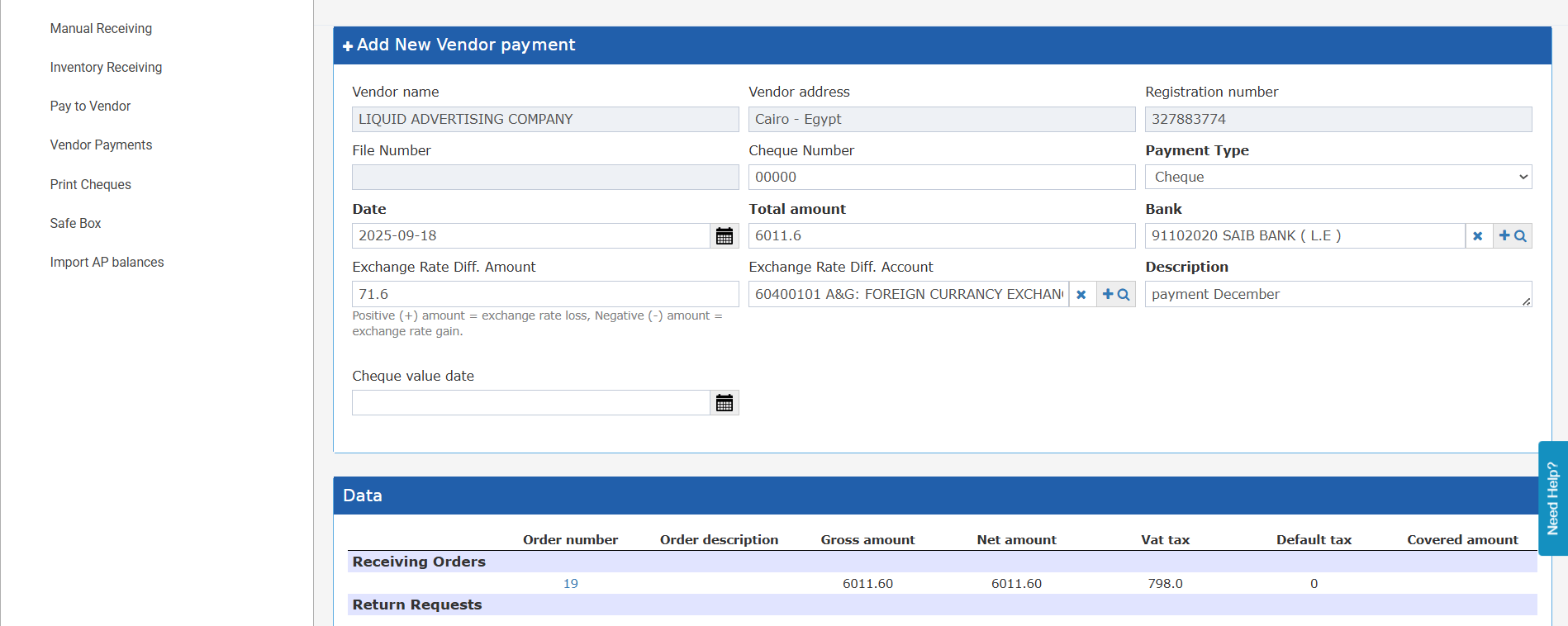
Two new fields are available in the Pending state of a vendor payment:
* Exchange Rate Diff. Amount — decimal value. Positive = exchange rate loss (extra cost). Negative = exchange rate gain (saving). Defaults to 0. Cannot cause the bank amount to go negative.
* Exchange Rate Diff. Account — autocomplete account selector. Required only when the amount field is non-zero. Must be an active, non-hidden, non-parent account.
| *Hint: "Positive (+) amount = exchange rate loss, Negative (−) amount = exchange rate gain."* |
| --------------------------------------------------------------------------------------------- |
 **How the JV Is Generated on Submit**
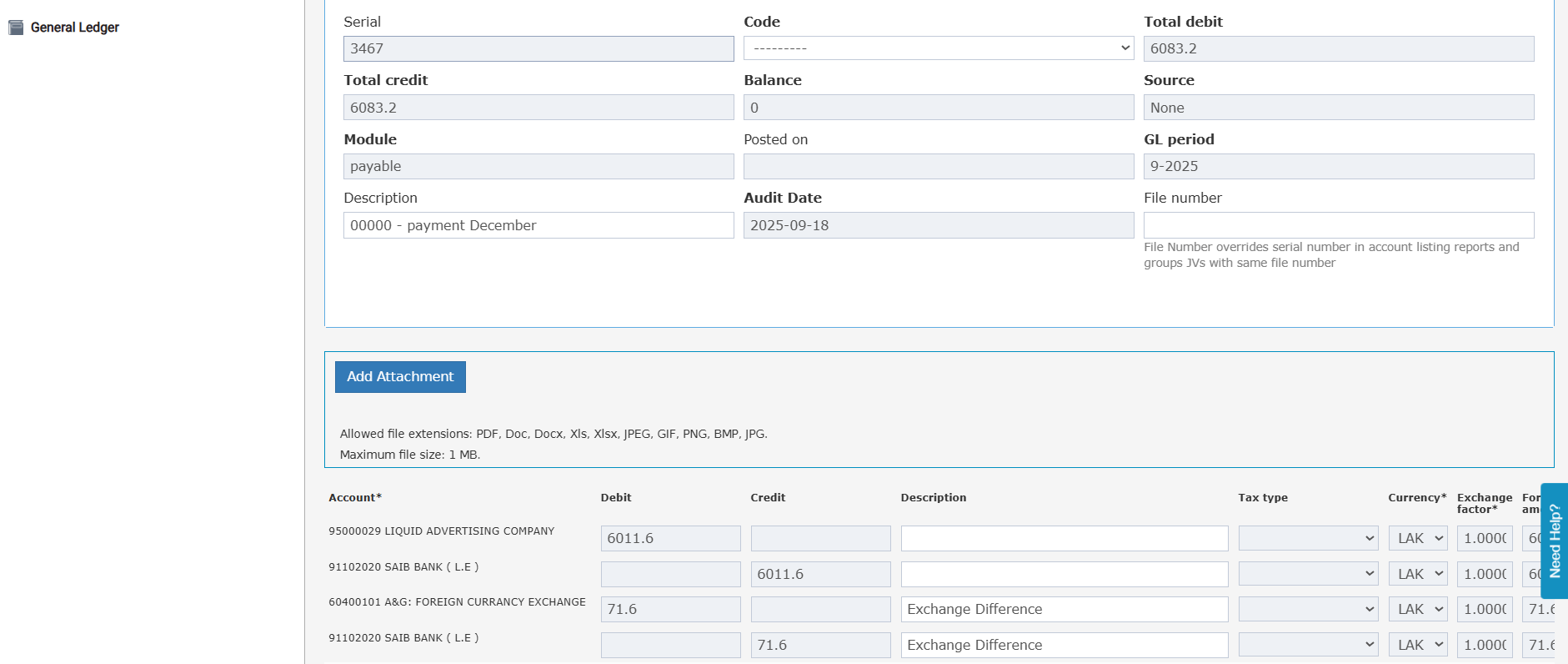
When the Exchange Rate Diff. Amount is non-zero, the system generates a modified journal voucher with additional entries:
* Debit: Vendor AP Account (total\_amount)
* Debit or Credit: Exchange Rate Diff. Account (exchange\_rate\_diff\_amount — debit if loss, credit if gain)
* Credit: Bank Account (total\_amount + exchange\_rate\_diff\_amount)
Both exchange difference transactions carry the default description "Exchange Difference" in the JV.
**How the JV Is Generated on Submit**
When the Exchange Rate Diff. Amount is non-zero, the system generates a modified journal voucher with additional entries:
* Debit: Vendor AP Account (total\_amount)
* Debit or Credit: Exchange Rate Diff. Account (exchange\_rate\_diff\_amount — debit if loss, credit if gain)
* Credit: Bank Account (total\_amount + exchange\_rate\_diff\_amount)
Both exchange difference transactions carry the default description "Exchange Difference" in the JV.
 **Field Behavior**
* Both fields are editable only in Pending state.
* Both fields become read-only once the payment is Submitted.
* If the amount is 0 or empty, the account field is not required and is ignored at submission.
**Print Template**
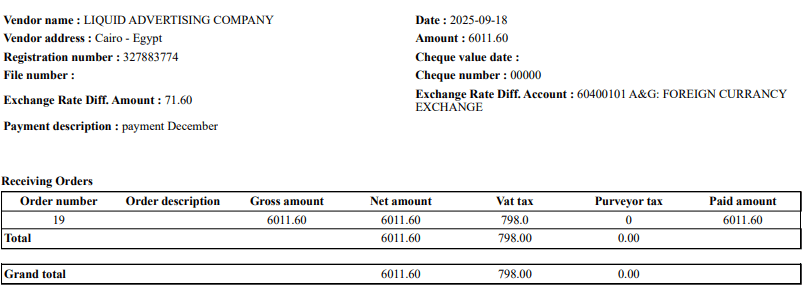
The vendor payment print view displays the Exchange Rate Diff. Amount and account name when the amount is non-zero.
**Field Behavior**
* Both fields are editable only in Pending state.
* Both fields become read-only once the payment is Submitted.
* If the amount is 0 or empty, the account field is not required and is ignored at submission.
**Print Template**
The vendor payment print view displays the Exchange Rate Diff. Amount and account name when the amount is non-zero.