> ## Documentation Index
> Fetch the complete documentation index at: https://help.kwentra.com/llms.txt
> Use this file to discover all available pages before exploring further.
# Inventory Stores — Link Divisions
> Stores can be linked to divisions, restricting access automatically. Click here to learn more about Divisions. Business Value Prevents cross-department misuse by restricting access. Reduces errors...
Stores can be linked to divisions, restricting access automatically.
*[Click here to learn more about Divisions.](/front-office/front-office-settings/general/how-do-i-add-divisions-on-the-system)*
**Business Value**
* Prevents cross-department misuse by restricting access.
* Reduces errors from selecting wrong stores.
* Clear error message for unauthorized access attempts.
**Use Cases**
* F\&B staff can only select F\&B stores linked to their division.
* Property manager confirms transactions come from the correct division.
* Admin links the Engineering store exclusively to the Engineering division.
**How It Works**
**Where to Find It**
| Back Office → Settings → Inventory → Stores |
| ------------------------------------------- |
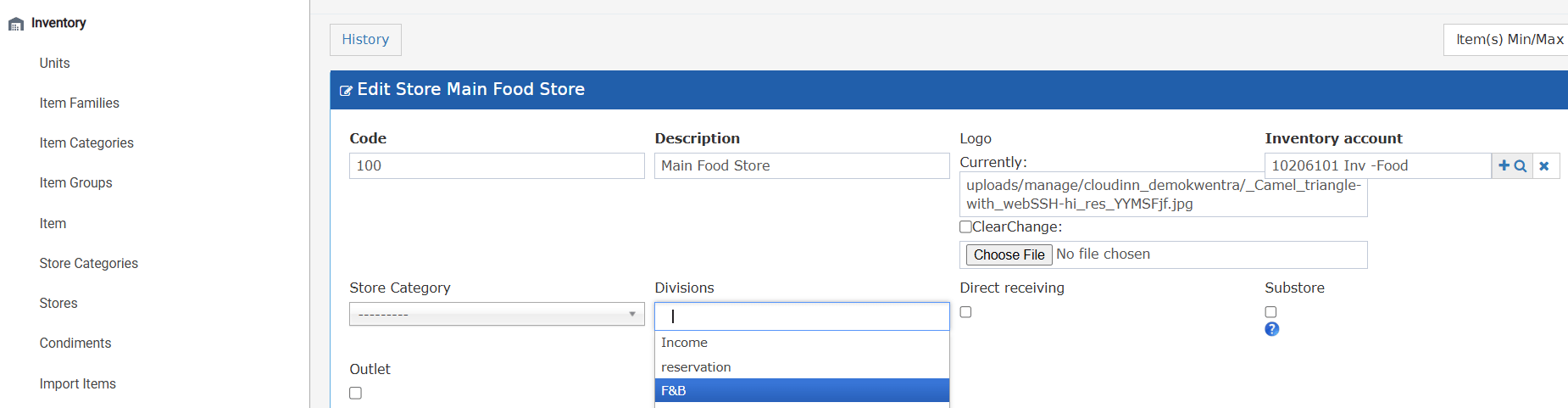
**Linking Divisions to a Store**
**1.** Open the store you want to restrict and go to its settings.
**2.** Locate the new Divisions field (optional, multi-select autocomplete).
**3.** Select one or more divisions from the list — all divisions configured on the instance are available.
**4.** Save the store. From this point, only users belonging to the selected division(s) can use this store.
 **Screens Affected by the Restriction**
The division filter applies to the following screens — stores not linked to the user's division are hidden from the store lookup in:
* Purchase Requests
* Receiving Orders
* Return Requests
* Store Transfer
* Store Usage
**Validation Message**
If a user attempts to select a restricted store (e.g., via a direct lookup), the system shows:
| *"You do not have permission to use Store \ \"* |
| ------------------------------------------------------------------------------ |
**Default Behavior**
If no divisions are linked to a store, the store remains accessible to all users with the required inventory permissions — no change from the previous behavior.
**Screens Affected by the Restriction**
The division filter applies to the following screens — stores not linked to the user's division are hidden from the store lookup in:
* Purchase Requests
* Receiving Orders
* Return Requests
* Store Transfer
* Store Usage
**Validation Message**
If a user attempts to select a restricted store (e.g., via a direct lookup), the system shows:
| *"You do not have permission to use Store \ \"* |
| ------------------------------------------------------------------------------ |
**Default Behavior**
If no divisions are linked to a store, the store remains accessible to all users with the required inventory permissions — no change from the previous behavior.