> ## Documentation Index
> Fetch the complete documentation index at: https://help.kwentra.com/llms.txt
> Use this file to discover all available pages before exploring further.
# Kwentra and SUN Integration - Mapping
> This article is to help you understand how to pass the income numbers and journal vouchers created by kwentra Front Office/Point of Sale and Import them directly into SunAccounts. The first step is...
This article is to help you understand how to pass the income numbers and journal vouchers created by kwentra Front Office/Point of Sale and Import them directly into SunAccounts.
The first step is to link your financial chart of accounts on kwentra with SunAccounts through the **Mapping Screen.**
**[Back Office → Settings → Accounts → SUN Mapping](https://manage.kwentra.com/gl/sunmapping/)**
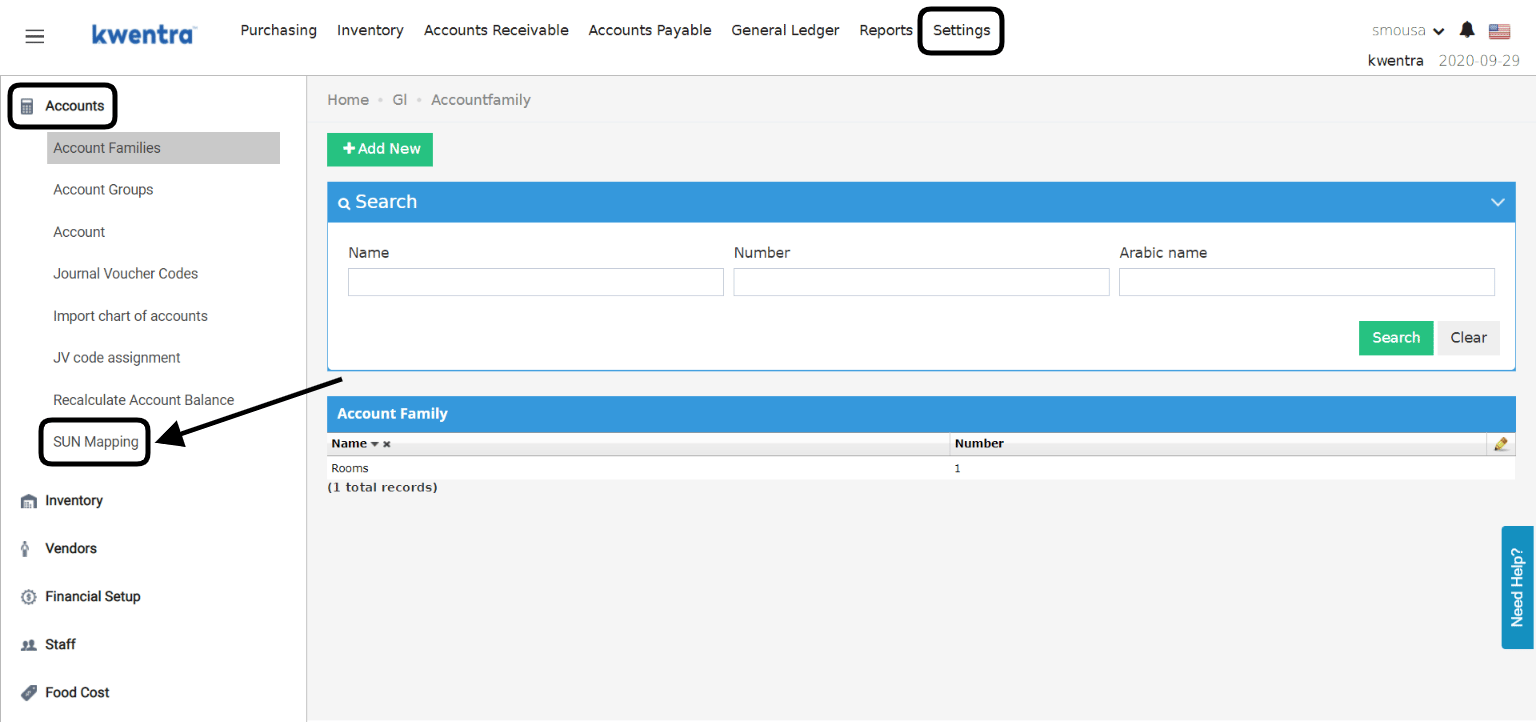 Once you reach the mapping screen you will need to link each kwentra account number with its corresponding account from SunAccount's side.
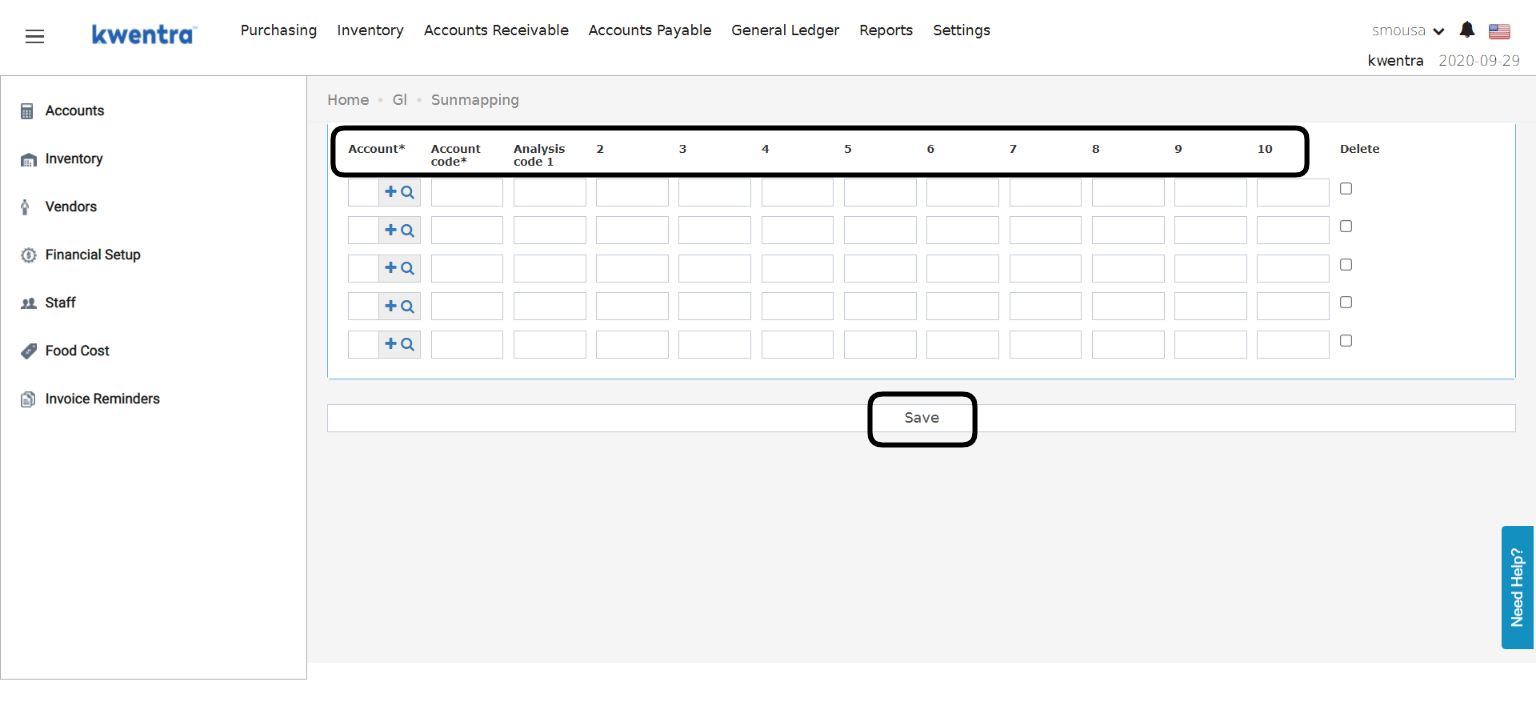
1. Search for kwentra account numbers and list them under the **Account Column.**
2. Add Sun Account code that coresponds to it under the **Account Code Column.**
Analysis codes or also known as T-Codes "Transaction Analysis Codes" are used to offer an extra layer of detail for your accounts.
Example: Cleaninig Supplies Cost account can have more than 1 T-code under it on SunAccounts to indentify and document Cleaning Supplies for rooms, Cleaning Supplies for restaurant etc.
Each T-Code you have on SunAccounts should be linked to kwentra Accounts in its correct order.
After you are done with mapping the accounts together click on **Save.**
Once you reach the mapping screen you will need to link each kwentra account number with its corresponding account from SunAccount's side.
1. Search for kwentra account numbers and list them under the **Account Column.**
2. Add Sun Account code that coresponds to it under the **Account Code Column.**
Analysis codes or also known as T-Codes "Transaction Analysis Codes" are used to offer an extra layer of detail for your accounts.
Example: Cleaninig Supplies Cost account can have more than 1 T-code under it on SunAccounts to indentify and document Cleaning Supplies for rooms, Cleaning Supplies for restaurant etc.
Each T-Code you have on SunAccounts should be linked to kwentra Accounts in its correct order.
After you are done with mapping the accounts together click on **Save.**
 **How do I download the export file to upload to SunAccounts?**
1. Go to kwentra's Proxy Dashboard.
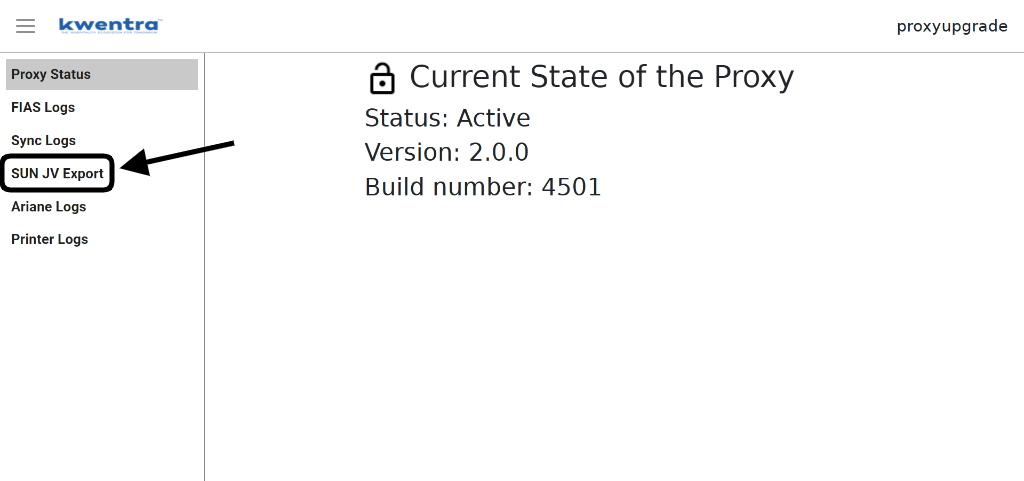
2. Click on **SUN JV Export** from the left side of the dashboard.
**How do I download the export file to upload to SunAccounts?**
1. Go to kwentra's Proxy Dashboard.
2. Click on **SUN JV Export** from the left side of the dashboard.
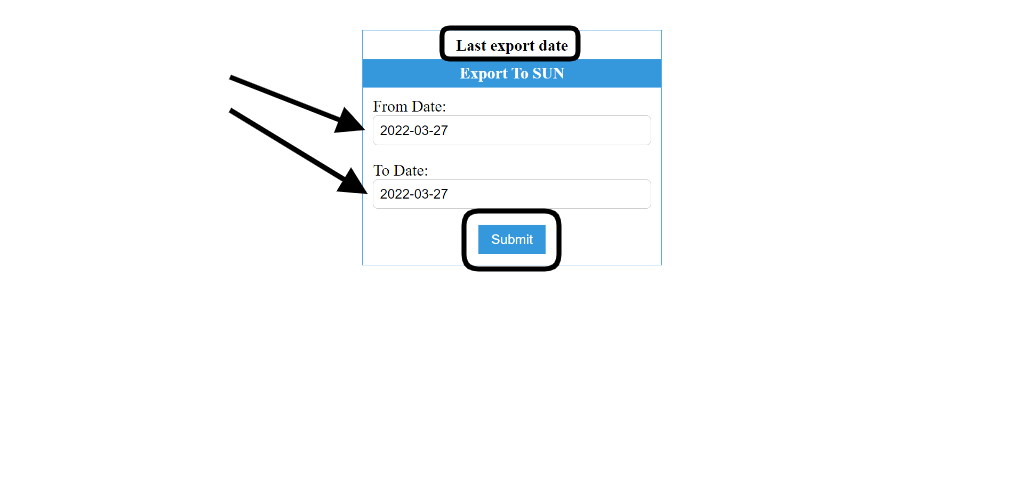
 3. Insert the start and end date you would like to export to SUN, the dashboard would tell you the last export date you did.
4. Click **Submit** to download the export file.
3. Insert the start and end date you would like to export to SUN, the dashboard would tell you the last export date you did.
4. Click **Submit** to download the export file.
 **When should I export the file?**
Exporting the journal vouchers created by Front Office and POS is a daily task to be imported to SunAccounts, this should happen after kwentra's Night Turn.
To export the previous day's jounral vouchers only you should insert the date you want in both **From Date & To Date fields.**
**Where can I find the exported file to import it to SunAccounts?**
The downloaded file goes to your virtual machine/linux machine that has the proxy server set up on.
You should contact **[support@kwentra.com](mailto:support@kwentra.com)** to help you create a folder on your virtual/linux machine with the below path.
Root/media/share
Once the folder is created and you export the file you will be able to use the downloaded file to import to SunAccounts.
**When should I export the file?**
Exporting the journal vouchers created by Front Office and POS is a daily task to be imported to SunAccounts, this should happen after kwentra's Night Turn.
To export the previous day's jounral vouchers only you should insert the date you want in both **From Date & To Date fields.**
**Where can I find the exported file to import it to SunAccounts?**
The downloaded file goes to your virtual machine/linux machine that has the proxy server set up on.
You should contact **[support@kwentra.com](mailto:support@kwentra.com)** to help you create a folder on your virtual/linux machine with the below path.
Root/media/share
Once the folder is created and you export the file you will be able to use the downloaded file to import to SunAccounts.