> ## Documentation Index
> Fetch the complete documentation index at: https://help.kwentra.com/llms.txt
> Use this file to discover all available pages before exploring further.
# CityLedger Payments Report
> Track all City Ledger and Credit Card payments processed by date. Business Value Provides a consolidated view of all payments posted against City Ledger accounts and Credit Cards. Helps the Account...
Track all City Ledger and Credit Card payments processed by date.
### **Business Value**
* Provides a consolidated view of all payments posted against City Ledger accounts and Credit Cards.
* Helps the Accounts Receivable team verify settlement and posting accuracy.
* Simplifies cashier and audit reconciliation by showing payment sources, responsible cashiers, and departments.
***
### **Typical Use Cases**
* Cross-checking City Ledger Payments recorded by FO team.
* Reviewing daily cashier postings for AR reconciliation.
* Auditing canceled or reversed transactions (“Canceled by” / “Canceling”).
* Monitoring Credit Card settlements by card type or cashier for bank reconciliation.
***
### **Technical Overview**
**Access Path:**
Home → Reports → Receivable → CityLedger Payments
**Report Parameters**
| Field | Description |
| ------------- | ------------------------------------------------------------------------------------------------------------------------- |
| **Date** | Select the transaction date to display payments processed on that day. |
| **File Type** | Choose export format: XLS, XLSX, ODS, or PDF. |
| **Actions** | - **Download:** Export the report.
- **Preview:** View report on screen.
- **Print:** Send report to printer. |
***
### **Report Structure**
**Header**
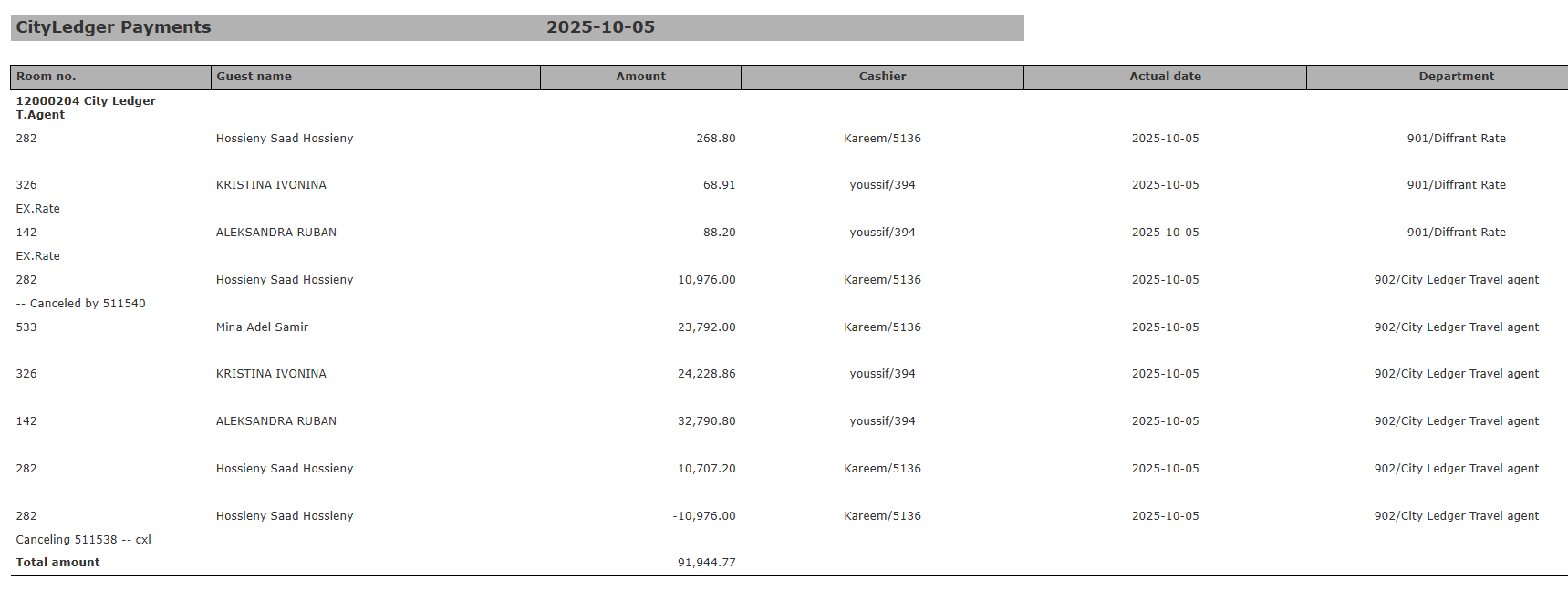
Displays the selected date and report title “CityLedger Payments”.
**Data Columns**
| Column | Description |
| ----------- | -------------------------------------------------- |
| Room No. | Guest room number is linked to the payment. |
| Guest Name | Name of the guest or payer. |
| Amount | Value of the payment recorded. |
| Cashier | User ID of the cashier who posted the transaction. |
| Actual Date | Actual date of posting "not audit date" |
| Department | Transaction code used |
***
### **Example Output**
**Date Selected:** 2025-10-05
**City Ledger Total:** 91,944.77
**Credit Card Total:** 443,093.57
**Combined Total:** Represents all receipts posted on the selected date, categorized by ledger type and cashier.