> ## Documentation Index
> Fetch the complete documentation index at: https://help.kwentra.com/llms.txt
> Use this file to discover all available pages before exploring further.
# Purchase Orders Report
> Easily review and track all purchase orders created from purchase requests within a selected date range. Business Value Provides a complete audit trail between purchase requests (PR) and purchase o...
Easily review and track all purchase orders created from purchase requests within a selected date range.
***
### **Business Value**
* Provides a **complete audit trail** between purchase requests (PR) and purchase orders (PO).
* Helps purchasing managers **track vendor commitments**, delivery status, and costs per order.
* Allows the finance and inventory teams to **monitor pending vs. received** purchase orders for accurate accruals and stock reconciliation.
***
### **Use Cases**
* Review all **pending purchase orders** to follow up with suppliers on delivery delays.
* Analyze **partially received or closed** orders for stock and cost control.
* Generate a **vendor-based report** to identify the total ordered value or the most active suppliers.
***
### **Technical Know-How**
**Navigation**
Back Office → Reports → Inventory → Purchase Orders
***
### **Filters & Options**
1. **Date Range (From / To):** Select the period to review purchase orders created within that range.
2. **Status Filter:** Choose one or more of the following statuses to narrow results:
* **Pending:** PO created but not yet received.
* **Received:** PO fully received and closed.
* **Partially Received + Closed:** PO received in part and then closed manually.
* **Closed:** PO manually closed without receipt.
3. **Details:**
* **Detailed:** Displays line-level information for each ordered item.
* **Summarized:** Displays one line per purchase order showing header-level details.
4. **File Type:** Choose the export format — XLS, XLSX, ODS, or PDF.
***
### Report Layouts
#### **Summarized View**
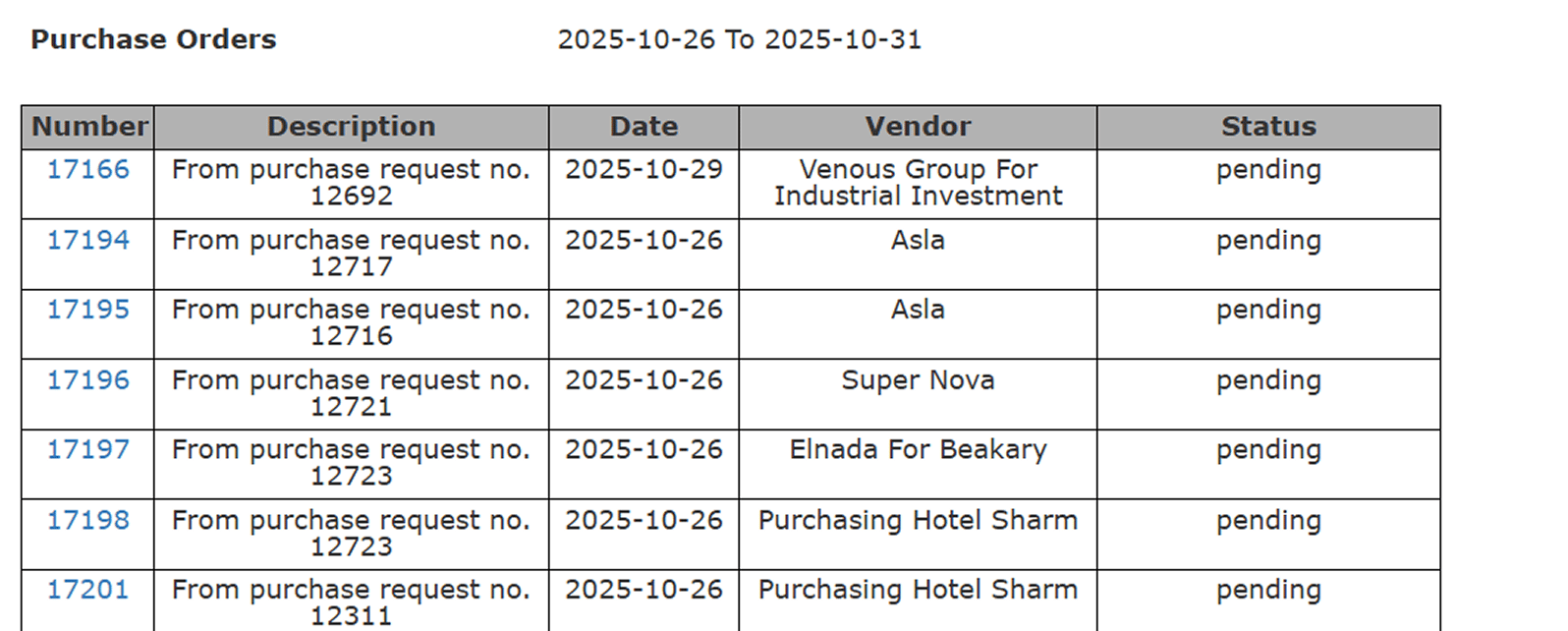
Shows a quick snapshot per purchase order:
* **Number:** Unique PO reference number.
* **Description:** Source PR number or notes.
* **Date:** PO creation date.
* **Vendor:** Supplier name.
* **Status:** Order progress (Pending, Received, Closed, etc.).
 #### **Detailed View**
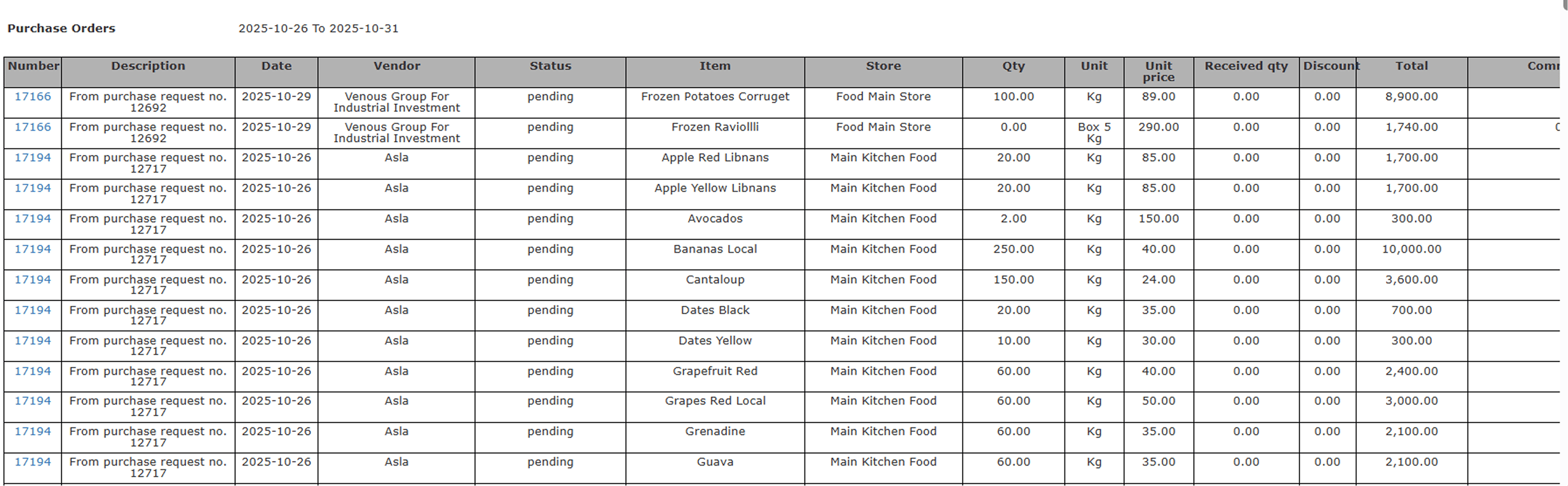
Breaks down every purchase order by item and store for operational accuracy.
**Columns Explained:**
* **Number:** Purchase order number.
* **Description:** Link to the source purchase request.
* **Date:** Date of PO creation.
* **Vendor:** Supplier name linked to the PO.
* **Status:** Current PO status.
* **Item:** product ordered.
* **Store:** Destination store for receiving.
* **Qty:** Ordered quantity.
* **Unit:** Unit of measure.
* **Unit Price:** Cost per unit.
* **Received Qty:** Quantity already received against the PO.
* **Discount:** Any applied discount.
* **Total:** Total line value.
* **Comment:** Additional remarks or notes.
#### **Detailed View**
Breaks down every purchase order by item and store for operational accuracy.
**Columns Explained:**
* **Number:** Purchase order number.
* **Description:** Link to the source purchase request.
* **Date:** Date of PO creation.
* **Vendor:** Supplier name linked to the PO.
* **Status:** Current PO status.
* **Item:** product ordered.
* **Store:** Destination store for receiving.
* **Qty:** Ordered quantity.
* **Unit:** Unit of measure.
* **Unit Price:** Cost per unit.
* **Received Qty:** Quantity already received against the PO.
* **Discount:** Any applied discount.
* **Total:** Total line value.
* **Comment:** Additional remarks or notes.