> ## Documentation Index
> Fetch the complete documentation index at: https://help.kwentra.com/llms.txt
> Use this file to discover all available pages before exploring further.
# Supplier Receiving Report
> Track and analyze all supplier receipts and payments in one report. Business Value Consolidates all supplier receipts, taxes, and payment statuses for financial control. Supports detailed and summa...
Track and analyze all supplier receipts and payments in one report.
***
### **Business Value**
* Consolidates all supplier receipts, taxes, and payment statuses for financial control.
* Supports detailed and summarized views for flexible reporting and auditing.
* Enhances tracking with new payment status and sorting options.
***
### **Use Cases**
* **Accounts Payable:** Track which supplier invoices are fully paid, partially paid, or unpaid.
* **Purchasing Department:** Review detailed receipts and tax values for procurement analysis.
***
### **Technical Know-how**
#### How to Run the Report
1. Go to: **Reports → Back Office → Supplier Receiving**
 2. **Parameters:**
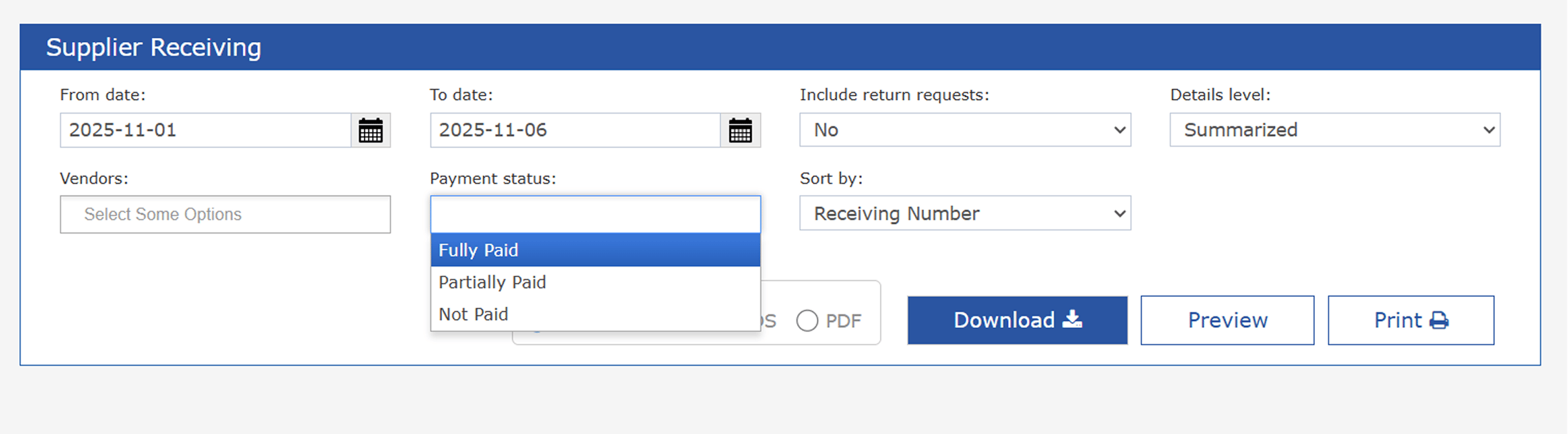
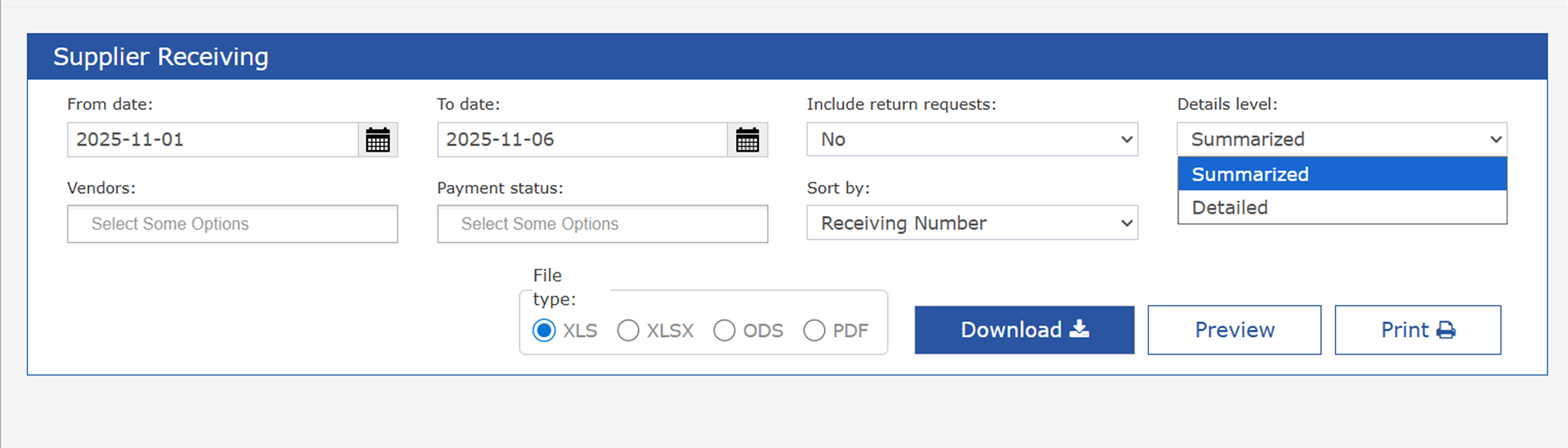
* **From date / To date:** Select the desired date range.
* **Include return requests:** Yes/No.
* **Details level:**
* Summarized: One line per supplier.
* Detailed: All receipts listed with line-by-line detail.
* **Vendors:** Multi-select suppliers to filter results.
* **Payment status (New):**
* All (default)
* Fully Paid
* Partially Paid
* Not Paid
* **Sort By (New):**
* Receiving Number (default)
* Date
3. **File type:** Export as XLS, XLSX, ODS, or PDF.
4. Download or print the report for sharing and analysis.
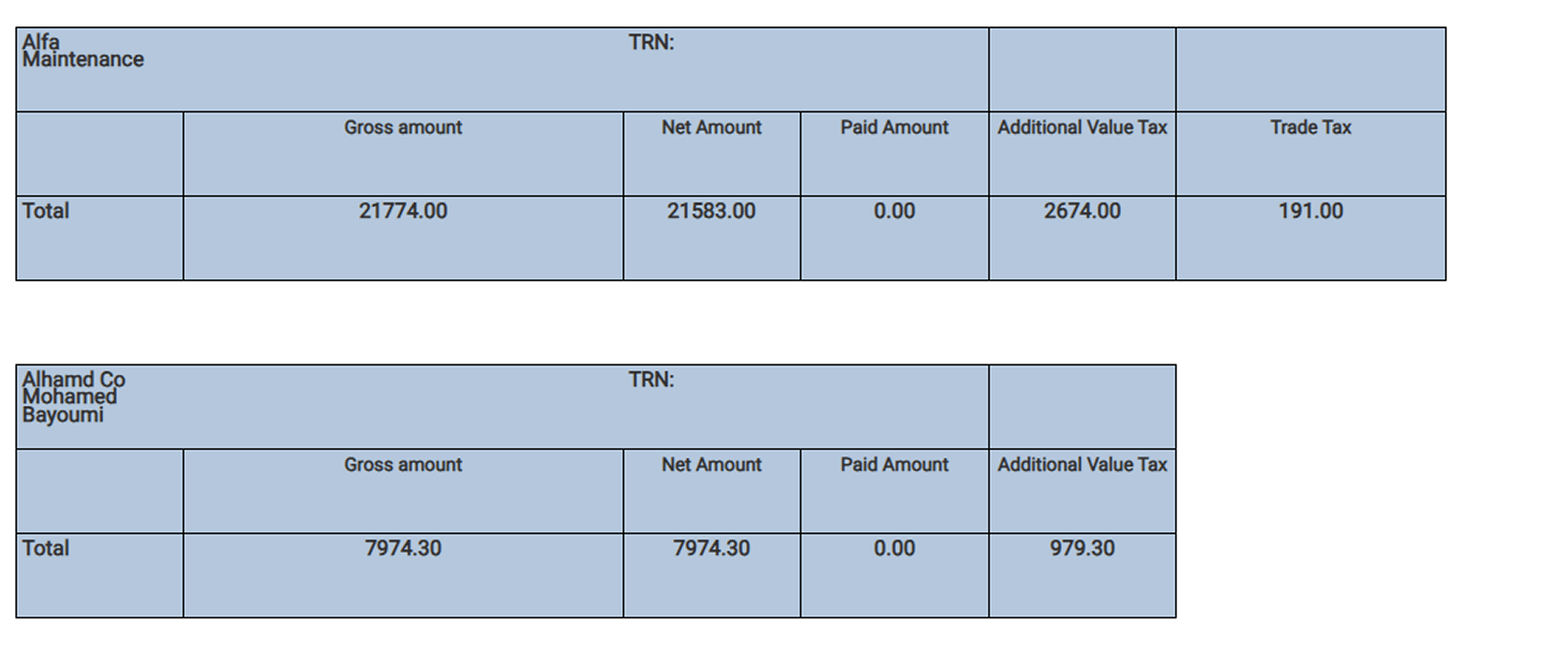
### **Summarized View Columns**
| Column | Description |
| ------------------------ | ----------------------------------------------------------------------- |
| **Supplier Name** | The name of the supplier/vendor from whom goods/services were received. |
| **TRN** | Tax Registration Number of the supplier. |
| **Gross Amount** | The total value of the receipt, including all taxes. |
| **Net Amount** | The value after excluding applicable taxes (actual purchase value). |
| **Paid Amount** | The total amount paid to the supplier for these receipts. |
| **Additional Value Tax** | The value-added tax (VAT) amount applied, if any. |
| **Trade Tax** | Any other trade-specific taxes applied to the transaction. |
2. **Parameters:**
* **From date / To date:** Select the desired date range.
* **Include return requests:** Yes/No.
* **Details level:**
* Summarized: One line per supplier.
* Detailed: All receipts listed with line-by-line detail.
* **Vendors:** Multi-select suppliers to filter results.
* **Payment status (New):**
* All (default)
* Fully Paid
* Partially Paid
* Not Paid
* **Sort By (New):**
* Receiving Number (default)
* Date
3. **File type:** Export as XLS, XLSX, ODS, or PDF.
4. Download or print the report for sharing and analysis.
### **Summarized View Columns**
| Column | Description |
| ------------------------ | ----------------------------------------------------------------------- |
| **Supplier Name** | The name of the supplier/vendor from whom goods/services were received. |
| **TRN** | Tax Registration Number of the supplier. |
| **Gross Amount** | The total value of the receipt, including all taxes. |
| **Net Amount** | The value after excluding applicable taxes (actual purchase value). |
| **Paid Amount** | The total amount paid to the supplier for these receipts. |
| **Additional Value Tax** | The value-added tax (VAT) amount applied, if any. |
| **Trade Tax** | Any other trade-specific taxes applied to the transaction. |
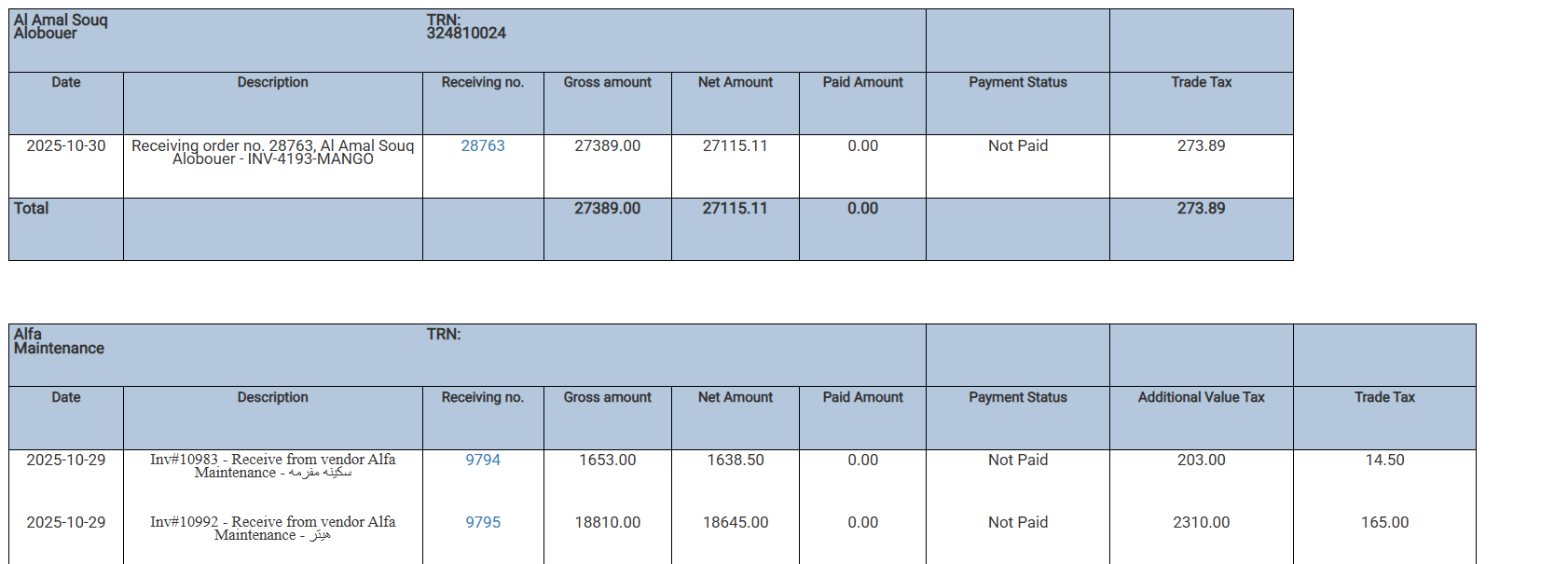
 ### **Detailed View Columns**
| Column | Description |
| ------------------------ | -------------------------------------------------------------------- |
| **Date** | The date the goods/services were received and recorded. |
| **Description** | Notes or details about the receiving order or invoice. |
| **Receiving No.** | Unique system number for the receiving order/transaction. |
| **Gross Amount** | The total value for that specific receipt line, including all taxes. |
| **Net Amount** | The value after deducting taxes for that line item. |
| **Paid Amount** | The amount actually paid for this particular receipt/invoice. |
| **Payment Status** | Shows if the receipt is fully paid, partially paid, or not paid. |
| **Additional Value Tax** | VAT amount for this line, if any. |
| **Trade Tax** | Any additional trade taxes applied to this line. |
### **Detailed View Columns**
| Column | Description |
| ------------------------ | -------------------------------------------------------------------- |
| **Date** | The date the goods/services were received and recorded. |
| **Description** | Notes or details about the receiving order or invoice. |
| **Receiving No.** | Unique system number for the receiving order/transaction. |
| **Gross Amount** | The total value for that specific receipt line, including all taxes. |
| **Net Amount** | The value after deducting taxes for that line item. |
| **Paid Amount** | The amount actually paid for this particular receipt/invoice. |
| **Payment Status** | Shows if the receipt is fully paid, partially paid, or not paid. |
| **Additional Value Tax** | VAT amount for this line, if any. |
| **Trade Tax** | Any additional trade taxes applied to this line. |
 ## ***Update: 5th of November, 2025***
### **New Report filters for payment status and sorting options**
**What’s New?**
* **Payment Status Filter:** Now you can filter supplier receipts by payment status (All, Fully Paid, Partially Paid, Not Paid).
* **Sorting Options:** Sort the report by **Receiving Number** or **Date**.
**How Does the Enhancement Work?**
* When you run the report, use the new **Payment Status** dropdown to show only fully paid, partially paid, or unpaid receipts.
* Choose the **Sort By** option to list records by their receiving number (default) or by date, helping you review supplier activity chronologically.
## ***Update: 5th of November, 2025***
### **New Report filters for payment status and sorting options**
**What’s New?**
* **Payment Status Filter:** Now you can filter supplier receipts by payment status (All, Fully Paid, Partially Paid, Not Paid).
* **Sorting Options:** Sort the report by **Receiving Number** or **Date**.
**How Does the Enhancement Work?**
* When you run the report, use the new **Payment Status** dropdown to show only fully paid, partially paid, or unpaid receipts.
* Choose the **Sort By** option to list records by their receiving number (default) or by date, helping you review supplier activity chronologically.