> ## Documentation Index
> Fetch the complete documentation index at: https://help.kwentra.com/llms.txt
> Use this file to discover all available pages before exploring further.
# Work with Journal Vouchers
> System-generated JVs are read-only. Hide unposted JVs, reconcile JVs one by one or in bulk, and print search results to PDF.
Review, hide, reconcile and print the journal vouchers in your General Ledger.
### **Business Value**
* Protects system-created entries from changes by mistake.
* Clears unposted JVs you do not need, without deleting them.
* Shows at once which JVs are reconciled before period close.
* Gives auditors PDF vouchers instead of editable spreadsheets.
### **Use Cases**
* A finance controller hides hundreds of duplicate unposted JVs at once.
* The finance team reconciles all posted JVs in one step after the period review.
* A financial controller prints a period's vouchers as PDF for the external auditors.
### **How It Works**
| **Where:** Back Office → General Ledger → Journal Vouchers |
| - |
To create a JV, see [Create Journal Vouchers](/back-office/general-ledger/manual-journal-voucher-record).
### **System-Generated JVs Are Read-Only**
JVs created by these modules cannot be edited in the General Ledger:
* **Income**
* **POS**
* **Receivable**
* **Payable**
You can view them. To correct one, change it in the module it came from, such as Receiving or Payables. The General Ledger updates by itself.
### **Hide and Unhide JVs**
Hidden JVs do not show in the list or in exports. They stay in the system for audit.
| **Note:** You can hide unposted JVs only. Posting a hidden JV unhides it. |
| - |
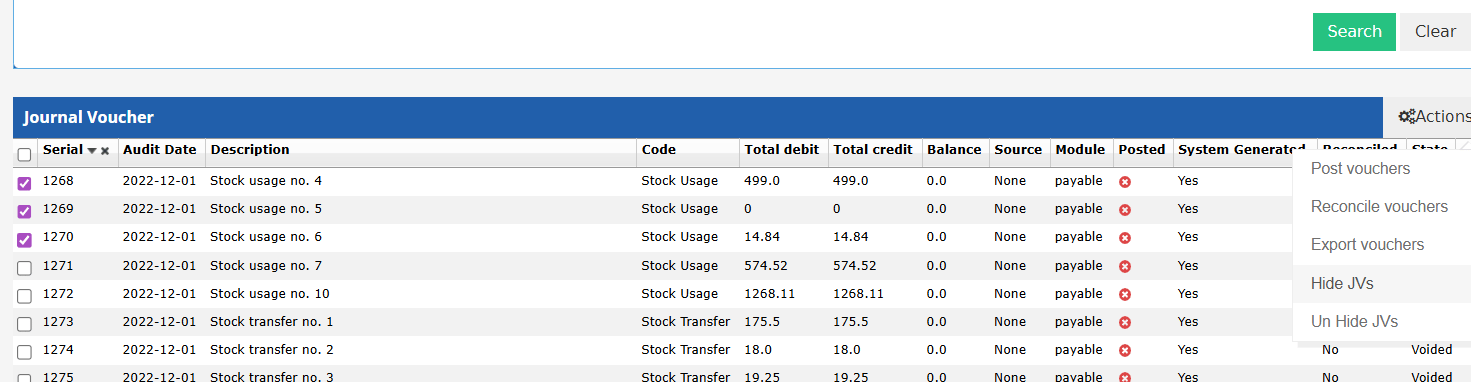
**Hide several JVs:**
1. Tick one or more unposted JVs.
2. Open **Tools** and choose **Hide JVs**.
3. Click **Confirm** on the message: *"Are you sure you want to perform the Hide JVs action for the selected JVs? This will hide them from the list and the Export."*
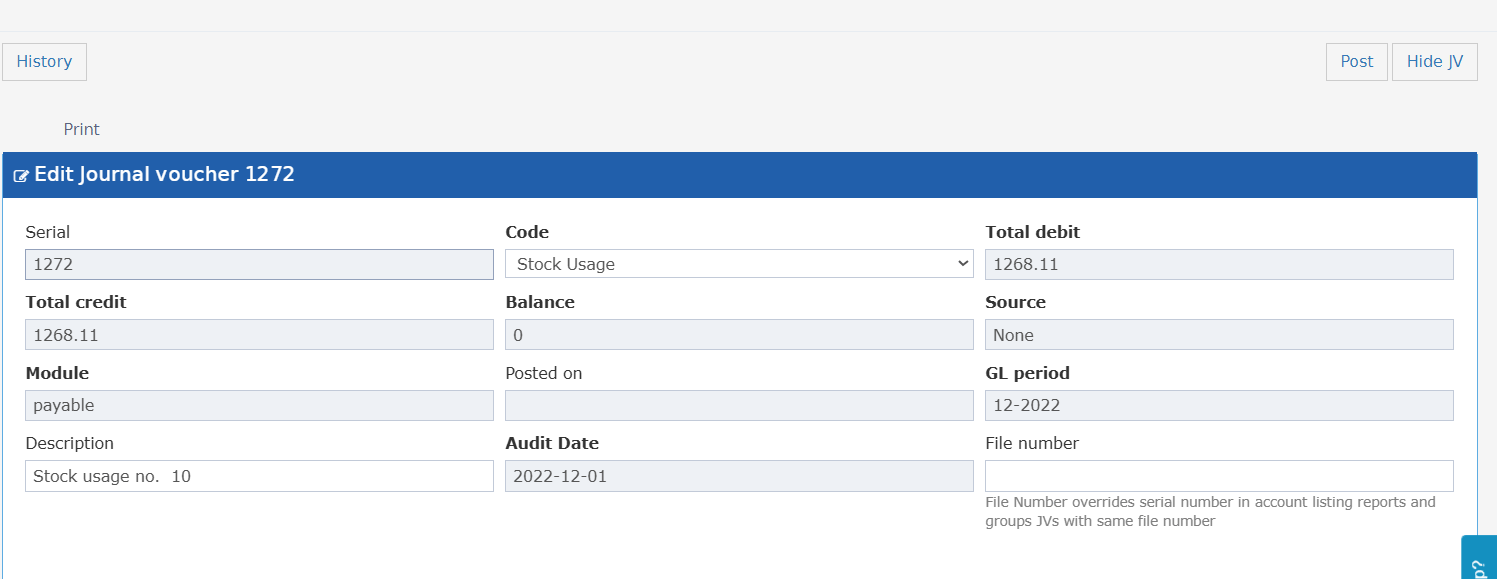
 **Hide one JV:** open an unposted JV and choose **Hide JV** from the action menu. To undo it, choose **Un Hide JV** on the same screen.
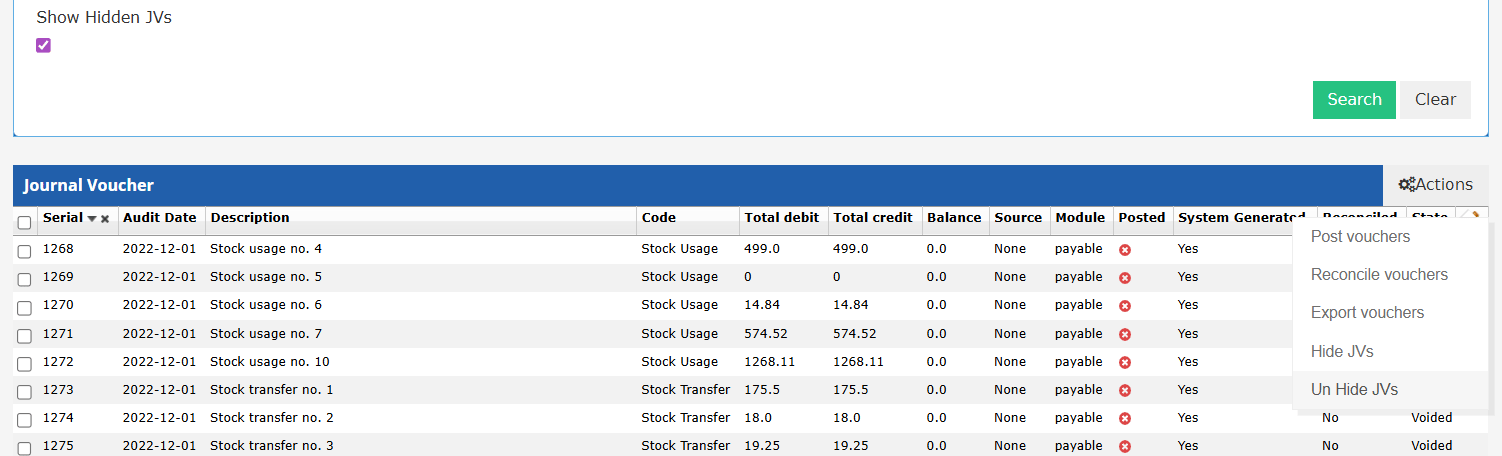
 **Show and unhide JVs:**
* Tick **Show Hidden JVs** in the search filters. It is off by default.
* Hidden JVs now show in the results.
* Tick them and choose **Un Hide JVs** from **Tools**.
**Show and unhide JVs:**
* Tick **Show Hidden JVs** in the search filters. It is off by default.
* Hidden JVs now show in the results.
* Tick them and choose **Un Hide JVs** from **Tools**.
 **Permission:** hiding and unhiding need **Can Hide Journal Vouchers**. The Financial Controller role has it by default. Without it, **Hide JVs** does not show.
### **Reconcile JVs**
**One JV:** open the JV and click **Reconcile**.
* The JV is marked **Reconciled**. The button turns green and reads **Reconciled**.
* Click it again to unmark it.
* Each mark and unmark is saved in the JV history, with the user, date and action.
**Permission:** hiding and unhiding need **Can Hide Journal Vouchers**. The Financial Controller role has it by default. Without it, **Hide JVs** does not show.
### **Reconcile JVs**
**One JV:** open the JV and click **Reconcile**.
* The JV is marked **Reconciled**. The button turns green and reads **Reconciled**.
* Click it again to unmark it.
* Each mark and unmark is saved in the JV history, with the user, date and action.
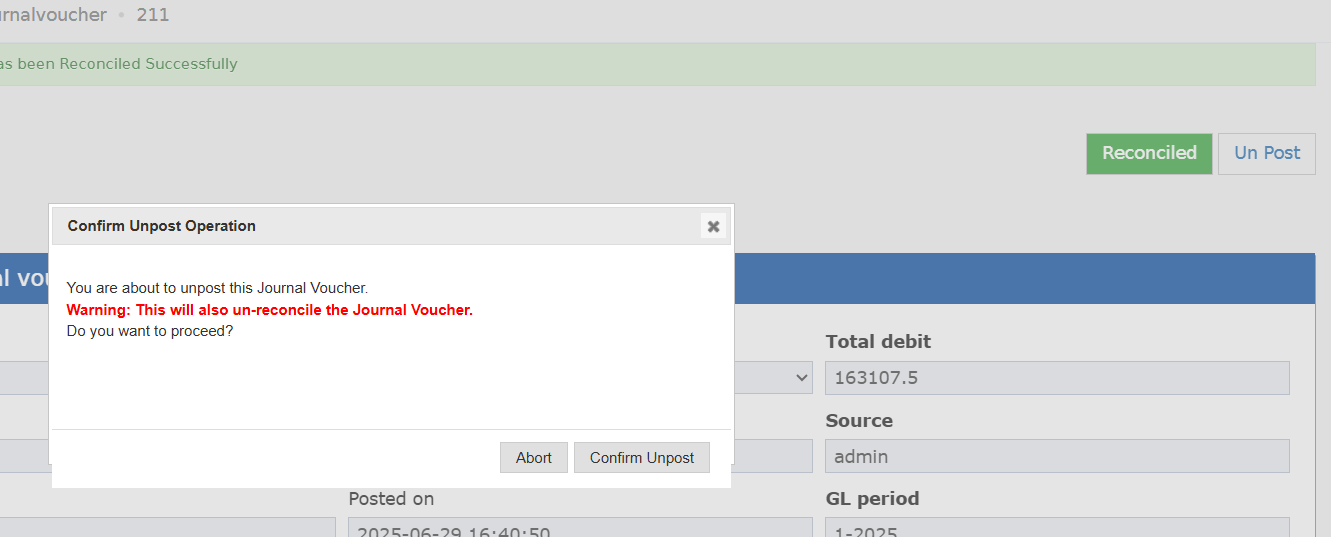
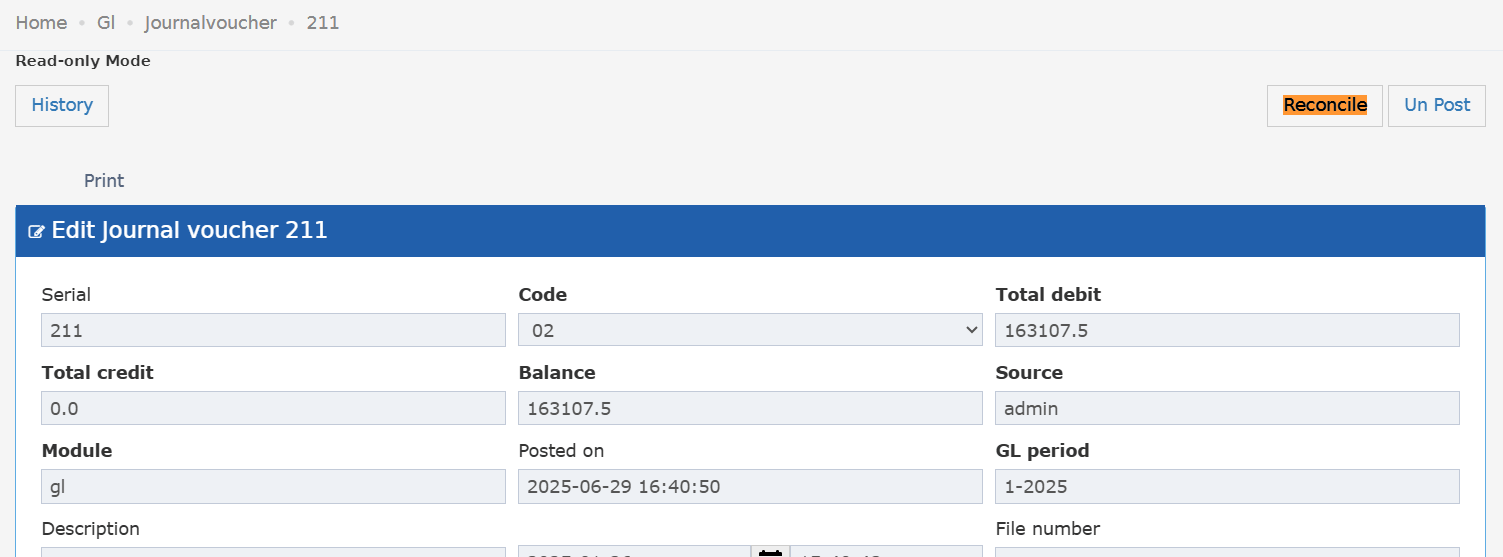 If you unpost a reconciled JV, you see: *"Unposting this JV will set the reconciliation flag to false."*
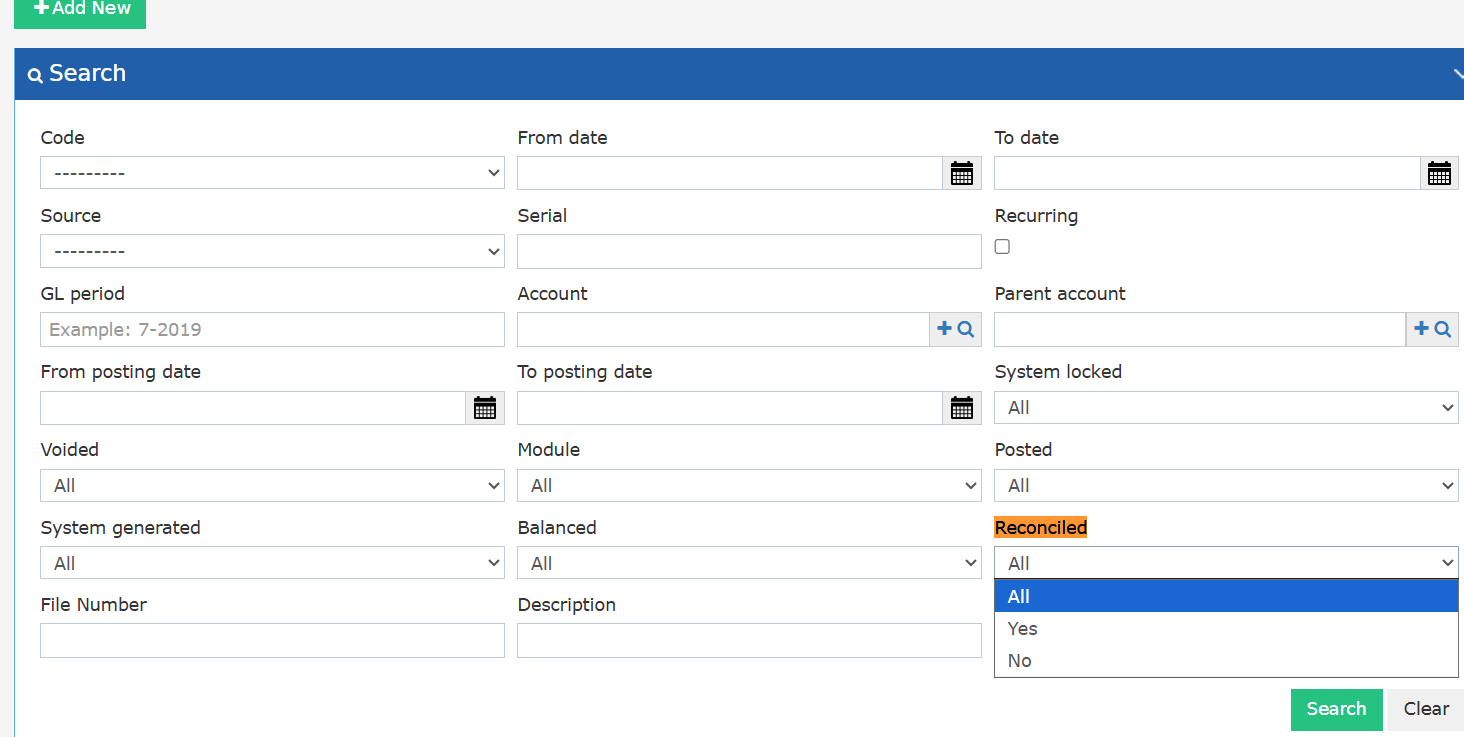
 **Filter:** the list has a **Reconciled** filter: **All** (default), **Yes** or **No**.
**Permission:** **can reconcile jv** is given to these groups:
* BackOffice and all its subtypes
* Chief Acc, Financial Controller, Financial Manager, General Manager
* Income Auditor, Payable, Purchasing Manager
* The "No Settings" and "No Reports" versions of these roles
Other users see the status but cannot change it.
**Filter:** the list has a **Reconciled** filter: **All** (default), **Yes** or **No**.
**Permission:** **can reconcile jv** is given to these groups:
* BackOffice and all its subtypes
* Chief Acc, Financial Controller, Financial Manager, General Manager
* Income Auditor, Payable, Purchasing Manager
* The "No Settings" and "No Reports" versions of these roles
Other users see the status but cannot change it.
 #### **Bulk Reconcile**
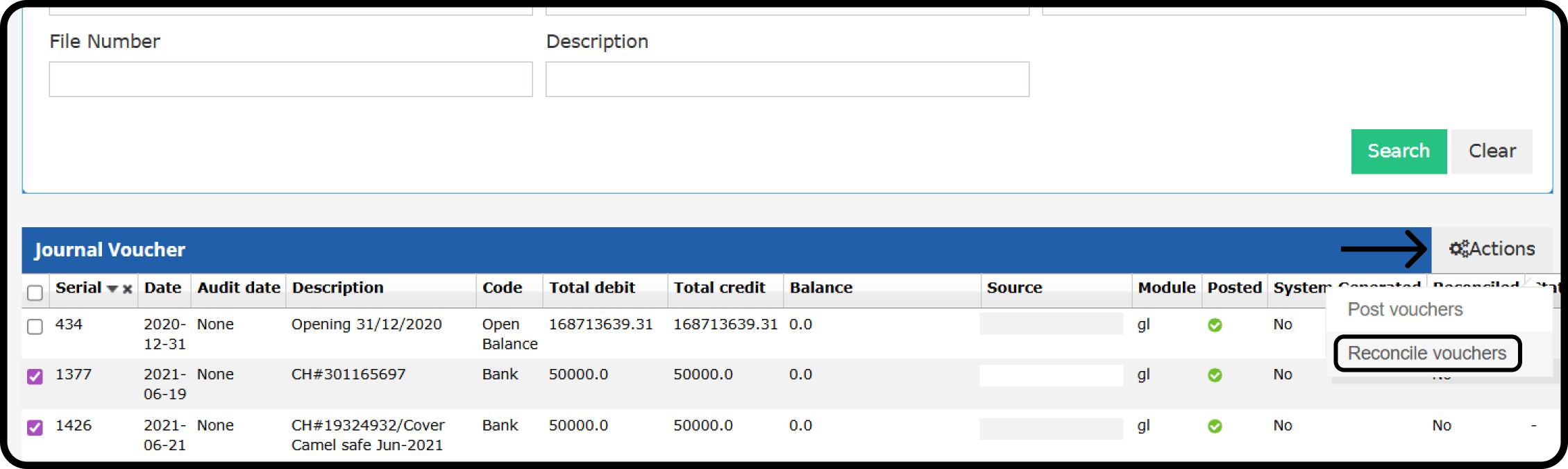
1. Search for not reconciled JVs.
2. Tick the JVs.
3. Choose **Actions → Reconcile Vouchers**.
#### **Bulk Reconcile**
1. Search for not reconciled JVs.
2. Tick the JVs.
3. Choose **Actions → Reconcile Vouchers**.
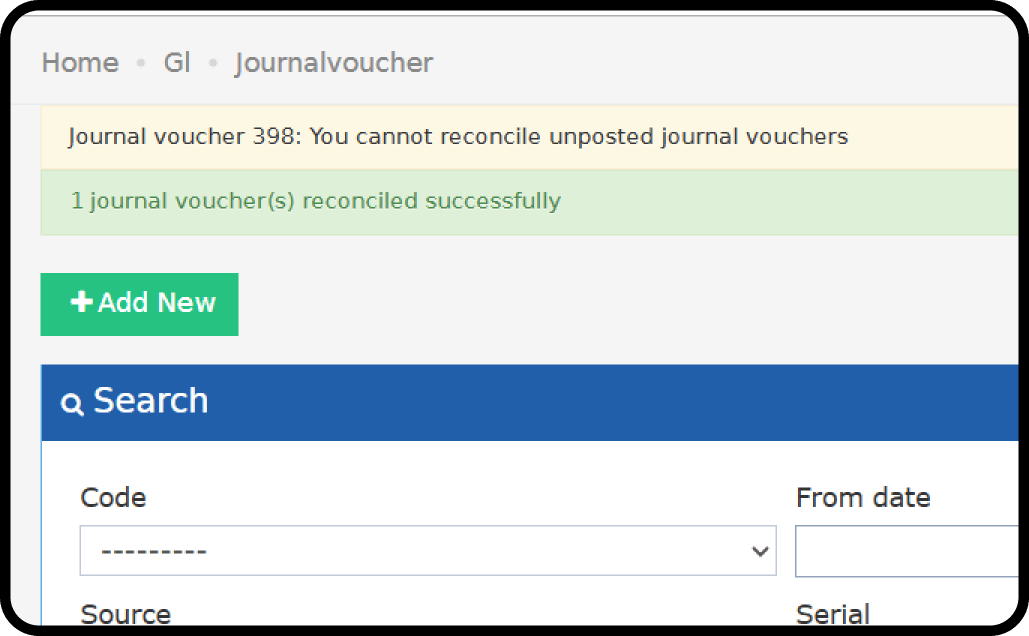
 * Posted JVs are reconciled. Unposted JVs stay not reconciled.
| If a selected JV is | You see |
| - | - |
| Unposted | *"JV Number: You cannot reconcile unposted journal vouchers."* |
| Already reconciled | *"JV Number: Journal voucher already reconciled"* |
* Posted JVs are reconciled. Unposted JVs stay not reconciled.
| If a selected JV is | You see |
| - | - |
| Unposted | *"JV Number: You cannot reconcile unposted journal vouchers."* |
| Already reconciled | *"JV Number: Journal voucher already reconciled"* |
 ### **Print JVs as PDF**
**Export Vouchers** gives a CSV file. Auditors reject it because it can be edited, and Arabic text breaks in Excel. **Print Vouchers as PDF** prints the vouchers instead.
1. Apply at least one search filter and run the search.
2. Choose **Print Vouchers as PDF**.
* It prints **every** JV in your current search results. There is no row selection.
* Each voucher has the same layout as the single-voucher print, including T-code analysis where it applies.
* It runs in the background. You get a download link named `jv_print_{timestamp}.pdf`.
* A very large run is split into numbered files, such as `jv_print_{timestamp}_part1.pdf`.
| If | You see |
| - | - |
| No search is applied | *"This export can only include filtered journal voucher results, please refine your search."* |
| No JVs match | *"No journal vouchers to print"* |
| **Note:** For voucher data to analyse, use **Export Vouchers** instead. |
| - |
This documentation is built and hosted on [Mintlify](https://mintlify.com), a developer documentation platform.
### **Print JVs as PDF**
**Export Vouchers** gives a CSV file. Auditors reject it because it can be edited, and Arabic text breaks in Excel. **Print Vouchers as PDF** prints the vouchers instead.
1. Apply at least one search filter and run the search.
2. Choose **Print Vouchers as PDF**.
* It prints **every** JV in your current search results. There is no row selection.
* Each voucher has the same layout as the single-voucher print, including T-code analysis where it applies.
* It runs in the background. You get a download link named `jv_print_{timestamp}.pdf`.
* A very large run is split into numbered files, such as `jv_print_{timestamp}_part1.pdf`.
| If | You see |
| - | - |
| No search is applied | *"This export can only include filtered journal voucher results, please refine your search."* |
| No JVs match | *"No journal vouchers to print"* |
| **Note:** For voucher data to analyse, use **Export Vouchers** instead. |
| - |
This documentation is built and hosted on [Mintlify](https://mintlify.com), a developer documentation platform.