> ## Documentation Index
> Fetch the complete documentation index at: https://help.kwentra.com/llms.txt
> Use this file to discover all available pages before exploring further.
# Direct Receiving
> The Direct Receiving feature streamlines purchasing and inventory management by: Receiving items directly without adding them to stock. Suitable for single-use items, consumables, and direct expens...
The **Direct Receiving** feature streamlines **purchasing and inventory management** by:
1. Receiving items directly without adding them to stock.
2. Suitable for single-use items, consumables, and direct expenses.
### **How do you set up direct receiving?**
**[Back Office → Settings → Inventory → Item → Add/Open Item](https://manage.kwentra.com/inventory/item/)**
**[Back Office → Settings → Inventory → Store→ Add/Open Store](https://manage.kwentra.com/inventory/store/)**
1. Both the store and the item must be marked as **Direct Receiving.**
2. Once used, direct receiving items and stores cannot be reverted to normal.
[ ](/images/back-office/purchasing/direct-receiving/bf67c1ff7b.png)
### **How does direct receiving affect purchasing and inventory cycles?**
**Purchase Requests and Purchase Orders:**
* Direct-receiving items can only be used with direct-receiving stores and vice versa.
* If a PR contains direct-receiving items with non-direct-receiving ones, the system will generate separate POs.
* This prevents mixing direct receiving with non-direct receiving items in the same PO.
**Receiving Orders:**
* It can be created from a PO or manually.
* **Mixed receiving orders (direct + non-direct items) are allowed**, but each line item is categorized separately.
* Upon submitting a **Receiving Order with Direct Receiving Items**, a **popup automatically prompts users to create a Store Usage entry for direct receiving items only.**
* All items, quantities, and values are pre-filled and **cannot be edited** except for the **Expense Account** field or the **Usage Department** field to autofill the expense accounts automatically.
[
](/images/back-office/purchasing/direct-receiving/bf67c1ff7b.png)
### **How does direct receiving affect purchasing and inventory cycles?**
**Purchase Requests and Purchase Orders:**
* Direct-receiving items can only be used with direct-receiving stores and vice versa.
* If a PR contains direct-receiving items with non-direct-receiving ones, the system will generate separate POs.
* This prevents mixing direct receiving with non-direct receiving items in the same PO.
**Receiving Orders:**
* It can be created from a PO or manually.
* **Mixed receiving orders (direct + non-direct items) are allowed**, but each line item is categorized separately.
* Upon submitting a **Receiving Order with Direct Receiving Items**, a **popup automatically prompts users to create a Store Usage entry for direct receiving items only.**
* All items, quantities, and values are pre-filled and **cannot be edited** except for the **Expense Account** field or the **Usage Department** field to autofill the expense accounts automatically.
[ ](/images/back-office/purchasing/direct-receiving/712cfc7099.png)
**Store Transfers & Usages:**
* Direct Receiving Stores and Items cannot be used in Store Transfers or Store Usage screens.
* Selecting them triggers validation errors to **prevent unnecessary inventory movement**.
**Return Requests**
* **Return requests for Direct Receiving Items are not allowed**, ensuring these purchases are treated as direct expenses.
### ***May 2025 Update***
| **Area** | Previous behavior | New behavior |
| -------------------------------------------------------------------------------------------- | ---------------------------------------------------------------------------------------------------------- | ----------------------------------------------------------------------------------------------------------------------------------- |
| **Store Usage status after you save a Receiving Order that contains Direct Receiving items** | Store usage is auto-approved.
](/images/back-office/purchasing/direct-receiving/712cfc7099.png)
**Store Transfers & Usages:**
* Direct Receiving Stores and Items cannot be used in Store Transfers or Store Usage screens.
* Selecting them triggers validation errors to **prevent unnecessary inventory movement**.
**Return Requests**
* **Return requests for Direct Receiving Items are not allowed**, ensuring these purchases are treated as direct expenses.
### ***May 2025 Update***
| **Area** | Previous behavior | New behavior |
| -------------------------------------------------------------------------------------------- | ---------------------------------------------------------------------------------------------------------- | ----------------------------------------------------------------------------------------------------------------------------------- |
| **Store Usage status after you save a Receiving Order that contains Direct Receiving items** | Store usage is auto-approved.
Store usage remains unsubmitted, waiting for bulk submit action.
| auto-approved and auto-submitted immediately.
JV created from that Store Usage is auto-posted (unchanged). |
| **Value of Store Usage created from a Direct Receiving order** | Calculated using the item’s average price. | Uses the exact price on the Receiving Order, ensuring 1-to-1 cost matching. |
| **Duplicate Items inside the same Purchase Request or Receiving Order** | Allowed (could lead to double quantities) | **Blocked.** If the same item is added to two lines, the system shows:
“*Item X is already added in this request.*” |
| **Bulk Submit / Un-submit** | Included Store Usages generated by Store Settlements. | Store usages linked to Store Settlements are now excluded. They submit or un-submit *only* when the settlement itself is processed. |
### **💡 Business Value**
* **Faster stock flow:** Direct-receiving items now move straight into inventory without waiting for the bulk-submit batch.
* **Accurate cost matching:** The Store Usage created by a direct-receiving order now carries the **exact purchase price**, not the system’s average price.
* **Cleaner approvals & audits:** Store Usages that belong to settlements are handled only by the settlement action, keeping bulk submits tidy and avoiding double processing.
***
## ***Update: 12th of October, 2025***
### **Splitting Direct Receiving Items in Store Usage**
Split direct-receiving items in store usage for accurate allocation to multiple expense accounts.
***
### **Business Value**
* **Precise Cost Allocation:** Allows users to split item quantities and assign different expense accounts for better financial tracking.
* **Operational Flexibility:** Users can split items directly from the usage screen when receiving orders are created manually, improving adaptability.
* **Audit Compliance:** Maintains clear records for each expense account, simplifying audits and approvals.
***
### **Use Case**
A user needs to allocate part of a direct-receiving item’s quantity to one expense account and the remainder to another—for example, splitting a single-use item between two departments.
***
### **Technical Know-how**
**Back Office → Purchasing → Receiving Orders**
* In case the receiving order is created through PR & PO, the system doesn’t allow adding extra line items, which means the item cannot be split into multiple lines to add multiple expense accounts in the linked store usage.
* Each direct-receiving line item in the linked store usage now has a **“Split” button**.
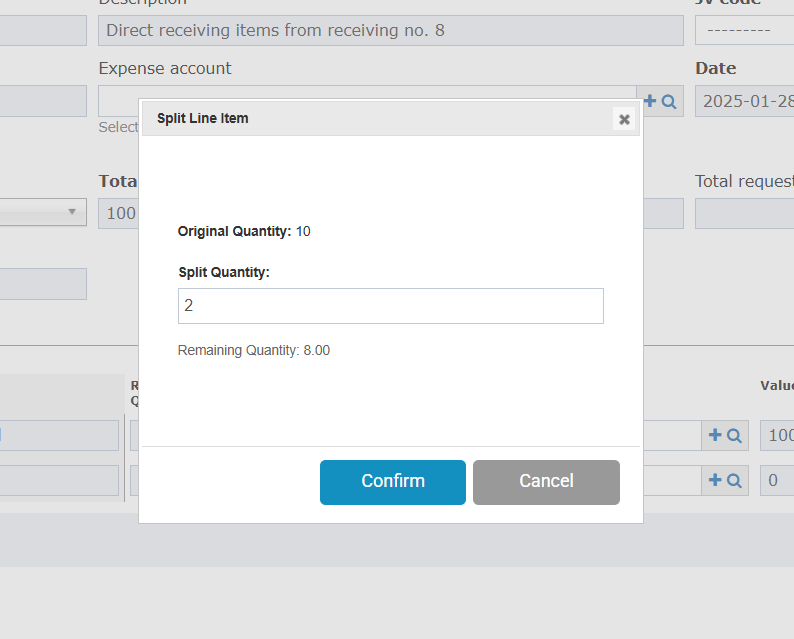
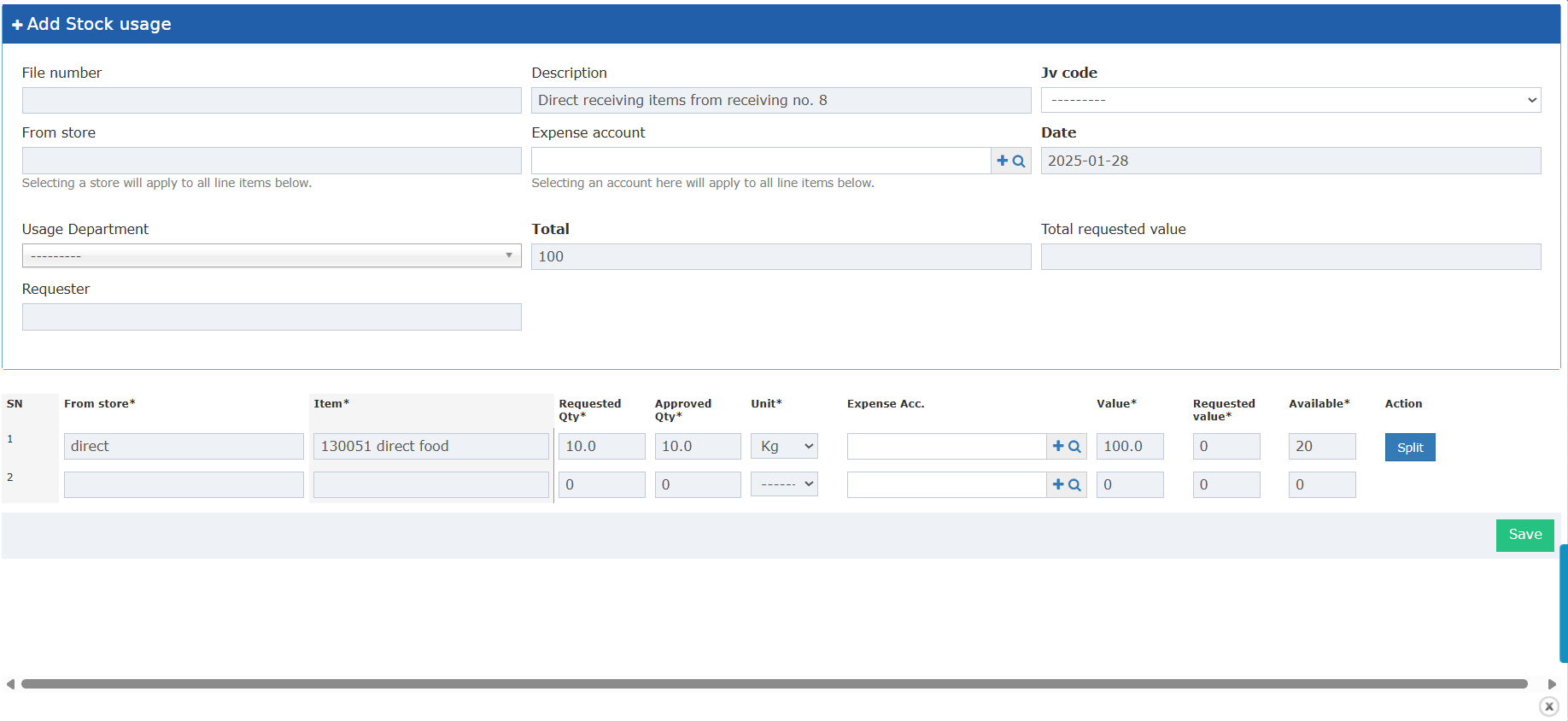 Clicking “Split” opens a pop-up:
* Allows the user to enter a “Splitting Quantity”.
* “Confirm” button splits the line; “Cancel” closes the popup.
Clicking “Split” opens a pop-up:
* Allows the user to enter a “Splitting Quantity”.
* “Confirm” button splits the line; “Cancel” closes the popup.
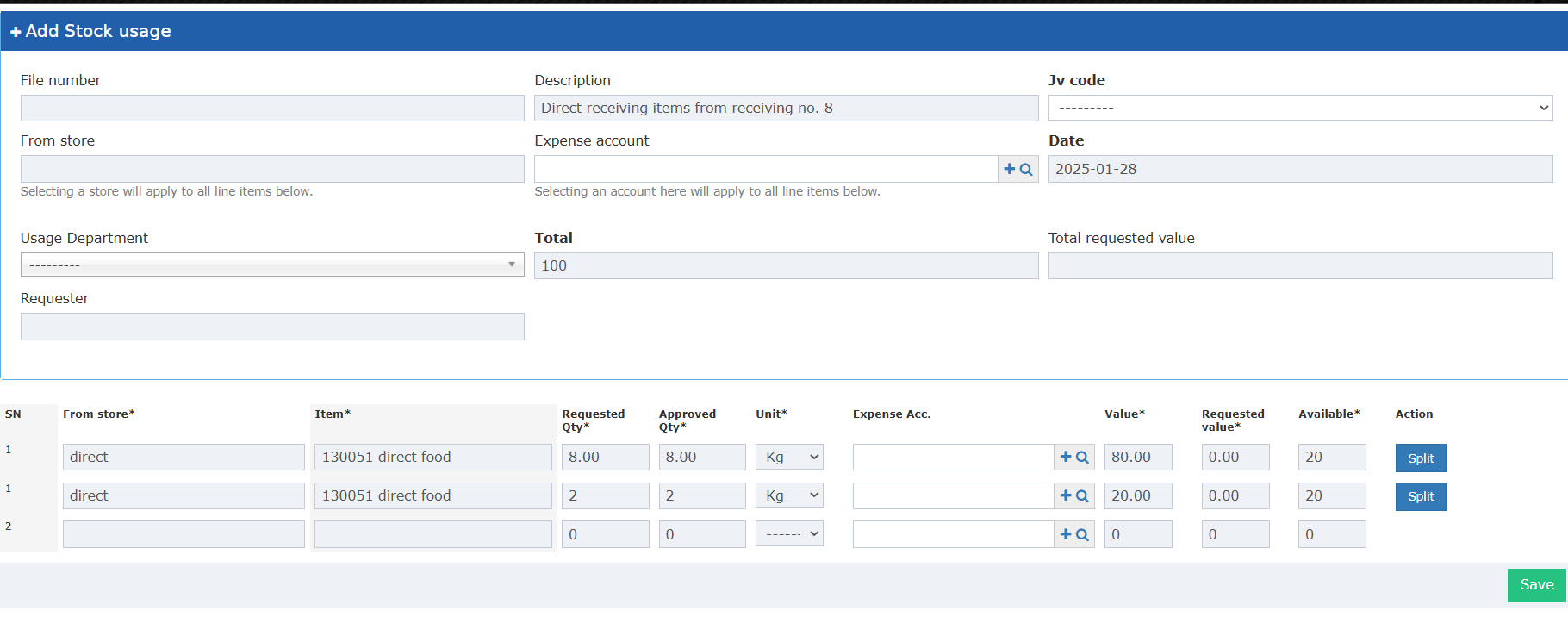
 * The new line displays the split quantity; both the original and new lines are read-only, except for the “Expense Account” field.
* **Splitting Rules:**
* Splitting Qty **must be less than the original quantity**.
* Must be **greater than or equal to 0.1** (cannot be zero or negative).
* Only accepts numeric input.
* The new line displays the split quantity; both the original and new lines are read-only, except for the “Expense Account” field.
* **Splitting Rules:**
* Splitting Qty **must be less than the original quantity**.
* Must be **greater than or equal to 0.1** (cannot be zero or negative).
* Only accepts numeric input.