> ## Documentation Index
> Fetch the complete documentation index at: https://help.kwentra.com/llms.txt
> Use this file to discover all available pages before exploring further.
# Receiving Orders — Bulk Approve
> Approve multiple pending receiving orders at once from the listing screen, with a confirmation step and permission control.
Approve multiple receiving orders at once from the Receiving Orders listing screen.
### **Business Value**
* Speeds up processing by approving many receiving orders in one action.
* Reduces repetitive clicks versus handling each order individually.
* Restricts the action to users with the approve permission.
* Confirmation step prevents accidental approvals.
### **Use Cases**
* Cost controller selects a day's pending receiving orders and approves them all at once.
* Store supervisor without permission never sees the action, keeping control intact.
### **How It Works**
| **Where:** Back Office → Purchasing → Receiving Orders |
| ------------------------------------------------------ |
* Select one or more receiving orders in the listing screen.
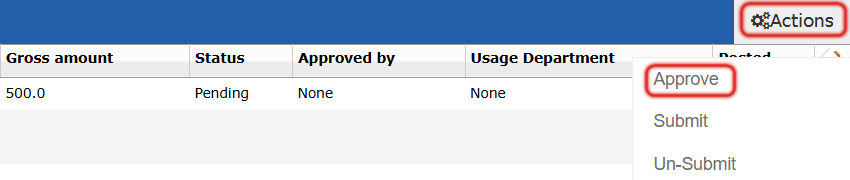
* Open the **Actions** button at the start of the list and choose **Approve**.
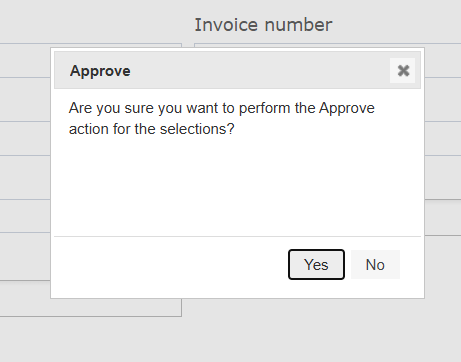
 * A confirmation dialog asks **"Approve the selected receiving orders?"** with **Yes** and **No** buttons.
* **Yes** runs the approve action on the selected receiving orders.
* **No** dismisses the action with no changes.
* A confirmation dialog asks **"Approve the selected receiving orders?"** with **Yes** and **No** buttons.
* **Yes** runs the approve action on the selected receiving orders.
* **No** dismisses the action with no changes.
 #### **Validations**
* Bulk Approve applies only to **Pending** receiving orders.
* The action is hidden for users without permission to approve receiving orders.
| Note: Bulk Approve builds on the [receiving order approval workflow](/back-office/purchasing/receiving-order-approve-and-reject-workflow). Receiving orders outside the eligible statuses are not affected by the action. |
| ------------------------------------------------------------------------------------------------------------------------------------------------------------------------------------------------------------------------- |
#### **Validations**
* Bulk Approve applies only to **Pending** receiving orders.
* The action is hidden for users without permission to approve receiving orders.
| Note: Bulk Approve builds on the [receiving order approval workflow](/back-office/purchasing/receiving-order-approve-and-reject-workflow). Receiving orders outside the eligible statuses are not affected by the action. |
| ------------------------------------------------------------------------------------------------------------------------------------------------------------------------------------------------------------------------- |