> ## Documentation Index
> Fetch the complete documentation index at: https://help.kwentra.com/llms.txt
> Use this file to discover all available pages before exploring further.
# How to Add Restrictions on Specific Channels?
> Users now can view all rates/rooms restrictions applied to a certain channel for a specific period of time. First, we need to see how to apply a restriction on a certain channel. I.E apply a restri...
#### **Apply Room Restriction for a certain Channel:**
##### **I.E apply a restriction on a channel “Expedia”**
1. Channel Management
2. Expedia
3. Bulk Restrictions
We would be directed to the below page in which we would start with the room type we want to apply restriction on.
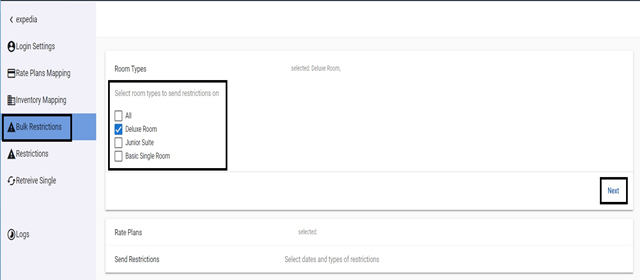 4. Select the room type then click **Next**.
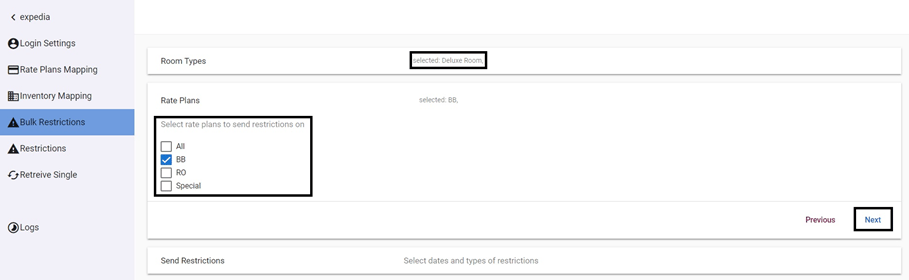
Now we can see the Room Type selected while selecting which Rates to send restrictions on.
5. Select the Rate then click **Next.**
4. Select the room type then click **Next**.
Now we can see the Room Type selected while selecting which Rates to send restrictions on.
5. Select the Rate then click **Next.**
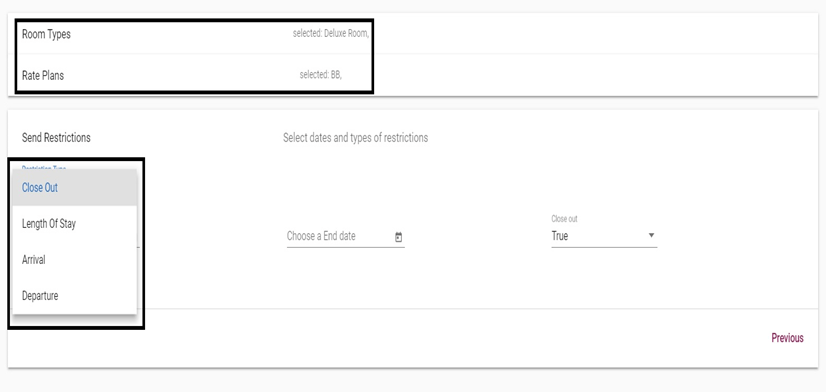
 Now we have selected the room type and rate we want to send restriction on, all we need to do now is to select what type of restriction we would like to send.
##### **Restriction Types:**
* ***Closed Out:*** *used when we want to block any reservations to take place for this specific room type & rate for a period between two dates.*
* ***Length of Stay:*** *used when we would like to restrict reservations to have specific number of nights for a period between two dates.*
* ***Arrival & Departure:*** *used when we want to prevent new reservations from arriving or departing on certain dates.*
Now we have selected the room type and rate we want to send restriction on, all we need to do now is to select what type of restriction we would like to send.
##### **Restriction Types:**
* ***Closed Out:*** *used when we want to block any reservations to take place for this specific room type & rate for a period between two dates.*
* ***Length of Stay:*** *used when we would like to restrict reservations to have specific number of nights for a period between two dates.*
* ***Arrival & Departure:*** *used when we want to prevent new reservations from arriving or departing on certain dates.*
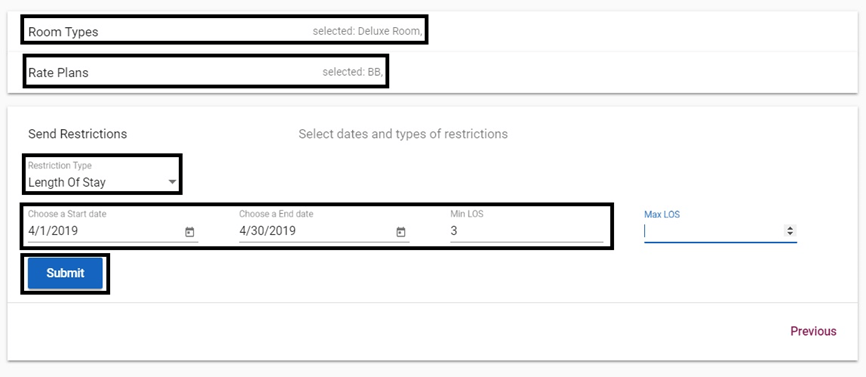
 In this scenario, we would be sending a restriction for the **Deluxe Room, BB Rate** with the restriction of **Minimum Length of Stay 3 Nights, between 1st of April 2019 and 30th of April 2019.**
Click **Submit** to send restriction.
In this scenario, we would be sending a restriction for the **Deluxe Room, BB Rate** with the restriction of **Minimum Length of Stay 3 Nights, between 1st of April 2019 and 30th of April 2019.**
Click **Submit** to send restriction.