> ## Documentation Index
> Fetch the complete documentation index at: https://help.kwentra.com/llms.txt
> Use this file to discover all available pages before exploring further.
# kwentra & ZATCA for Saudi Arabia - Invoice and Financial Operations
> With our ZATCA-Compliant invoice templates, ZATCA Direct Integration offers a seamless B2C and B2B transactions. B2C invoices from front office and POS are submitted for reporting - simplified invo...
With our ZATCA-Compliant invoice templates, ZATCA Direct Integration offers a seamless B2C and B2B transactions.
* **B2C invoices** from front office and POS are submitted for reporting - simplified invoice.
* **B2B invoices** are submitted from clearance - detailed/tax invoice.
### **How will the system generate the simplified or the tax invoice?**
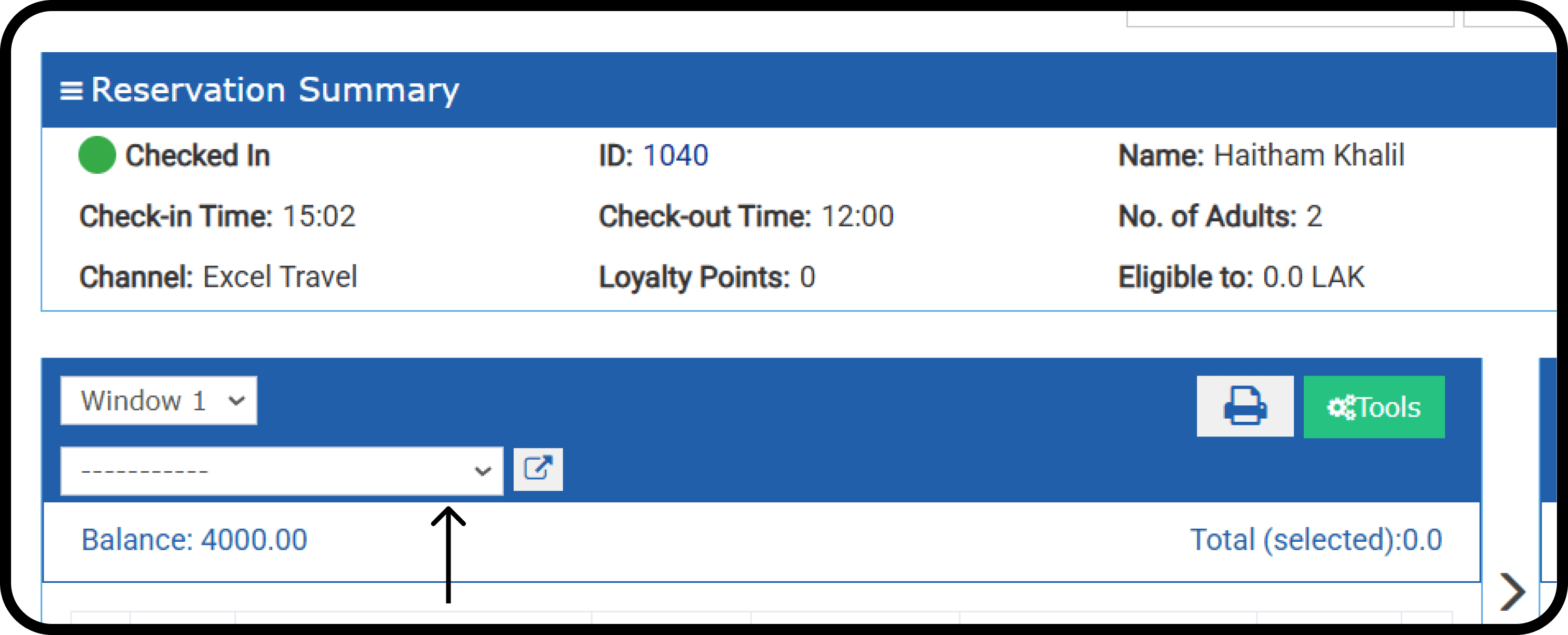
* If the reservation's/paymaster billing window is not linked to any channel.
* The system will generate the simplified invoice template.
* The guest profile must be complete before the invoice can be reported.
* An incomplete guest profile will fail to submit the invoice.
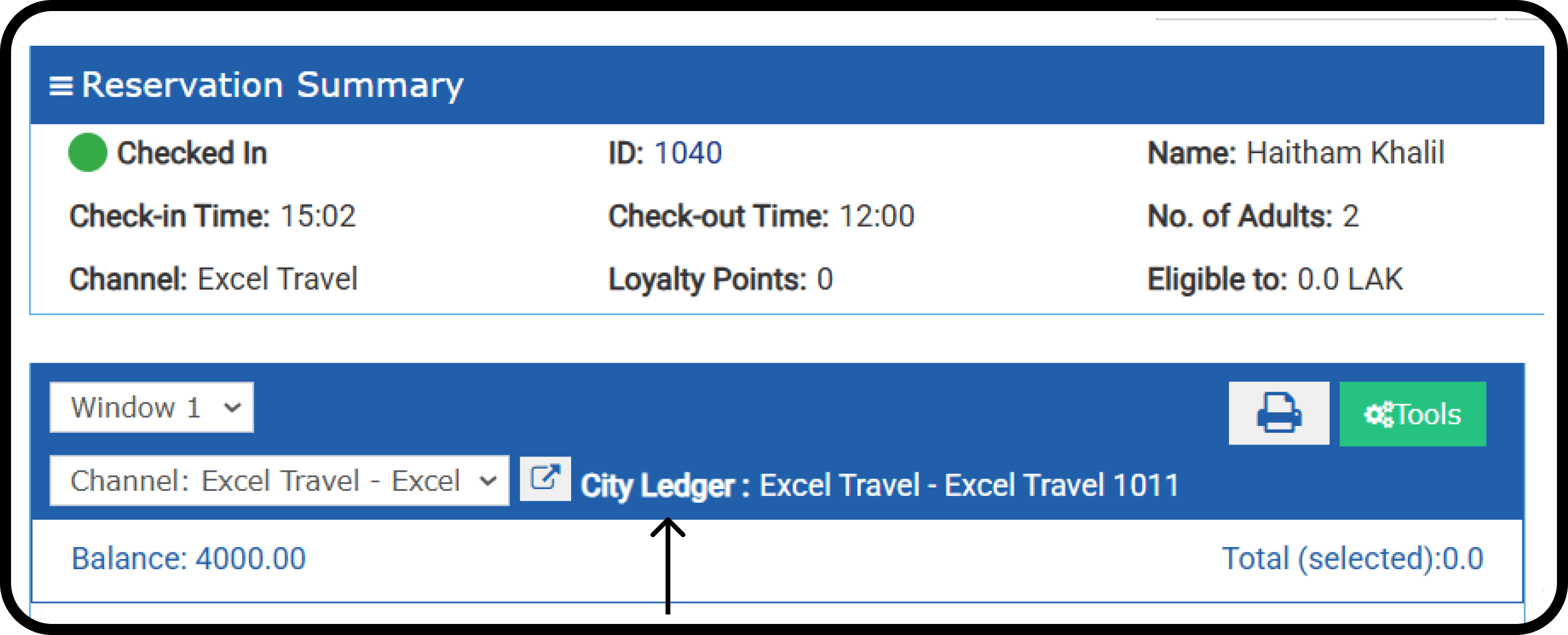
 * If the reservation's/paymaster billing window is linked to a city ledger account for a channel.
* The system will generate the detailed/tax invoice template.
* The channel profile must be completed before the invoice can be cleared.
* An incomplete channel profile will fail to submit the invoice.
* If the reservation's/paymaster billing window is linked to a city ledger account for a channel.
* The system will generate the detailed/tax invoice template.
* The channel profile must be completed before the invoice can be cleared.
* An incomplete channel profile will fail to submit the invoice.
 ### **Example: Invoice Sent to ZATCA → Payment Canceled → New Manual Charge Added**
This scenario involves a **sequence of transactions** where an invoice has already been submitted to **ZATCA**, a **payment is canceled**, and a **new manual charge is added and paid**. Below is a step-by-step breakdown of what happens and the types of invoices generated.
### **1️⃣ Initial Invoice (Standard Invoice) Sent to ZATCA**
* A guest pays for a service (e.g., room stay, dining, spa).
* Kwentra generates an **Invoice**.
**Invoice Type:**
Simplified Invoice for B2C or Detailed Invoice for B2B
### **2️⃣ Payment Is Canceled (Credit Note Issued)**
* The guest requests a **refund** or the payment is reversed due to an issue.
* Since the invoice was **already submitted to ZATCA**, the system **cannot delete it**.
* Instead, kwentra generates a **Credit Note** to reverse the amount.
* This **Credit Note** has been sent to **ZATCA** and is linked to the original invoice.
**Invoice Type:**
**Credit Note (Linked to Original Invoice)** – Simplified Invoice for B2C or Detailed Invoice for B2B.
### **3️⃣ New Manual Charge Added**
* A new charge is manually added to the guest’s folio (e.g., an additional service, extended stay, late checkout).
* This is treated as a **new taxable transaction**, requiring a separate invoice.
**Next Steps:**
* The system **generates a new invoice** for the additional charge.
* This invoice is sent to **ZATCA** as a separate transaction.
**Invoice Type:**
**New Invoice** → A fresh invoice is generated for the latest charge, a simplified invoice for B2C, or a detailed invoice for B2B.
### **Final Outcome: What Invoices Exist in ZATCA?**
1. **Original Standard Invoice** (Initially submitted).
2. **Credit Note** (Reverses the original invoice due to canceled payment).
3. **New Standard Invoice** (Records the new manual charge and payment).
### **Final Invoice Status Table**
| **Status** | **Meaning** | **Next Steps** |
| ----------------- | ------------------------------------------ | --------------------------------------------- |
| **Pending**
### **Example: Invoice Sent to ZATCA → Payment Canceled → New Manual Charge Added**
This scenario involves a **sequence of transactions** where an invoice has already been submitted to **ZATCA**, a **payment is canceled**, and a **new manual charge is added and paid**. Below is a step-by-step breakdown of what happens and the types of invoices generated.
### **1️⃣ Initial Invoice (Standard Invoice) Sent to ZATCA**
* A guest pays for a service (e.g., room stay, dining, spa).
* Kwentra generates an **Invoice**.
**Invoice Type:**
Simplified Invoice for B2C or Detailed Invoice for B2B
### **2️⃣ Payment Is Canceled (Credit Note Issued)**
* The guest requests a **refund** or the payment is reversed due to an issue.
* Since the invoice was **already submitted to ZATCA**, the system **cannot delete it**.
* Instead, kwentra generates a **Credit Note** to reverse the amount.
* This **Credit Note** has been sent to **ZATCA** and is linked to the original invoice.
**Invoice Type:**
**Credit Note (Linked to Original Invoice)** – Simplified Invoice for B2C or Detailed Invoice for B2B.
### **3️⃣ New Manual Charge Added**
* A new charge is manually added to the guest’s folio (e.g., an additional service, extended stay, late checkout).
* This is treated as a **new taxable transaction**, requiring a separate invoice.
**Next Steps:**
* The system **generates a new invoice** for the additional charge.
* This invoice is sent to **ZATCA** as a separate transaction.
**Invoice Type:**
**New Invoice** → A fresh invoice is generated for the latest charge, a simplified invoice for B2C, or a detailed invoice for B2B.
### **Final Outcome: What Invoices Exist in ZATCA?**
1. **Original Standard Invoice** (Initially submitted).
2. **Credit Note** (Reverses the original invoice due to canceled payment).
3. **New Standard Invoice** (Records the new manual charge and payment).
### **Final Invoice Status Table**
| **Status** | **Meaning** | **Next Steps** |
| ----------------- | ------------------------------------------ | --------------------------------------------- |
| **Pending**
| Invoice created but not yet submitted. | System will submit automatically or manually. |
| **Failed** | Invoice could not be sent to ZATCA. | Retry after resolving network/auth issues. |
| **Reported** | Invoice successfully reported to ZATCA. | No action needed; invoice is compliant. |
| **Not Reported** | B2C invoice failed to be reported. | Review errors, fix, and resubmit. |
| **Cleared** | B2B invoice successfully cleared by ZATCA. | No action needed; invoice is compliant. |
| **Not Cleared** | B2B invoice was rejected by ZATCA. | Review errors, fix, and resubmit. |
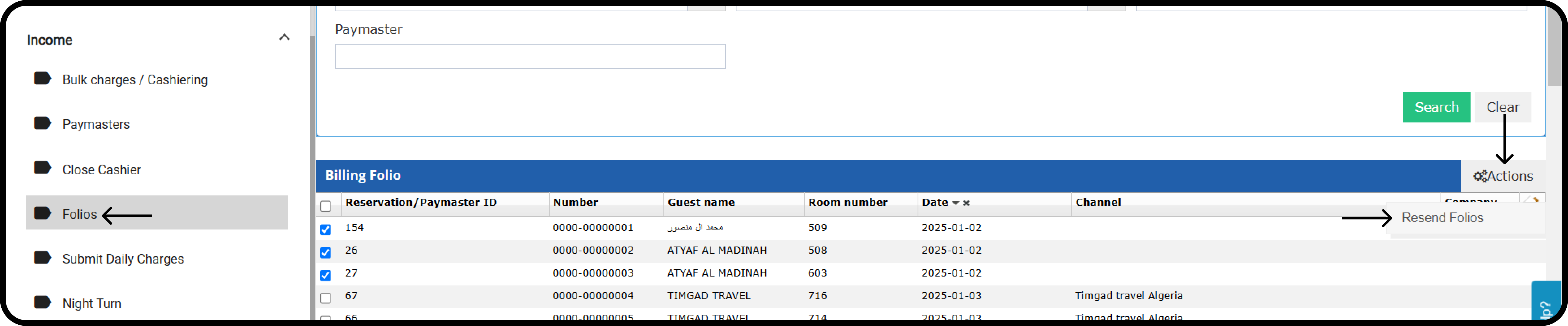
### **How do you resend failed invoices?**
**[Front Office → Income → Folios](https://manage.kwentra.com/frontoffice/#/hms/billingfolio)**
1. Select the failed folios from the checkboxes.
2. Click on **Actions.**
3. Select **Resend Folios.**