> ## Documentation Index
> Fetch the complete documentation index at: https://help.kwentra.com/llms.txt
> Use this file to discover all available pages before exploring further.
# Adyen Payment Gateway - Payment Departments Setup
> After consulting with CloudInn Support Team and successfully configure the system for payment, it is time to adjust the payment departments to sync with the payment done and credit card type used....
After consulting with kwentra Support Team and successfully configure the system for payment, it is time to adjust the payment departments to sync with the payment done and credit card type used.
The benefit for this is to have the payment routed correctly to the department and therefore finances would be adjused automatically.
*Prerequisites to have prior to setting up Adyen Payment Departments:*
* *Payment Departments per currency to serve multi currency scenario if any I.E. Credit Cards USD, Credit Cards EUR*
* *Payment Departments per credit card type to have each payment routed to the designated department I.E. Visa, Master Card, Diners etc*
* *The Main Payment Department that would get routed to in case the payment is made with a different credit card type/currency.*
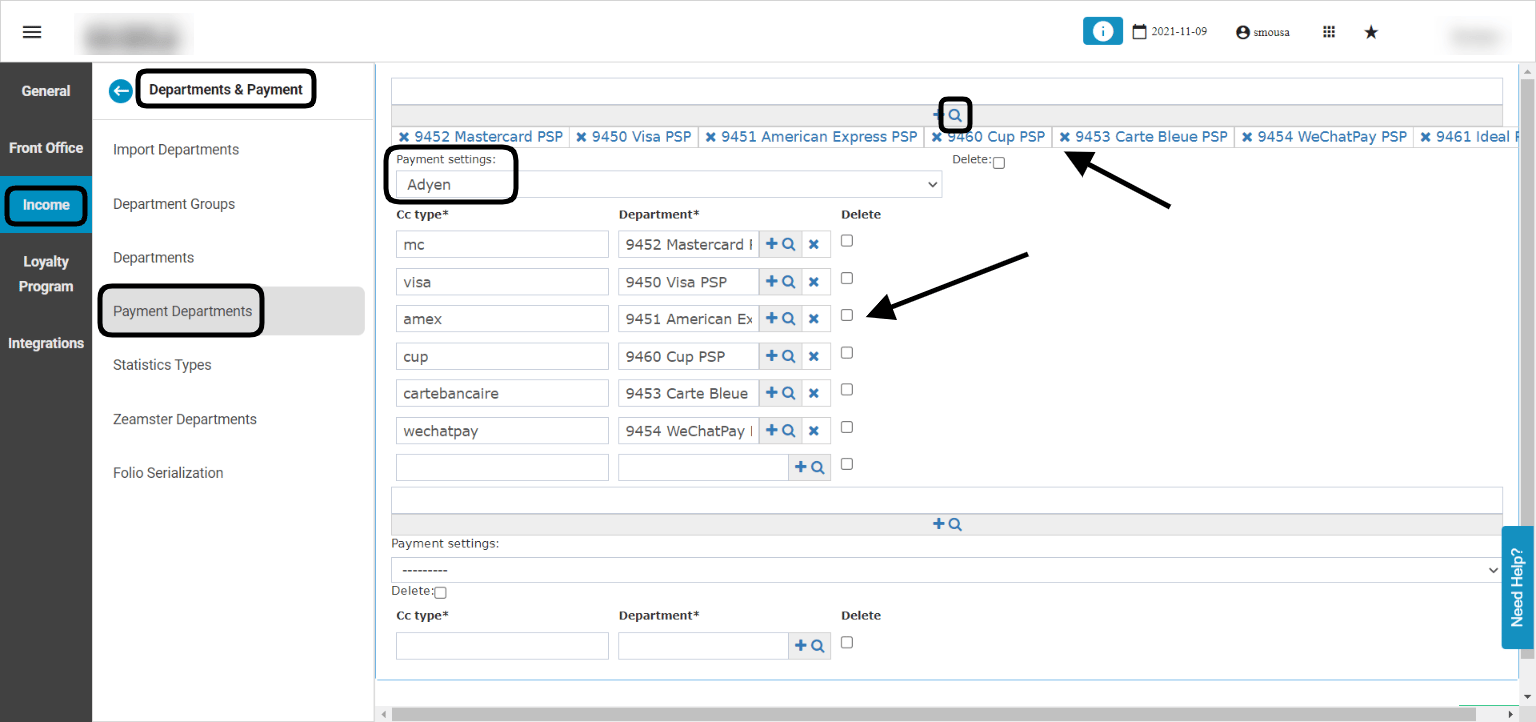
**[Front Office → Settings Gear Sign → Income → Departments & Payment → Payment Departments](https://manage.kwentra.com/settings/#/hms/paymentdepartments)**
In this step we would utilize the requirements in the prerquisites so that once the payment is done, billing postings gets routed to the correct department.
1. From the magnifying glass we select the payment departments per currency alongside the main payment department we want to set up for Adyen.
2. Adjust **Payment Settings** to Adyen.
3. For each cc type, select the department you desire.
4. Scroll down to **save.**
 With the above in place, one final step to be done for Online Booking purposes.
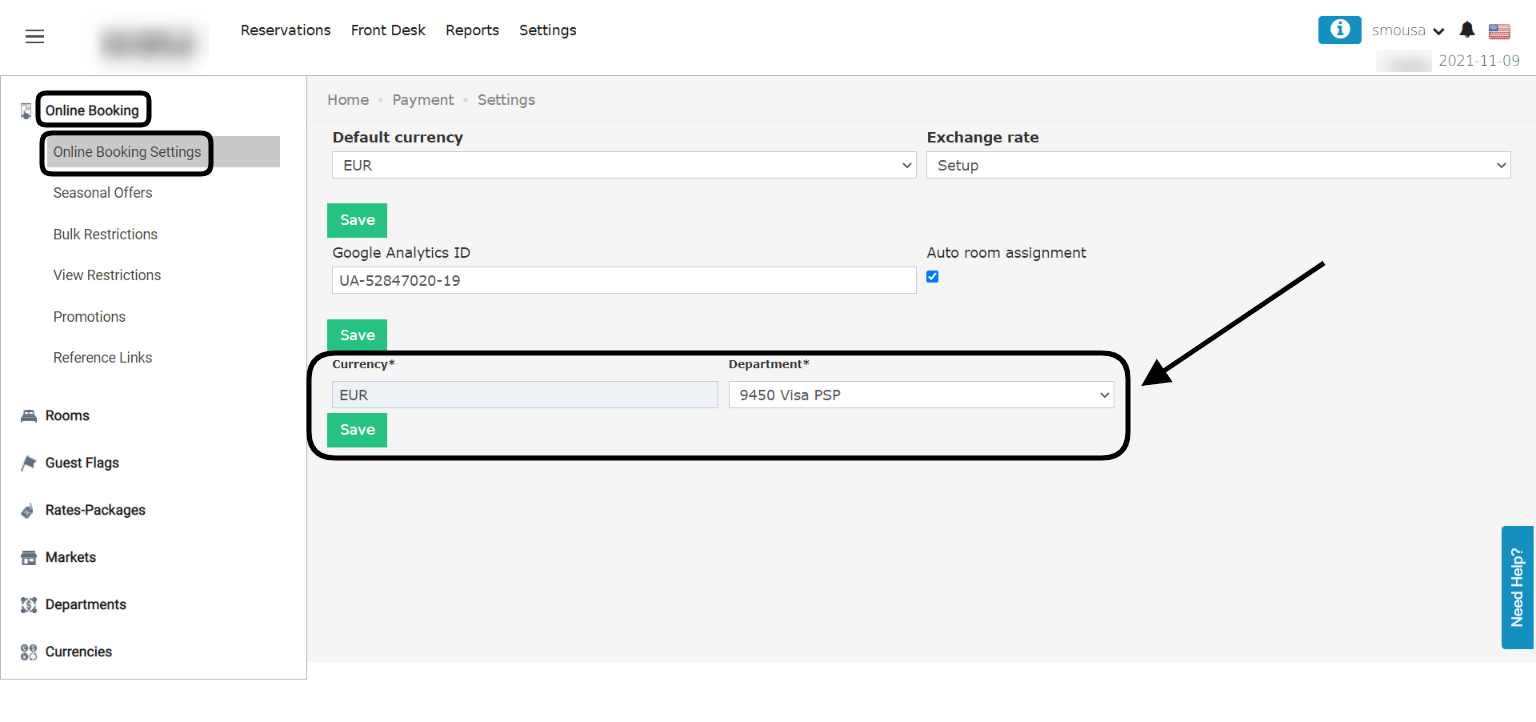
**[Online Booking → Settings → Online Booking → Online Booking Settings](https://manage.kwentra.com/payment/settings/)**
*It is very important for OB payments to adjust the currencies here with your payment departments so as to link each merchant account you own with multiple payment departments from kwentra.*
With the above in place, one final step to be done for Online Booking purposes.
**[Online Booking → Settings → Online Booking → Online Booking Settings](https://manage.kwentra.com/payment/settings/)**
*It is very important for OB payments to adjust the currencies here with your payment departments so as to link each merchant account you own with multiple payment departments from kwentra.*
 With the above in place, your payment integration with Adyen has been successfully completed and ready to receive payments from your website.
**Using Adyen to finalize payments from Front Office Billing:**
After setting up Adyen on your system, using any of the payment departments we set up in step 1 will trigger a payment fields inside kwentra's payment dialogue to use the guests' credit cards to finalize their payment.
This Payment Dialogue will charge the guest's credit card and add the payment amount to your billing screen.
With the above in place, your payment integration with Adyen has been successfully completed and ready to receive payments from your website.
**Using Adyen to finalize payments from Front Office Billing:**
After setting up Adyen on your system, using any of the payment departments we set up in step 1 will trigger a payment fields inside kwentra's payment dialogue to use the guests' credit cards to finalize their payment.
This Payment Dialogue will charge the guest's credit card and add the payment amount to your billing screen.