> ## Documentation Index
> Fetch the complete documentation index at: https://help.kwentra.com/llms.txt
> Use this file to discover all available pages before exploring further.
# Tax Definition - Egyptian Tax Law
> Following the local tax code for Egypt, all hotels are obliged to follow the below tax definition for their rates, packages and any income generated for the hotel. There are three types of taxes to...
Following the local tax code for Egypt, all hotels are obliged to follow the below tax definition for their rates, packages and any income generated for the hotel.
There are three types of taxes to be applied on hotels in Egypt:
* 12% service charge.
* 1% local city tax.
* 14% value added taxes.
The Egyptian Tax Code obligates Hoteliers to follow the below formula in order to calculate and apply the taxes correctly.
**Example:** Net Rate per night is 100 EGP.
**1. Apply the 12% service charge:**
100 EGP \* 0.12 = 12 EGP
**2. Apply the local city tax on the net rate + the service charge:**
(100 EGP + 12 EGP) \* 0.01 = 1.12 EGP
**3. Apply the VAT on the net rate + service charge + local city tax:**
(100 EGP + 12 EGP +1.12 EGP) \* 0.14 = 15.84 EGP
With the above formula in place the Gross Rate Per Night is 100 EGP + 15.84 EGP = 115.84 EGP including all taxes.
**How to apply the taxes on the system?:**
**[Front Office → Settings Gear Sign → Income → Taxes → Add New](https://manage.kwentra.com/settings/#/hms/taxes)**
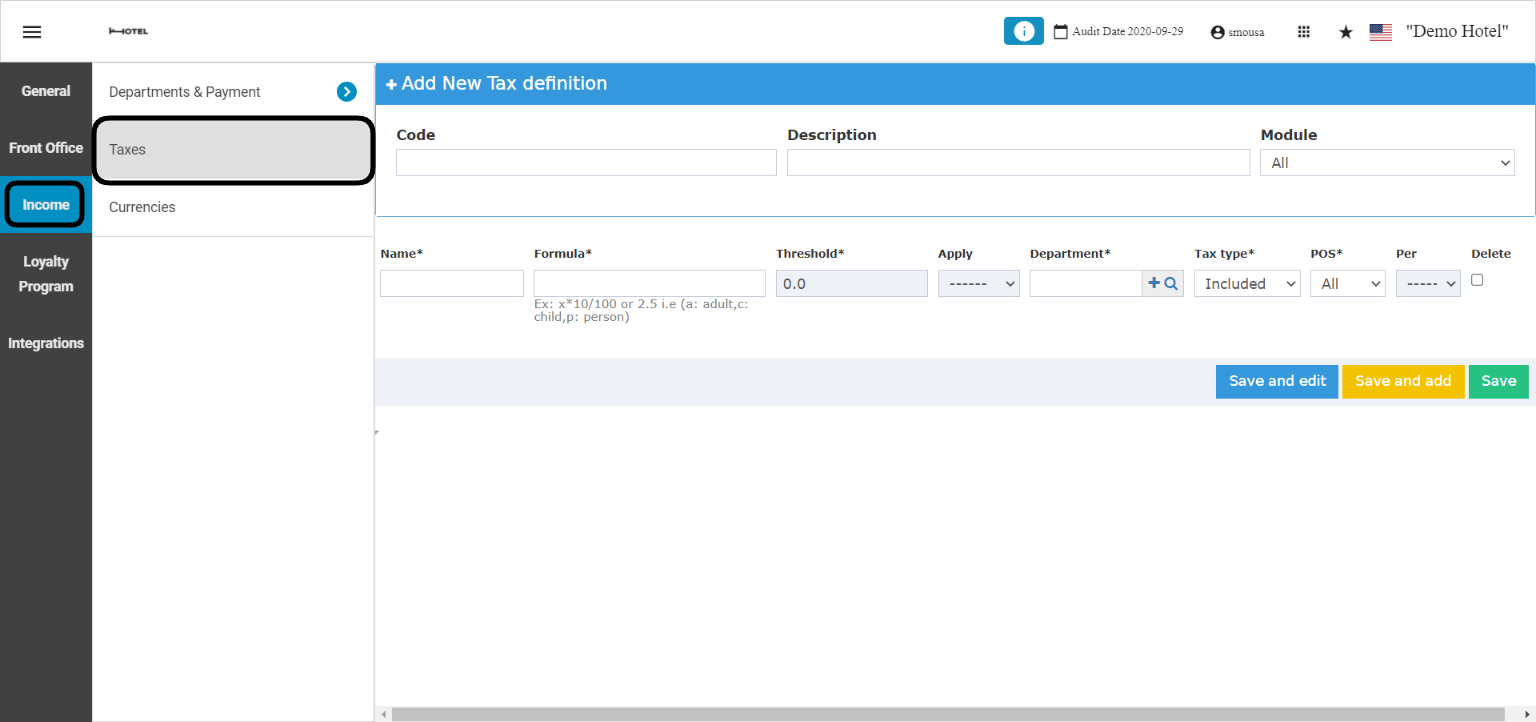 * Add a numerical code & a description for the new tax definition.
* In the **Name** field write the first tax to be applied which is the service charge.
* Formula to apply is x\*0.12.
* Select the Tax Department to link with the service charge.
* Select whether this tax is included or excluded from the charges.
* Click **Save and edit** to get more lines for the remaining taxes.
* Add a numerical code & a description for the new tax definition.
* In the **Name** field write the first tax to be applied which is the service charge.
* Formula to apply is x\*0.12.
* Select the Tax Department to link with the service charge.
* Select whether this tax is included or excluded from the charges.
* Click **Save and edit** to get more lines for the remaining taxes.
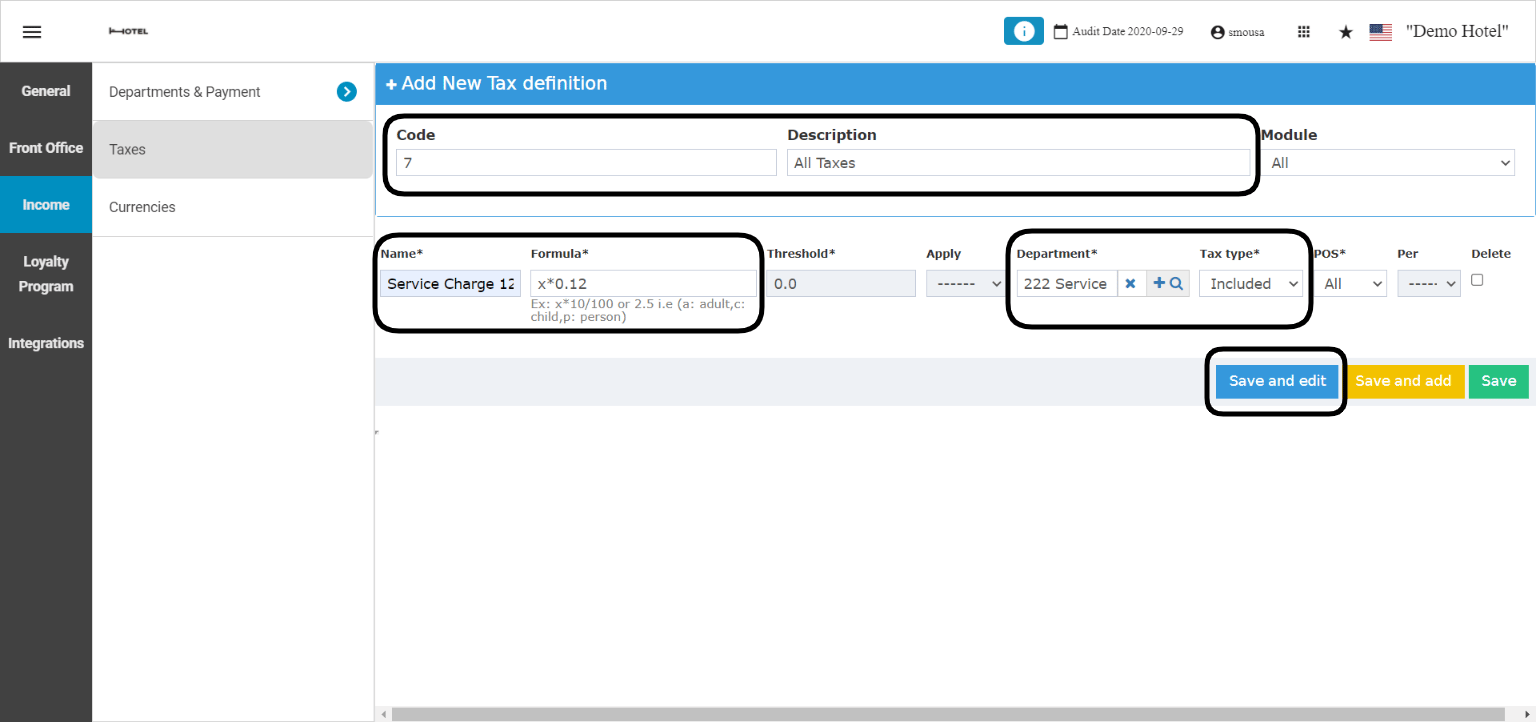 * Enter in the **Name** field the second tax to be applied which is the local city tax.
* Formula to apply is (x\*1.12)\*0.01
* Select the Tax Department to link with the local city tax.
* Select whether this tax is included or excluded from charges.
* Click **Save and edit** to get the last line for the tax.
* Enter in the **Name** field the second tax to be applied which is the local city tax.
* Formula to apply is (x\*1.12)\*0.01
* Select the Tax Department to link with the local city tax.
* Select whether this tax is included or excluded from charges.
* Click **Save and edit** to get the last line for the tax.
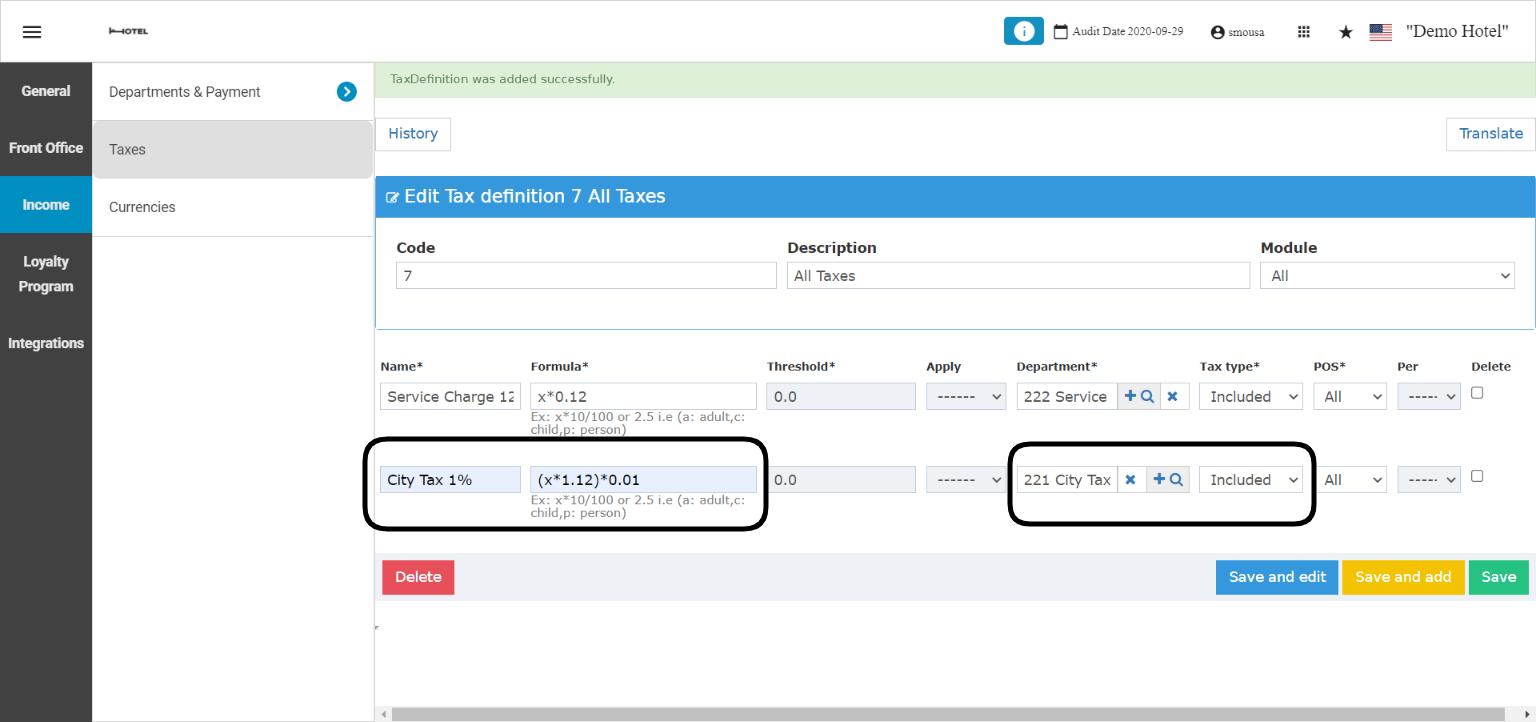 * Enter in the last **Name** field the name for VAT tax.
* Formula to apply is (x\*1.1312)\*0.14
* Select the Tax Department to link with the value added tax.
* Select whether this tax is included or excluded from charges.
* Click **Save and edit** to finalize your tax definition.
* Enter in the last **Name** field the name for VAT tax.
* Formula to apply is (x\*1.1312)\*0.14
* Select the Tax Department to link with the value added tax.
* Select whether this tax is included or excluded from charges.
* Click **Save and edit** to finalize your tax definition.
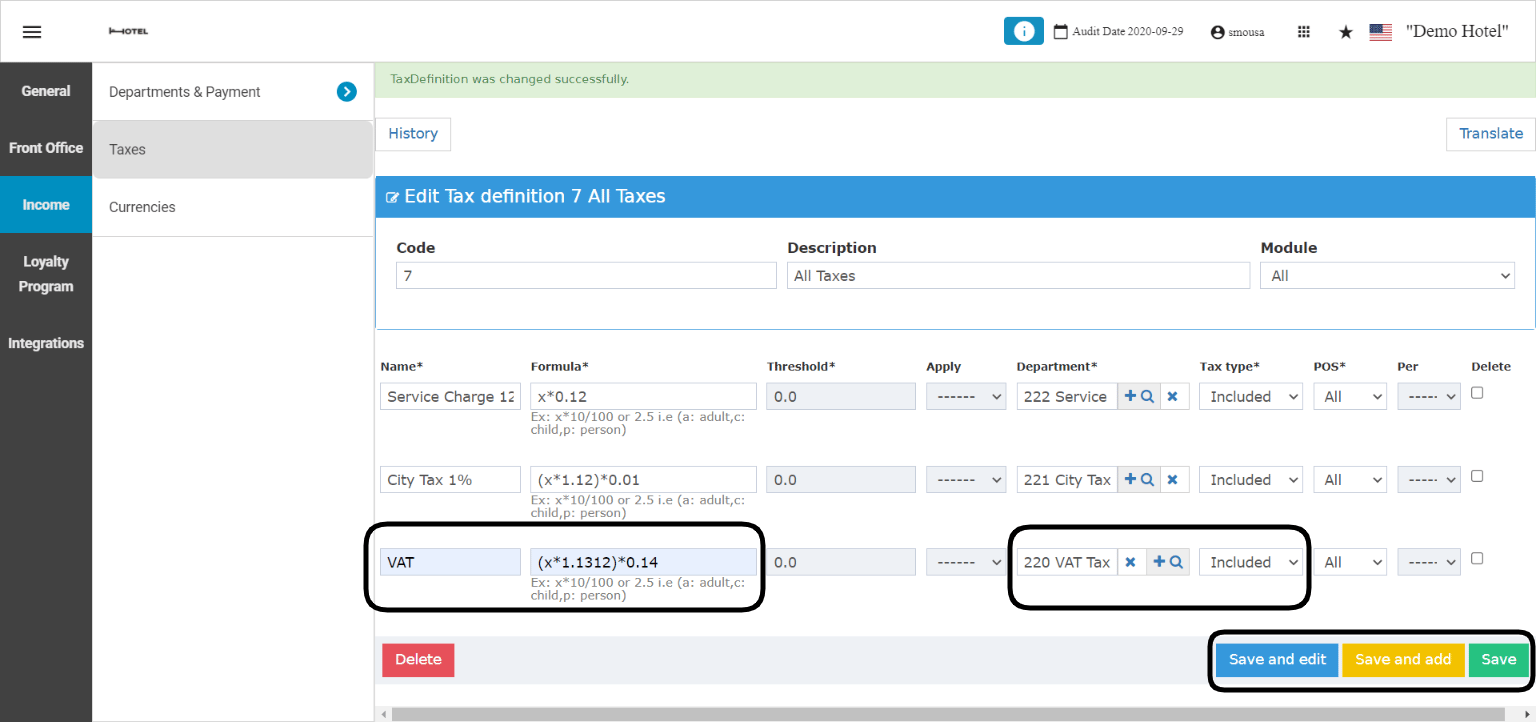 After adding the tax definition you need to link it to your **Revenue Departments** so the taxes would apply automatically on the generated income from your hotel.
**[Front Office → Settings Gear Sign → Income → Departments & Payment → Departments → Select Revenue Department](https://manage.kwentra.com/settings/#/hms/departments)**
Taxes apply on departments with the type **Debit** only.
**Example:** you would like to apply the new tax definition on the **Food Revenue Department:**
* Find the Revenue Department you need to apply the new tax on.
* Select the Tax definition from the drop down menu.
* Choose the start and end date for the tax definition.
* Click **Save and edit.**
After adding the tax definition you need to link it to your **Revenue Departments** so the taxes would apply automatically on the generated income from your hotel.
**[Front Office → Settings Gear Sign → Income → Departments & Payment → Departments → Select Revenue Department](https://manage.kwentra.com/settings/#/hms/departments)**
Taxes apply on departments with the type **Debit** only.
**Example:** you would like to apply the new tax definition on the **Food Revenue Department:**
* Find the Revenue Department you need to apply the new tax on.
* Select the Tax definition from the drop down menu.
* Choose the start and end date for the tax definition.
* Click **Save and edit.**
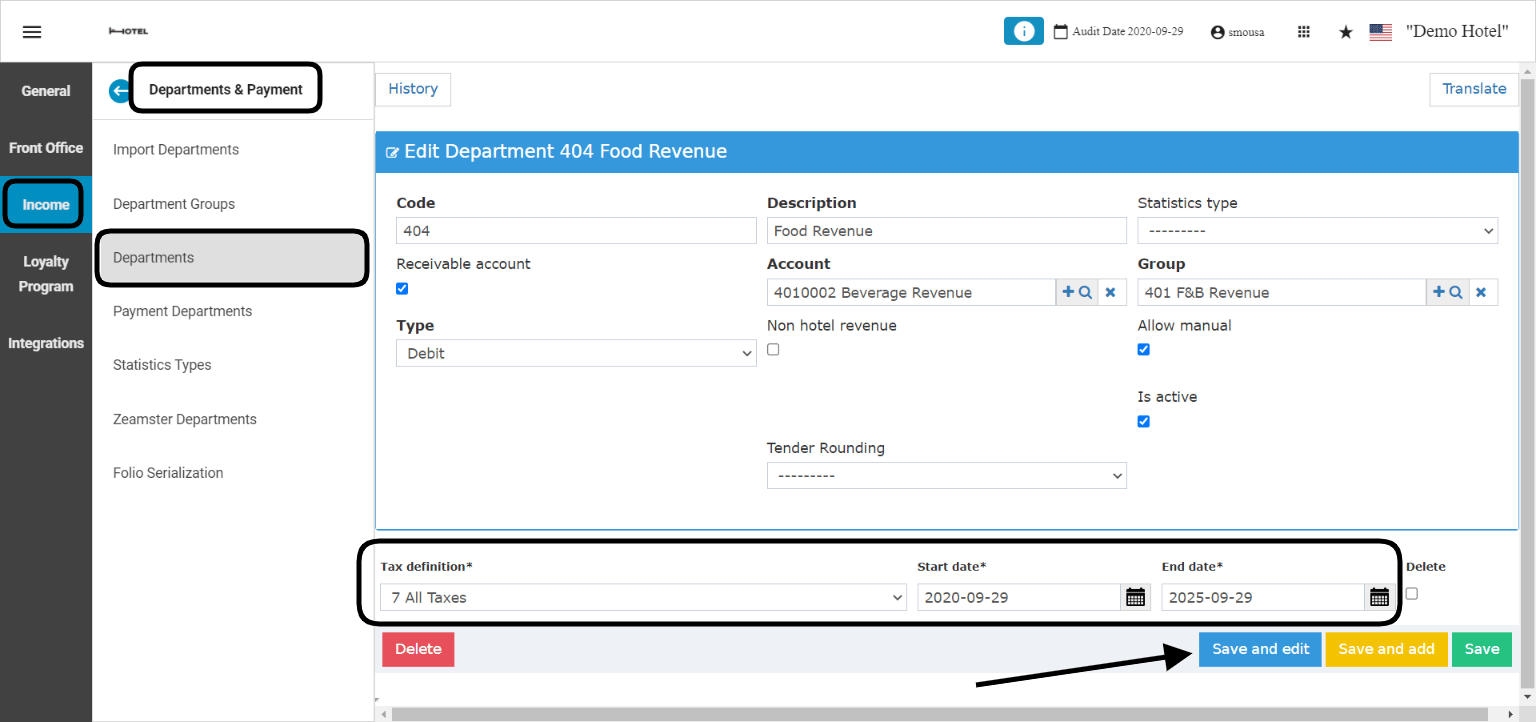 Now that the tax definition have been applied, all charges going to **Food Revenue** shall be taxed based on the formulas and settings applied.