> ## Documentation Index
> Fetch the complete documentation index at: https://help.kwentra.com/llms.txt
> Use this file to discover all available pages before exploring further.
# Add Packages to Paymaster Profiles
> Apply public addon packages to paymaster profiles so you can charge guests who have no room reservation, with charges posted during night turn.
Enable applying public addon packages to paymaster profiles for non-reservation guest charges.
### **🎯 Business Value**
* Extend the utility of paymaster profiles to support non-reservation guest services (e.g., spa, meals).
* Allow scheduled charge automation via addon packages without requiring a reservation.
* Improve transparency and auditability of non-room revenue postings.
* Align addon package usage with standard guest flows through a consistent interface.
### **💡 Use Cases**
* A guest walks in for a spa session without having a room reservation — the front office can charge them through a paymaster and apply a spa package with a daily rhythm.
* A facility manager wants to sell weekly gym access as a predefined package — it can now be added to the paymaster and charged nightly.
* A restaurant offers a weekend buffet pass for non-resident visitors — the charge can be configured as a package and applied to a dedicated paymaster.
Go to [manage.kwentra.com](https://manage.kwentra.com/)
Click "Front Office"
 Click "Paymasters"
 Choose a Paymaster
 Click "Packages"
 Add-on Packages Screen
 Choose any public package
**🔹 Package Selection Constraints**
* Only packages marked with `Public = true` can be selected.
* For “Per Person” packages: Default to `1 Adult`, `0 Children`.
* For “Per Reservation” packages: Default to `1 package`.
Choose any public package
**🔹 Package Selection Constraints**
* Only packages marked with `Public = true` can be selected.
* For “Per Person” packages: Default to `1 Adult`, `0 Children`.
* For “Per Reservation” packages: Default to `1 package`.
 Click "Add"
**Stay Dates Logic**
* Auto-list nights from **Paymaster Start Date → End Date**.
* Auto-select **posting dates** starting from current **Audit Date** onward only.
* Respect package’s **posting rhythm** (daily, once, etc.) to preselect nights.
* Do **not** auto-select past nights, even if within stay period.
Click "Add"
**Stay Dates Logic**
* Auto-list nights from **Paymaster Start Date → End Date**.
* Auto-select **posting dates** starting from current **Audit Date** onward only.
* Respect package’s **posting rhythm** (daily, once, etc.) to preselect nights.
* Do **not** auto-select past nights, even if within stay period.
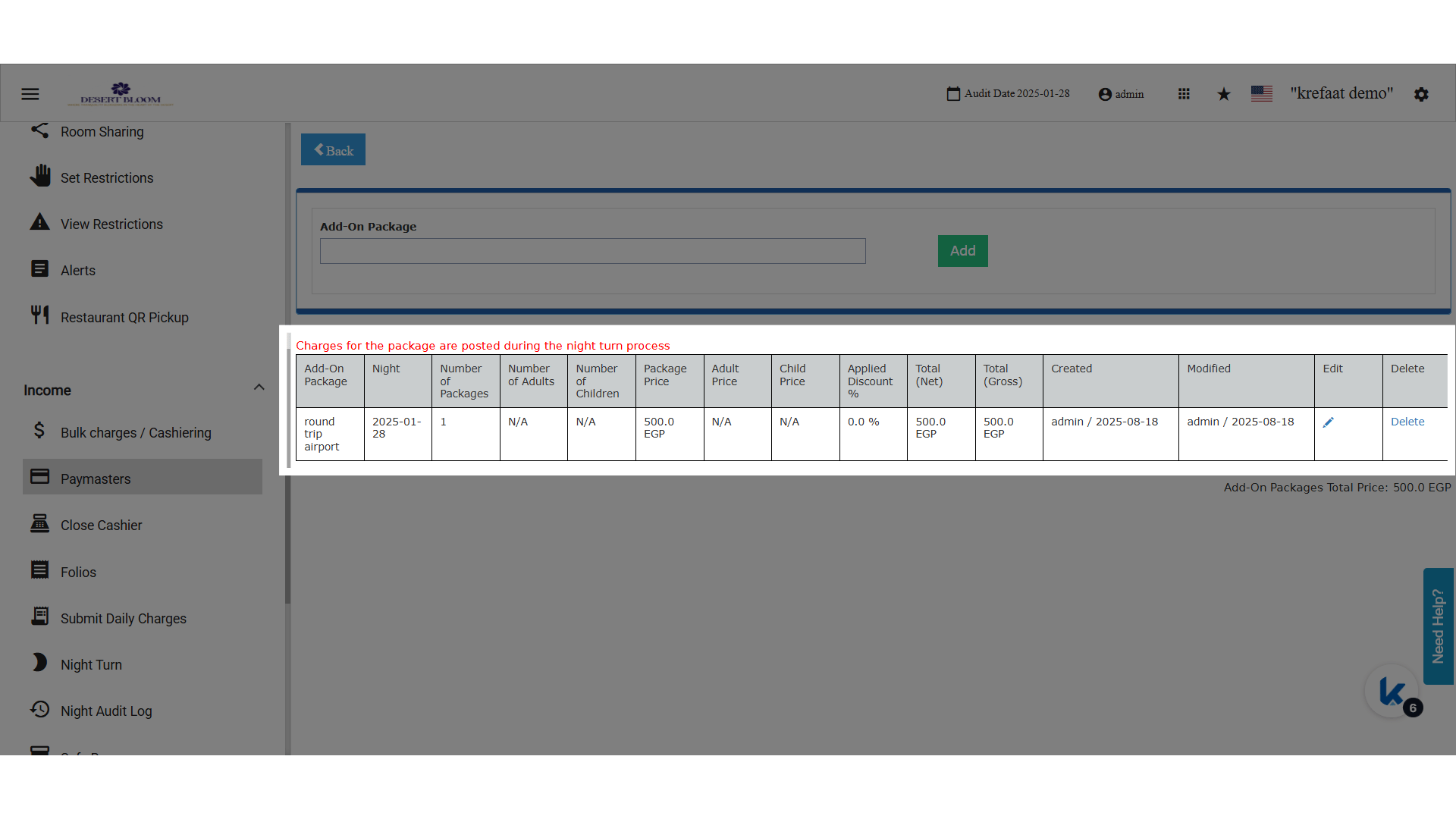
 Add-on Package Added
**🔹 Posting Logic**
* Charges are **automatically posted during Night Turn** based on the selected nights.
* Applies only to **Open Paymasters**.
* **Visual note** shown in the pop-up:
> “Charges for the package are posted during the night turn process.”
Add-on Package Added
**🔹 Posting Logic**
* Charges are **automatically posted during Night Turn** based on the selected nights.
* Applies only to **Open Paymasters**.
* **Visual note** shown in the pop-up:
> “Charges for the package are posted during the night turn process.”