> ## Documentation Index
> Fetch the complete documentation index at: https://help.kwentra.com/llms.txt
> Use this file to discover all available pages before exploring further.
# Manager Report: Insights and Formula
> What Is the Manager Report? The Manager Report gives you a quick, daily snapshot of your property’s core performance metrics. It’s designed for hotel managers and decision makers to monitor occupan...
### **What Is the Manager Report?**
The Manager Report gives you a quick, daily snapshot of your property’s core performance metrics. It’s designed for hotel managers and decision makers to monitor occupancy, revenue, guest averages, and department performance, all in one place.
The report covers **Room Revenue**, **Food & Beverage Revenue**, **Other Revenue**, and **Totals**. For each, you’ll find averages per guest and per room (gross and net), as well as occupancy and RevPAR figures.
### **Key Business Value**
* **One Report, Full Visibility:** Instantly see your property’s most important numbers, so you can act fast if something needs attention.
* **Daily Monitoring:** Track trends and make daily operational decisions with confidence.
* **Easy Audit & Benchmarking:** Supports reporting to ownership, brand management, or auditors.
### **Key Calculations Explained**
Below are the main equations as implemented in Kwentra’s Manager Report. These follow hospitality best practices.
#### **Room Metrics:**
* **Total rooms to sell:**
\= Total Rooms – Out Of Order Rooms
* **Occupied %:**
\= (Occupied rooms / (Total rooms – OOO)) × 100
* **Occ. % minus Comp:**
\= ((Occupied rooms – Complimentary rooms) / (Total rooms – OOO)) × 100
* **ADR (Average Daily Rate):**
\= (Total Room Revenue (net) – Manual Charges) / Number of Occupied Rooms
*(ADR will soon be updated to: Total Room Revenue (net) / Number of Rooms Sold)*
* **RevPAR (Revenue Per Available Room):**
\= (Total Room Revenue (net) – Manual Charges) / Total Available Rooms
*(RevPAR will soon be updated to: Total Room Revenue / Total Available Rooms)*
#### **Departmental Metrics:**
For **Room Revenue**, **F\&B Revenue**, **Other Revenue**, and **Total**:
* **Gross Avg. Guests:**
\= Total Gross Revenue / (Inhouse Guests – House Use) *(includes free child for Room & Total)*
* **Gross Avg. Rooms:**
\= Total Gross Revenue / (Occupied Rooms – House Use)
* **Net Avg. Guests:**
\= Total Net Revenue / (Inhouse Guests – House Use) *(includes free child for Room & Total)*
* **Net Avg. Rooms:**
\= Total Net Revenue / (Occupied Rooms – House Use)
### Example:
Suppose you have:
* **Total Rooms:** 100
* **Out Of Order:** 5
* **Occupied Rooms:** 80
* **Comp Rooms:** 2
* **Total Room Revenue (net):** 40,000 SAR
* **Manual Charges:** 2,000 SAR
**Occupied %:** (80/95) × 100 = 84.2%
**Occ. % minus Comp:** (78/95) × 100 = 82.1%
**ADR:** (40,000 – 2,000)/80 = 475 SAR
**RevPAR:** (40,000 – 2,000)/95 = 400 SAR
### **Additional Notes**
* All definitions and formulas are based on leading industry standards.
* The calculations are subject to ongoing improvements and best practice updates.
## ***Update: 19 Feb 2026***
### **Hijri Daily Budget Import**
The Manager Report now reflects Hijri daily budgets — showing accurate Day, Month, and Year budget figures for each KPI.
**Budget Calculation Logic — Hijri Daily Budget**
The Manager Report shows budget figures across Day, Month, and Year columns for each KPI. These values change when a Hijri daily budget is imported for the selected month.
**When only a monthly budget is imported:**
* Day = imported monthly budget ÷ number of days in the month
* Month = total imported monthly budget
* Year = sum of all months + days from start of year to the report date
**When a Hijri daily budget is imported:**
* Day = the imported budget for that specific day
* Month = sum of all imported daily budgets for that month
* Year = cumulative sum from start of year, using Hijri daily budgets where available
**Example — Ramadan (30 days), Occupied Rooms:**
Monthly budget only: Imported budget = 15,000
→ Day = 15,000 ÷ 30 = 500
Hijri daily budget imported:
Days 1–20 = 500/day | Days 21–30 = 600/day
→ Month = (500 × 20) + (600 × 10) = 16,000
→ Day = the specific imported value for that day (500 or 600)
## ***Update: 15 Apr 2026***
### **Multi-Currency Support**
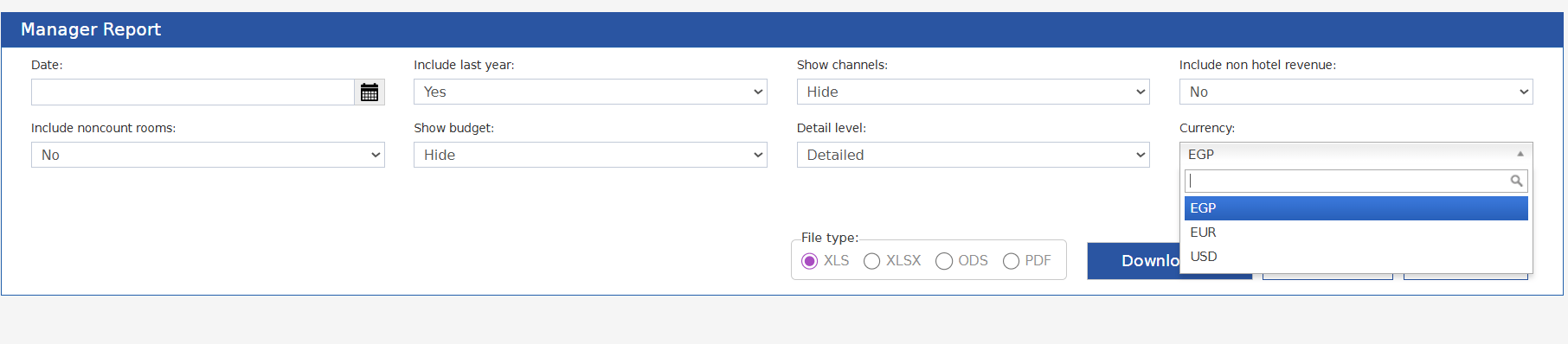
The Manager Report now supports generating figures in any currency configured on the system.
**How It Works**
**Running the Report**
Where: Reports → FO → Income → Manager Report
**Currency Field** — Single-select dropdown listing all currencies set up on the system. Defaults to the base currency.
Note: The exchange rate applied is the rate at the time the report is generated, not historical rates.
 **What Gets Converted**
When a non-base currency is selected, the following fields are converted using the current exchange rate:
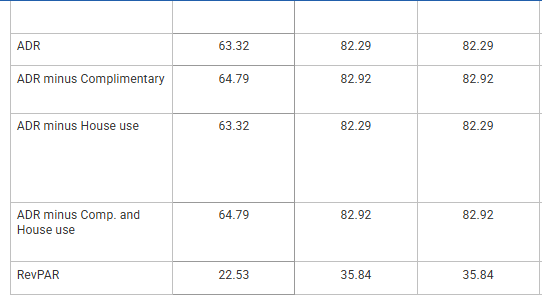
* ADR, ADR minus Complimentary, ADR minus House Use, ADR minus Comp. and House Use
* RevPAR
* Statistic Types (Gross, Net, Gross Avg. Guests, Gross Avg. Rooms, Net Avg. Guests, Net Avg. Rooms) and Totals
* Payments
* Budget: ADR, RevPAR, and Net statistics
**Report Output**
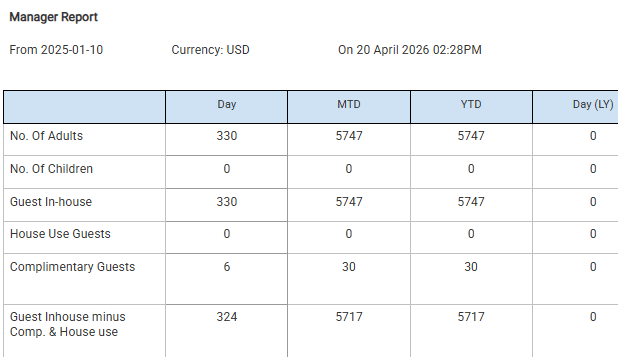
The report parameters section will show two additional lines:
* Currency — the currency selected when generating the report
**What Gets Converted**
When a non-base currency is selected, the following fields are converted using the current exchange rate:
* ADR, ADR minus Complimentary, ADR minus House Use, ADR minus Comp. and House Use
* RevPAR
* Statistic Types (Gross, Net, Gross Avg. Guests, Gross Avg. Rooms, Net Avg. Guests, Net Avg. Rooms) and Totals
* Payments
* Budget: ADR, RevPAR, and Net statistics
**Report Output**
The report parameters section will show two additional lines:
* Currency — the currency selected when generating the report
 **Need more info?**
Contact [support@kwentra.com](mailto:support@kwentra.com) for further help.
**Need more info?**
Contact [support@kwentra.com](mailto:support@kwentra.com) for further help.