> ## Documentation Index
> Fetch the complete documentation index at: https://help.kwentra.com/llms.txt
> Use this file to discover all available pages before exploring further.
# Cashier Summary Report
> Review a consolidated summary of each cashier’s daily collections by department and currency. Business Value Provides a daily snapshot of all transactions posted by each cashier. Helps the finance...
### Review a consolidated summary of each cashier’s daily collections by department and currency.
### **Business Value**
* Provides a **daily snapshot** of all transactions posted by each cashier.
* Helps the finance and audit teams confirm **total collected amounts** per payment type and department.
* Facilitates **cashier accountability** and supports day-end **reconciliation** with physical receipts.
* Enables management to identify irregularities or missing postings at the cashier level.
***
### **Use Cases**
* Validating each cashier’s **daily totals** before closing shift.
* Comparing **department-level receipts** such as Cash, Visa, or City Ledger.
* Confirming currency values between **local and foreign amounts**.
* Reviewing **audit trail consistency** across departments.
***
### **Report Parameters**
| Field | Description |
| ----------------------- | ----------------------------------------------------------------------------------------------------------------- |
| **From Date / To Date** | Define the reporting date range. Typically, a single business day. |
| **Cashier** | Filter by a specific cashier or view all. |
| **Department** | Filter by department (e.g., Cash, Visa, Travel Agent). |
| **File Type** | Select output format: XLS, XLSX, ODS, or PDF. |
| **Actions** | - **Download:** Export the file.
- **Preview:** Display on-screen.
- **Print:** Generate a hard copy. |
***
### **Report Structure**
**Data Columns**
| Column | Description |
| ------------------ | ---------------------------------------------------------------- |
| **Cashier** | Name and ID of the cashier. |
| **Department** | The transaction code where the amount was posted. |
| **Amount** | Local currency total for the department. |
| **Foreign Amount** | Equivalent amount in the transaction’s original currency. |
| **Currency** | Currency in which the transaction was recorded (e.g., EGP, USD). |
***
### **Grouping and Totals**
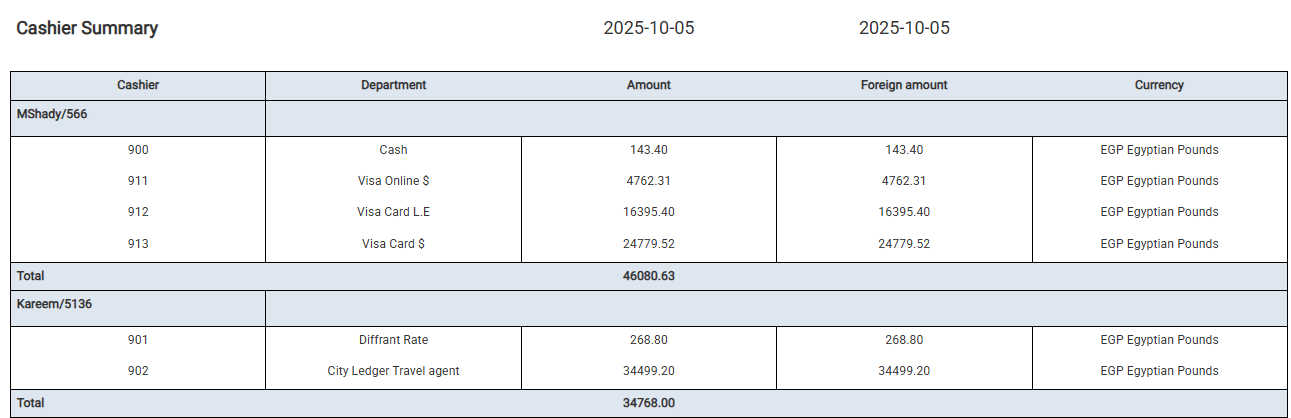
* The report is **grouped by cashier**, summarizing all related department postings under each name.
* Each group ends with a **“Total”** line displaying the cashier’s combined collection amount.
* Department codes (e.g., *900 Cash*, *911 Visa Online \$*, *902 City Ledger Travel Agent*) correspond to internal ledger accounts used in Kwentra’s financial mapping.
***
### **Example Output**