> ## Documentation Index
> Fetch the complete documentation index at: https://help.kwentra.com/llms.txt
> Use this file to discover all available pages before exploring further.
# Income Summary Report
> See the total payments, revenue and tax for each department over a date range, on one page.
The Income Summary report shows the total payments, revenue and tax for each department over a date range.
### **Business Value**
* Shows payments, revenue and tax on one page.
* Totals each department, each department group and each section.
* Shows revenue before tax, with the tax in its own section.
* Can include or leave out AR postings.
### **Use Cases**
* A night auditor checks the day's totals before closing the day.
* A financial controller reviews the month's revenue by department group.
* An accountant compares the tax totals with the VAT return.
### **How It Works**
| **Where:** [Reports → FO → Income → Income Summary Report](https://manage.kwentra.com/reports/Income/Income%20Summary%20Report/) |
| - |
#### **Running the Report**
1. **From date** and **To date**: pick the audit dates to cover. The Hijri date shows under each field.
2. **Include income from accounts receivable**:
* **Yes**: also counts charges and payments posted on AR (City Ledger) accounts.
* **No**: counts front office postings only.
3. **File type**: **XLS**, **XLSX**, **ODS** or **PDF**.
4. Click **Preview**, **Download** or **Print**.
 #### **Report Layout**
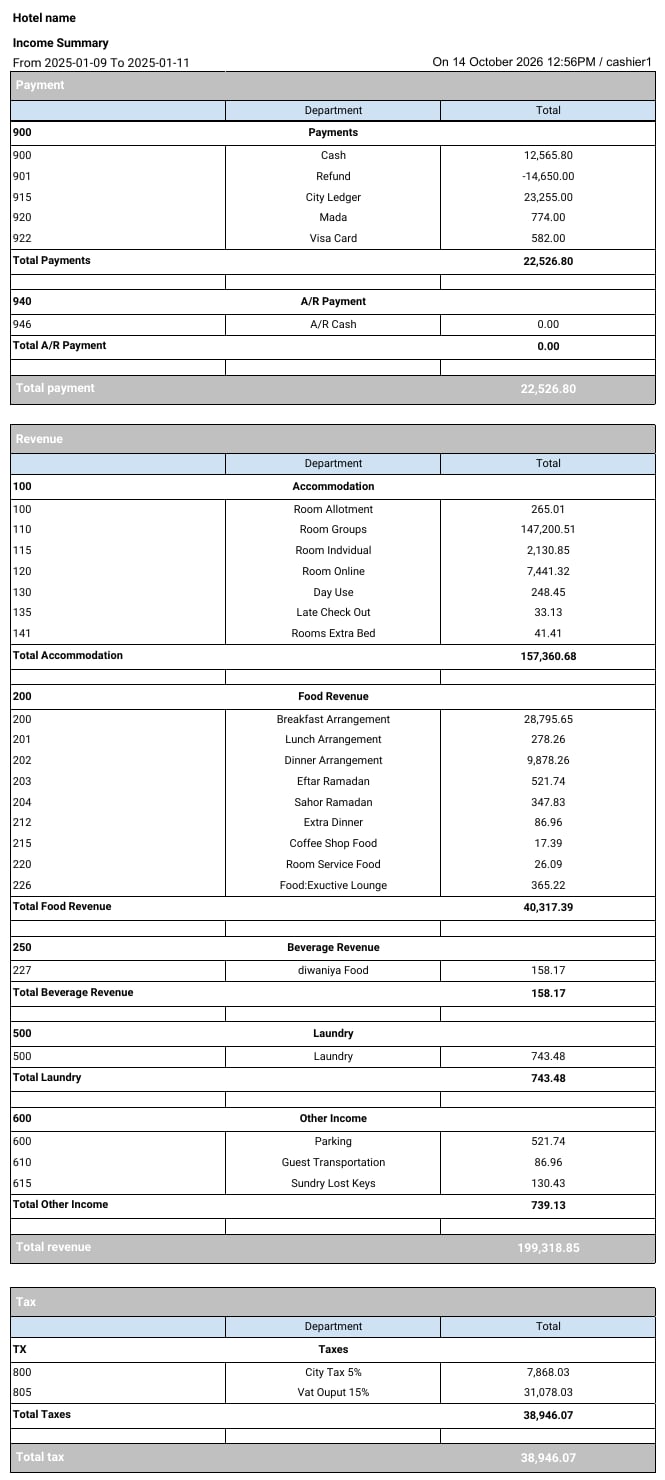
The report has three sections. Each one ends with its own total row.
| Section | What it shows | Ends with |
| - | - | - |
| **Payment** | Payments, such as cash, cards, refunds and city ledger. | **Total payment** |
| **Revenue** | Revenue before tax, such as rooms, food and laundry. | **Total revenue** |
| **Tax** | The tax amounts, such as VAT and city tax. | **Total tax** |
Inside each section:
* Departments are grouped under their department group, for example **100 Accommodation**.
* Each group ends with a **Total** row, for example **Total Accommodation**.
#### **Report Layout**
The report has three sections. Each one ends with its own total row.
| Section | What it shows | Ends with |
| - | - | - |
| **Payment** | Payments, such as cash, cards, refunds and city ledger. | **Total payment** |
| **Revenue** | Revenue before tax, such as rooms, food and laundry. | **Total revenue** |
| **Tax** | The tax amounts, such as VAT and city tax. | **Total tax** |
Inside each section:
* Departments are grouped under their department group, for example **100 Accommodation**.
* Each group ends with a **Total** row, for example **Total Accommodation**.
 [Download a sample report (XLSX)](/images/front-office/reports/income-reports/income-summary-report/income-summary-report-sample.xlsx)
| **Note:** The sample uses test data. The hotel and user names are not real. |
| - |
#### **Report Columns**
| Column | Description | Example |
| - | - | - |
| *(first column)* | The department code. On a group row, the department group code. | 110 |
| **Department** | The department name. On a group row, the department group name. | Room Groups |
| **Total** | The total amount for the department in the date range. | 147,200.51 |
| **Note:** Revenue amounts are before tax. The tax on them shows in the **Tax** section. |
| - |
For more detail, see:
* [Payment Report](/front-office/reports/income-reports/payment-report): every payment posting.
* [Tax Report](/front-office/reports/income-reports/tax-report): the tax on each posting.
* [Revenue Report](/front-office/reports/income-reports/revenue-report): revenue compared with your budget.
This documentation is built and hosted on [Mintlify](https://mintlify.com), a developer documentation platform.
[Download a sample report (XLSX)](/images/front-office/reports/income-reports/income-summary-report/income-summary-report-sample.xlsx)
| **Note:** The sample uses test data. The hotel and user names are not real. |
| - |
#### **Report Columns**
| Column | Description | Example |
| - | - | - |
| *(first column)* | The department code. On a group row, the department group code. | 110 |
| **Department** | The department name. On a group row, the department group name. | Room Groups |
| **Total** | The total amount for the department in the date range. | 147,200.51 |
| **Note:** Revenue amounts are before tax. The tax on them shows in the **Tax** section. |
| - |
For more detail, see:
* [Payment Report](/front-office/reports/income-reports/payment-report): every payment posting.
* [Tax Report](/front-office/reports/income-reports/tax-report): the tax on each posting.
* [Revenue Report](/front-office/reports/income-reports/revenue-report): revenue compared with your budget.
This documentation is built and hosted on [Mintlify](https://mintlify.com), a developer documentation platform.