> ## Documentation Index
> Fetch the complete documentation index at: https://help.kwentra.com/llms.txt
> Use this file to discover all available pages before exploring further.
# Journal Voucher Report
> See the journal voucher the night audit posts to the general ledger for one audit date, by GL account.
The Journal Voucher report shows the journal voucher (JV) the night audit posts to the general ledger for one day.
### **Business Value**
* Shows what the night audit posts to the general ledger for a day.
* Lists each GL account with its debit or credit amount.
* Shows that total debit equals total credit.
* Helps accountants check the posting before they review the ledger.
### **Use Cases**
* An accountant checks the day's JV before reviewing the general ledger.
* An income auditor finds which GL account a revenue amount went to.
* A financial controller confirms that debit and credit match for the day.
### **How It Works**
| **Where:** [Reports → FO → Income → Journal Voucher](https://manage.kwentra.com/reports/Income/Journal%20Voucher/) |
| - |
#### **Running the Report**
1. **Date**: pick the audit date. The Hijri date shows under the field.
2. **File type**: **XLS** (the default), **XLSX**, **ODS** or **PDF**.
3. Click **Preview**, **Download** or **Print**.
 #### **Report Layout**
* Each department's postings go to the GL account linked to that department.
* The report shows one row for each GL account.
* The **Total** row shows total debit and total credit. They are always equal.
#### **Report Layout**
* Each department's postings go to the GL account linked to that department.
* The report shows one row for each GL account.
* The **Total** row shows total debit and total credit. They are always equal.
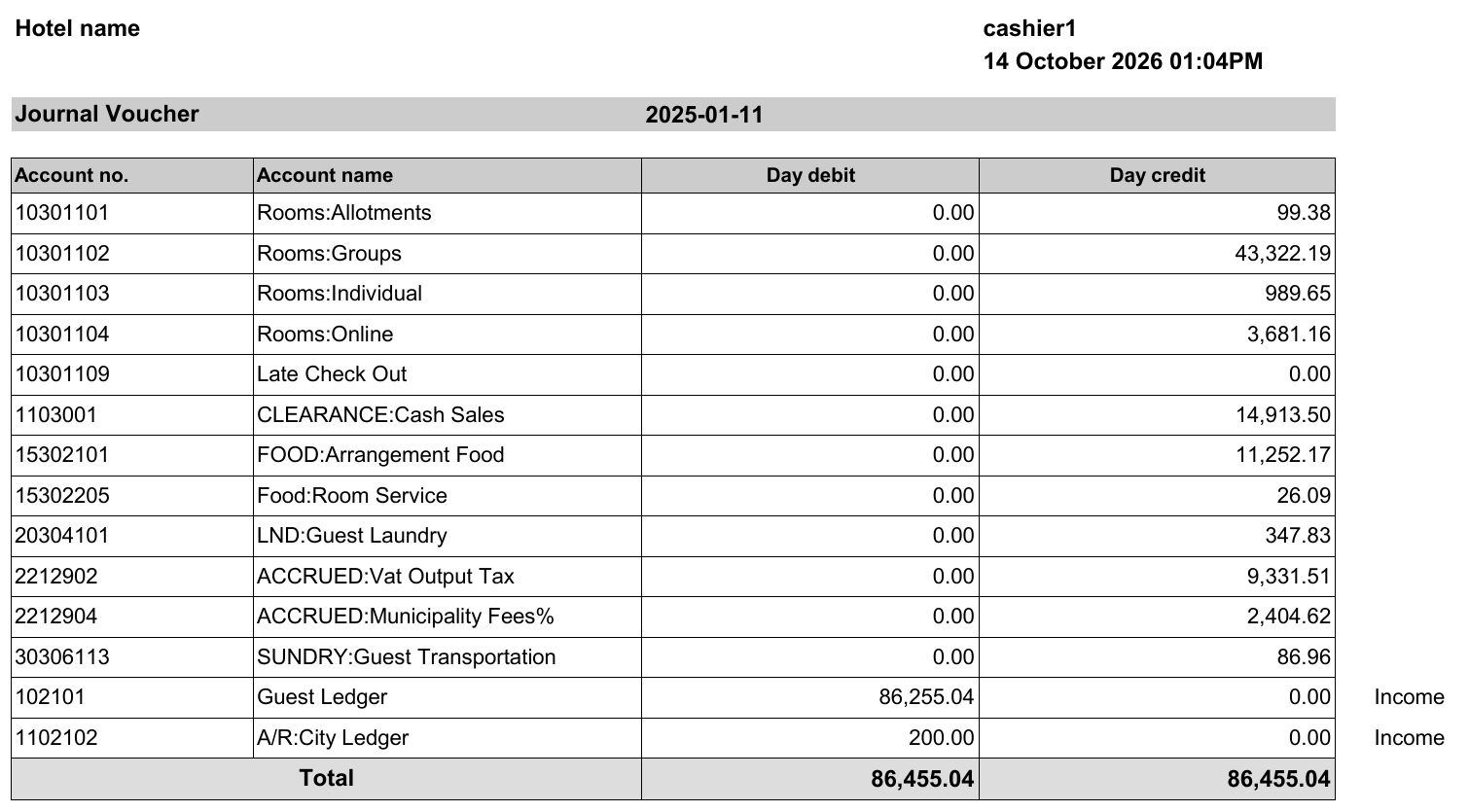 [Download a sample report (XLSX)](/images/front-office/reports/income-reports/journal-voucher-report/journal-voucher-report-sample.xlsx)
| **Note:** The sample uses test data. The hotel and user names are not real. |
| - |
#### **Report Columns**
| Column | Description | Example |
| - | - | - |
| **Account no.** | The GL account number. | 10301102 |
| **Account name** | The GL account name. | Rooms:Groups |
| **Day debit** | The debit amount for the account on that day. | 0.00 |
| **Day credit** | The credit amount for the account on that day. | 43,322.19 |
| *(last column, no title)* | The module the line comes from. Shown on some lines only. | Income |
| **Note:** The JV is posted to the general ledger after the night audit runs. The **Posted** column in the [Cashier Transactions Report](/front-office/reports/income-reports/cashier-transactions-report) shows when this has happened. |
| - |
To see every posting behind these amounts, use the [Journal By Department Report](/front-office/reports/income-reports/journal-by-department-report).
This documentation is built and hosted on [Mintlify](https://mintlify.com), a developer documentation platform.
[Download a sample report (XLSX)](/images/front-office/reports/income-reports/journal-voucher-report/journal-voucher-report-sample.xlsx)
| **Note:** The sample uses test data. The hotel and user names are not real. |
| - |
#### **Report Columns**
| Column | Description | Example |
| - | - | - |
| **Account no.** | The GL account number. | 10301102 |
| **Account name** | The GL account name. | Rooms:Groups |
| **Day debit** | The debit amount for the account on that day. | 0.00 |
| **Day credit** | The credit amount for the account on that day. | 43,322.19 |
| *(last column, no title)* | The module the line comes from. Shown on some lines only. | Income |
| **Note:** The JV is posted to the general ledger after the night audit runs. The **Posted** column in the [Cashier Transactions Report](/front-office/reports/income-reports/cashier-transactions-report) shows when this has happened. |
| - |
To see every posting behind these amounts, use the [Journal By Department Report](/front-office/reports/income-reports/journal-by-department-report).
This documentation is built and hosted on [Mintlify](https://mintlify.com), a developer documentation platform.