> ## Documentation Index
> Fetch the complete documentation index at: https://help.kwentra.com/llms.txt
> Use this file to discover all available pages before exploring further.
# Channels Income Statistics Report
> See each channel's nights, guests, cancellations and no-shows, with its revenue split by statistics type.
The Channels Income Statistics report shows each channel's stays and revenue, split by statistics type.
### **Business Value**
* Shows nights, guests, cancellations and no-shows for every channel.
* Splits each channel's revenue by statistics type, such as room or food and beverage.
* Shows revenue with and without taxes.
* Works out revenue per night and per guest for you.
### **Use Cases**
* A revenue manager compares how much each travel agent earns per night.
* A sales manager checks which channels bring food and beverage revenue, not only room revenue.
* A front office manager reviews cancellations and no-shows by channel.
### **How It Works**
| **Where:** [Reports → FO → Reservation → Channels Income Statistics](https://manage.kwentra.com/reports/Reservation/Channels%20Income%20Statistics/) |
| - |
#### **Running the Report**
1. **From date** and **To date**: pick the first and last day of the range. The Hijri date shows under each field.
2. **Channel**: pick one or more channels. Leave it empty to show all channels.
3. **Statistics types**: pick one or more revenue types. Leave it empty to show all of them.
4. **File type**: **XLS**, **XLSX**, **ODS** or **PDF**.
5. Click **Preview**, **Download** or **Print**.
 The **Statistics types** list shows your hotel's own statistics types. You add them and link them to departments in the settings. See [Revenue Reports Customization - Statistics Types](/front-office/front-office-settings/income/revenue-reports-customization-statistics-types).
#### **Report Layout**
* The report shows one block for each channel.
* The first row of a block counts the channel's nights, guests, cancellations and no-shows.
* Below it, one row for each statistics type shows that revenue.
* **None** shows revenue from departments with no statistics type.
* **Total** adds up the revenue rows of the channel.
* A channel with no revenue in the range shows only its first row.
The **Statistics types** list shows your hotel's own statistics types. You add them and link them to departments in the settings. See [Revenue Reports Customization - Statistics Types](/front-office/front-office-settings/income/revenue-reports-customization-statistics-types).
#### **Report Layout**
* The report shows one block for each channel.
* The first row of a block counts the channel's nights, guests, cancellations and no-shows.
* Below it, one row for each statistics type shows that revenue.
* **None** shows revenue from departments with no statistics type.
* **Total** adds up the revenue rows of the channel.
* A channel with no revenue in the range shows only its first row.
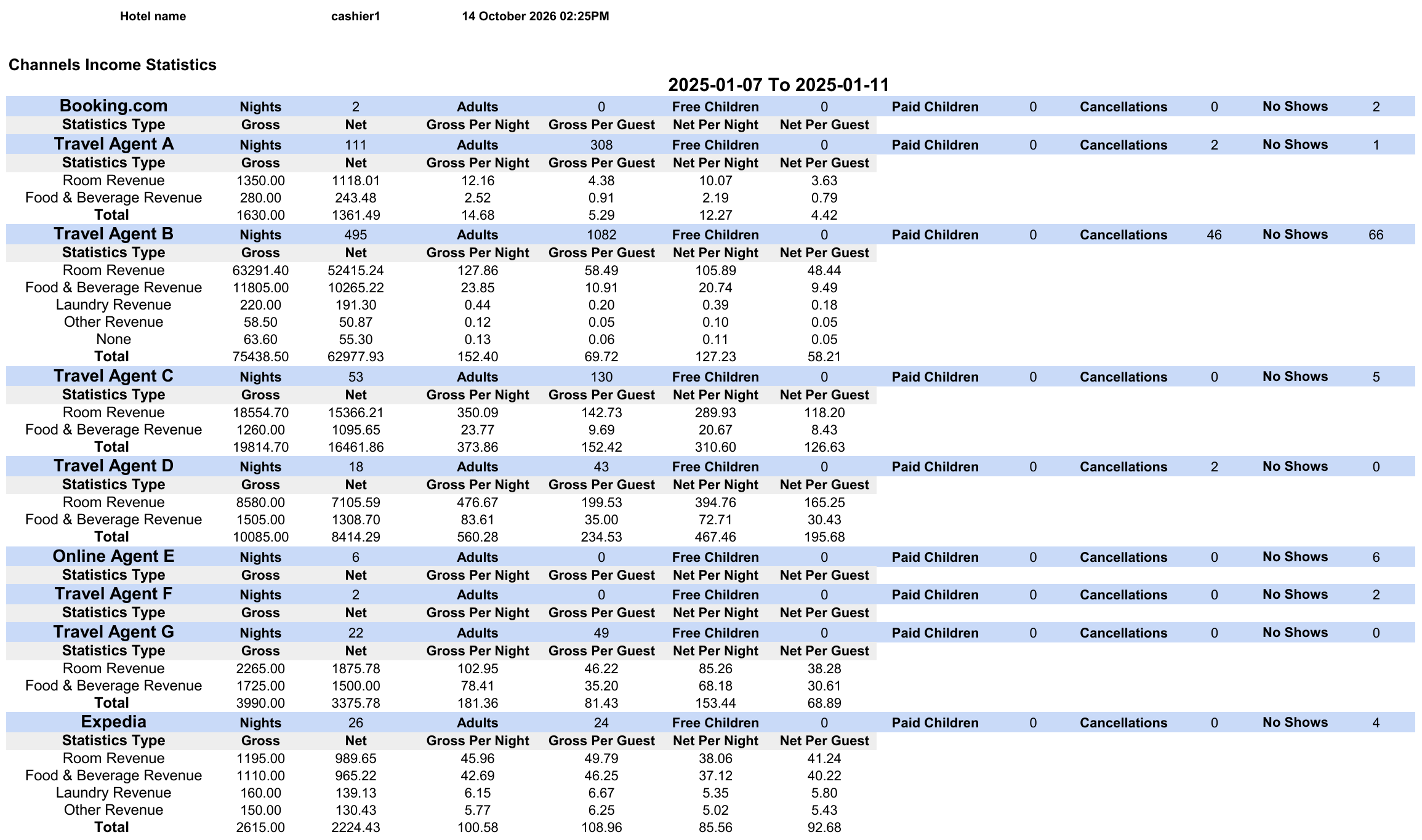 [Download a sample report (XLSX)](/images/front-office/reports/reservation-reports/channels-income-statistics-report/channels-income-statistics-sample.xlsx)
| **Note:** The sample uses test data. The hotel, user and travel agent names are not real. |
| - |
#### **Report Columns**
The first row of each channel block:
| Column | Description | Example |
| - | - | - |
| **Channel** (no header) | The channel name. | Travel Agent B |
| **Nights** | Room nights of the channel's reservations in the range. | 495 |
| **Adults** | Adults in the channel's reservations. | 1082 |
| **Free Children** | Children who stay free. | 0 |
| **Paid Children** | Children who pay. | 0 |
| **Cancellations** | Cancelled reservations of the channel. | 46 |
| **No Shows** | No-show reservations of the channel. | 66 |
The revenue rows below it:
| Column | Description | Example |
| - | - | - |
| **Statistics Type** | The revenue type, such as **Room Revenue**. **None** and **Total** also show here. | Room Revenue |
| **Gross** | The revenue, with taxes. | 63291.40 |
| **Net** | The revenue, without taxes. | 52415.24 |
| **Gross Per Night** | **Gross** divided by **Nights**. | 127.86 |
| **Gross Per Guest** | **Gross** divided by **Adults**. | 58.49 |
| **Net Per Night** | **Net** divided by **Nights**. | 105.89 |
| **Net Per Guest** | **Net** divided by **Adults**. | 48.44 |
For other channel revenue views, see the [Channel Revenue Report](/front-office/reports/reservation-reports/channel-revenue-report).
This documentation is built and hosted on [Mintlify](https://mintlify.com), a developer documentation platform.
[Download a sample report (XLSX)](/images/front-office/reports/reservation-reports/channels-income-statistics-report/channels-income-statistics-sample.xlsx)
| **Note:** The sample uses test data. The hotel, user and travel agent names are not real. |
| - |
#### **Report Columns**
The first row of each channel block:
| Column | Description | Example |
| - | - | - |
| **Channel** (no header) | The channel name. | Travel Agent B |
| **Nights** | Room nights of the channel's reservations in the range. | 495 |
| **Adults** | Adults in the channel's reservations. | 1082 |
| **Free Children** | Children who stay free. | 0 |
| **Paid Children** | Children who pay. | 0 |
| **Cancellations** | Cancelled reservations of the channel. | 46 |
| **No Shows** | No-show reservations of the channel. | 66 |
The revenue rows below it:
| Column | Description | Example |
| - | - | - |
| **Statistics Type** | The revenue type, such as **Room Revenue**. **None** and **Total** also show here. | Room Revenue |
| **Gross** | The revenue, with taxes. | 63291.40 |
| **Net** | The revenue, without taxes. | 52415.24 |
| **Gross Per Night** | **Gross** divided by **Nights**. | 127.86 |
| **Gross Per Guest** | **Gross** divided by **Adults**. | 58.49 |
| **Net Per Night** | **Net** divided by **Nights**. | 105.89 |
| **Net Per Guest** | **Net** divided by **Adults**. | 48.44 |
For other channel revenue views, see the [Channel Revenue Report](/front-office/reports/reservation-reports/channel-revenue-report).
This documentation is built and hosted on [Mintlify](https://mintlify.com), a developer documentation platform.