> ## Documentation Index
> Fetch the complete documentation index at: https://help.kwentra.com/llms.txt
> Use this file to discover all available pages before exploring further.
# Bulk Reinstate & Cancel No Show for Reservations
> Easily reinstate cancelled or no-show reservations in bulk, with a single action, clear feedback, and automatic validation for ineligible bookings. Business Value Streamlines recovery of bookings a...
Easily reinstate cancelled or no-show reservations in bulk, with a single action, clear feedback, and automatic validation for ineligible bookings.
## **Business Value**
* Streamlines recovery of bookings after group cancellations, system errors, or mass no-shows.
* Reduces front office effort with one popup, one reason, and bulk action for multiple reservations.
* Prevents operational mistakes by validating and flagging bookings that cannot be reinstated due to audit/date constraints.
***
## **Use Cases**
* Front desk reinstates all cancelled reservations for a group.
* Reservations manager cancels “No Show” status for several bookings when guests arrive the next morning and adjusts their arrival date.
* Night audit team sees a list of bookings not reinstated, with clickable reservation numbers and clear reasons for fast follow-up.
***
## **How It Works**
### **1. Reinstate Cancelled Reservations**
* Go to **Front Office → Individual Reservations**.
* Select multiple **Cancelled** reservations.
* Click **Actions → Reinstate**.
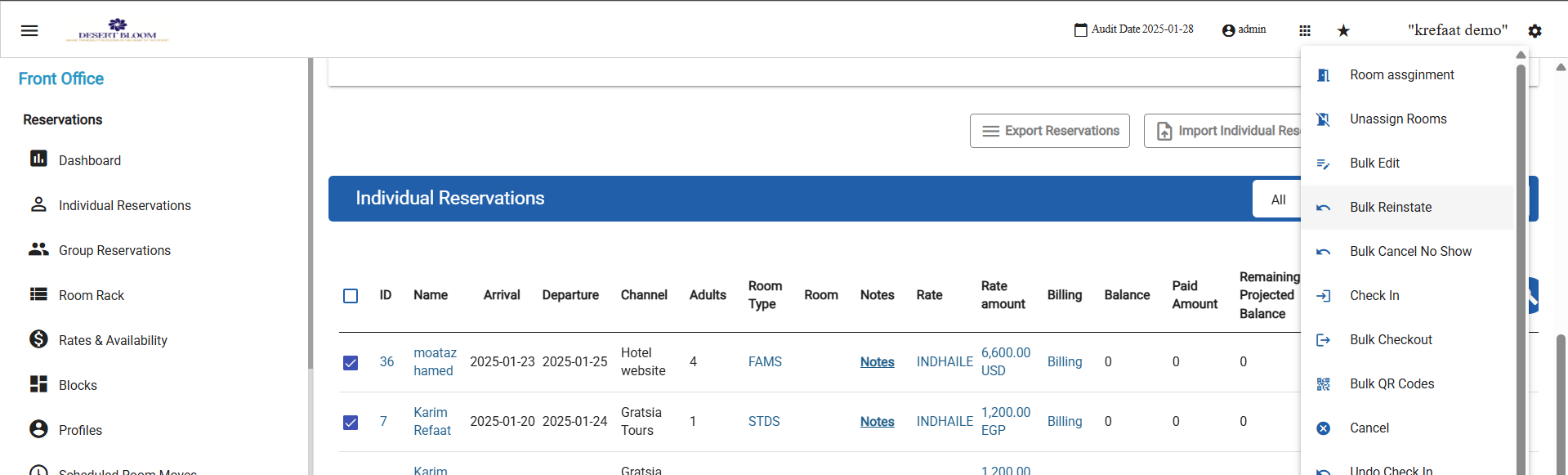 * Enter a single reason in the pop-up (applies to all selected bookings).
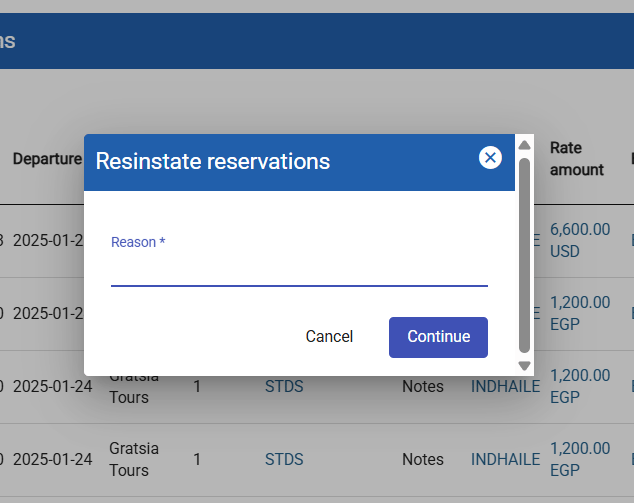 * All eligible bookings’ status changes to **Expected**.
* Success pop-up: all selected reservations set to Expected.
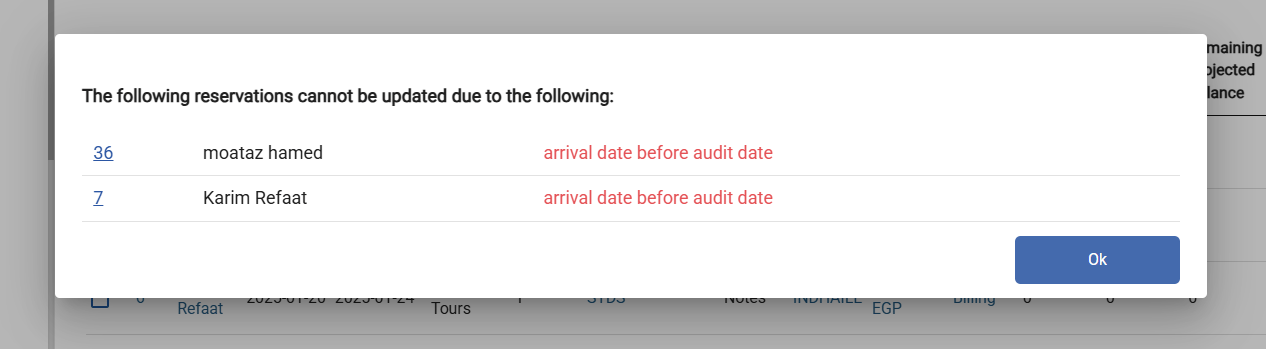
* Validation: Any reservation with an **arrival date before the audit date** is not reinstated. In the results pop-up, these appear with a clickable reservation ID, guest name, and reason (“Arrival date before audit date”).
* All eligible bookings’ status changes to **Expected**.
* Success pop-up: all selected reservations set to Expected.
* Validation: Any reservation with an **arrival date before the audit date** is not reinstated. In the results pop-up, these appear with a clickable reservation ID, guest name, and reason (“Arrival date before audit date”).
 ***
### **2. Cancel No Show**
* Go to **Front Office → Individual Reservations**.
* Select multiple **No Show** reservations.
* Click **Actions → Cancel No Show**.
***
### **2. Cancel No Show**
* Go to **Front Office → Individual Reservations**.
* Select multiple **No Show** reservations.
* Click **Actions → Cancel No Show**.
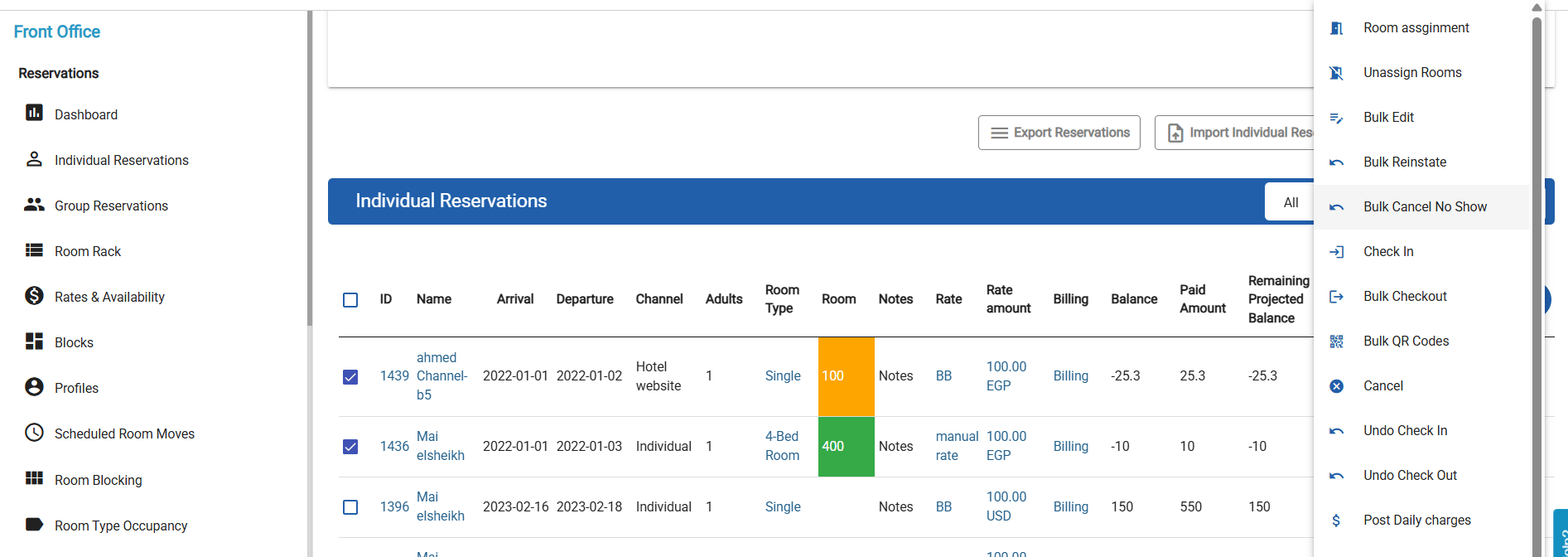 * Reason is required for all selected reservations.
* All selected reservations have their **arrival date set to today**.
* All statuses update to **Expected**.
* Success popup confirms update.
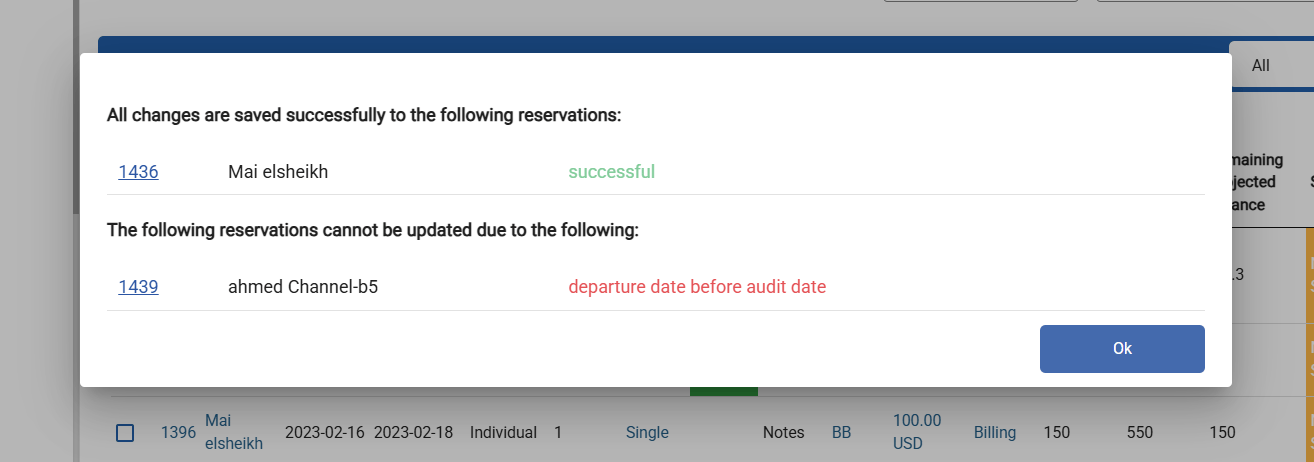
* Validation: Any reservation with **departure date before audit date** is not reinstated, and appears in results popup with reservation ID (clickable), guest name, and reason (“Departure date before audit date”).
* Reason is required for all selected reservations.
* All selected reservations have their **arrival date set to today**.
* All statuses update to **Expected**.
* Success popup confirms update.
* Validation: Any reservation with **departure date before audit date** is not reinstated, and appears in results popup with reservation ID (clickable), guest name, and reason (“Departure date before audit date”).
 ***
## **Validation Feedback**
* After any bulk operation, the results pop-up lists all bookings that were not updated, with clickable reservation numbers, guest names, and exact failure reasons.
* All staff messages are direct and easy to act on.
***
## **Validation Feedback**
* After any bulk operation, the results pop-up lists all bookings that were not updated, with clickable reservation numbers, guest names, and exact failure reasons.
* All staff messages are direct and easy to act on.