> ## Documentation Index
> Fetch the complete documentation index at: https://help.kwentra.com/llms.txt
> Use this file to discover all available pages before exploring further.
# Individual Reservations — Departure Day Room Move
> Free a departing guest's room for a same-day arrival by moving that guest to another room as a day-use stay.
Free a departing guest's room for a same-day arrival by moving that guest to another room.
### **Business Value**
* Frees the departing guest's room immediately for a waiting arrival.
* Prevents manual room status overrides at the front desk.
* Speeds up same-day check-ins on fully booked days.
* Keeps the moved guest counted in occupancy and day-use statistics.
* Links both reservations in the history for a clean audit trail.
### **Use Cases**
* Front office manager frees a room so an early arrival checks in immediately.
* Shift leader moves a late-departing guest to another room for the day.
* Receptionist checks in an arriving guest without waiting for the departure.
### **How It Works**
| **Where:** Front Office → Individual Reservations → open a reservation → **Room Move** |
| -------------------------------------------------------------------------------------- |
A guest who is due to depart today but is still on property keeps their room occupied, which blocks any arrival assigned to that same room. **Room Move** checks that guest out of their current room and re-books them on a different room as a **day-use** stay for the rest of the day.
The move ends with two reservations: the original one **Checked Out**, and a new day-use reservation **Checked In** on the new room.
#### When the action is available
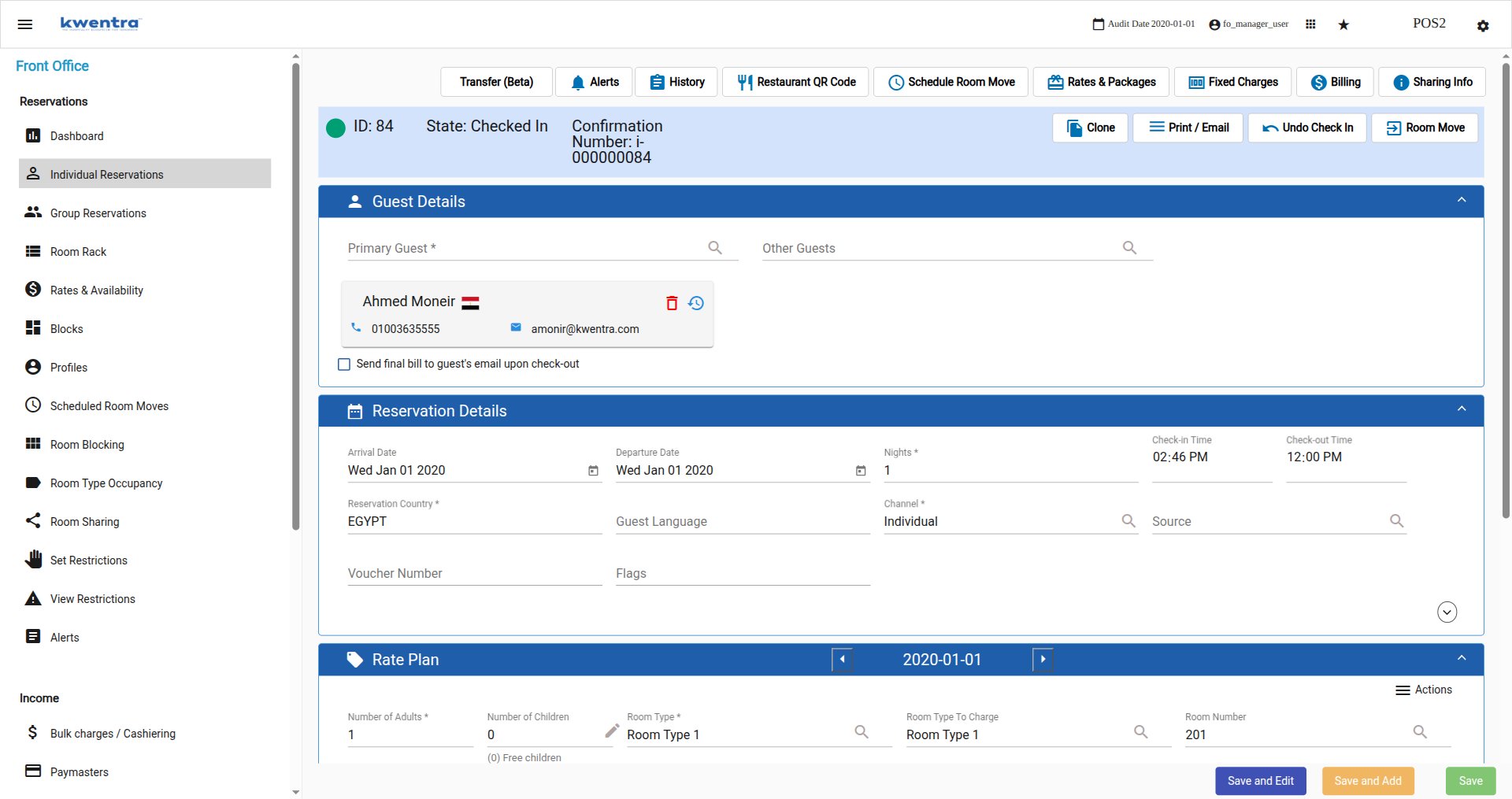
**Room Move** sits in the reservation header, next to **Undo Check In**. It appears only when all of the following are true:
* The displayed night is the last night of the reservation.
* The reservation's departure date is the current audit date.
* The reservation state is **Checked In**.
If any condition is not met, the action is not shown.
 #### Moving the guest
The dialog opens as **Departure Day Room Move — *guest name*** and states exactly what will happen: the guest is checked out of their current room, freeing it for the next arrival, and the selected room is booked as a day-use stay. Any new charges go on the new day-use reservation.
#### Moving the guest
The dialog opens as **Departure Day Room Move — *guest name*** and states exactly what will happen: the guest is checked out of their current room, freeing it for the next arrival, and the selected room is booked as a day-use stay. Any new charges go on the new day-use reservation.
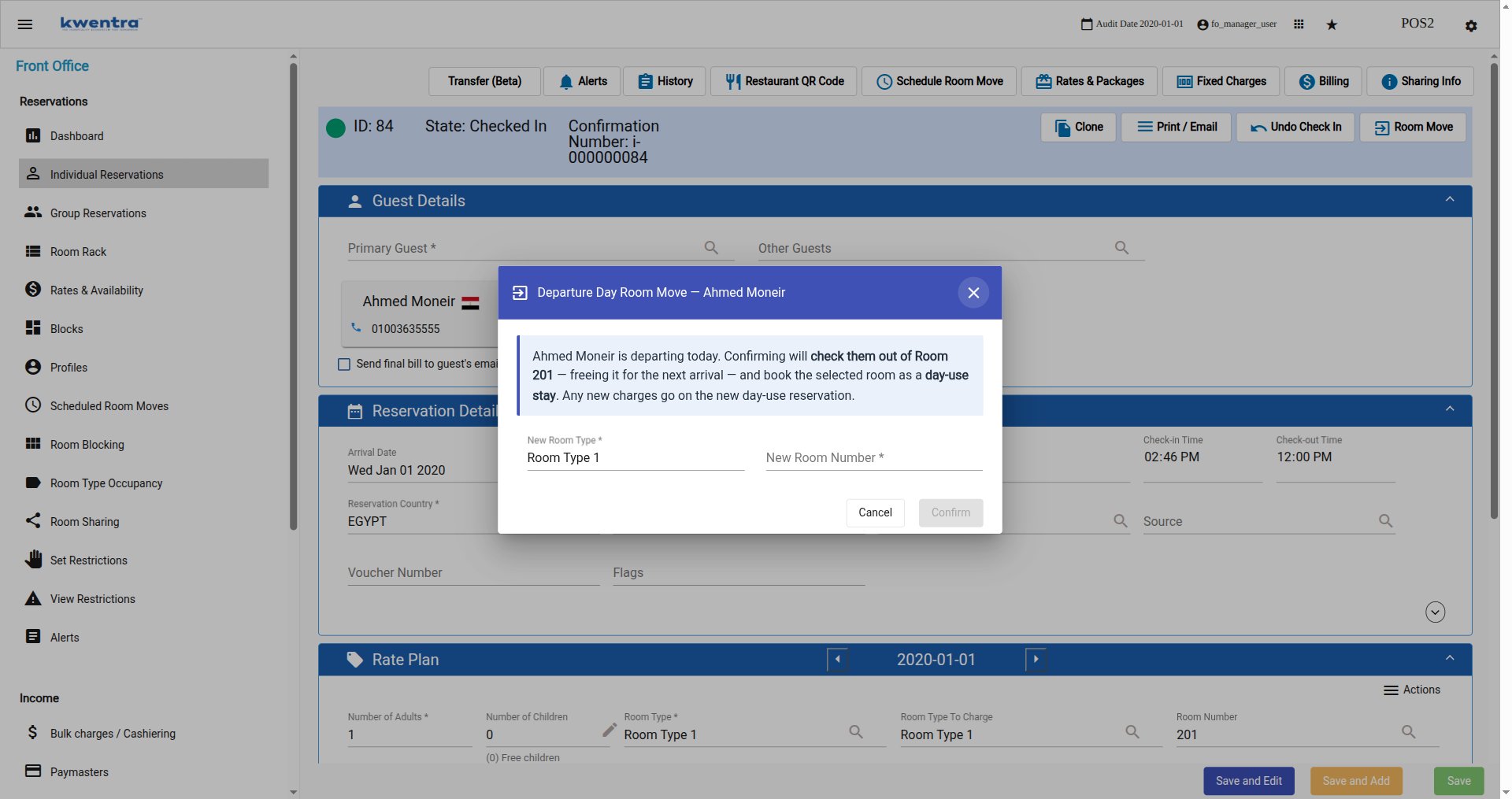 1. Select a **New Room Type**. It defaults to the reservation's current room type and can be changed.
2. Select a **New Room Number**.
3. Select **Confirm**. It stays disabled until a room number is chosen, so the move cannot be triggered accidentally.
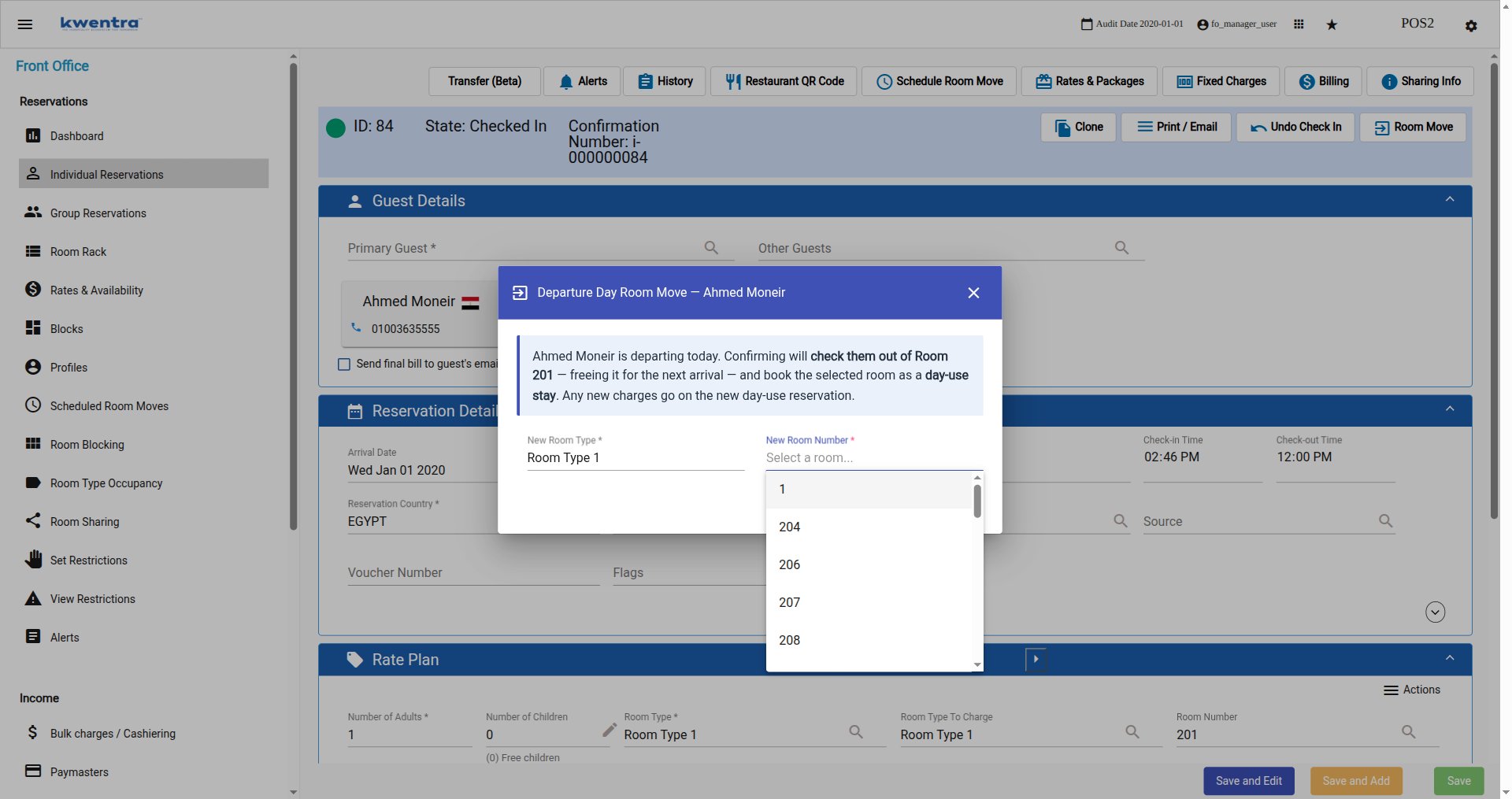
Only rooms genuinely free for today are offered. In the example below, room 203 is missing from the list because a day-use reservation already occupies it; occupied, out-of-order, and out-of-service rooms are filtered out the same way.
1. Select a **New Room Type**. It defaults to the reservation's current room type and can be changed.
2. Select a **New Room Number**.
3. Select **Confirm**. It stays disabled until a room number is chosen, so the move cannot be triggered accidentally.
Only rooms genuinely free for today are offered. In the example below, room 203 is missing from the list because a day-use reservation already occupies it; occupied, out-of-order, and out-of-service rooms are filtered out the same way.
 #### The bill must be settled first
Because the move performs a real checkout, the reservation has to pass the standard checkout validation — in practice, **every billing window must be at zero balance**. Any unsettled charge blocks the move.
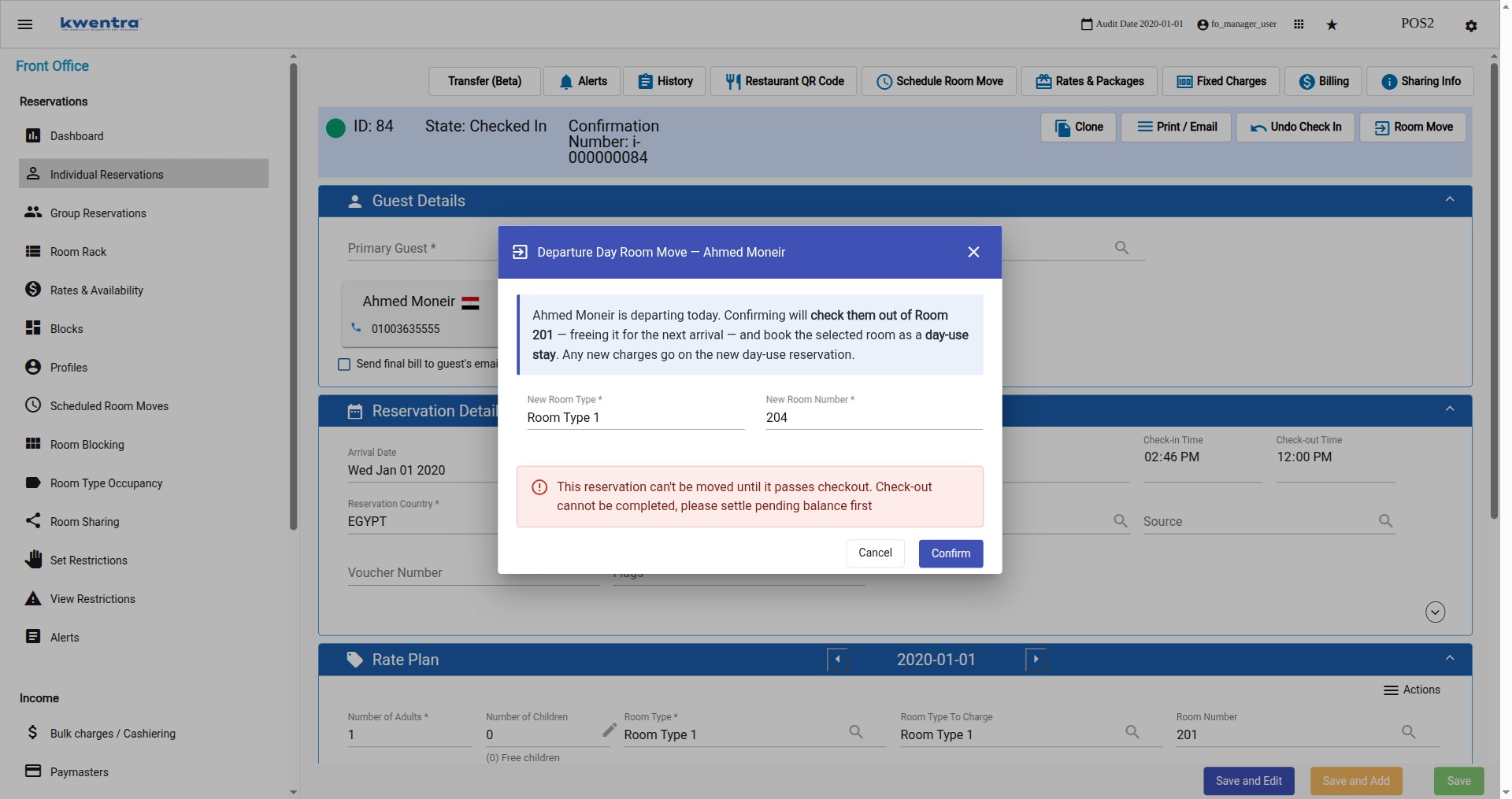
Selecting **Confirm** on a reservation with an outstanding balance shows this in the dialog, and **nothing is changed** — the reservation stays Checked In on its original room:
*This reservation can't be moved until it passes checkout. Check-out cannot be completed, please settle pending balance first*
#### The bill must be settled first
Because the move performs a real checkout, the reservation has to pass the standard checkout validation — in practice, **every billing window must be at zero balance**. Any unsettled charge blocks the move.
Selecting **Confirm** on a reservation with an outstanding balance shows this in the dialog, and **nothing is changed** — the reservation stays Checked In on its original room:
*This reservation can't be moved until it passes checkout. Check-out cannot be completed, please settle pending balance first*
 Once the balance is settled — by posting a payment or correcting the charges — the same move goes through normally.
| **Note:** Other checkout conditions apply as usual. For example, when *folio on checkout* is enabled the user must be associated with a cashier, and any folio generation problem appears with its usual message. |
| ----------------------------------------------------------------------------------------------------------------------------------------------------------------------------------------------------------------- |
#### What happens after you confirm
A **Move completed** popup summarizes both outcomes and offers **Open day-use reservation** to go straight to the new booking.
Once the balance is settled — by posting a payment or correcting the charges — the same move goes through normally.
| **Note:** Other checkout conditions apply as usual. For example, when *folio on checkout* is enabled the user must be associated with a cashier, and any folio generation problem appears with its usual message. |
| ----------------------------------------------------------------------------------------------------------------------------------------------------------------------------------------------------------------- |
#### What happens after you confirm
A **Move completed** popup summarizes both outcomes and offers **Open day-use reservation** to go straight to the new booking.
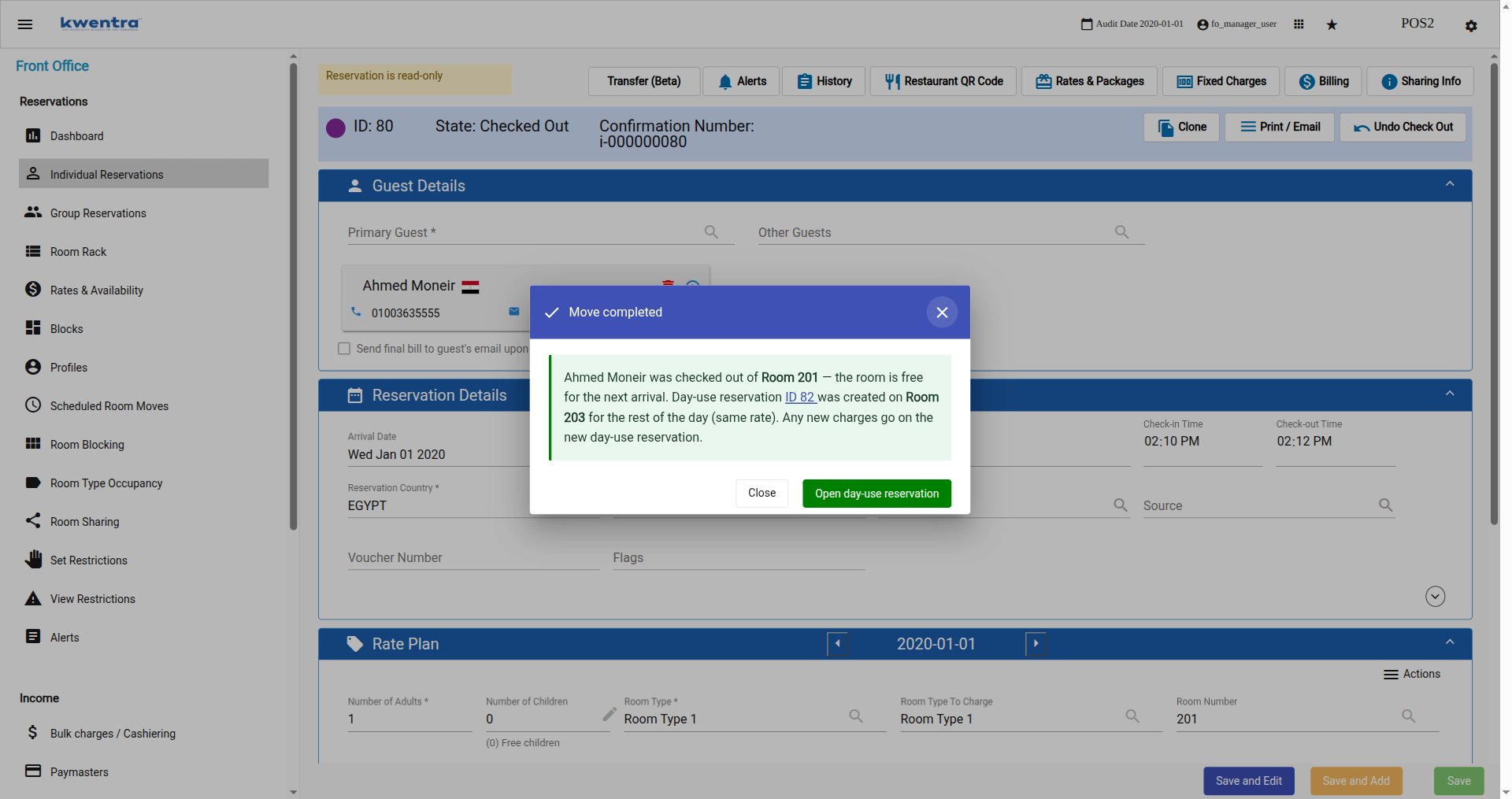 * The original reservation is **Checked Out** and its room is free for the next arrival.
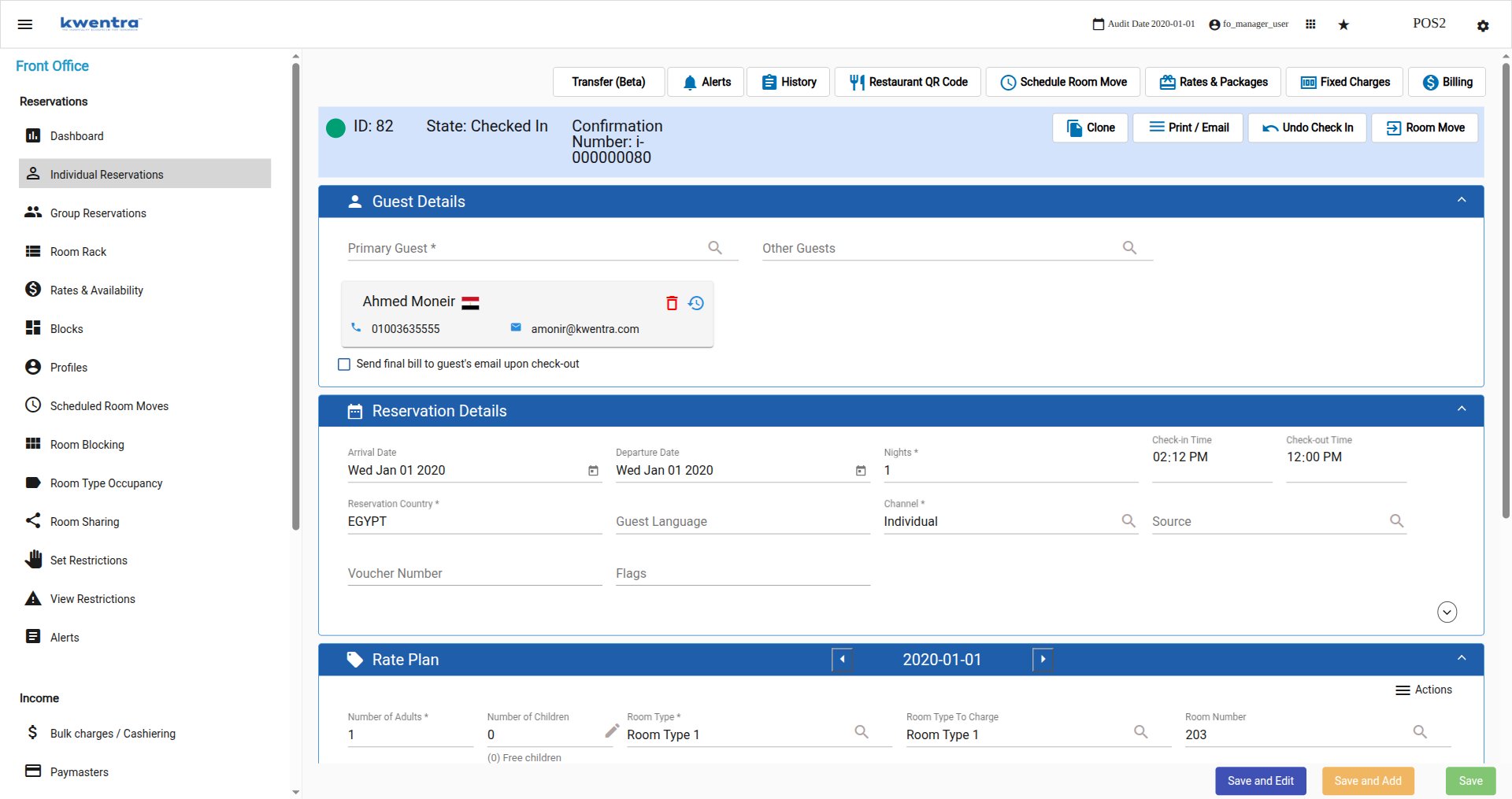
* A new **day-use** reservation is created for the same guest on the selected room, checked in immediately, with arrival and departure both set to today and the same rate as the original.
* The new reservation carries the **same confirmation number** as the original.
* The guest counts normally in guest counts, occupancy, today's arrivals, and day-use statistics, and the selected room shows as occupied for the day.
* The original reservation is **Checked Out** and its room is free for the next arrival.
* A new **day-use** reservation is created for the same guest on the selected room, checked in immediately, with arrival and departure both set to today and the same rate as the original.
* The new reservation carries the **same confirmation number** as the original.
* The guest counts normally in guest counts, occupancy, today's arrivals, and day-use statistics, and the selected room shows as occupied for the day.
 #### Tracing the move afterwards
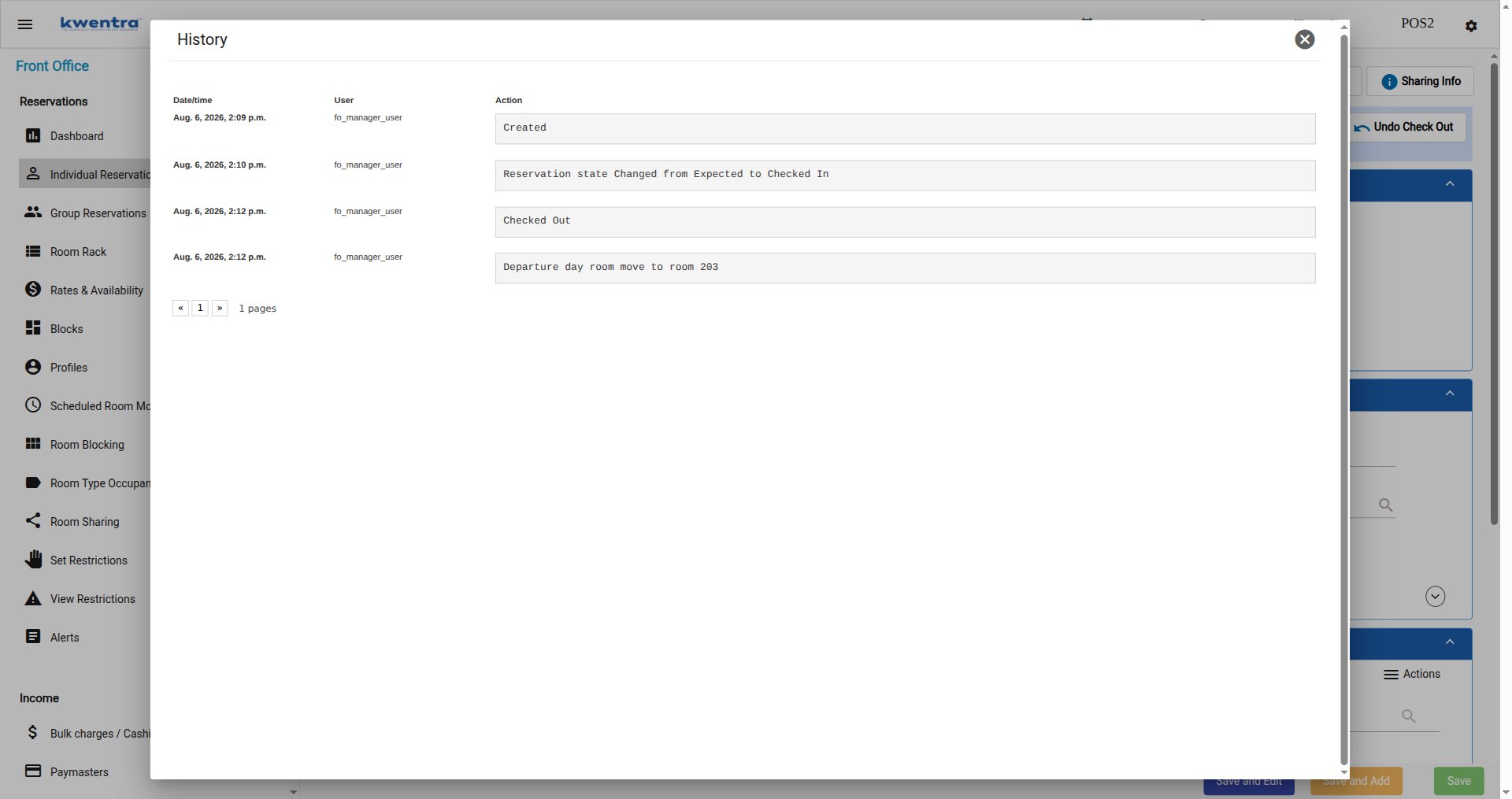
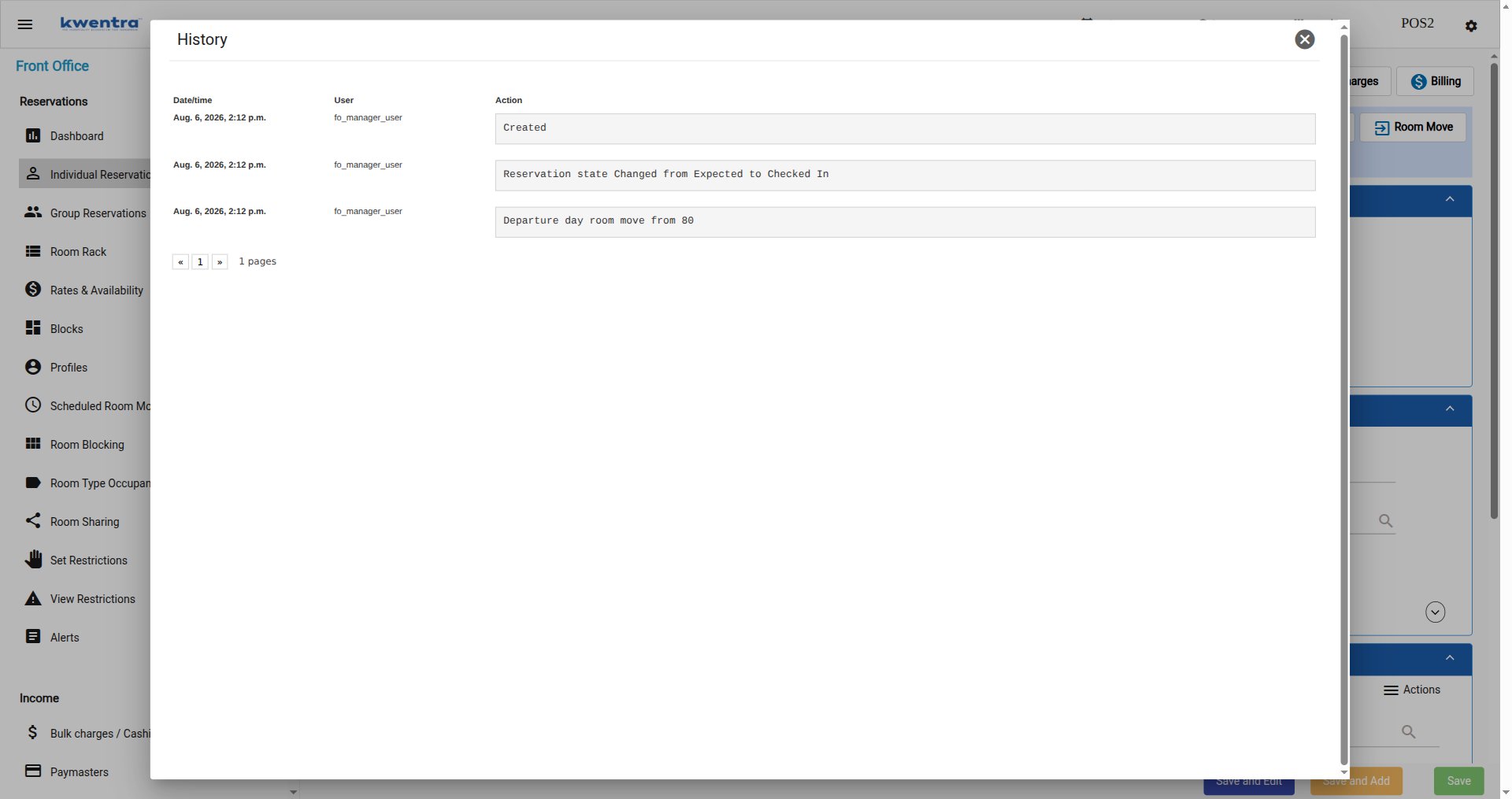
Both reservations record the move in their history, so the audit trail connects them in both directions. Open **History** from the reservation toolbar.
On the original reservation, **Checked Out** is followed by `Departure day room move to room {room number}`:
#### Tracing the move afterwards
Both reservations record the move in their history, so the audit trail connects them in both directions. Open **History** from the reservation toolbar.
On the original reservation, **Checked Out** is followed by `Departure day room move to room {room number}`:
 On the new day-use reservation, the entry reads `Departure day room move from {original reservation ID}`:
 #### Permissions
A dedicated permission controls who can perform a Departure Day Room Move. It is granted by default to the **Front Office Manager** and **Shift Leader** roles. Users without the permission do not see the action.
| The move is final and cannot be undone. If it was done in error, correct it with the standard check-in and check-out tools — undo the check-in on the new reservation and cancel it. |
| ------------------------------------------------------------------------------------------------------------------------------------------------------------------------------------ |
#### Permissions
A dedicated permission controls who can perform a Departure Day Room Move. It is granted by default to the **Front Office Manager** and **Shift Leader** roles. Users without the permission do not see the action.
| The move is final and cannot be undone. If it was done in error, correct it with the standard check-in and check-out tools — undo the check-in on the new reservation and cancel it. |
| ------------------------------------------------------------------------------------------------------------------------------------------------------------------------------------ |