> ## Documentation Index
> Fetch the complete documentation index at: https://help.kwentra.com/llms.txt
> Use this file to discover all available pages before exploring further.
# How to search for a specific reservation?
> Finding a reservation on the new front office is very simple, you can search for individual reservations using multiple inputs. Front Office (beta) → Individual Reservations The most common details...
Finding a reservation on the new front office is very simple, you can search for individual reservations using multiple inputs.
**[Front Office → Individual Reservations](https://manage.kwentra.com/frontoffice/#/individualreservation)**
The most common details you can search for a reservation with are below:
* Dates
* Guest name
* Reservation state
* Channel
* Room number
[ ](/images/front-office/reservations/individual-reservations/how-to-search-for-a-specific-reservation/0b724fb9e2.png)
Alternatively, you can search for a group of reservations all at once using the reservation filters as shown below:
* **Expected Arrival:** are the reservations that are expected to arrive today.
* **Expected Departure:** are the reservations that are expected to check-out today.
* **In-House:** are the reservations checked in on the system and still staying through today's night.
* **Actual Arrival:** these are the reservations that were expected to arrive today and the check-in procedure already took place for them.
* **Actual Departure:** these are the reservations that were expected to check out today and the check-out procedure already took place for them.
[
](/images/front-office/reservations/individual-reservations/how-to-search-for-a-specific-reservation/0b724fb9e2.png)
Alternatively, you can search for a group of reservations all at once using the reservation filters as shown below:
* **Expected Arrival:** are the reservations that are expected to arrive today.
* **Expected Departure:** are the reservations that are expected to check-out today.
* **In-House:** are the reservations checked in on the system and still staying through today's night.
* **Actual Arrival:** these are the reservations that were expected to arrive today and the check-in procedure already took place for them.
* **Actual Departure:** these are the reservations that were expected to check out today and the check-out procedure already took place for them.
[ ](/images/front-office/reservations/individual-reservations/how-to-search-for-a-specific-reservation/666de07270.png)
Clicking on any reservation will trigger opening it to take further actions on them.
***Update: 10th of March, 2022***
You can easily search for multiple room types to return all reservations that are created on one or more room type.
**[Front Office → Individual Reservations → Search](https://manage.kwentra.com/frontoffice/#/individualreservation)**
You can select multiple room types like below, you can also clear the search inputs once you are done by using **Clear Selected Items.**
You need to click **Search** in order to view the reservations based on your search inputs.
[
](/images/front-office/reservations/individual-reservations/how-to-search-for-a-specific-reservation/666de07270.png)
Clicking on any reservation will trigger opening it to take further actions on them.
***Update: 10th of March, 2022***
You can easily search for multiple room types to return all reservations that are created on one or more room type.
**[Front Office → Individual Reservations → Search](https://manage.kwentra.com/frontoffice/#/individualreservation)**
You can select multiple room types like below, you can also clear the search inputs once you are done by using **Clear Selected Items.**
You need to click **Search** in order to view the reservations based on your search inputs.
[ ](/images/front-office/reservations/individual-reservations/how-to-search-for-a-specific-reservation/a135e2307a.png)
***Update: 29th of March, 2022***
You can easily search for the reservations created under a certain booker using this new field in the search form.
**[Front Office → Individual Reservations → Search](https://manage.kwentra.com/frontoffice/#/individualreservation)**
This field accepts multiple selections to allow you to search for reservations created under multiple bookers.
[
](/images/front-office/reservations/individual-reservations/how-to-search-for-a-specific-reservation/a135e2307a.png)
***Update: 29th of March, 2022***
You can easily search for the reservations created under a certain booker using this new field in the search form.
**[Front Office → Individual Reservations → Search](https://manage.kwentra.com/frontoffice/#/individualreservation)**
This field accepts multiple selections to allow you to search for reservations created under multiple bookers.
[ ](/images/front-office/reservations/individual-reservations/how-to-search-for-a-specific-reservation/fa94fb7101.png)
***Update: 20th of June, 2022***
You can now easily search for a reservation using the secondary "other" guests profiles from the **Guest Name** field
[
](/images/front-office/reservations/individual-reservations/how-to-search-for-a-specific-reservation/fa94fb7101.png)
***Update: 20th of June, 2022***
You can now easily search for a reservation using the secondary "other" guests profiles from the **Guest Name** field
[ ](/images/front-office/reservations/individual-reservations/how-to-search-for-a-specific-reservation/d8c3e12777.png)
***Update: 6th of Novemeber, 2022***
The below columns have been added to the reservation listing screen:
* Check In Time
* Check Out Time
* Voucher Number
You can customize the columns presented in front of you from the tools icon.
[
](/images/front-office/reservations/individual-reservations/how-to-search-for-a-specific-reservation/d8c3e12777.png)
***Update: 6th of Novemeber, 2022***
The below columns have been added to the reservation listing screen:
* Check In Time
* Check Out Time
* Voucher Number
You can customize the columns presented in front of you from the tools icon.
[ ](/images/front-office/reservations/individual-reservations/how-to-search-for-a-specific-reservation/a11c80f83c.png)
***Update: 20th of November, 2022***
You can now search for reservations that contain certain notes or fragments from a word to lookup all reservations that has the same note.
*Example: if you searched with the word "to" you will get all the reservations that has notes with words that include those 2 letters, like the word elevator.*
[
](/images/front-office/reservations/individual-reservations/how-to-search-for-a-specific-reservation/a11c80f83c.png)
***Update: 20th of November, 2022***
You can now search for reservations that contain certain notes or fragments from a word to lookup all reservations that has the same note.
*Example: if you searched with the word "to" you will get all the reservations that has notes with words that include those 2 letters, like the word elevator.*
[ ](/images/front-office/reservations/individual-reservations/how-to-search-for-a-specific-reservation/cc04c71a14.png)
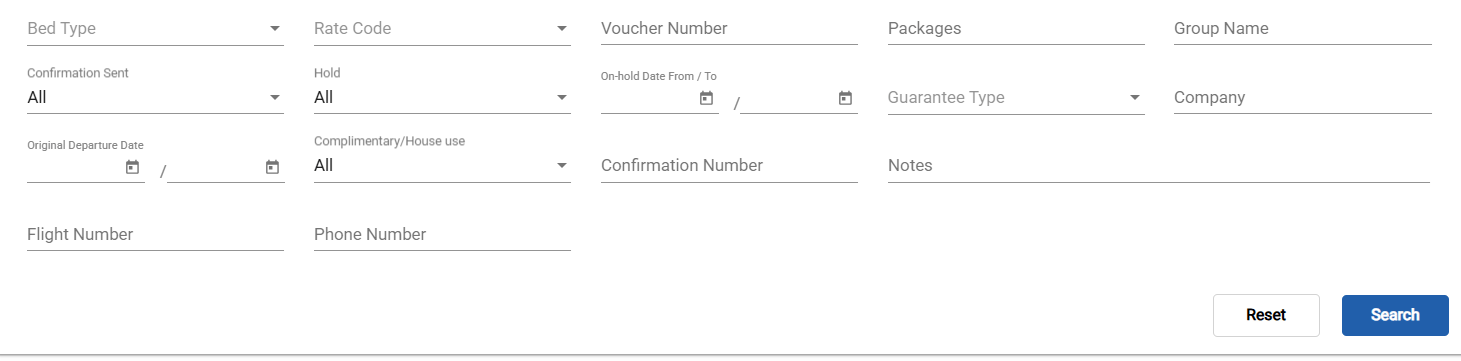
#### ***Update 12 March, 2026 - Flight Number and Mobile Number Search***
#### Reservations can now be searched by flight number or guest mobile number from the listing screen.
**How It Works**
**New Search Fields**
| Where to find it: Front Office → Individual Reservations (listing screen) |
| ------------------------------------------------------------------------- |
Two new search fields have been added to the Individual Reservations listing screen filters:
* Flight Number — searches both the arrival flight number and departure flight number fields stored on the reservation.
* Mobile Number — searches the guest profile's mobile number field.
**Partial Match Behaviour**
Both new fields use partial (substring) matching. Entering "UA4" will return reservations with flight numbers like "UA401", "UA412", or "UA4005". Similarly, entering part of a mobile number will return all reservations whose guest mobile contains that substring.
**Combining with Other Filters**
The new fields work alongside all existing filters (arrival date, departure date, status, room type, etc.). Combine them to narrow results — for example, search by flight number within a specific arrival date range to handle a busy airport transfer day.
| *Note: Mobile number search looks up the guest profile mobile field. If a guest has multiple profiles linked to one reservation, the search checks all linked profiles.* |
| ------------------------------------------------------------------------------------------------------------------------------------------------------------------------ |
](/images/front-office/reservations/individual-reservations/how-to-search-for-a-specific-reservation/cc04c71a14.png)
#### ***Update 12 March, 2026 - Flight Number and Mobile Number Search***
#### Reservations can now be searched by flight number or guest mobile number from the listing screen.
**How It Works**
**New Search Fields**
| Where to find it: Front Office → Individual Reservations (listing screen) |
| ------------------------------------------------------------------------- |
Two new search fields have been added to the Individual Reservations listing screen filters:
* Flight Number — searches both the arrival flight number and departure flight number fields stored on the reservation.
* Mobile Number — searches the guest profile's mobile number field.
**Partial Match Behaviour**
Both new fields use partial (substring) matching. Entering "UA4" will return reservations with flight numbers like "UA401", "UA412", or "UA4005". Similarly, entering part of a mobile number will return all reservations whose guest mobile contains that substring.
**Combining with Other Filters**
The new fields work alongside all existing filters (arrival date, departure date, status, room type, etc.). Combine them to narrow results — for example, search by flight number within a specific arrival date range to handle a busy airport transfer day.
| *Note: Mobile number search looks up the guest profile mobile field. If a guest has multiple profiles linked to one reservation, the search checks all linked profiles.* |
| ------------------------------------------------------------------------------------------------------------------------------------------------------------------------ |