> ## Documentation Index
> Fetch the complete documentation index at: https://help.kwentra.com/llms.txt
> Use this file to discover all available pages before exploring further.
# View Room Charges
> How can you see the charges of a reservation? In this scenario you don't want to add anything to the existing reservation, all you need to do is to see the charges that shall be applied on the gues...
#### **How can you see the charges of a reservation?**
In this scenario you don't want to add anything to the existing reservation, all you need to do is to see the charges that shall be applied on the guest when **Night Turn Procedure** takes place.
1- Once you reach the reservation page click on **Billing.**
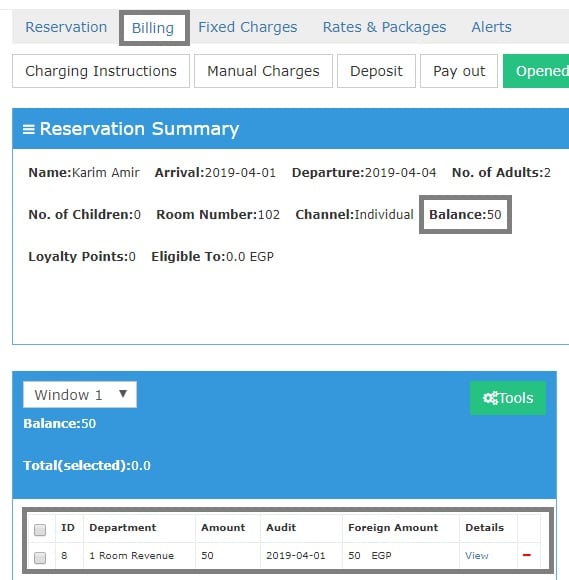
You can see the daily postings for this reservation.
**Balance = 50 EGP:** this means that there were daily postings for this reservation with a total of 50 EGP that the guest should pay for this specific night.
50 EGP shall be posted to **Room Revenue Department** in return for the guest's stay for the 1st night of the *1st of April 2019.*
let's see what we can learn from this screen:
 For any posting you can find in this window there's a **View** button that can help you understand this posting even further.
Let's see the posting of a reservation that has a breakfast included in it's rate:
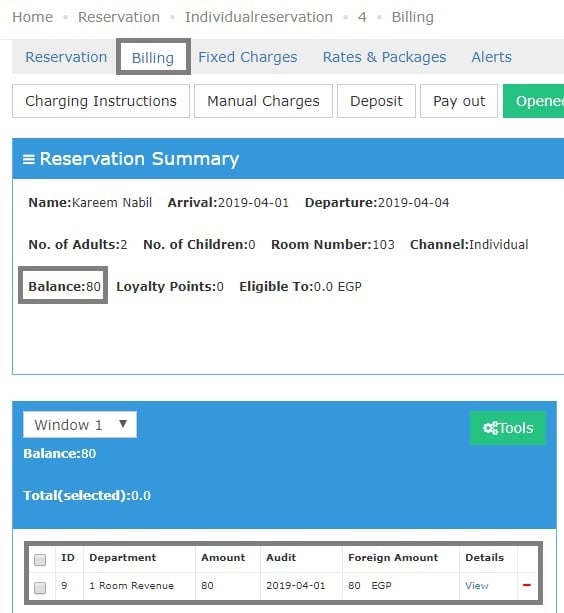
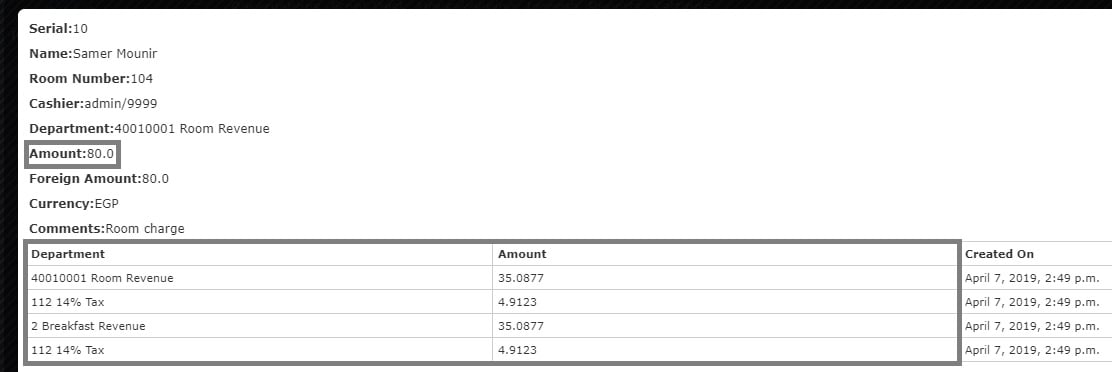
It shows below a posting for **Room Revenue** only with **80 EGP,** however when we click on **View** we can see how the **80 EGP** are divided.
For any posting you can find in this window there's a **View** button that can help you understand this posting even further.
Let's see the posting of a reservation that has a breakfast included in it's rate:
It shows below a posting for **Room Revenue** only with **80 EGP,** however when we click on **View** we can see how the **80 EGP** are divided.
 It clearly shows that the Room Charge are divided into **Room Charge and Breakfast Charge** each going to it's designated **Debit Department** alongside the taxes for each charge.
 *The above applies to any postings or charges after the **Night Turn.***