> ## Documentation Index
> Fetch the complete documentation index at: https://help.kwentra.com/llms.txt
> Use this file to discover all available pages before exploring further.
# Guest Profile Management
> Keeping a tab on your repeated guests is vital for relationship continuity with them, also to make a good impression on their following visit.
Keeping a tab on your repeated guests is vital for relationship continuity with them, also to make a good impression on their following visit.
not only it will help in building strong regular customers, it will help save you time whilst managing their reservation.
**\_\_\_\_\_\_\_\_\_\_\_\_\_\_\_\_\_\_\_\_\_\_\_\_\_\_\_\_\_\_\_\_\_\_\_\_\_\_\_\_\_\_\_\_\_\_\_\_\_\_\_\_\_\_\_\_\_\_\_\_\_\_\_\_\_\_\_\_\_\_\_\_\_\_\_\_\_\_\_\_\_\_\_\_\_\_\_\_\_\_\_\_\_\_\_\_\_\_\_\_\_\_\_\_\_\_\_\_\_\_\_\_**
##### **How?**
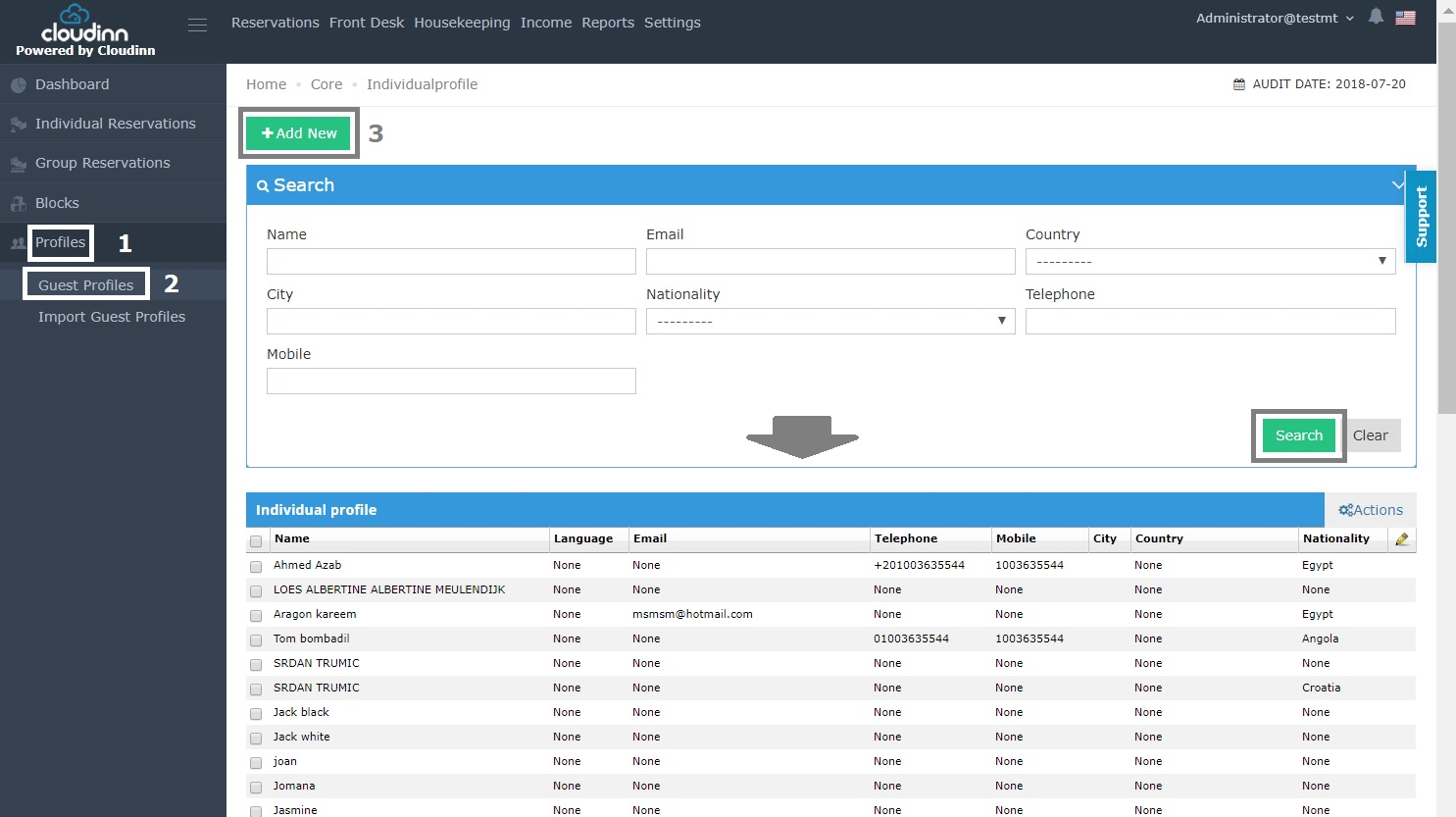
1- After clicking on **Front Office** from home page click on **Profiles.**
2- Choose **Guest Profiles.**
3- Click on **Add New.**
*you can see all the guests that are added to the directory alongside the option to **Search.***
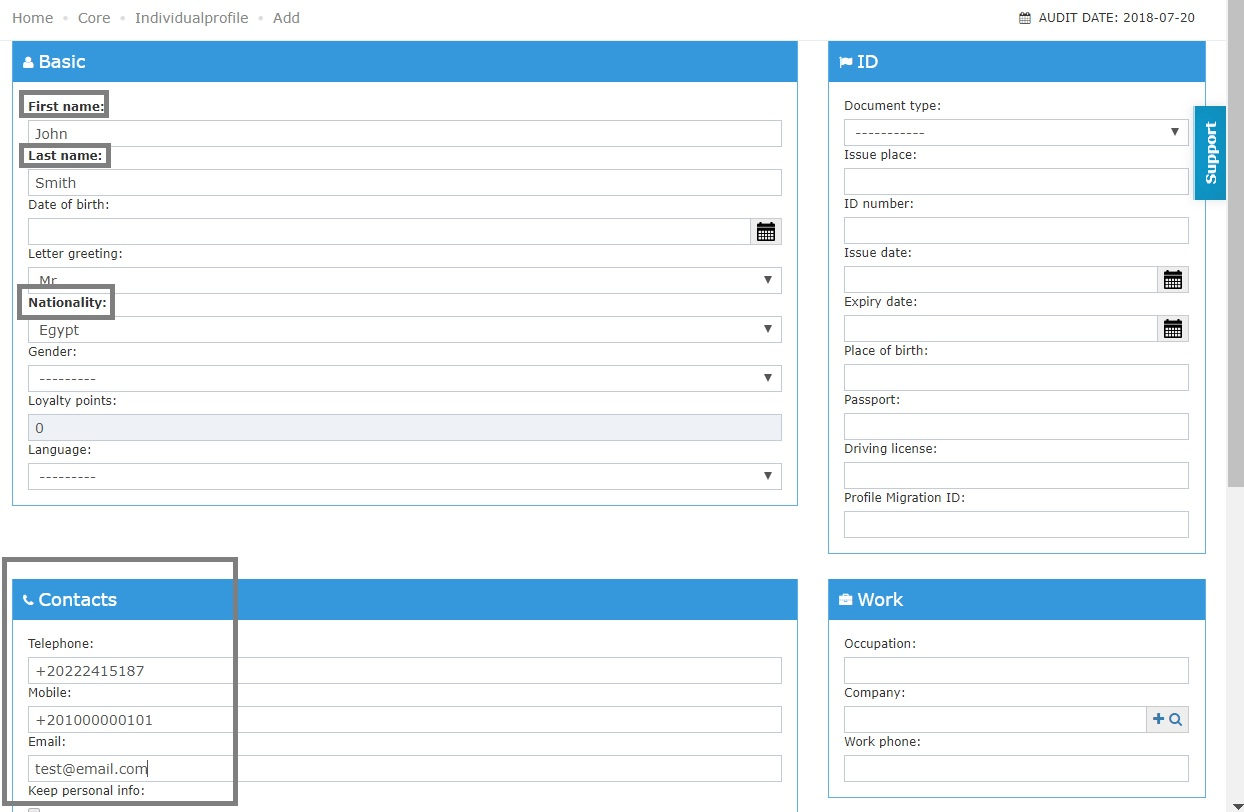
 Now you can add your guests' info, the mandatory fields would be written in **bold font.**
*It is recommended to keep the contact information on file to help in communicating offers or promotions to your regular guests.*
Now you can add your guests' info, the mandatory fields would be written in **bold font.**
*It is recommended to keep the contact information on file to help in communicating offers or promotions to your regular guests.*
 *Don't forget to click **save** from the end of the page to add the guest's info to your directory.*
**\_\_\_\_\_\_\_\_\_\_\_\_\_\_\_\_\_\_\_\_\_\_\_\_\_\_\_\_\_\_\_\_\_\_\_\_\_\_\_\_\_\_\_\_\_\_\_\_\_\_\_\_\_\_\_\_\_\_\_\_\_\_\_\_\_\_\_\_\_\_\_\_\_\_\_\_\_\_\_\_\_\_\_\_\_\_\_\_\_\_\_\_\_\_\_\_\_\_\_\_\_\_\_\_\_\_\_\_\_\_\_\_\_\_\_\_\_\_\_\_\_\_\_\_\_\_\_\_\_\_\_\_\_\_\_\_\_\_\_\_\_\_\_\_\_**
##### **How can Guest Profile help in the reservation process?**
in the scenario where you're making a reservation for a repeated guest that his personal info are saved in **guest profile,** filling the reservation's info would be done in simple steps:
When you get the option to **Add New** guest profile or **Search** for one as below.
*Don't forget to click **save** from the end of the page to add the guest's info to your directory.*
**\_\_\_\_\_\_\_\_\_\_\_\_\_\_\_\_\_\_\_\_\_\_\_\_\_\_\_\_\_\_\_\_\_\_\_\_\_\_\_\_\_\_\_\_\_\_\_\_\_\_\_\_\_\_\_\_\_\_\_\_\_\_\_\_\_\_\_\_\_\_\_\_\_\_\_\_\_\_\_\_\_\_\_\_\_\_\_\_\_\_\_\_\_\_\_\_\_\_\_\_\_\_\_\_\_\_\_\_\_\_\_\_\_\_\_\_\_\_\_\_\_\_\_\_\_\_\_\_\_\_\_\_\_\_\_\_\_\_\_\_\_\_\_\_\_**
##### **How can Guest Profile help in the reservation process?**
in the scenario where you're making a reservation for a repeated guest that his personal info are saved in **guest profile,** filling the reservation's info would be done in simple steps:
When you get the option to **Add New** guest profile or **Search** for one as below.
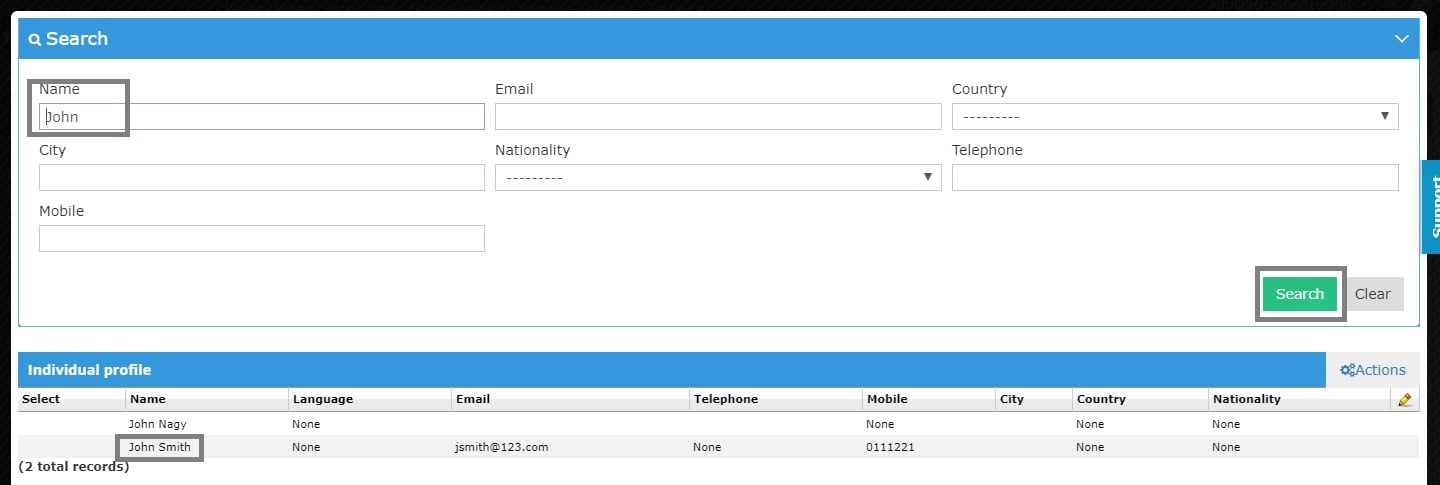
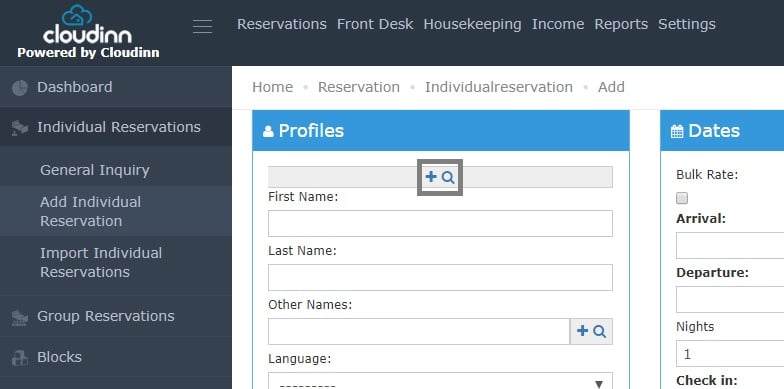 1- Click on the **Magnifying Glass.**
2- Use and of the search criteria and click **Search.**
3- Double click on the guest's name to add his info to the reservation screen.
1- Click on the **Magnifying Glass.**
2- Use and of the search criteria and click **Search.**
3- Double click on the guest's name to add his info to the reservation screen.
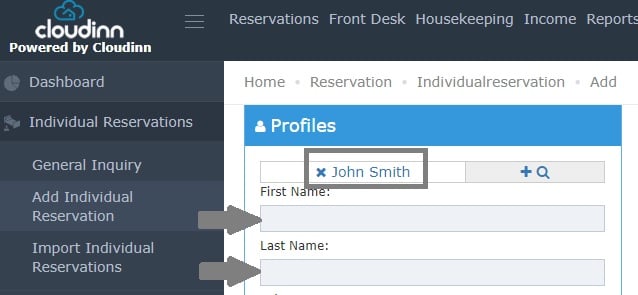
 Now we can see the guest's name on the reservation and the first & last name fields cannot be edited as this reservation is locked to the guest we selected from **Guest Profile.**
*Read more about*
Now we can see the guest's name on the reservation and the first & last name fields cannot be edited as this reservation is locked to the guest we selected from **Guest Profile.**
*Read more about*