> ## Documentation Index
> Fetch the complete documentation index at: https://help.kwentra.com/llms.txt
> Use this file to discover all available pages before exploring further.
# Consolidated Revenue and Statistics Summary Report
> View aggregated revenue and occupancy KPIs across all selected hotels in a single consolidated report. Business Value Eliminates the need to combine individual hotel reports manually. Provides a un...
View aggregated revenue and occupancy KPIs across all selected hotels in a single consolidated report.
***
### **Business Value**
* Eliminates the need to combine individual hotel reports manually.
* Provides a unified, portfolio-level visibility for multi-property operators.
* Enhances executive decision-making with consolidated KPIs.
* Supports financial controllers with accurate multi-property variance analysis.
* Streamlines revenue performance review across all operational hotels.
***
### **Use Cases**
* **Executive Performance Review:** CEOs and owners analyze portfolio-wide revenue and occupancy trends.
* **Financial Consolidation:** Controllers aggregate revenue and budget data across multiple hotels.
* **Regional Comparisons:** Multi-property GMs compare hotel-to-hotel performance using the detailed version.
* **Forecasting & Strategy:** Consolidated metrics help determine pricing strategy and operational needs.
* **Operational Oversight:** Identify underperforming hotels quickly using weighted KPIs.
***
### **Report Parameters**
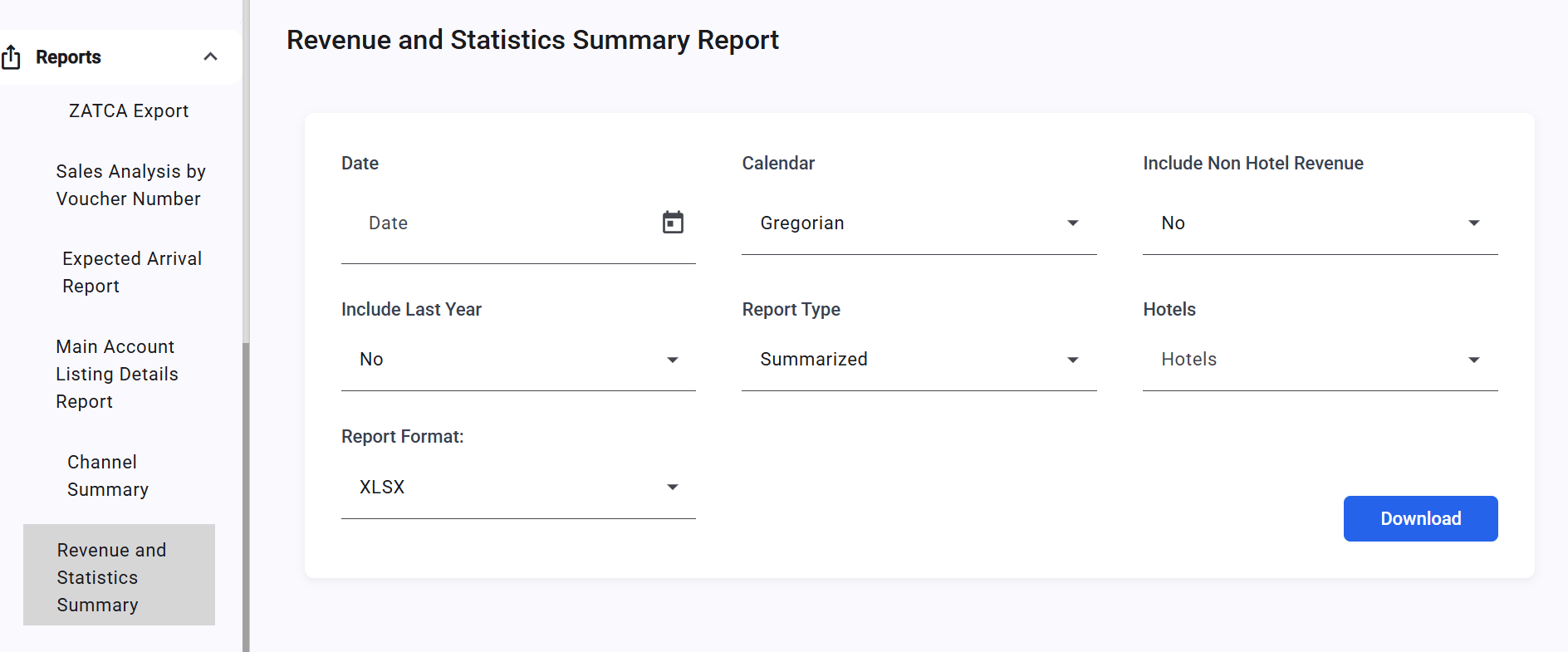
**1. Date Filter (Mandatory)**
* Single date picker for analysis
* Supports **Gregorian** and **Hijri** calendar display
**2. Calendar**
* **Gregorian (default)**
* **Hijri**
**3. Hotels (Multi-Select)**
* Autocomplete list of **all company hotels**
* Automatically **excludes head office** and **demo/training** hotels
* If nothing is selected → all operational hotels are included
**4. Report Type**
* **Summarized (default):** Consolidated totals only
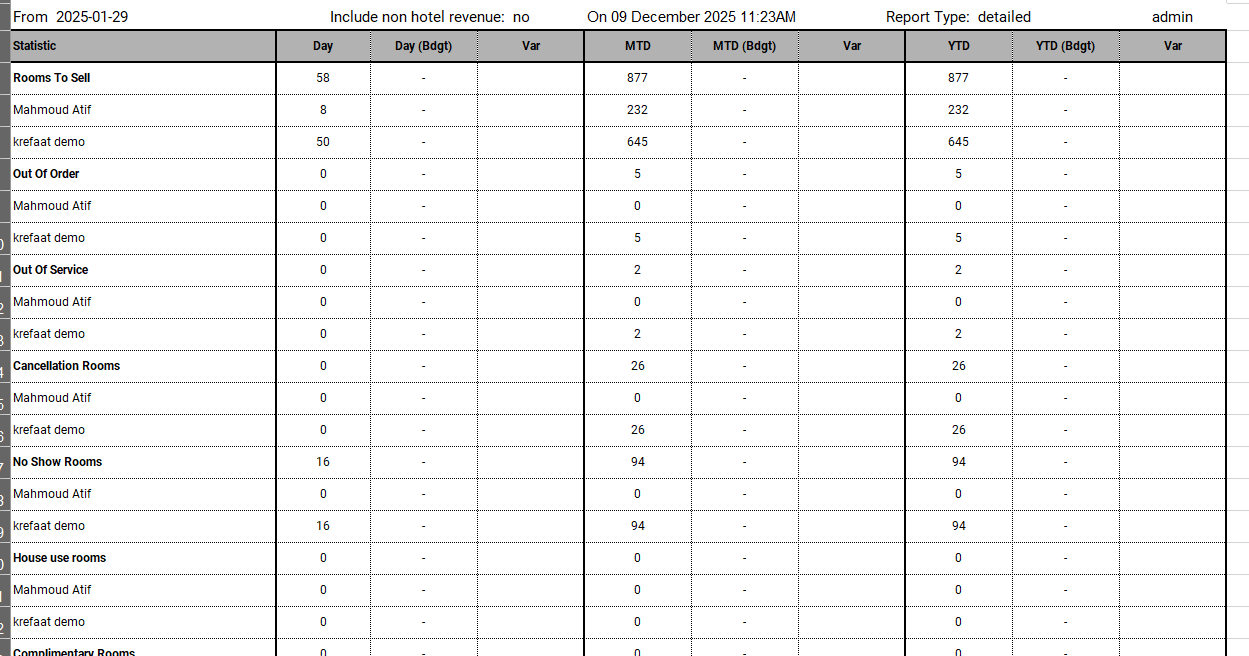
* **Detailed:** Totals + individual hotel breakdown under each KPI section
**5. Non-Hotel Revenue Filter**
* Checkbox: **Exclude Non-Hotel Revenue**
 ***
### **Report Outcome Sections**
### **Section 1: Statistics**
* Rooms To Sell
* Out Of Order
* Out Of Service
* Cancellation Rooms
* No Show Rooms
* House Use Rooms
* Complimentary Rooms
* Arrival Rooms
* Arrival Guests
* Departure Rooms
* Departure Guests
* Occupied Rooms
* Occupied Rooms (Without Comp. & HU)
* Guest Inhouse
* Guest Inhouse (Without Comp. & HU)
* Occupied %
* Occupancy % (Without Comp. & HU)
***
### **Section 2: Total**
* Total Hotel Revenue
* Total Hotel Revenue Per Room
* Total Hotel Revenue Per Room (Without Comp. & HU)
* Total Hotel Revenue Per Available Room
* Total Hotel Revenue per Guest In-house
### **Summarized View (combines all hotels):**
**Detailed (adds a breakdown per property)**
***
### **Report Outcome Sections**
### **Section 1: Statistics**
* Rooms To Sell
* Out Of Order
* Out Of Service
* Cancellation Rooms
* No Show Rooms
* House Use Rooms
* Complimentary Rooms
* Arrival Rooms
* Arrival Guests
* Departure Rooms
* Departure Guests
* Occupied Rooms
* Occupied Rooms (Without Comp. & HU)
* Guest Inhouse
* Guest Inhouse (Without Comp. & HU)
* Occupied %
* Occupancy % (Without Comp. & HU)
***
### **Section 2: Total**
* Total Hotel Revenue
* Total Hotel Revenue Per Room
* Total Hotel Revenue Per Room (Without Comp. & HU)
* Total Hotel Revenue Per Available Room
* Total Hotel Revenue per Guest In-house
### **Summarized View (combines all hotels):**
**Detailed (adds a breakdown per property)**
 ## ***Update: 22 Feb 2026***
## **Hijri Daily Budget Import**
Budget figures in the Consolidated Revenue and Statistics Summary Report now reflect Hijri daily imports aggregated from all connected property instances.
**Budget Calculation Logic — Hijri Daily Budget**
The report aggregates data from all connected property instances. Budget figures follow the same Hijri daily budget logic applied at each property, then summed at group level.
**When only a monthly budget is imported:**
* Day = monthly budget ÷ number of days in the month (per property, then aggregated)
* Month = total monthly budget (aggregated across all properties)
* Year = cumulative sum from start of year (aggregated across all properties)
**When a Hijri daily budget is imported:**
* Day = imported daily budget for that specific day (aggregated across all properties)
* Month = sum of all imported daily budgets for that month (aggregated)
* Year = cumulative sum from start of year using Hijri daily budgets (aggregated)
**Example — Ramadan (30 days), Room Revenue (per property):**
**Monthly budget only: Imported budget = 150,000**
→ Day = 150,000 ÷ 30 = 5,000
**Hijri daily budget imported:**
Days 1–20 = 5,000/day | Days 21–30 = 6,000/day
→ Month (per property) = (5,000 × 20) + (6,000 × 10) = 160,000
→ Consolidated total = aggregated from all connected properties
## ***Update: 22 Feb 2026***
## **Hijri Daily Budget Import**
Budget figures in the Consolidated Revenue and Statistics Summary Report now reflect Hijri daily imports aggregated from all connected property instances.
**Budget Calculation Logic — Hijri Daily Budget**
The report aggregates data from all connected property instances. Budget figures follow the same Hijri daily budget logic applied at each property, then summed at group level.
**When only a monthly budget is imported:**
* Day = monthly budget ÷ number of days in the month (per property, then aggregated)
* Month = total monthly budget (aggregated across all properties)
* Year = cumulative sum from start of year (aggregated across all properties)
**When a Hijri daily budget is imported:**
* Day = imported daily budget for that specific day (aggregated across all properties)
* Month = sum of all imported daily budgets for that month (aggregated)
* Year = cumulative sum from start of year using Hijri daily budgets (aggregated)
**Example — Ramadan (30 days), Room Revenue (per property):**
**Monthly budget only: Imported budget = 150,000**
→ Day = 150,000 ÷ 30 = 5,000
**Hijri daily budget imported:**
Days 1–20 = 5,000/day | Days 21–30 = 6,000/day
→ Month (per property) = (5,000 × 20) + (6,000 × 10) = 160,000
→ Consolidated total = aggregated from all connected properties