> ## Documentation Index
> Fetch the complete documentation index at: https://help.kwentra.com/llms.txt
> Use this file to discover all available pages before exploring further.
# POS Customer Display Screen
> POS Terminals now gives you the opportunity to display guests’ invoices on a separate screen showing their ordered items as they are added to them, view the cost per item and also the total cost th...
POS Terminals now gives you the opportunity to display guests’ invoices on a separate screen showing their ordered items as they are added to them, view the cost per item and also the total cost they should pay.
This feature does not require any setting configuration, all you need to do is to have 2 screens, one for **The Cashier** and one for **Customer Display.**
1. Open the terminal you would be working through.
Point of Sale => Cashiering => Select Outlet => Select Terminal => Select Table
2. Open the **Customer Display Screen** in front of the guest.
Point of Sale => Customer Display Screen => Select Outlet => Select Terminal => Select Table
It is very important to select the exact same terminal on both screens for the invoice to reflect on the guest’s screen.
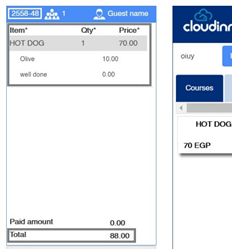
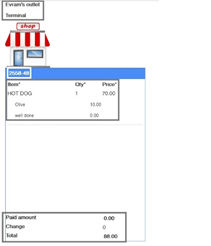
Below is an invoice opened on the terminal and customer display screen wherein we can see the same invoice number and all items added are synced real time to the customer display screen.