> ## Documentation Index
> Fetch the complete documentation index at: https://help.kwentra.com/llms.txt
> Use this file to discover all available pages before exploring further.
# How do I create a promotion code for my website's guests?
> Creating promotions is important to generate higher occupancy and revenue across all seasons, whether its summer or winter or even long weekends you can create discounts to promotion code users onl...
Creating promotions is important to generate higher occupancy and revenue across all seasons, whether its summer or winter or even long weekends you can create discounts to promotion code users only.
Promotion Codes help you in icreasing traffic and bookings coming from social media by spreading your website alongwith the promo code in a post.
**How do I create a promotion code?**
1. or a new rate plan.
2. Make sure the new rate plan is linked to the website's channel and marked as web.
After you are done with the above 2 steps go to your online booking settings.
**[Online Booking → Settings → Online Booking → Promotions → Add New](https://manage.kwentra.com/reservation/promotion/2/)**
All fields must be filled:
* Enter the **Code** that you will provide/send to your guests.
* Enter a **Name** for the promotion "won't appear on the website"
* Select the dates of the promotion **"From & To".**
* Enter a text about the promotion "won't appear on the website"
* Highlight the new rate you created.
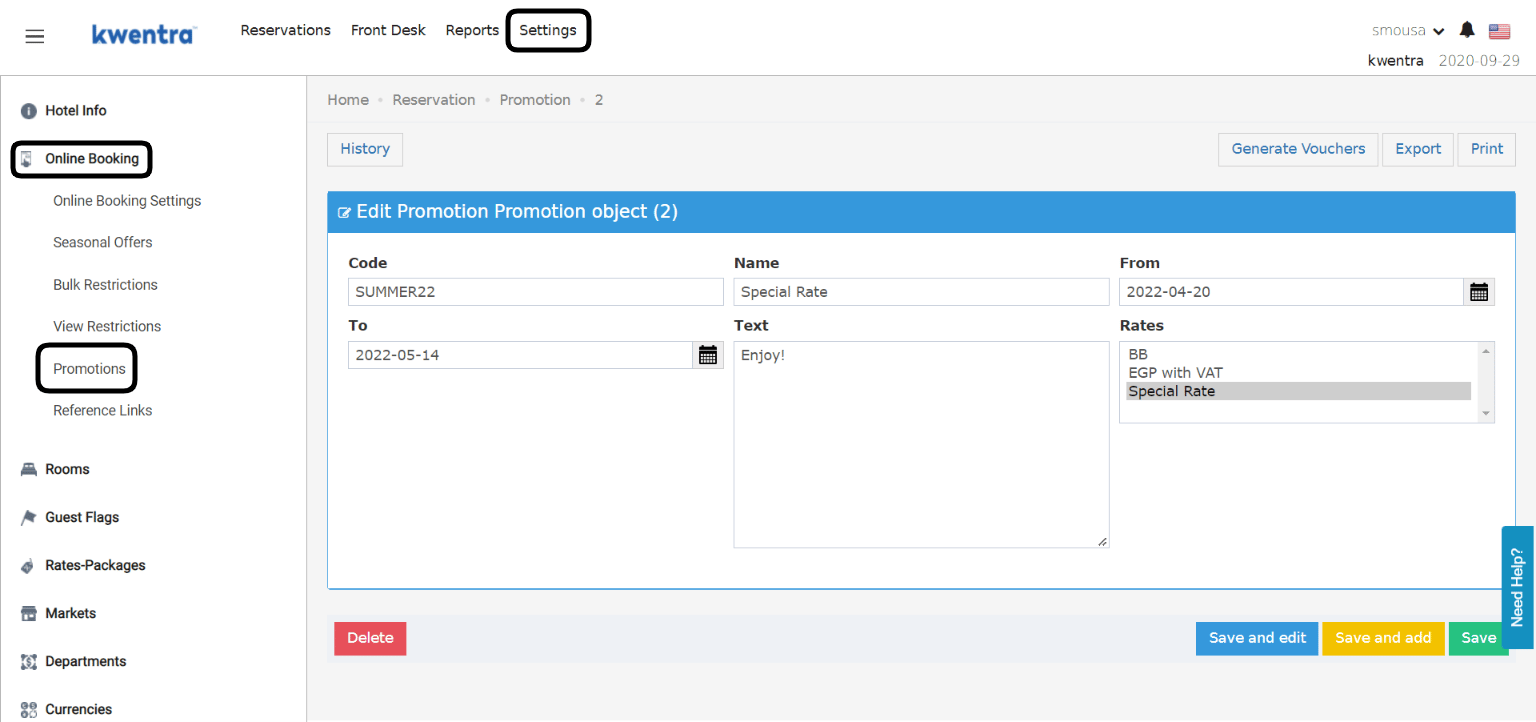 We just created a **promo code SUMMER22** from the **20th of April to the 14th of May** linked to the **Special Rate** we just created and let's see how it would work.
You should apply a on the newly created rate outside the dates of the promotion and whenever you want to use it just remove the restriction.
We just created a **promo code SUMMER22** from the **20th of April to the 14th of May** linked to the **Special Rate** we just created and let's see how it would work.
You should apply a on the newly created rate outside the dates of the promotion and whenever you want to use it just remove the restriction.