> ## Documentation Index
> Fetch the complete documentation index at: https://help.kwentra.com/llms.txt
> Use this file to discover all available pages before exploring further.
# 2020 Release Notes
> All Kwentra product updates released in 2020.
## Accounts Receivable Manual Entries On Past Dates
New Update: you can now do the following actions on a past date on any of your Accounts Receivables.
* Manual Charges
* Deposits
* Adjustments
**Back Office → Accounts Receivable → AR Accounts → Select Account → Tools**
## Purchase Orders Authorization Level Update
New Update: You now view the authorization level, the status for each item and which level of authorization is pending when you print your Purchase Order.
## 6th of December: Vendor Payment Report Update
Report Update: Vendor Payment Report now returns all your payments made against all kinds of receiving orders (Vendor/Manual Receiving Orders). The report shows all the payment transactions that have been made to a certain vendor in a given date range.
**Reports → Back Office → Vendor Payment Report**
[Read more](/front-office/reports/income-reports/payment-report)
## YieldPlanet Integration
New Integration: Kwentra is now fully integrated with YieldPlanet Channel Manager.
## Expected Arrival & Reservation List Reports Updates
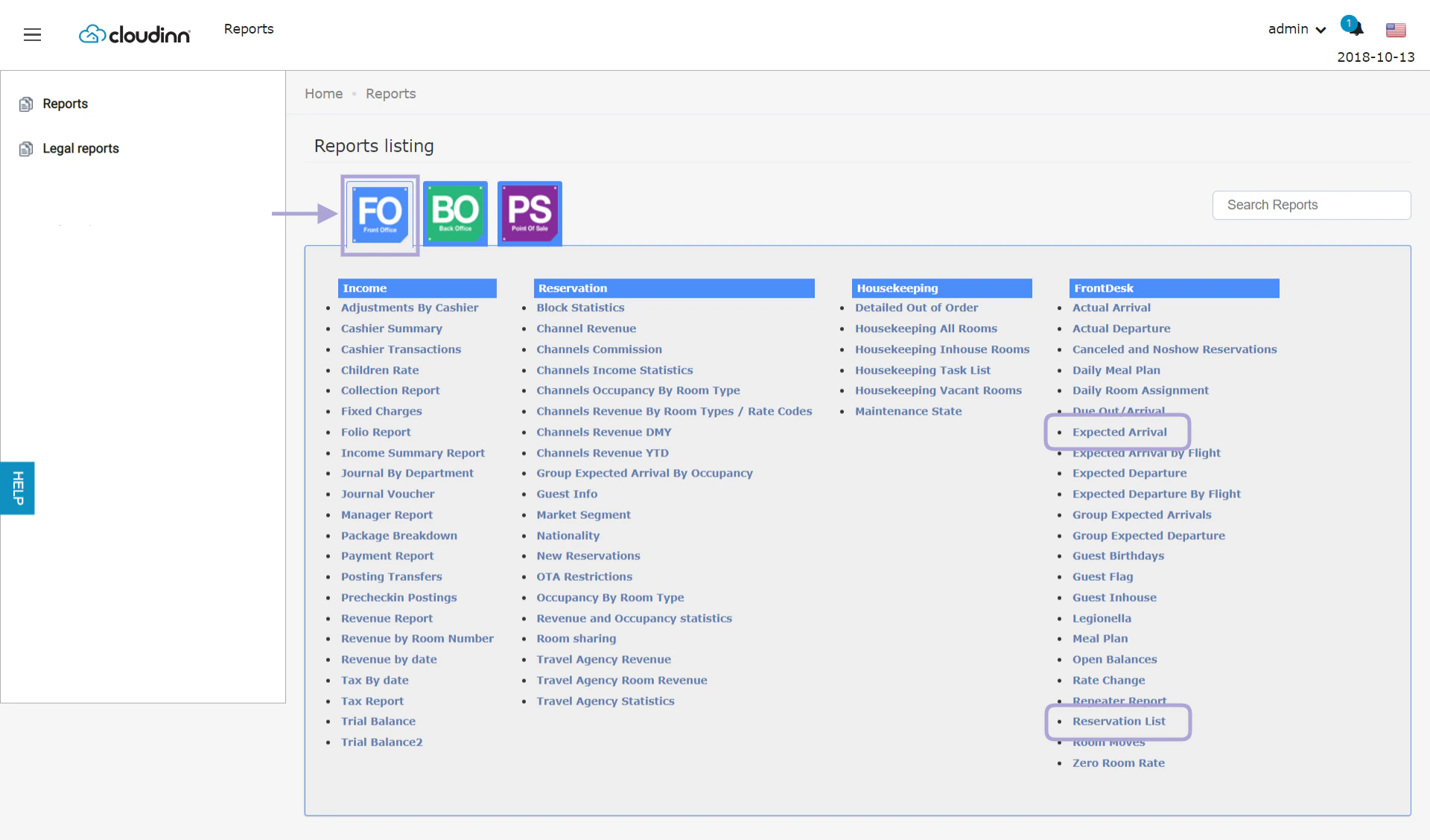
Report Update: You can now see the **On Hold Reservations** and the **Hold Until Date** in separate columns when exporting the below reports.
 ## Guest Info Report Update
Report Update: Guest info report is now updated to have multiple search options to find guests' profiles.
[Read more](/front-office/reports/reservation-reports/guest-info-report)
## Hotel Internal Policy Update
New Update: Your hotel internal policy input format is now more advanced to accept hyperlinks and have custom lables.
[Read more](/front-office/front-office-settings/front-office/hotel-internal-policy-reference-links)
## New Notes System for Reservations
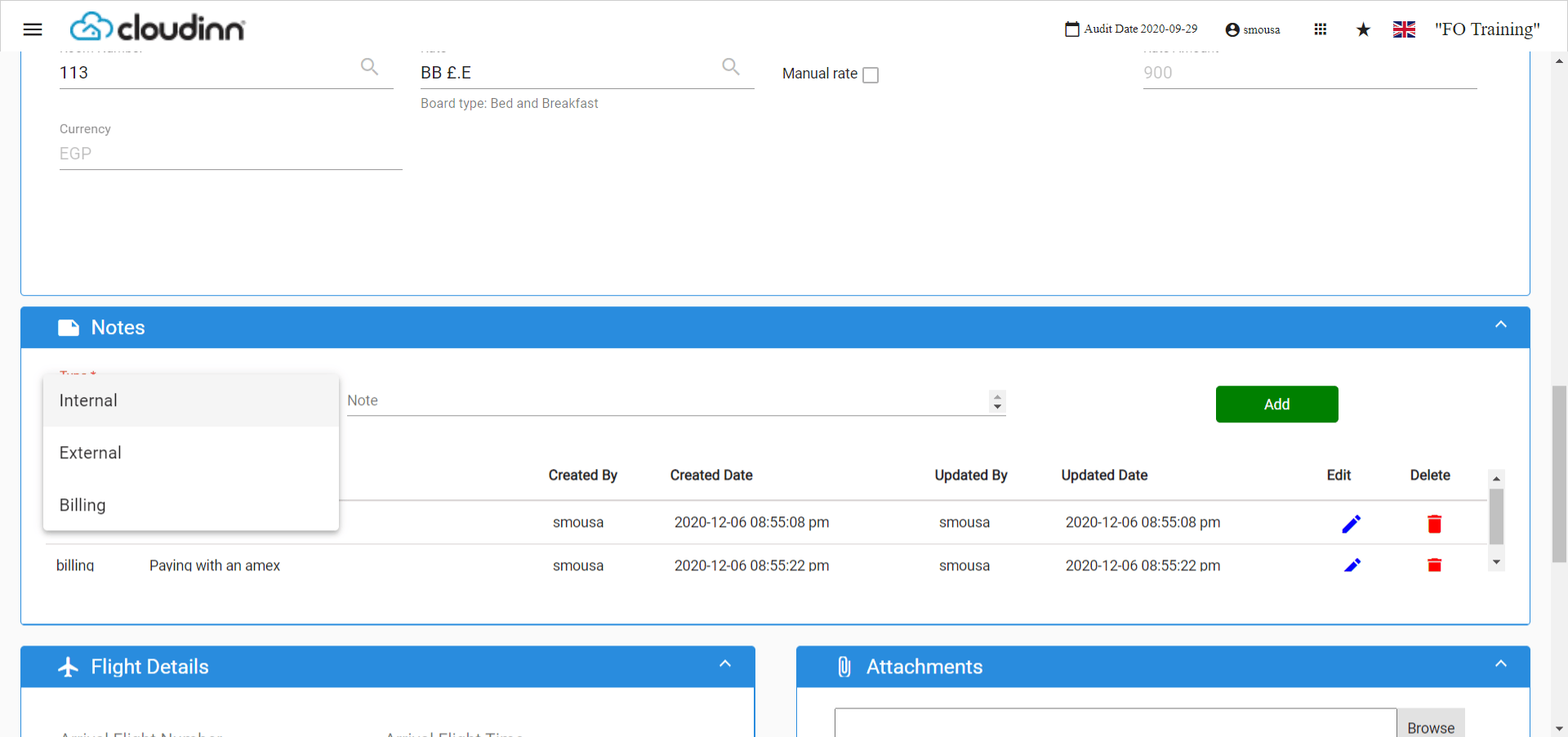
New Update: When creating or editing your reservation, you can now addvarious types of notes for your staff to refer back to later.
**Front Office**→ **Individual Reservations → Add Reservation**
## Guest Info Report Update
Report Update: Guest info report is now updated to have multiple search options to find guests' profiles.
[Read more](/front-office/reports/reservation-reports/guest-info-report)
## Hotel Internal Policy Update
New Update: Your hotel internal policy input format is now more advanced to accept hyperlinks and have custom lables.
[Read more](/front-office/front-office-settings/front-office/hotel-internal-policy-reference-links)
## New Notes System for Reservations
New Update: When creating or editing your reservation, you can now addvarious types of notes for your staff to refer back to later.
**Front Office**→ **Individual Reservations → Add Reservation**
 ## Online Booking Apartments Terminologies
New Update: Added new terminologies to the Front Office Settings that affect your Online Booking Engine as well.
[Read more](/front-office/front-office-settings/general/online-booking-new-terminologies)
## Open Balance Report Update
Report Update: Now you can choose to show/hide the main guest's information and also shows the total number of people "adults+children" benefiting from the reservation with the rate code.
**Reports → FO → FrontDesk → Open Balances Report**
[Read more](/multi-property/consolidated-open-balance-report)
## Public Add-on Packages Feature
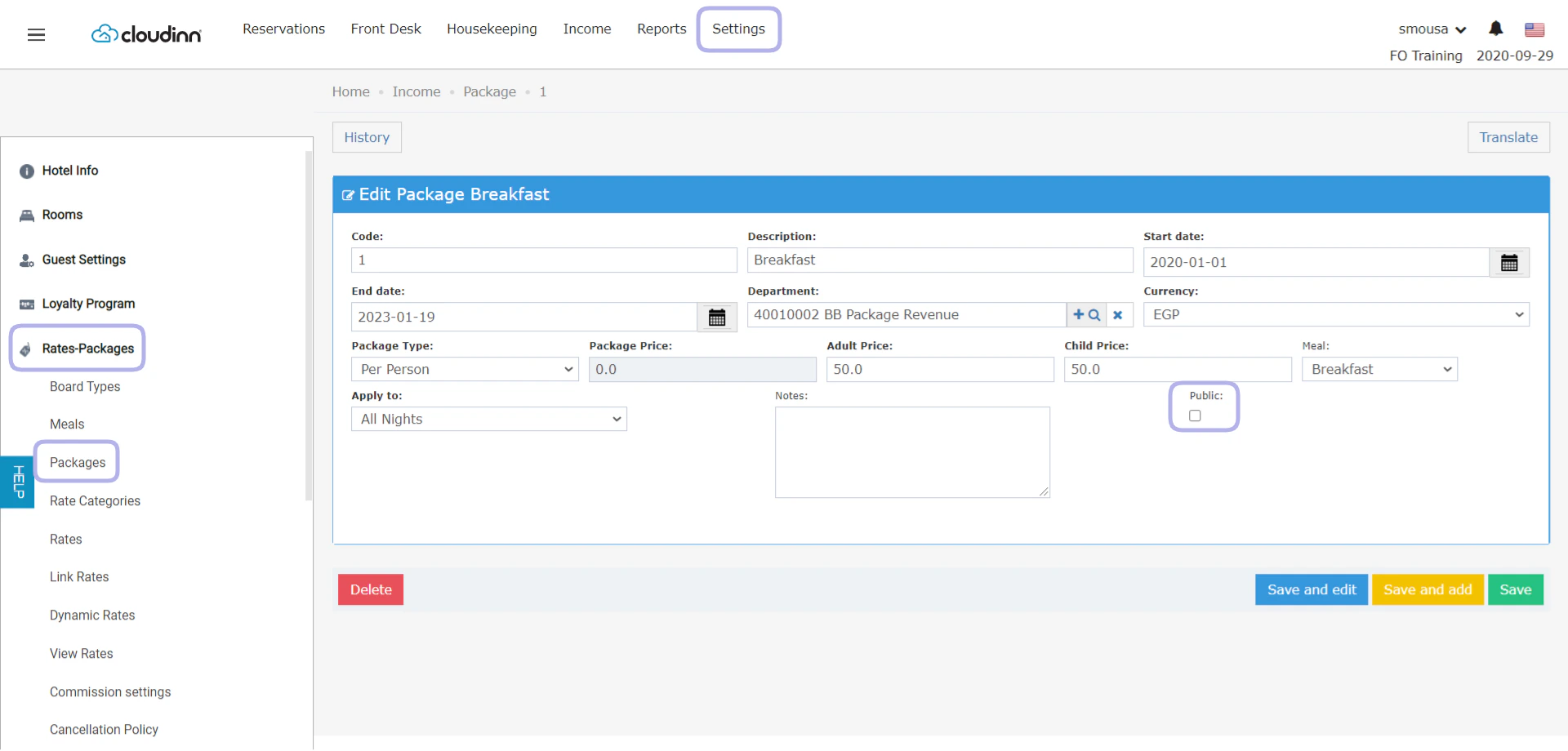
New Feature: Add-on Packages can now be marked as public packages so as to apply on any rate code and without the need of adding it to newly created rate codes
**Front Office → Settings → Rates-Packages → Packages → Select Package**
## Online Booking Apartments Terminologies
New Update: Added new terminologies to the Front Office Settings that affect your Online Booking Engine as well.
[Read more](/front-office/front-office-settings/general/online-booking-new-terminologies)
## Open Balance Report Update
Report Update: Now you can choose to show/hide the main guest's information and also shows the total number of people "adults+children" benefiting from the reservation with the rate code.
**Reports → FO → FrontDesk → Open Balances Report**
[Read more](/multi-property/consolidated-open-balance-report)
## Public Add-on Packages Feature
New Feature: Add-on Packages can now be marked as public packages so as to apply on any rate code and without the need of adding it to newly created rate codes
**Front Office → Settings → Rates-Packages → Packages → Select Package**
 ## Configurable Check-In and Check-out times
New update: you can now configure the check in & check out times based on your operational needs.
**Front Office → Settings → Reservation Settings → Default Checking Times**
## Send Kitchen Orders to multiple POS Printers
New Feature: You can now configure your menu items to be reflecting it's printing orders on multiple printers.
[Read more](/point-of-sale/point-of-sale-settings/send-kitchen-orders-to-multiple-pos-printers)
## Maintenance Report Update
Report Update: Maintenance State report would now show the comment you would leave when changing the maintenance state of a room.
**Reports → FO → Housekeeping → Maintenance State**
## Rate Restriction Day of Week Update
New Update: Rate Restrictions through Front Office/Online Booking now has the "day of the week" field to allow restrictions application on certain days of the week within a date range.
[Read more](/front-office/reservations/restrictions/rate-restriction-day-of-week)
## Room Rack Quick Add New Update
New update: The Quick Add feature from Kwentra Room Rack now displays more rate details per night while creating the reservation.
[Read more](/front-office/reservations/room-rack/room-rack-quick-add-new-update)
## Priority Bed Type Selling
New Update: Front Office Auto Prioritize Bed Type Selling.
[Read more](/front-office/front-office-settings/front-office/priority-bed-selling)
## Adyen Deposit Payment
New Update: Deposit Payments are now available through Adyen Online Booking Payment.
## Excluded Tax on Online Booking Confirmation
New Update: Excluded Taxes are now available per room on generated Online Booking/HMS Confirmations.
## Online Bookings made with Credit Cards
New Update: Now Kwentra Users can further use guests' credit cards that they use to finalize payments through the Online Booking and make further transactions.
## Housekeeping Report Update
New Report Update: Guest names won't show when running the Housekeeping All Room/In-House report for systems following GDPR Settings.
[Read more](/front-office/reports/housekeeping-reports/housekeeping-discrepancy-report)
## Confirmation Template Update
New Update: The confirmation sent to guests would now have all rate details & packages under Offer Details.
## Online Booking Date & Time Format
New Update: All Online booking date & time related stamps and fields are configurable.
Date: Any numeric date format.
Time: Military or AM/PM.
## Online Booking New Terminologies
New Update: Now you can configure different terminologies for each property you have on the online booking widget, Update terminologies from Settings.
[Read more](/front-office/front-office-settings/general/online-booking-new-terminologies)
## Accounts Receivable Reminder Email Notifications
New Feature: using the new custom uploads feature for your templates, you can now have multiple reminder notifications to be sent to your partners.
## Calculate Total Value of Purchase Orders
New Update: When printing the Purchase Order the total value of the items purchased will be printed alongside other PO details.
**Back Office → Purchase Orders → Purchase Order screen → Print**
## Channel Commission Report Updates
New Updates: The Channel Commission Report has been enhanced to fit your financial needs to calculate commission on the channel and reservation level.
## Discounts New Behavior on Front Office Billing
New Update: The user can now get to choose whether discounts apply on taxes or no. Reach out to us through our Support Channel.
[Support@kwentra.com](mailto:Support@kwentra.com)
## Excluded/Fixed Excluded City Tax per Guest
New Feature: Applying Local City Taxes in respect to the number of guests and their type in a given reservation.
## Kwentra New Login Page
New Screen: Check out our new System Admin Login Screen. ***[Login Now](https://manage.kwentra.com/)***
## New Confirmation/Cancellation Templates
New Templates: you can now enjoy the new detailed, custom-made css templates for both new reservations and cancelled ones. *Read More about [User Templates & Custom Uploads](https://help.kwentra.com/article/show/111098-user-templates-custom-uploads)*
## Room Rack Room list view adjustment
New update: now users get to choose how many rooms to view on the single view of the room rack.
[Read more](/front-office/reservations/room-rack/room-rack-room-list-view-adjustment)
## Bulk Guest Profile Update
New Feature: Updating existing Guest Profiles is now easy, all you need to do is follow the Kwentra Profile ID in the Import CSV File.
**Front Office → Reservations → Guest Profiles → Import guest profiles**
## AR Statement Invoice New Template
New Template: AR Statement Invoice shows all the information for a specific AR account based on the selected invoices, this template shows aged invoices and where do they stand in the aging cycle in addition to further info about the AR Account and bank details.
## Invoice Due Date for Accounts Receivable Billing
New Feature: Accounts receivable invoices now show the invoices' due dates.
New Feature: AR Invoice and AR Aging reports now follow the due date setting to be presented on the produced report.
[Read more](/back-office/accounts-receivable/invoice-due-date-for-ar-accounts)
## Apply Manual Rate from Kwentra Room Rack
New Feature: you can apply a manual rate whilst creating a reservation using the quick add option from room rack.
[Read more](/front-office/reservations/room-rack/apply-manual-rate-from-room-rack)
## Guarantee Types Option Added to Front Office Reservations
New Feature: Guarantee Type option is now available on all Front Office Reservation Screens.
## Import Parent/Child Rooms
New Feature: Bulk Import Rooms with parent/child relationship to accommodate the Bed-Selling Scenario.
**Front Office → Settings → Rooms → Import Rooms**
## New Fields in Hotel Info Screen
New Fields: Bank Branch and RIB numbers are now available to be updated on your hotel info screen.
**Front Office → Settings → Hotel Info**
## New Folio Template
New Template: a new folio template is available that reacts to the email/print versions of the information.
[Read more](/front-office/income/cashiering/new-folio-template)
## Pro Forma Wording Change
Name Change: The proforma generated before the final folio has changed to be Information Invoice.
**Front Office → Reservations → Select Reservation → Billing → Tools → Information Invoice**
## Room Blocking New Columns and Fields
New Feature: Added new search fields to the search engine to easily find reservations.
New Feature: Added a new column **Upcoming Arrival Date** which reflects the first expected reservation that this room number is assigned to.
**Front Office → Front Desk → Rooms → Room Blocking**
## Add Notes on Items Through Extras
New Feature: You can now add extra notes on any item in the POS invoice to be included in the kitchen print for instructions and notes.
[Read more](/point-of-sale/cashiering/add-notes-on-items-through-extras)
## Apply Open Discount on Total Invoice
New Feature: Apply open discount on the invoice total with the flexibility to apply a fixed discount or percentage based.
[Read more](/point-of-sale/cashiering/apply-open-discount)
## Auto-Lock Terminals
New Feature: Lock Terminal Upon Submit option to automatically lock the terminal after each and every order submission to kitchen.
[Read more](/point-of-sale/point-of-sale-settings/auto-lock-pos-terminals)
## Clear Outlet Tables Automatically
New Feature: Have your Outlet Tables get cleared automatically without the need of doing it manually.
[Read more](/point-of-sale/point-of-sale-settings/clear-outlet-tables-automatically)
## Deactivate/Delete POS Terminals
New Feature: You can now enable/disable/delete POS terminals at your convenience.
## Item Clone Prefix
Now cloning items from POS settings won't include the 0 prefix before the new serial number.
## Set Menu Report
New Report: Set Menu Report, useful to see the item sales for the items that are marked as **Set Menus** only.
[Read more](/point-of-sale/reports/set-menu-report)
## SmartHotel Update
Smart Hotel Update: now reservations can be retrieved per each Hotel ID separately.
## Channel Occupancy by Room Type Report
New Report: Channels Occupancy by Room Types Report, helpful to see the statistics of your occupancy classified per channel per room type.
**Reports → FO → Reservations → Channels Occupancy by Room Type**
## Front Office Automatic Room Assignment
New Feature: Automatic Room Assignment feature for reservations made through Front Office Module.
## Rate Code Update for 6 Adults and More
New Feature: Rate details update can now accommodate 6 adults and more, any reservations having more than 6 adults the system will apply the 6th Adult rate for any occupancy higher than 6.
**Front Office → Settings → Rates-Packages → Rates → Select Rate → Update**
## Room Moves Report Update
Report Update: Room Moves Report now to present the action date and reservation date to show all room moves on certain dates as desired.
**Reports → FO → FrontDesk → Room Moves**
[Read more](/front-office/reports/front-desk-reports/room-moves-report)
## Room Rack Advance Add Option
New Feature: Add new reservations through Kwentra Room Rack using the New Individual Reservations Screen.
[Read more](/front-office/reservations/room-rack/room-rack-advance-add-option)
## Channels Revenue YTD Report
New Report: YTD report will allow you to see revenue per channel across various date ranges.
[Read more](/front-office/reports/income-reports/revenue-report)
## Create 1 Receiving Order from Multiple Purchase Orders
New Feature: You can now create receiving orders from multiple purchase orders easily. *Read More*
[Read more](/back-office/purchasing/create-receiving-orders)
## Update to Total Units Price Column in PO/RO Screens
New Update: Totals column is now editable while creating new Purchase Orders / Receiving Orders, simply update the total and the unit price gets calculated automatically.
**Back Office → Purchasing → Receiving Order → Add New → Total Column**
## Close PayMaster User Permission
User Permission: Only FO Manager and Income Auditor will be able to undo the action of closing a PayMaster Account.
## Collect No-show/Cancellation Fees
New Feature: The ability to collect No Show / Cancellation fees from reservations.
## Extra Columns on Reservation Screens
Added extra columns to include bed types, arrival and departure times on all reservation screens across The Front Office Module.
## Front Office New Navigation Bookmarks
New Feature: Bookmark your frequently used links on the new navigation for Front Office.
[Read more](/front-office/new-front-office-navigation-menu/add-quick-front-office-bookmarks)
## Rate Code Update Won't Affect Old Reservations
New Behavior: Rate Code Updates will no longer affect reservations created prior to the action instead, the update will only affect new reservations created after rate code update.
## Revenue by Room Number Report
New Report: Revenue by Room Number, helpful for Service Apartments Hotels.
[Read more](/front-office/reports/income-reports/revenue-by-room-number-report)
## Close to Arrival/Departure New Rate Restrictions
New Rate Restrictions: Close to Arrival & Close to Departure rate restrictions have been added.
## Configurable Check-In and Check-out times
New update: you can now configure the check in & check out times based on your operational needs.
**Front Office → Settings → Reservation Settings → Default Checking Times**
## Send Kitchen Orders to multiple POS Printers
New Feature: You can now configure your menu items to be reflecting it's printing orders on multiple printers.
[Read more](/point-of-sale/point-of-sale-settings/send-kitchen-orders-to-multiple-pos-printers)
## Maintenance Report Update
Report Update: Maintenance State report would now show the comment you would leave when changing the maintenance state of a room.
**Reports → FO → Housekeeping → Maintenance State**
## Rate Restriction Day of Week Update
New Update: Rate Restrictions through Front Office/Online Booking now has the "day of the week" field to allow restrictions application on certain days of the week within a date range.
[Read more](/front-office/reservations/restrictions/rate-restriction-day-of-week)
## Room Rack Quick Add New Update
New update: The Quick Add feature from Kwentra Room Rack now displays more rate details per night while creating the reservation.
[Read more](/front-office/reservations/room-rack/room-rack-quick-add-new-update)
## Priority Bed Type Selling
New Update: Front Office Auto Prioritize Bed Type Selling.
[Read more](/front-office/front-office-settings/front-office/priority-bed-selling)
## Adyen Deposit Payment
New Update: Deposit Payments are now available through Adyen Online Booking Payment.
## Excluded Tax on Online Booking Confirmation
New Update: Excluded Taxes are now available per room on generated Online Booking/HMS Confirmations.
## Online Bookings made with Credit Cards
New Update: Now Kwentra Users can further use guests' credit cards that they use to finalize payments through the Online Booking and make further transactions.
## Housekeeping Report Update
New Report Update: Guest names won't show when running the Housekeeping All Room/In-House report for systems following GDPR Settings.
[Read more](/front-office/reports/housekeeping-reports/housekeeping-discrepancy-report)
## Confirmation Template Update
New Update: The confirmation sent to guests would now have all rate details & packages under Offer Details.
## Online Booking Date & Time Format
New Update: All Online booking date & time related stamps and fields are configurable.
Date: Any numeric date format.
Time: Military or AM/PM.
## Online Booking New Terminologies
New Update: Now you can configure different terminologies for each property you have on the online booking widget, Update terminologies from Settings.
[Read more](/front-office/front-office-settings/general/online-booking-new-terminologies)
## Accounts Receivable Reminder Email Notifications
New Feature: using the new custom uploads feature for your templates, you can now have multiple reminder notifications to be sent to your partners.
## Calculate Total Value of Purchase Orders
New Update: When printing the Purchase Order the total value of the items purchased will be printed alongside other PO details.
**Back Office → Purchase Orders → Purchase Order screen → Print**
## Channel Commission Report Updates
New Updates: The Channel Commission Report has been enhanced to fit your financial needs to calculate commission on the channel and reservation level.
## Discounts New Behavior on Front Office Billing
New Update: The user can now get to choose whether discounts apply on taxes or no. Reach out to us through our Support Channel.
[Support@kwentra.com](mailto:Support@kwentra.com)
## Excluded/Fixed Excluded City Tax per Guest
New Feature: Applying Local City Taxes in respect to the number of guests and their type in a given reservation.
## Kwentra New Login Page
New Screen: Check out our new System Admin Login Screen. ***[Login Now](https://manage.kwentra.com/)***
## New Confirmation/Cancellation Templates
New Templates: you can now enjoy the new detailed, custom-made css templates for both new reservations and cancelled ones. *Read More about [User Templates & Custom Uploads](https://help.kwentra.com/article/show/111098-user-templates-custom-uploads)*
## Room Rack Room list view adjustment
New update: now users get to choose how many rooms to view on the single view of the room rack.
[Read more](/front-office/reservations/room-rack/room-rack-room-list-view-adjustment)
## Bulk Guest Profile Update
New Feature: Updating existing Guest Profiles is now easy, all you need to do is follow the Kwentra Profile ID in the Import CSV File.
**Front Office → Reservations → Guest Profiles → Import guest profiles**
## AR Statement Invoice New Template
New Template: AR Statement Invoice shows all the information for a specific AR account based on the selected invoices, this template shows aged invoices and where do they stand in the aging cycle in addition to further info about the AR Account and bank details.
## Invoice Due Date for Accounts Receivable Billing
New Feature: Accounts receivable invoices now show the invoices' due dates.
New Feature: AR Invoice and AR Aging reports now follow the due date setting to be presented on the produced report.
[Read more](/back-office/accounts-receivable/invoice-due-date-for-ar-accounts)
## Apply Manual Rate from Kwentra Room Rack
New Feature: you can apply a manual rate whilst creating a reservation using the quick add option from room rack.
[Read more](/front-office/reservations/room-rack/apply-manual-rate-from-room-rack)
## Guarantee Types Option Added to Front Office Reservations
New Feature: Guarantee Type option is now available on all Front Office Reservation Screens.
## Import Parent/Child Rooms
New Feature: Bulk Import Rooms with parent/child relationship to accommodate the Bed-Selling Scenario.
**Front Office → Settings → Rooms → Import Rooms**
## New Fields in Hotel Info Screen
New Fields: Bank Branch and RIB numbers are now available to be updated on your hotel info screen.
**Front Office → Settings → Hotel Info**
## New Folio Template
New Template: a new folio template is available that reacts to the email/print versions of the information.
[Read more](/front-office/income/cashiering/new-folio-template)
## Pro Forma Wording Change
Name Change: The proforma generated before the final folio has changed to be Information Invoice.
**Front Office → Reservations → Select Reservation → Billing → Tools → Information Invoice**
## Room Blocking New Columns and Fields
New Feature: Added new search fields to the search engine to easily find reservations.
New Feature: Added a new column **Upcoming Arrival Date** which reflects the first expected reservation that this room number is assigned to.
**Front Office → Front Desk → Rooms → Room Blocking**
## Add Notes on Items Through Extras
New Feature: You can now add extra notes on any item in the POS invoice to be included in the kitchen print for instructions and notes.
[Read more](/point-of-sale/cashiering/add-notes-on-items-through-extras)
## Apply Open Discount on Total Invoice
New Feature: Apply open discount on the invoice total with the flexibility to apply a fixed discount or percentage based.
[Read more](/point-of-sale/cashiering/apply-open-discount)
## Auto-Lock Terminals
New Feature: Lock Terminal Upon Submit option to automatically lock the terminal after each and every order submission to kitchen.
[Read more](/point-of-sale/point-of-sale-settings/auto-lock-pos-terminals)
## Clear Outlet Tables Automatically
New Feature: Have your Outlet Tables get cleared automatically without the need of doing it manually.
[Read more](/point-of-sale/point-of-sale-settings/clear-outlet-tables-automatically)
## Deactivate/Delete POS Terminals
New Feature: You can now enable/disable/delete POS terminals at your convenience.
## Item Clone Prefix
Now cloning items from POS settings won't include the 0 prefix before the new serial number.
## Set Menu Report
New Report: Set Menu Report, useful to see the item sales for the items that are marked as **Set Menus** only.
[Read more](/point-of-sale/reports/set-menu-report)
## SmartHotel Update
Smart Hotel Update: now reservations can be retrieved per each Hotel ID separately.
## Channel Occupancy by Room Type Report
New Report: Channels Occupancy by Room Types Report, helpful to see the statistics of your occupancy classified per channel per room type.
**Reports → FO → Reservations → Channels Occupancy by Room Type**
## Front Office Automatic Room Assignment
New Feature: Automatic Room Assignment feature for reservations made through Front Office Module.
## Rate Code Update for 6 Adults and More
New Feature: Rate details update can now accommodate 6 adults and more, any reservations having more than 6 adults the system will apply the 6th Adult rate for any occupancy higher than 6.
**Front Office → Settings → Rates-Packages → Rates → Select Rate → Update**
## Room Moves Report Update
Report Update: Room Moves Report now to present the action date and reservation date to show all room moves on certain dates as desired.
**Reports → FO → FrontDesk → Room Moves**
[Read more](/front-office/reports/front-desk-reports/room-moves-report)
## Room Rack Advance Add Option
New Feature: Add new reservations through Kwentra Room Rack using the New Individual Reservations Screen.
[Read more](/front-office/reservations/room-rack/room-rack-advance-add-option)
## Channels Revenue YTD Report
New Report: YTD report will allow you to see revenue per channel across various date ranges.
[Read more](/front-office/reports/income-reports/revenue-report)
## Create 1 Receiving Order from Multiple Purchase Orders
New Feature: You can now create receiving orders from multiple purchase orders easily. *Read More*
[Read more](/back-office/purchasing/create-receiving-orders)
## Update to Total Units Price Column in PO/RO Screens
New Update: Totals column is now editable while creating new Purchase Orders / Receiving Orders, simply update the total and the unit price gets calculated automatically.
**Back Office → Purchasing → Receiving Order → Add New → Total Column**
## Close PayMaster User Permission
User Permission: Only FO Manager and Income Auditor will be able to undo the action of closing a PayMaster Account.
## Collect No-show/Cancellation Fees
New Feature: The ability to collect No Show / Cancellation fees from reservations.
## Extra Columns on Reservation Screens
Added extra columns to include bed types, arrival and departure times on all reservation screens across The Front Office Module.
## Front Office New Navigation Bookmarks
New Feature: Bookmark your frequently used links on the new navigation for Front Office.
[Read more](/front-office/new-front-office-navigation-menu/add-quick-front-office-bookmarks)
## Rate Code Update Won't Affect Old Reservations
New Behavior: Rate Code Updates will no longer affect reservations created prior to the action instead, the update will only affect new reservations created after rate code update.
## Revenue by Room Number Report
New Report: Revenue by Room Number, helpful for Service Apartments Hotels.
[Read more](/front-office/reports/income-reports/revenue-by-room-number-report)
## Close to Arrival/Departure New Rate Restrictions
New Rate Restrictions: Close to Arrival & Close to Departure rate restrictions have been added.