> ## Documentation Index
> Fetch the complete documentation index at: https://help.kwentra.com/llms.txt
> Use this file to discover all available pages before exploring further.
# 2021 Release Notes
> All Kwentra product updates released in 2021.
## Local Police Report
New Report: a new report has been added to the list of legal reports that allows you to communicate guests' profile information easily to local authorities.
[Read more](/front-office/reports/front-desk-reports/police-report)
## New Restriction Screens
New Screen: it is now easier to apply restrictions on your internal reservations from the new restriction screens.
## Billing Windows & Channel Profiles Update
New Update: linking your billing windows to Travel Agencies with Accounts Receivables now has a simple dropdown menu to make it easier to link the invoice with an AR account.
## Group Reservation Expected Arrival Card
New Update: a new enhancement on our dashboard to include the expected arrival group reservations that still need to be split into individual reservations.
[Read more](/front-office/reservations/group-reservations/add-a-new-group-reservation)
## Hide Unwanted Room Types
New Update: All unwanted Room Types "room types that doesn't have room numbers linked to it" will no longer appear on dashboards and occupancy screens.
[Read more](/front-office/front-office-settings/front-office/hide-room-types)
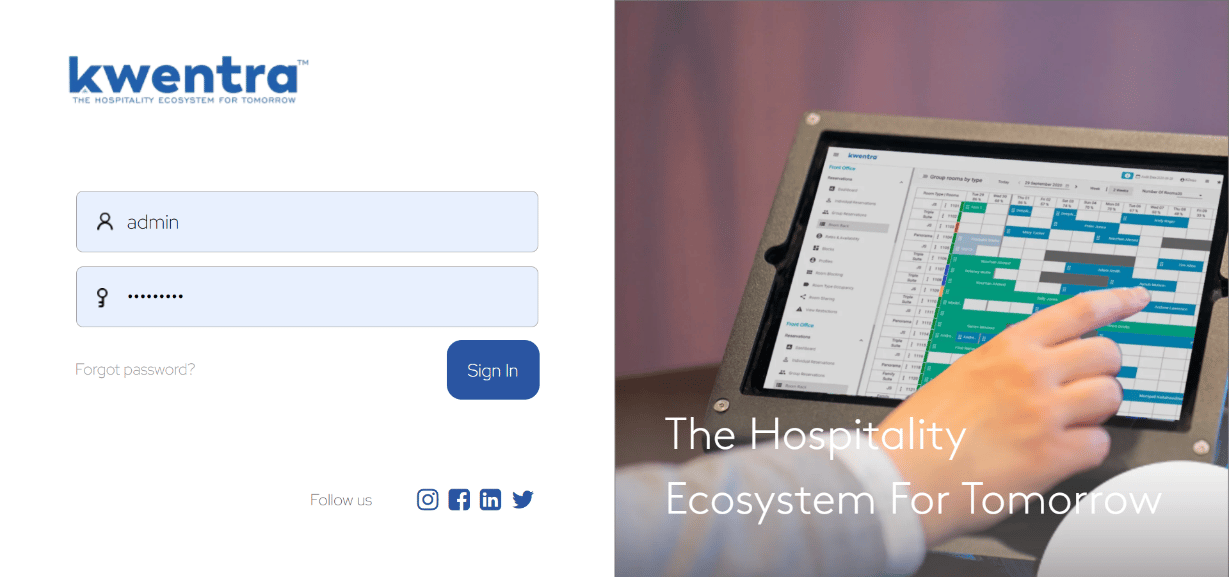
## kwentra Login Page
New Update: kwentra Login Page is finally here, you can use it now to login to your kwentra system.
[Click here to login to kwentra Ecosystem.](https://manage.kwentra.com/account/login/)
 ## Room Rack Occupancy Decimal Points
New Update: rather than rounding up the occupancy percentage on room rack, you can now see the exact occupancy percentage displaying two decimal places.
**[Front Office → Room Rack](https://test.kwentra.com/frontoffice/#/roomrack)**
[Read more](/front-office/new-front-office-navigation-menu/room-rack)
## Received Orders & Received Items Report Update
Report Update: a new approach to group the Received Items and Received Orders report by **Item Group** to be able to view the quantities you receive per item group in a selected date range.
[Read more](/back-office/bo-reports/received-items-report)
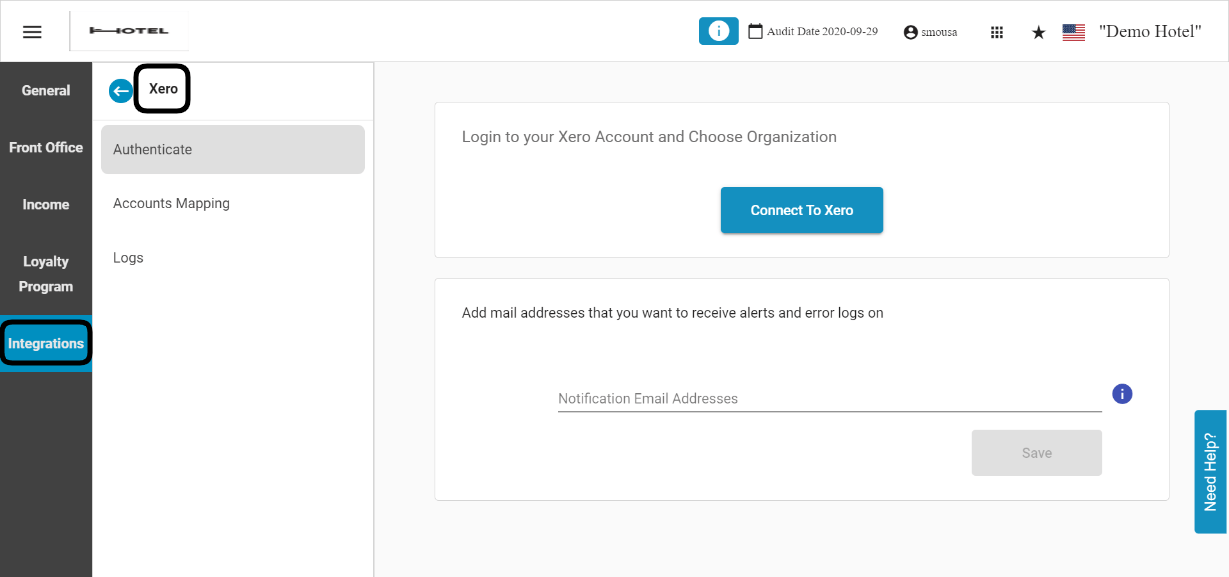
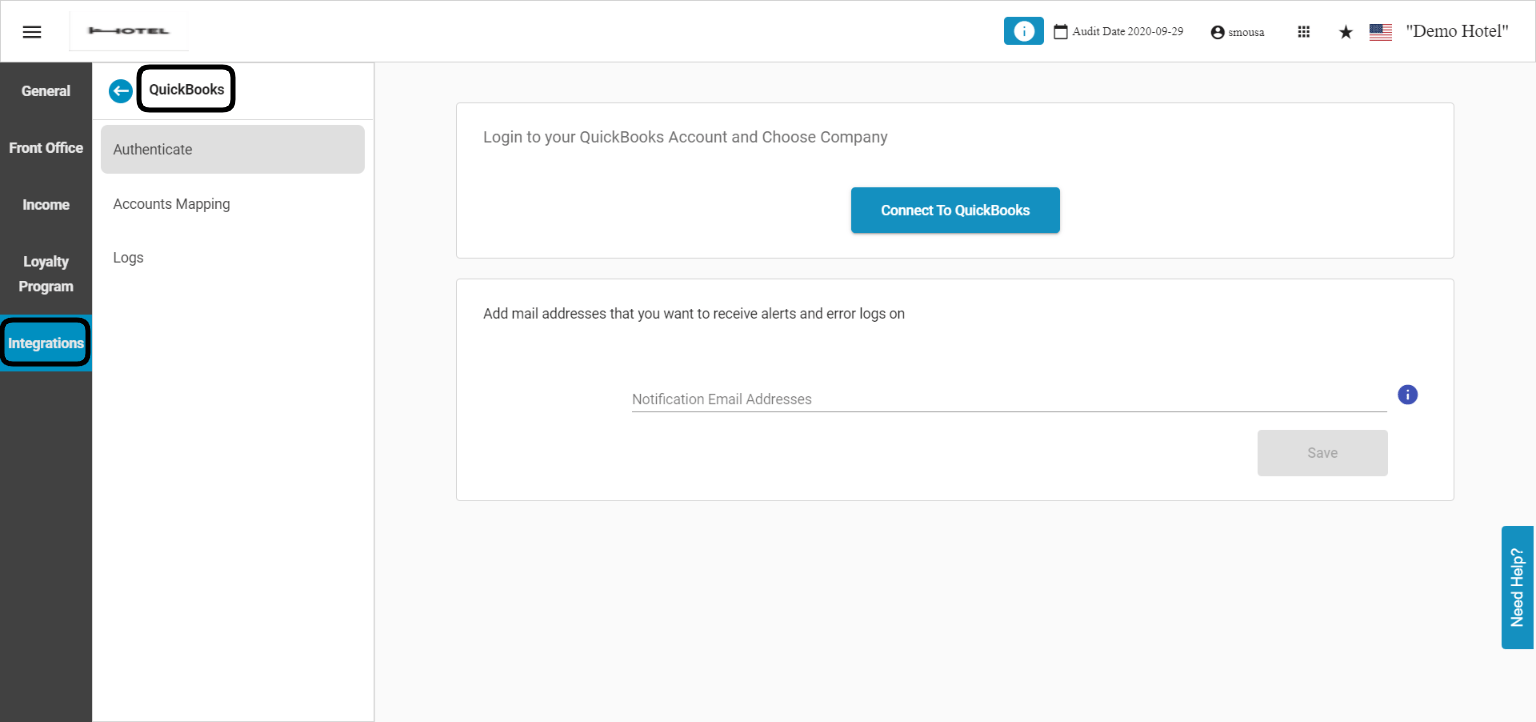
## Add Financial Integrations to Front Office Settings
New Update: Xero and Quickbooks are now available in the new front office settings to be easily managed from there.
**[Front Office → Settings Gear Sign → Integrations → Xero](https://manage.kwentra.com/settings/#/xero/login)**
## Room Rack Occupancy Decimal Points
New Update: rather than rounding up the occupancy percentage on room rack, you can now see the exact occupancy percentage displaying two decimal places.
**[Front Office → Room Rack](https://test.kwentra.com/frontoffice/#/roomrack)**
[Read more](/front-office/new-front-office-navigation-menu/room-rack)
## Received Orders & Received Items Report Update
Report Update: a new approach to group the Received Items and Received Orders report by **Item Group** to be able to view the quantities you receive per item group in a selected date range.
[Read more](/back-office/bo-reports/received-items-report)
## Add Financial Integrations to Front Office Settings
New Update: Xero and Quickbooks are now available in the new front office settings to be easily managed from there.
**[Front Office → Settings Gear Sign → Integrations → Xero](https://manage.kwentra.com/settings/#/xero/login)**
 **[Front Office → Settings Gear Sign → Integrations → QuickBooks](https://manage.kwentra.com/settings/#/quickbooks/login)**
 ## Group Reservations New ID Field
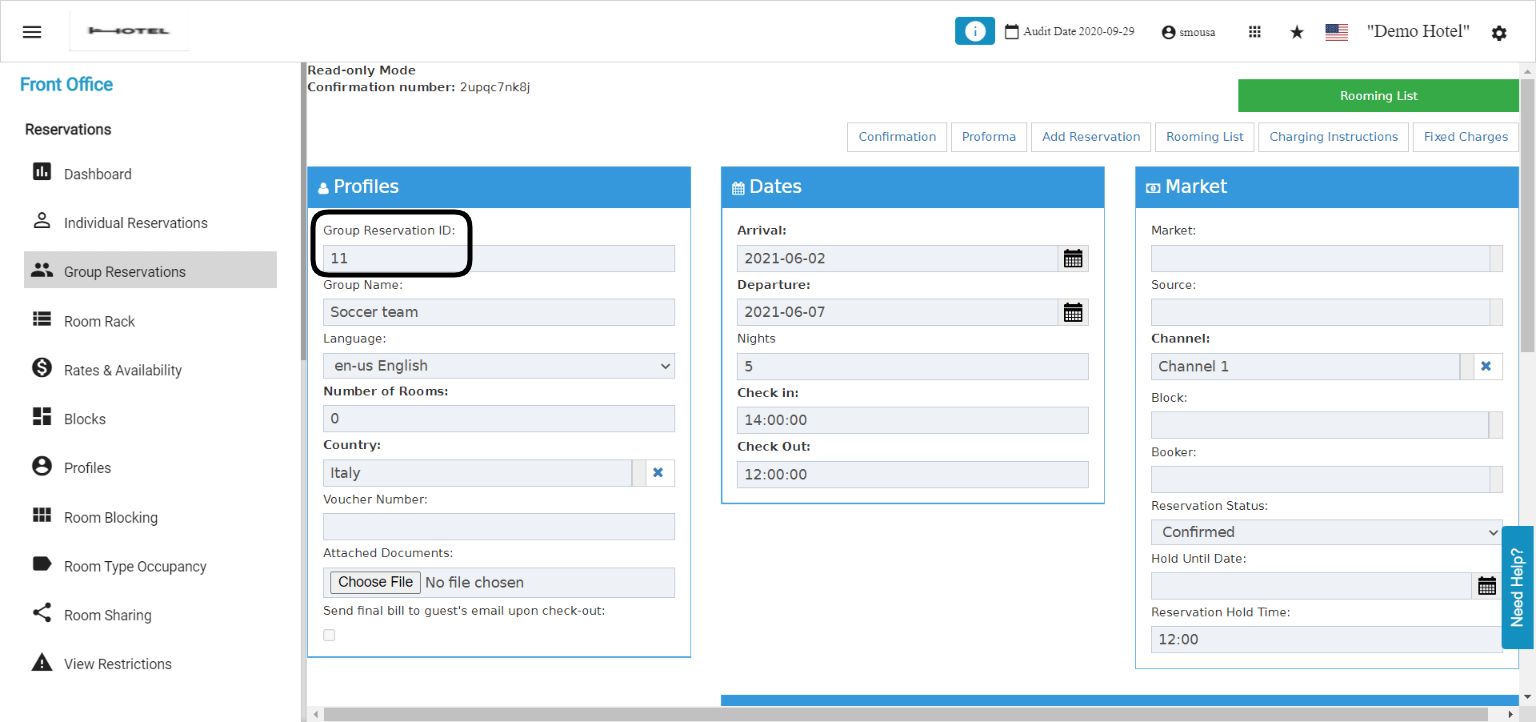
New Update: just like the individual reservations, the group reservations now have their unique ID to make it easier for search and tracking.
**[Front Office → Group Reservations → Select a Group](https://manage.kwentra.com/frontoffice/#/groupreservation)**
## Group Reservations New ID Field
New Update: just like the individual reservations, the group reservations now have their unique ID to make it easier for search and tracking.
**[Front Office → Group Reservations → Select a Group](https://manage.kwentra.com/frontoffice/#/groupreservation)**
 ## Reservation Notes presence on the billing screen during check out
New Update: All reservation notes can now be viewed on the billing screen to make it easier to check and serve the guest according to previously added notes by staff.
[Read more](/front-office/reservations/individual-reservations/how-do-i-add-notes-on-a-reservation)
## Your support is much closer now
New Support Mechanism: with the new help button you can access multiple material or contact your support directly from inside the platform.
The support button is available on all system screens to help you reach your information faster, you get to access different material through 3 different options:
* **Our Knowledge base:**
By clicking on the **Need Help? Button** the first option is our knwoledge base that is rich with articles and tutorials to answer you day to day inquiries without getting in touch with anyone.
* **Our Guided Walkthroughs:**
By clicking on the second option **Guided Walkthroughs,** a checklist for all the system needed tutorials to help you gain more knowledge or train your new staff on the platform.
These guided tours work on-screen to help you understand how the platform works.
* **Our Support Ticketing Portal:**
To easily contact support you can simply choose the 3rd option **Contact Support** which will open our direct portal to report bugs, request features or training refreshers.
## New Online Booking Reference Link for Hotel Terms & Conditions
New Update: a new reference link is added to the online booking widget to communicate to your website users your internal hotel terms and conditions for more transparent relationship with your guests.
## Cashier & Order Printers Notification Error
New Update: whenever you encounter a printing error, whether its your order printer or cashier printer, the system will promptly notify you with the error message to work on it.
[Read more](/point-of-sale/cashiering/order-and-cashier-printers-error-messages-notification)
## Menu Item Configuration Update
New Update: changes to the menu item configuration user's interface in order to configure menu items in an easier way.
[Read more](/point-of-sale/point-of-sale-settings/menu-item-configuration)
## Back Office Reports to have separate columns for item numbers and descriptions
Reports Update: the below reports are now updated to have 2 separate columns for the item numbers and description rather than having them under 1 column, you can now view the item numbers and descriptions separatly.
2. Received Items
3. Receiving Orders
4. Return Requests
5. Stock Usage
6. Store Closing
7. Store Stock Audit
8. Store Transfers
9. Store Usage/Transfers
## Housekeeping State Indicator
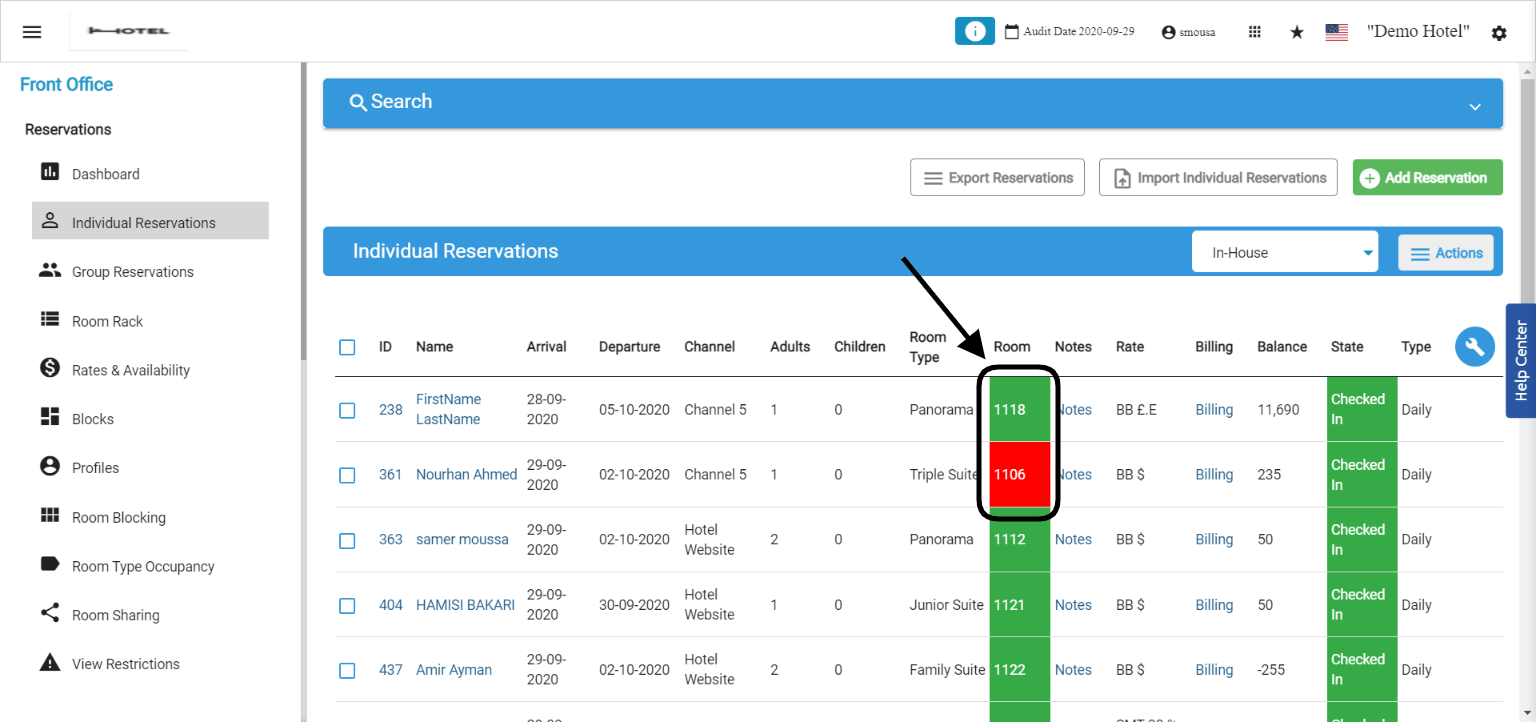
New Feature: Our Front Office Reservation List Screen now shows the housekeeping status of the rooms whether the room is dirty or clean.
**[Front Office → Individual Reservations](https://manage.kwentra.com/frontoffice/#/individualreservation)**
## Reservation Notes presence on the billing screen during check out
New Update: All reservation notes can now be viewed on the billing screen to make it easier to check and serve the guest according to previously added notes by staff.
[Read more](/front-office/reservations/individual-reservations/how-do-i-add-notes-on-a-reservation)
## Your support is much closer now
New Support Mechanism: with the new help button you can access multiple material or contact your support directly from inside the platform.
The support button is available on all system screens to help you reach your information faster, you get to access different material through 3 different options:
* **Our Knowledge base:**
By clicking on the **Need Help? Button** the first option is our knwoledge base that is rich with articles and tutorials to answer you day to day inquiries without getting in touch with anyone.
* **Our Guided Walkthroughs:**
By clicking on the second option **Guided Walkthroughs,** a checklist for all the system needed tutorials to help you gain more knowledge or train your new staff on the platform.
These guided tours work on-screen to help you understand how the platform works.
* **Our Support Ticketing Portal:**
To easily contact support you can simply choose the 3rd option **Contact Support** which will open our direct portal to report bugs, request features or training refreshers.
## New Online Booking Reference Link for Hotel Terms & Conditions
New Update: a new reference link is added to the online booking widget to communicate to your website users your internal hotel terms and conditions for more transparent relationship with your guests.
## Cashier & Order Printers Notification Error
New Update: whenever you encounter a printing error, whether its your order printer or cashier printer, the system will promptly notify you with the error message to work on it.
[Read more](/point-of-sale/cashiering/order-and-cashier-printers-error-messages-notification)
## Menu Item Configuration Update
New Update: changes to the menu item configuration user's interface in order to configure menu items in an easier way.
[Read more](/point-of-sale/point-of-sale-settings/menu-item-configuration)
## Back Office Reports to have separate columns for item numbers and descriptions
Reports Update: the below reports are now updated to have 2 separate columns for the item numbers and description rather than having them under 1 column, you can now view the item numbers and descriptions separatly.
2. Received Items
3. Receiving Orders
4. Return Requests
5. Stock Usage
6. Store Closing
7. Store Stock Audit
8. Store Transfers
9. Store Usage/Transfers
## Housekeeping State Indicator
New Feature: Our Front Office Reservation List Screen now shows the housekeeping status of the rooms whether the room is dirty or clean.
**[Front Office → Individual Reservations](https://manage.kwentra.com/frontoffice/#/individualreservation)**
 ## Internal Notes update on operational reports
Reports Update: all internal notes added on reservations are now available for view on the Expected Arrival Report and the Guest Inhouse Report.
## Room Rack Date Row Freeze
New Update: when scrolling up and down in our room rack the date row will freeze to know which date exactly you are creating/viewing the reservations on.
[Read more](/front-office/new-front-office-navigation-menu/room-rack)
## View Notes from Reservation List Screen
New Feature: all reservation notes whether added manually or coming along the reservation from your OTA or direct website are viewable from the reservation list screen.
[Read more](/front-office/reservations/individual-reservations/how-do-i-add-notes-on-a-reservation)
## Store Sales Invoices update with number of guests/covers
Report Update: the store sales invoices report now returns the number of guests/covers added on any POS Invoice.
## Clickable Reservation ID Upon Saving New Reservations
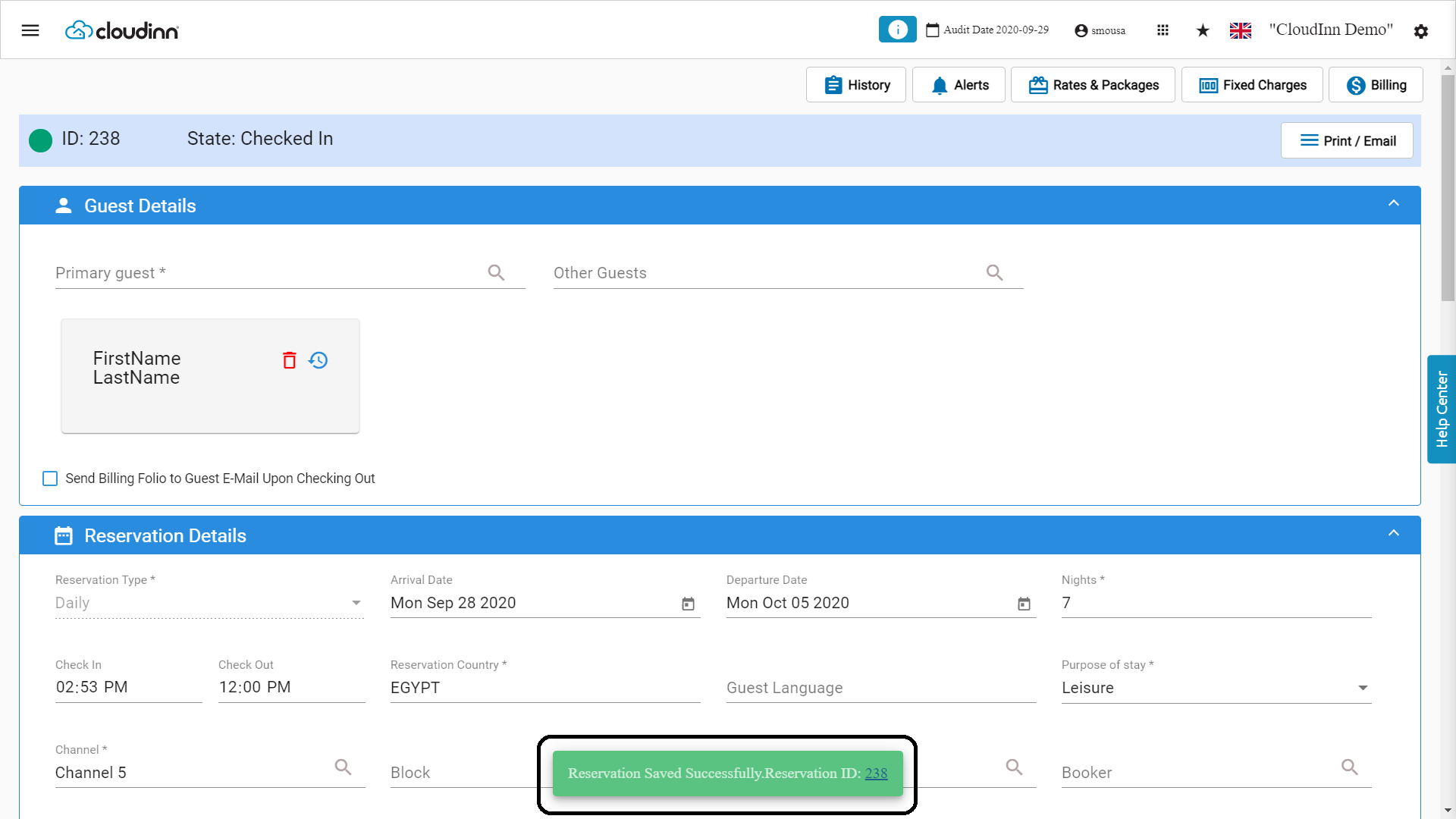
New Update: the reservation ID appears in the green pop-up once you save any new reservation, clicking on the Reservation ID will open the reservation for you to view.
## Internal Notes update on operational reports
Reports Update: all internal notes added on reservations are now available for view on the Expected Arrival Report and the Guest Inhouse Report.
## Room Rack Date Row Freeze
New Update: when scrolling up and down in our room rack the date row will freeze to know which date exactly you are creating/viewing the reservations on.
[Read more](/front-office/new-front-office-navigation-menu/room-rack)
## View Notes from Reservation List Screen
New Feature: all reservation notes whether added manually or coming along the reservation from your OTA or direct website are viewable from the reservation list screen.
[Read more](/front-office/reservations/individual-reservations/how-do-i-add-notes-on-a-reservation)
## Store Sales Invoices update with number of guests/covers
Report Update: the store sales invoices report now returns the number of guests/covers added on any POS Invoice.
## Clickable Reservation ID Upon Saving New Reservations
New Update: the reservation ID appears in the green pop-up once you save any new reservation, clicking on the Reservation ID will open the reservation for you to view.
 ## Export Guest Profiles for GDPR Compliant Systems
New Feature: export your guest profile to include all their details and their previous reservation history.
[Read more](/front-office/new-front-office-navigation-menu/guest-profiles)
## Housekeeping All Rooms Report Update
New Update: the reservation status column in the housekeeping all rooms report shows the actual reservation status of the room in comparison to the report date and system's audit date.
[Read more](/front-office/reports/housekeeping-reports/housekeeping-all-rooms-report)
## Housekeeping Task List Report Update
New Update: added the **Detailed & Summarized Feature** when generating the report to control the data exported.
[Read more](/front-office/reports/housekeeping-reports/housekeeping-task-list-report)
## New Front Office Dashboard
New Update: Our dashboard has changed to have a better layout and counting the number of arrival, departure and in-house rooms and guests in a more "easy on the eye" design, check it out below:
[Read more](/front-office/reservations/dashboard/new-front-office-dashboard)
## New Guided Walkthroughs For Self Learning
**New Guided System Walkthroughs:**
Now available on our platform, an icon on the top right of all of the screens that include help tutorials for front office and how to apply certain tasks, you can check them to refresh and increase your knowledge about how our system works.
## Transfer Charges to Expected Reservations
New Update: you can utilize to transfer charges to expected reservations.
## Automatic Room Assignment Updates
New Feature: you can now control which Housekeeping States to be selected for the automatic room assignment when you create new reservations from Front Office or for reservations coming directly from your website "Online Booking".
## New Front Office Settings Screen
New Feature: we are proudly announcing the new settings screen that you can access from our new front office, the new settings screen is more organized and simple to use.
[Read more](/front-office/front-office-settings/front-office-new-settings-screens)
## Online Booking URL
New Feature: Your Online Booking Search Engine is now customizable to a link so you can add it to any button on your website.
*Please contact [support@kwentra.com](mailto:support@kwentra.com) in order to apply this new feature to your website.*
[Read more](/online-booking/online-booking-url-customization)
## Accounts Receivable Guest Name Filter
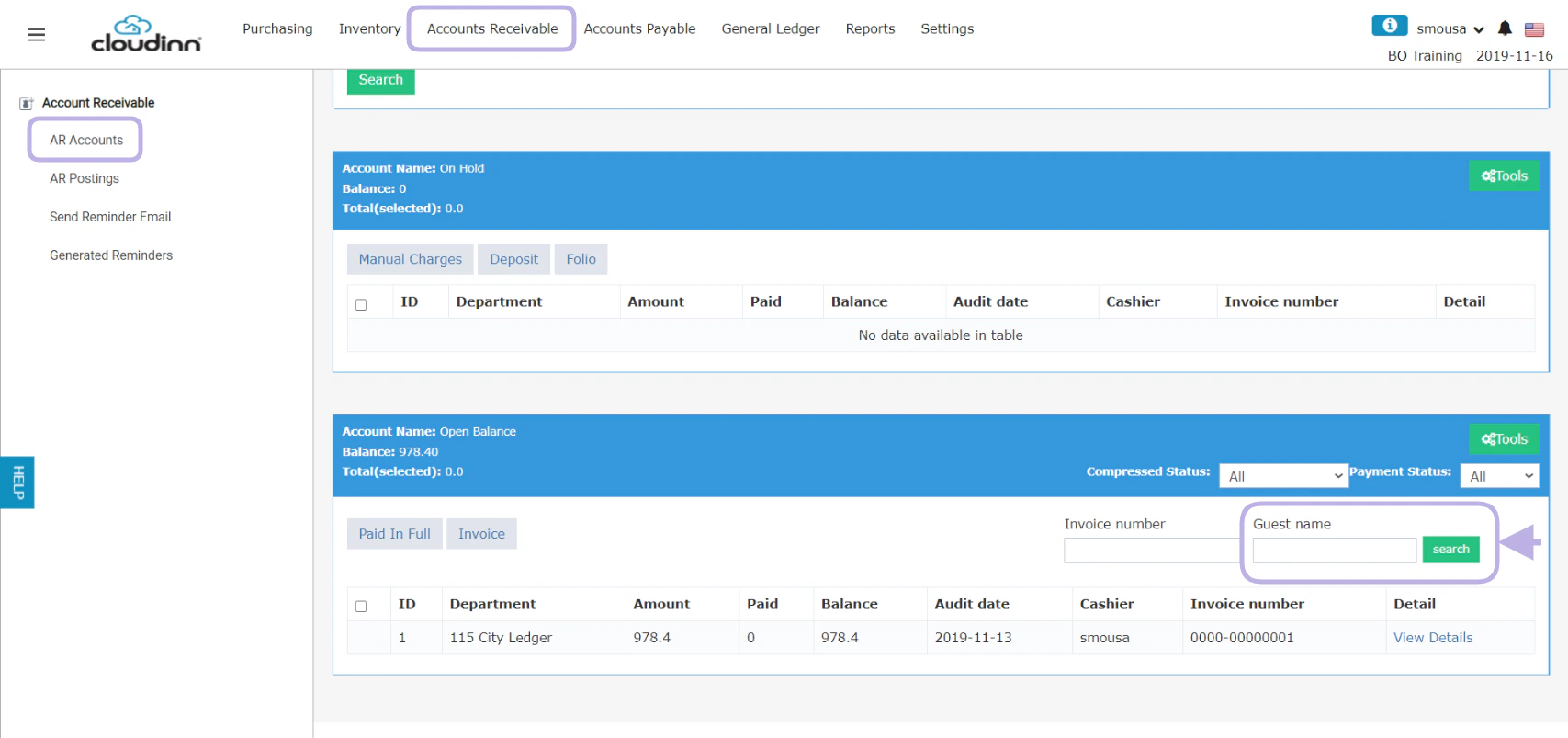
New Feature: Refine your search within the Accounts Receivable Invoices using the main guest's name on the reservation.
**Backoffice → Accounts Receivable → AR Accounts → Selected AR Account → Open Balance Window**
## Export Guest Profiles for GDPR Compliant Systems
New Feature: export your guest profile to include all their details and their previous reservation history.
[Read more](/front-office/new-front-office-navigation-menu/guest-profiles)
## Housekeeping All Rooms Report Update
New Update: the reservation status column in the housekeeping all rooms report shows the actual reservation status of the room in comparison to the report date and system's audit date.
[Read more](/front-office/reports/housekeeping-reports/housekeeping-all-rooms-report)
## Housekeeping Task List Report Update
New Update: added the **Detailed & Summarized Feature** when generating the report to control the data exported.
[Read more](/front-office/reports/housekeeping-reports/housekeeping-task-list-report)
## New Front Office Dashboard
New Update: Our dashboard has changed to have a better layout and counting the number of arrival, departure and in-house rooms and guests in a more "easy on the eye" design, check it out below:
[Read more](/front-office/reservations/dashboard/new-front-office-dashboard)
## New Guided Walkthroughs For Self Learning
**New Guided System Walkthroughs:**
Now available on our platform, an icon on the top right of all of the screens that include help tutorials for front office and how to apply certain tasks, you can check them to refresh and increase your knowledge about how our system works.
## Transfer Charges to Expected Reservations
New Update: you can utilize to transfer charges to expected reservations.
## Automatic Room Assignment Updates
New Feature: you can now control which Housekeeping States to be selected for the automatic room assignment when you create new reservations from Front Office or for reservations coming directly from your website "Online Booking".
## New Front Office Settings Screen
New Feature: we are proudly announcing the new settings screen that you can access from our new front office, the new settings screen is more organized and simple to use.
[Read more](/front-office/front-office-settings/front-office-new-settings-screens)
## Online Booking URL
New Feature: Your Online Booking Search Engine is now customizable to a link so you can add it to any button on your website.
*Please contact [support@kwentra.com](mailto:support@kwentra.com) in order to apply this new feature to your website.*
[Read more](/online-booking/online-booking-url-customization)
## Accounts Receivable Guest Name Filter
New Feature: Refine your search within the Accounts Receivable Invoices using the main guest's name on the reservation.
**Backoffice → Accounts Receivable → AR Accounts → Selected AR Account → Open Balance Window**
 ## Add-On Packages Sales Report
New Report: now you have a special report designed to show add-on packages sold in the past or in the future.
[Read more](/front-office/reports/income-reports/add-on-packages-sales-report)
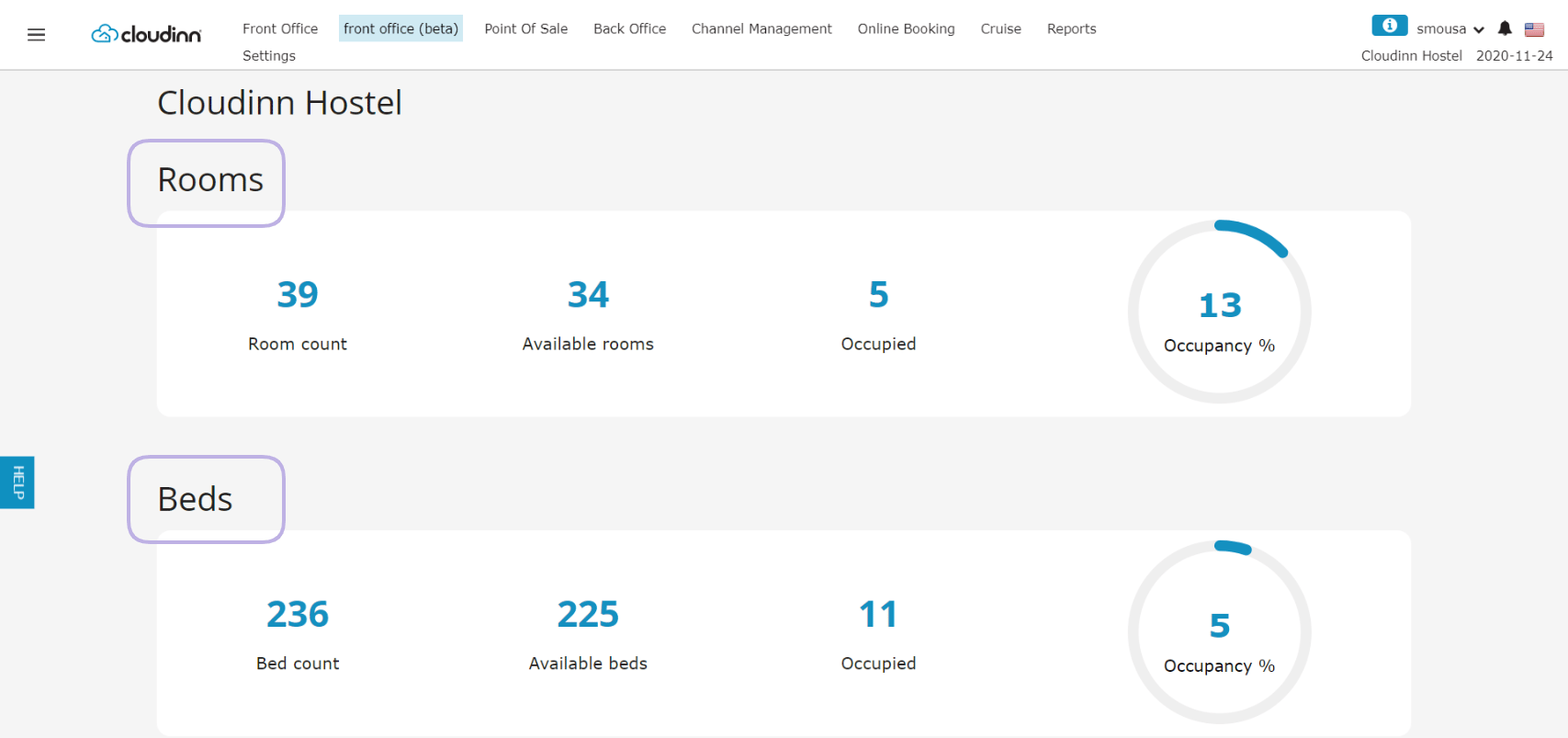
## Dashboard Counter for Rooms & Beds
New Update: the landing page after login now properly displays units based on their type whether it's beds or rooms.
## Add-On Packages Sales Report
New Report: now you have a special report designed to show add-on packages sold in the past or in the future.
[Read more](/front-office/reports/income-reports/add-on-packages-sales-report)
## Dashboard Counter for Rooms & Beds
New Update: the landing page after login now properly displays units based on their type whether it's beds or rooms.
 ## Housekeeping Task List Report
Report Update: Task list report now shows when exactly the task was received alongside the current reservation and room status.
[Read more](/front-office/reports/housekeeping-reports/housekeeping-task-list-report)
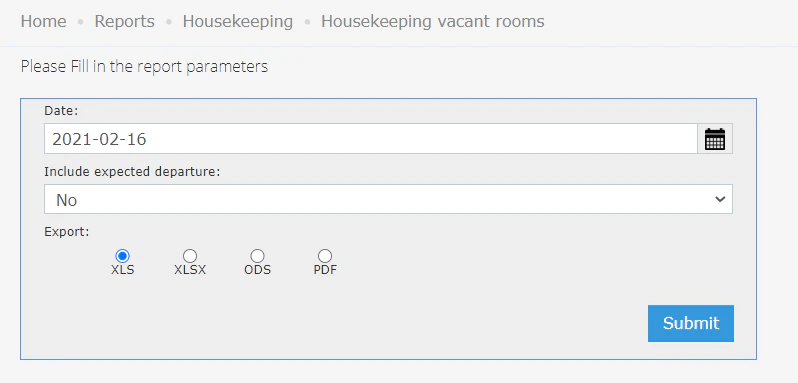
## Housekeeping Vacant Rooms Report
Report Update: running the HK vacant rooms report can include or exclude the expected departure.
**Reports → Housekeeping → Housekeeping Vacant Rooms**
## Housekeeping Task List Report
Report Update: Task list report now shows when exactly the task was received alongside the current reservation and room status.
[Read more](/front-office/reports/housekeeping-reports/housekeeping-task-list-report)
## Housekeeping Vacant Rooms Report
Report Update: running the HK vacant rooms report can include or exclude the expected departure.
**Reports → Housekeeping → Housekeeping Vacant Rooms**
 [Read more](/front-office/reports/housekeeping-reports/housekeeping-all-rooms-report)
## Include Guest Signatures on Printed Invoices
New Update: Guest signature space on printed out invoices is now available from Front Office Settings.
## Room Types Custom Tags
New Feature: Room types have the option to add custom tags to it to be able to search for them easier.
[Read more](/front-office/front-office-settings/front-office/custom-tags-for-room-types)
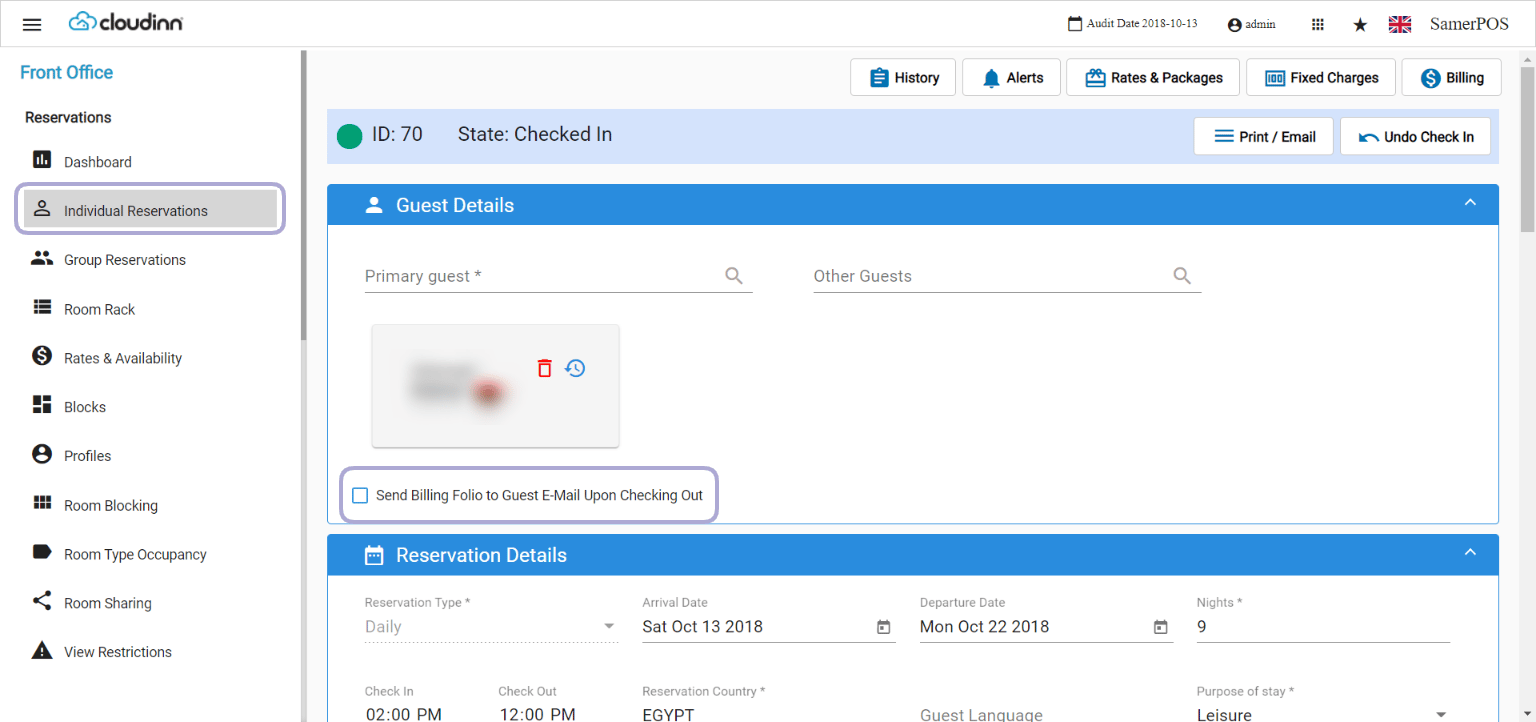
## Automatic Bill Sending upon Check-out
New Feature: Bill Generation and Sending to guests now simply happens by checking the box on the reservation. With this feature the final bill will get generated and sent automatically upon clicking check-out on the reservation.
**Front Office**→ **Individual Reservations → Add/Open a reservation**
[Read more](/front-office/reports/housekeeping-reports/housekeeping-all-rooms-report)
## Include Guest Signatures on Printed Invoices
New Update: Guest signature space on printed out invoices is now available from Front Office Settings.
## Room Types Custom Tags
New Feature: Room types have the option to add custom tags to it to be able to search for them easier.
[Read more](/front-office/front-office-settings/front-office/custom-tags-for-room-types)
## Automatic Bill Sending upon Check-out
New Feature: Bill Generation and Sending to guests now simply happens by checking the box on the reservation. With this feature the final bill will get generated and sent automatically upon clicking check-out on the reservation.
**Front Office**→ **Individual Reservations → Add/Open a reservation**
 ## Deposit Ledger Report
New Report: Deposit Ledger Report helps you see payments/deposits paid by Expected Arrival reservations.
[Read more](/front-office/reports/front-desk-reports/deposit-ledger-report)
## Journal of VAT report
New Report: Journal of VAT report helps you see the transactions that had taxes apply to it within a certain period.
[Read more](/front-office/reports/income-reports/journal-of-vat-report)
## AR Aging Invoice Due Date Report Update
Report Update: AR Aging Invoice Due Date Report now returns the total of all aged invoices along with the total open balances and grant total for all invoices per account.
[Read more](/back-office/accounts-receivable/invoice-due-date-for-ar-accounts)
## Purchase Order Printout Update
New Update: you can now control which items to be printed when printing your New Purchase Orders.
[Read more](/back-office/purchasing/purchase-order-printout)
## Receiving Order Printout Update
New Update: When printing any receiving order now you will get to see the Purchase Order Number presented on the printout.
**Back Office → Purchasing → Receiving Orders → selected receiving order → Print**
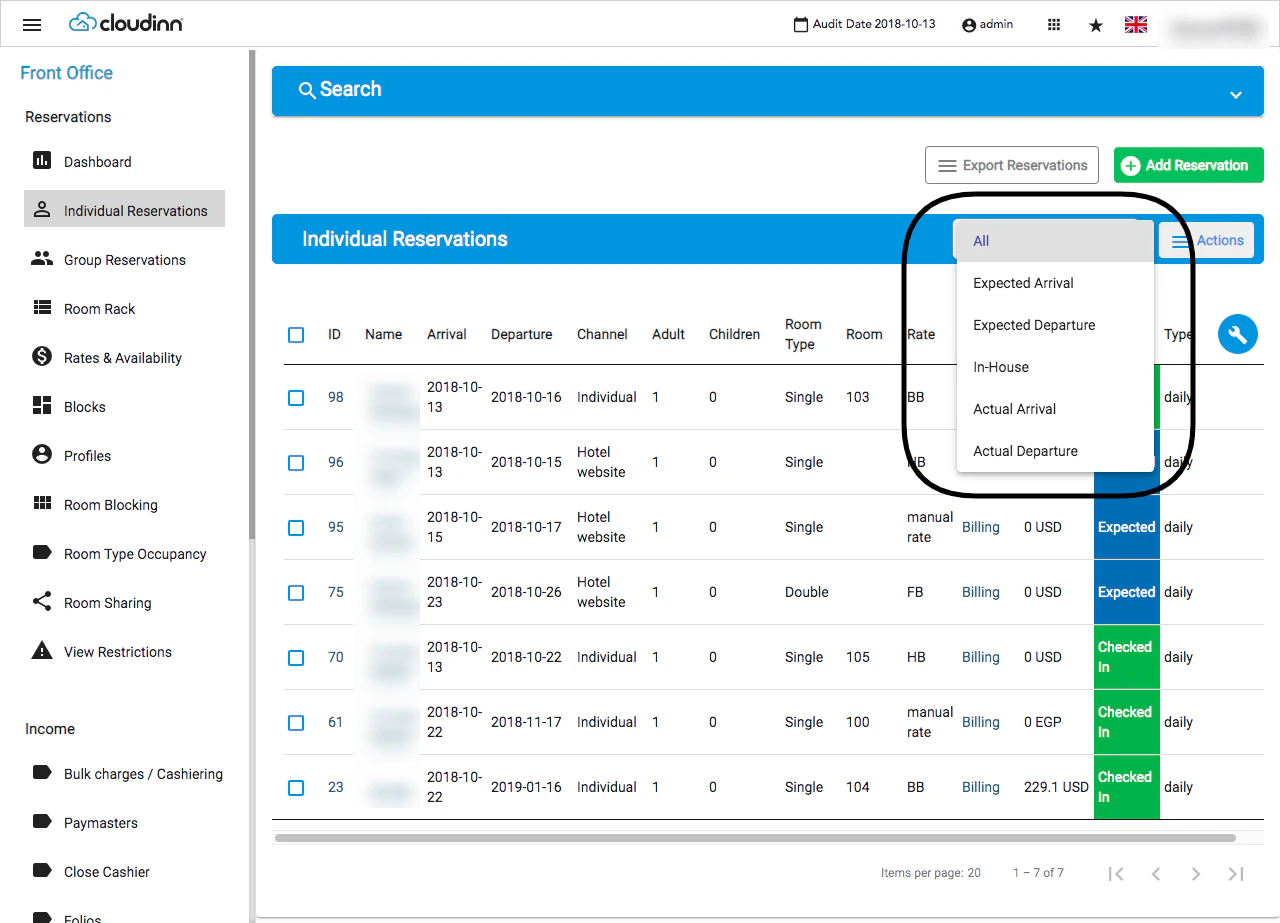
## Daily Operations Filter
New Update: your day to day operational filters to your reservations are now easily accessible once you go to the reservations list.
**Front Office (Beta) → Individual Reservations**
## Deposit Ledger Report
New Report: Deposit Ledger Report helps you see payments/deposits paid by Expected Arrival reservations.
[Read more](/front-office/reports/front-desk-reports/deposit-ledger-report)
## Journal of VAT report
New Report: Journal of VAT report helps you see the transactions that had taxes apply to it within a certain period.
[Read more](/front-office/reports/income-reports/journal-of-vat-report)
## AR Aging Invoice Due Date Report Update
Report Update: AR Aging Invoice Due Date Report now returns the total of all aged invoices along with the total open balances and grant total for all invoices per account.
[Read more](/back-office/accounts-receivable/invoice-due-date-for-ar-accounts)
## Purchase Order Printout Update
New Update: you can now control which items to be printed when printing your New Purchase Orders.
[Read more](/back-office/purchasing/purchase-order-printout)
## Receiving Order Printout Update
New Update: When printing any receiving order now you will get to see the Purchase Order Number presented on the printout.
**Back Office → Purchasing → Receiving Orders → selected receiving order → Print**
## Daily Operations Filter
New Update: your day to day operational filters to your reservations are now easily accessible once you go to the reservations list.
**Front Office (Beta) → Individual Reservations**
 ## Journal by Department Report Update
Report Update: Journal by Department is now generated by room number to see billing postings on room level.
**Reports → FO → Income → Journal By Department Report**
[Read more](/front-office/reports/income-reports/journal-by-department-report)
## Payment Report Update
Report Update: Payment Report now shows a comparison between current and last year payments.
[Read more](/front-office/reports/income-reports/payment-report)
## Revenue Report Update
Report Update: Revenue Report now shows a comparison between current and last year revenue.
[Read more](/front-office/reports/income-reports/revenue-report)
## Tender Rounding Feature for Front Office and POS
New update: all extra or short cents in cash invoices settlement "FO/POS" can now be channeled correctly into its correct department for tracking and reporting.
[Read more](/front-office/front-office-settings/income/tender-rounding-feature-for-front-office-and-pos)
## Return to Supplier New Feature
New Feature: Returning items to your supplier for any reason would now happen easily using the new **Return Request** Feature from Back Office.
[Read more](/back-office/purchasing/return-items-to-supplier)
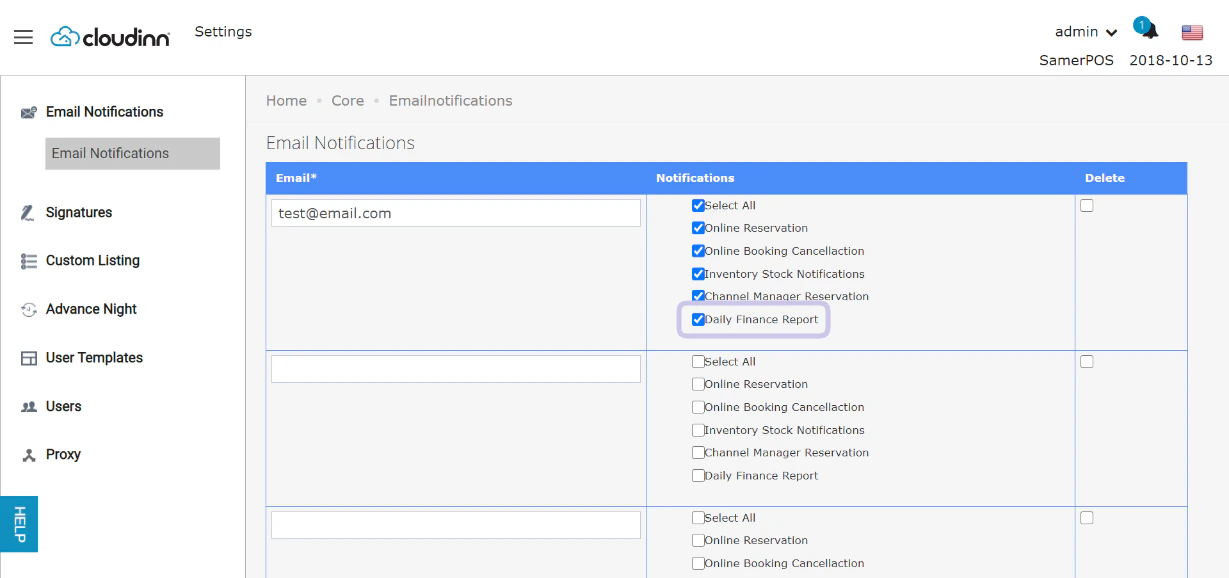
## Automated Daily Finance Report
New Report: Now you can receive an Automated Finance Report after the daily that includes Net Income and Tax Breakdown for the Audited Date.
**Settings → Email Notifications**
## Journal by Department Report Update
Report Update: Journal by Department is now generated by room number to see billing postings on room level.
**Reports → FO → Income → Journal By Department Report**
[Read more](/front-office/reports/income-reports/journal-by-department-report)
## Payment Report Update
Report Update: Payment Report now shows a comparison between current and last year payments.
[Read more](/front-office/reports/income-reports/payment-report)
## Revenue Report Update
Report Update: Revenue Report now shows a comparison between current and last year revenue.
[Read more](/front-office/reports/income-reports/revenue-report)
## Tender Rounding Feature for Front Office and POS
New update: all extra or short cents in cash invoices settlement "FO/POS" can now be channeled correctly into its correct department for tracking and reporting.
[Read more](/front-office/front-office-settings/income/tender-rounding-feature-for-front-office-and-pos)
## Return to Supplier New Feature
New Feature: Returning items to your supplier for any reason would now happen easily using the new **Return Request** Feature from Back Office.
[Read more](/back-office/purchasing/return-items-to-supplier)
## Automated Daily Finance Report
New Report: Now you can receive an Automated Finance Report after the daily that includes Net Income and Tax Breakdown for the Audited Date.
**Settings → Email Notifications**
 ## Email Notification for Cancelled on-hold reservations
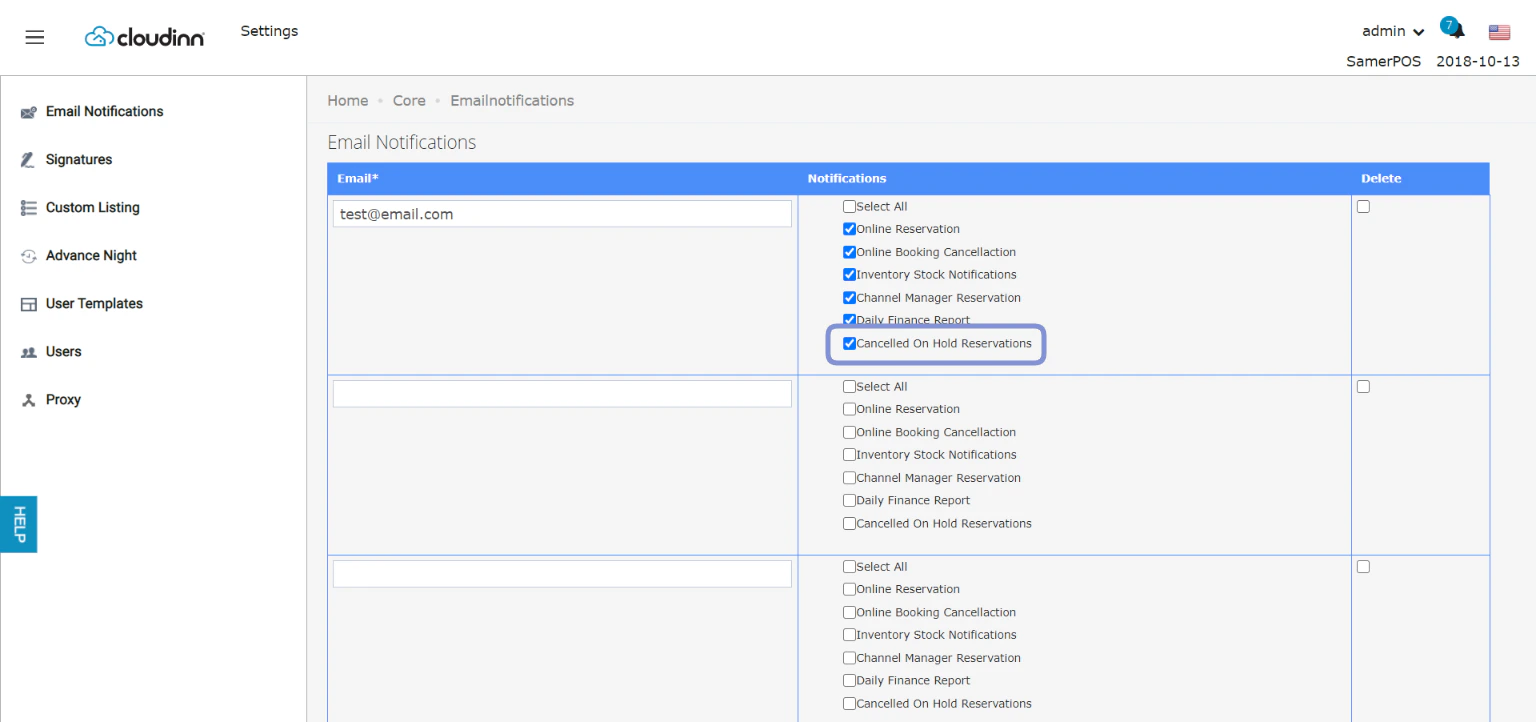
New Notification: Use this toggle when you want to get notified with the auto-cancellation of the reservations you put on hold.
**Settings →** **Email Notifications → Cancelled On Hold Reservations**
## Email Notification for Cancelled on-hold reservations
New Notification: Use this toggle when you want to get notified with the auto-cancellation of the reservations you put on hold.
**Settings →** **Email Notifications → Cancelled On Hold Reservations**
 ## Make Payments on Cancelled/No Show Reservations
New Permission: You can now collect and make payments on the billing screen for reservation states "Cancelled & No Show" to be able to charge your guests accordingly.
**Front Office → Income → Casheiring → Search for Cancelled/No Show → Billing → Tools → Payment**
[Read more](/front-office/reports/front-desk-reports/cancelled-and-no-show-reservations-report)
## New inputs added to hotel policies reference links
New Inputs: now under the reference links there are 2 newly added inputs for **Additional info & Thank you message** for you to update accordingly, *Read more about [Hotel Internal Policy Reference Links.](https://help.kwentra.com/article/show/121559-hotel-internal-policy-reference-links)*
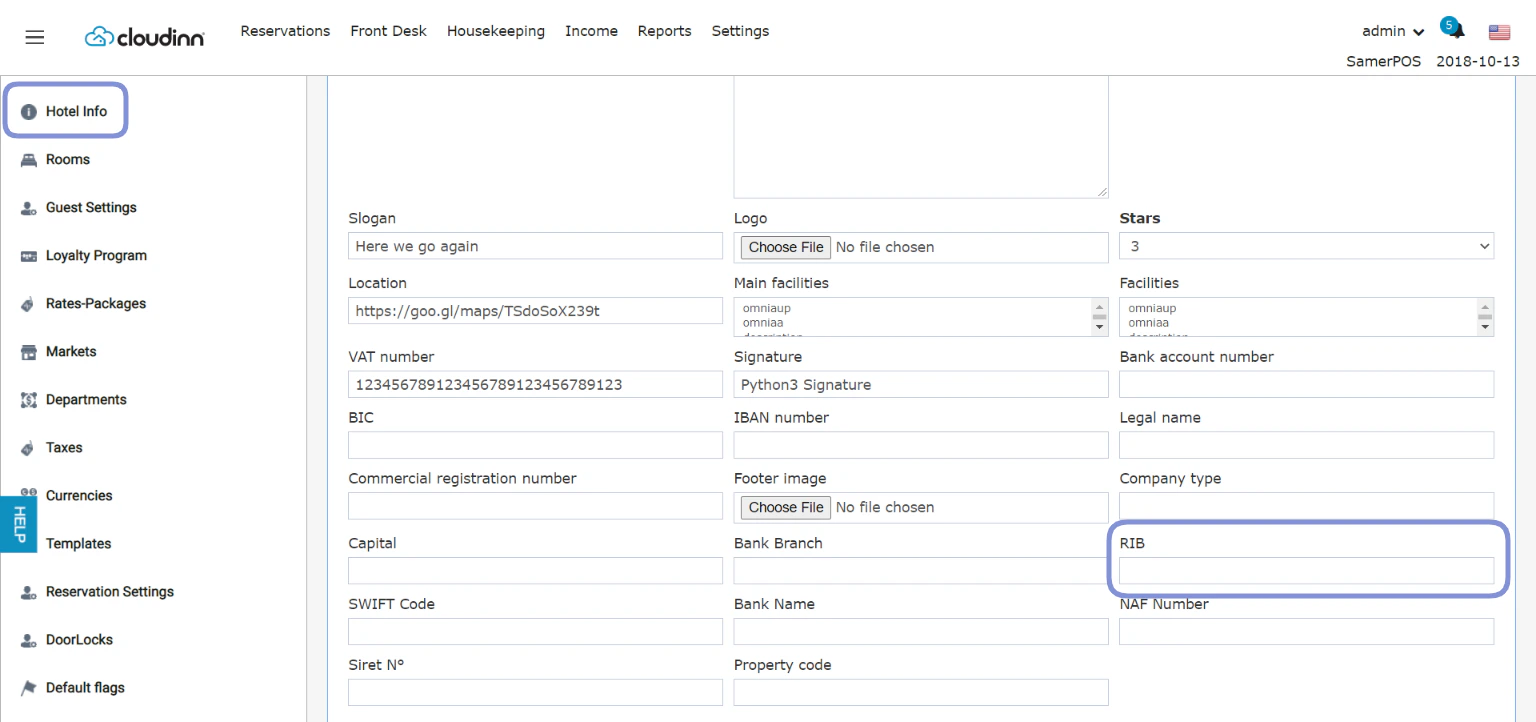
## New RIB field in hotel's info screen
New Field: You can now update your "statement of banking identity number" or your RIB number to your Kwentra hotel information.
**Front office → Settings → hotel info**
## Make Payments on Cancelled/No Show Reservations
New Permission: You can now collect and make payments on the billing screen for reservation states "Cancelled & No Show" to be able to charge your guests accordingly.
**Front Office → Income → Casheiring → Search for Cancelled/No Show → Billing → Tools → Payment**
[Read more](/front-office/reports/front-desk-reports/cancelled-and-no-show-reservations-report)
## New inputs added to hotel policies reference links
New Inputs: now under the reference links there are 2 newly added inputs for **Additional info & Thank you message** for you to update accordingly, *Read more about [Hotel Internal Policy Reference Links.](https://help.kwentra.com/article/show/121559-hotel-internal-policy-reference-links)*
## New RIB field in hotel's info screen
New Field: You can now update your "statement of banking identity number" or your RIB number to your Kwentra hotel information.
**Front office → Settings → hotel info**
 ## Reservations by Unit New report
New Report: you can now see how many nights were reserved on a certain unit during a certain month by simply running the **Reservations by Unit new report.**
[Read more](/front-office/reports/front-desk-reports/reservations-by-unit-report)
## Safe Box New Feature for Petty Cash Payments
New Feature: Now you have a safe box option from your Income sub-module in Front Office to help you manage your finances and purchases easily.
[Read more](/front-office/income/cashiering/safe-box)
## Update Rates from Rates & Availability Screen
New Update: You can now update rates directly from the table presented in the **[Rates & Availability](https://help.kwentra.com/article/show/100256-rates-availability) Screen.**
[Read more](/front-office/reservations/rates-availability/update-rates-from-rates-availability-screen)
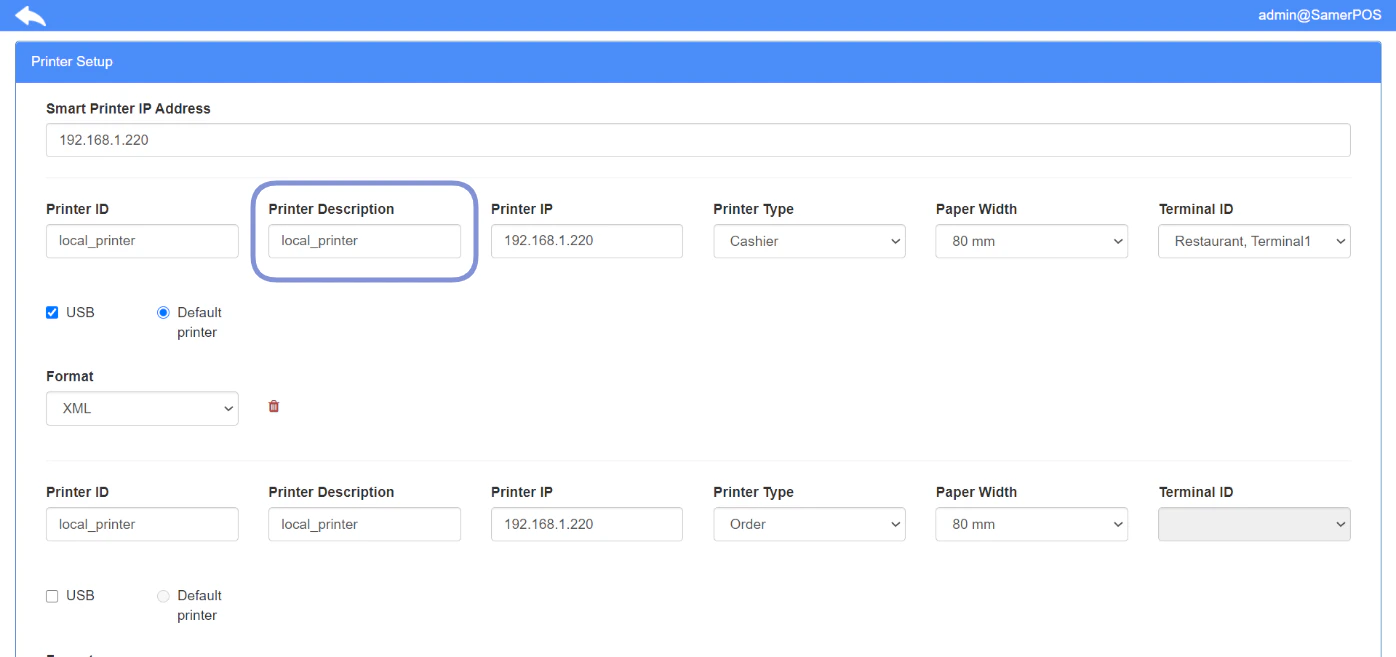
## Printer Description Field for USB printers
New Field: You can now define a printer description for your printers to be able to differenciate them rather than using the code.
**Point of Sale → Settings → Printing Setup**
## Reservations by Unit New report
New Report: you can now see how many nights were reserved on a certain unit during a certain month by simply running the **Reservations by Unit new report.**
[Read more](/front-office/reports/front-desk-reports/reservations-by-unit-report)
## Safe Box New Feature for Petty Cash Payments
New Feature: Now you have a safe box option from your Income sub-module in Front Office to help you manage your finances and purchases easily.
[Read more](/front-office/income/cashiering/safe-box)
## Update Rates from Rates & Availability Screen
New Update: You can now update rates directly from the table presented in the **[Rates & Availability](https://help.kwentra.com/article/show/100256-rates-availability) Screen.**
[Read more](/front-office/reservations/rates-availability/update-rates-from-rates-availability-screen)
## Printer Description Field for USB printers
New Field: You can now define a printer description for your printers to be able to differenciate them rather than using the code.
**Point of Sale → Settings → Printing Setup**