Documentation Index

Fetch the complete documentation index at: https://help.kwentra.com/llms.txt

Use this file to discover all available pages before exploring further.

Apply Room Restriction for a certain Channel:

I.E apply a restriction on a channel “Expedia”
  1. Channel Management
  2. Expedia
  3. Bulk Restrictions
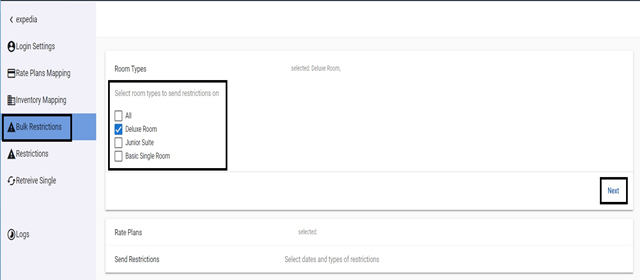
We would be directed to the below page in which we would start with the room type we want to apply restriction on.
  1. Select the room type then click Next.
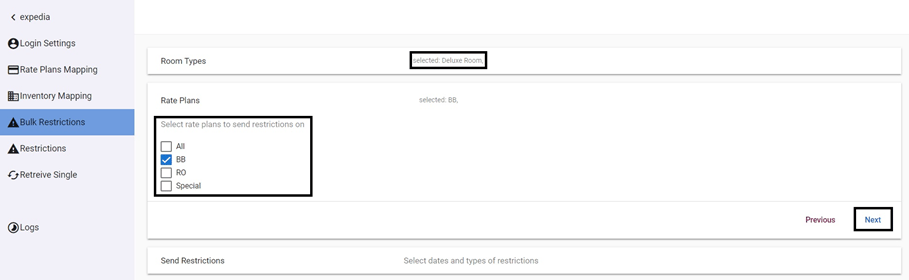
Now we can see the Room Type selected while selecting which Rates to send restrictions on.
  1. Select the Rate then click Next.
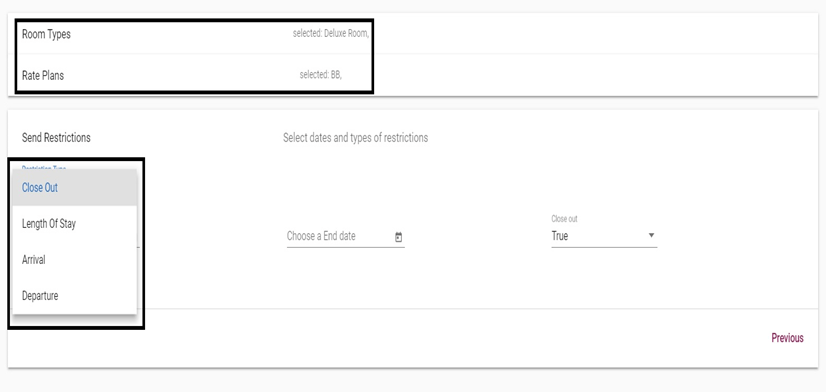
Now we have selected the room type and rate we want to send restriction on, all we need to do now is to select what type of restriction we would like to send.
Restriction Types:
  • Closed Out: used when we want to block any reservations to take place for this specific room type & rate for a period between two dates.
  • Length of Stay: used when we would like to restrict reservations to have specific number of nights for a period between two dates.
  • Arrival & Departure: used when we want to prevent new reservations from arriving or departing on certain dates.
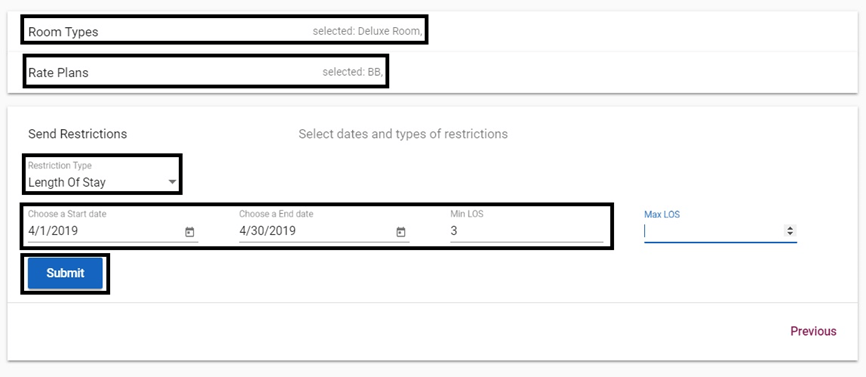
In this scenario, we would be sending a restriction for the Deluxe Room, BB Rate with the restriction of Minimum Length of Stay 3 Nights, between 1st of April 2019 and 30th of April 2019. Click Submit to send restriction.