
Documentation Index

Fetch the complete documentation index at: https://help.kwentra.com/llms.txt

Use this file to discover all available pages before exploring further.

The Occupancy screen now includes a Forecast tab, showing projected occupancy by month across a selectable range — alongside the existing Actual tab. Business Value
  • View occupancy forecasts up to 12 months ahead — plan capacity before arrivals happen.
  • Compare past actuals, current-month mixed data, and future forecasts in one screen.
  • Adjust the month range anytime to focus on the planning window that matters.
  • Multi-property view — one column per hotel per month, with a totals row.
  • Available on web and mobile — accessible anywhere.
Use Cases
  • Revenue manager selects the next 6 months to spot low-occupancy periods and plan promotions early.
  • GM reviews the current month’s mixed forecast to gauge how close the hotel is to full occupancy.
  • Multi-property owner compares forecasted occupancy across all hotels for the upcoming quarter.
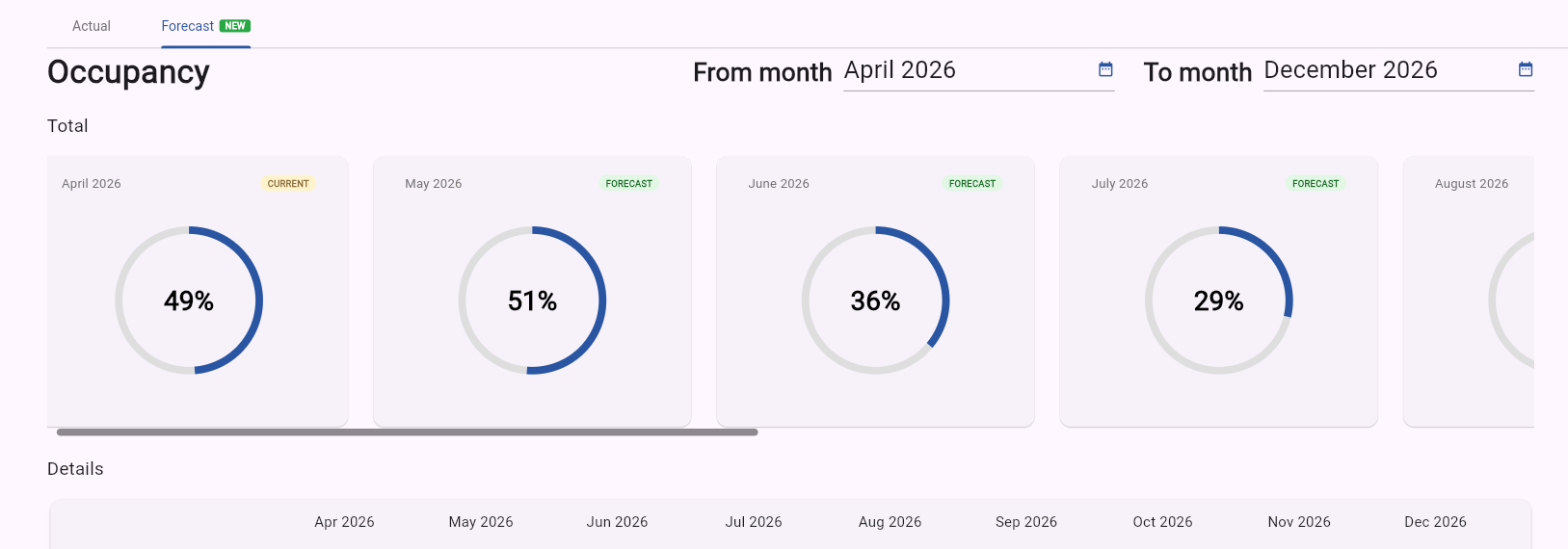
How It Works Forecast Tab
Where: Kwentra Insights App → Occupancy → Forecast
Month Range Selector Two month pickers: From month and To month. Defaults to current month → current month + 2. Maximum range: 12 months. Validation: From month must be ≤ To month; range cannot exceed 12 months. Total Section One month card per month in the selected range. Each card includes a donut visual matching the Actual tab style. Details Section One column per hotel per month in the selected range. A totals row appears at the bottom. Scroll Behaviour Horizontal scroll activates automatically when cards or columns exceed the viewport. Data Behaviour Data is sourced from the accommodation breakdown.
Month TypeData ShownExample
Past monthsActual valuesJan 2025 — 78%
Current monthMixed — actuals so far + forecast for restApr 2026 — 65% actual + 70% forecast
Future monthsForecast valuesJul 2026 — 82%