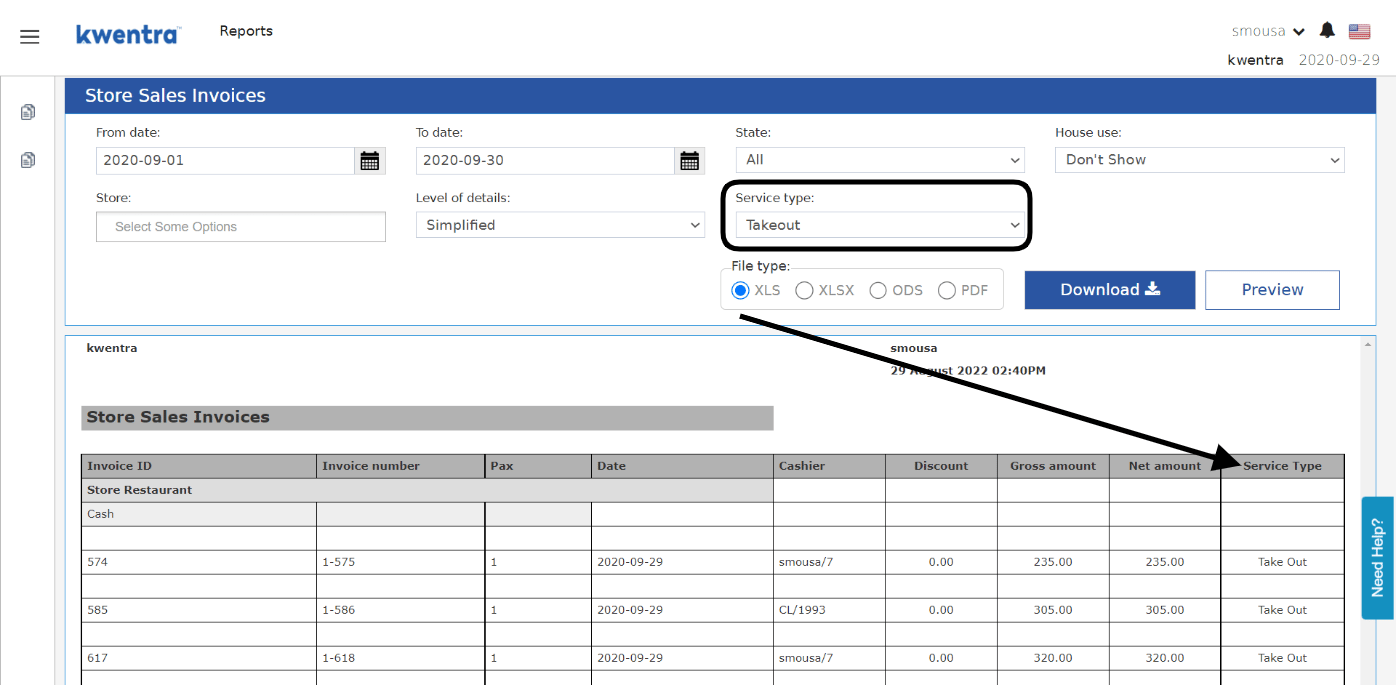
- Shows the number of guests/covers served on each invoice.
- Shows the waiter/cashier who was responsible for each invoice.
- Shows if any discounts were applied on the invoices.
- Shows the items breakdown of each invoice, quantity and value for each item sold.
How it works?
Reports → PS → Store Sales Invoices
- Select the date range you would like to view the invoices within.
- Choose whether to see all the invoices by selecting All or to view Settled only invoices or opened only invoices.
- Choose whether to view the report including the House Use Invoices or no.
- Choose a specific outlet to view the invoices for, if left blank the report will return all invoices from all outlets.
- Choose the level of detail to show in the report whether Detailed or Simplified.
- Invoice ID & Invoice Number: the first 2 columns return the unique identifiers of the invoice, no 2 invoices can have the same invoice ID or invoice numbers.
- Pax: returns the number of adults/covers served on each invoice entered from the waiter on any invoice.
- Date: returns the audit date any invoice was created on.
- Cashier: returns the cashier/waiter who worked last on the invoice.
- Discount: if applicable, this column returns the discount amount applied on an invoice.
- Gross Amount: returns the total amount of the invoice including taxes.
- Net Amount: returns the total amount of the invoice excluding taxes.
- Item: returns the name of the item.
- Qty: returns the quantity of the item sold on the invoice.
- Price: returns the total price of the quantities sold for each item.