Documentation Index

Fetch the complete documentation index at: https://help.kwentra.com/llms.txt

Use this file to discover all available pages before exploring further.

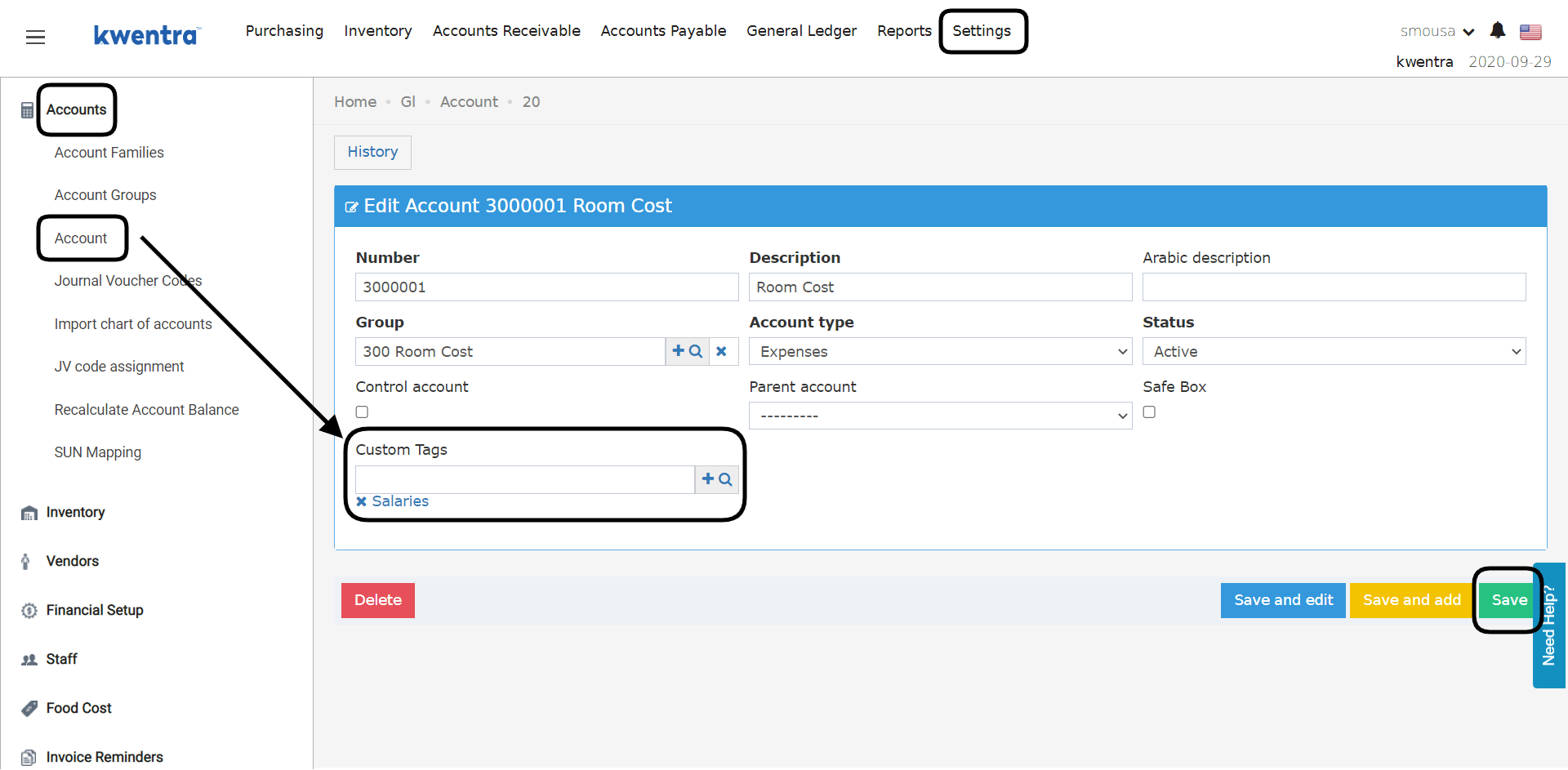
What are GL Accounts Custom Tags? GL Accounts Custom Tags Feature is a flag that we add to your GL accounts to make it easier to group accounts together in the Income Statement Report using specific tags “flags”. What is the benefit of having Accounts Custom Tags? Imagine having 10 different salary accounts in your chart of accounts and you would like to only see the balances on these accounts in your income statement. Rather than exporting your income statement to excel and doing it manually, you can generate the income statement using the Custom Tag: Salaries. The income statement will generate the accounts linked to this custom tag only. How do I link Accounts Custom Tags to my accounts? Back Office → Settings → Accounts → Account → Search for an Account
  1. Open the account you want to link to the custom tag.
  2. From Custom Tags choose the tag you just created; you can link multiple tags to the same account.
  3. Click Save.
In that way when you run the Income Statement Report you can use this custom tag to only get the balances of the accounts linked to it.