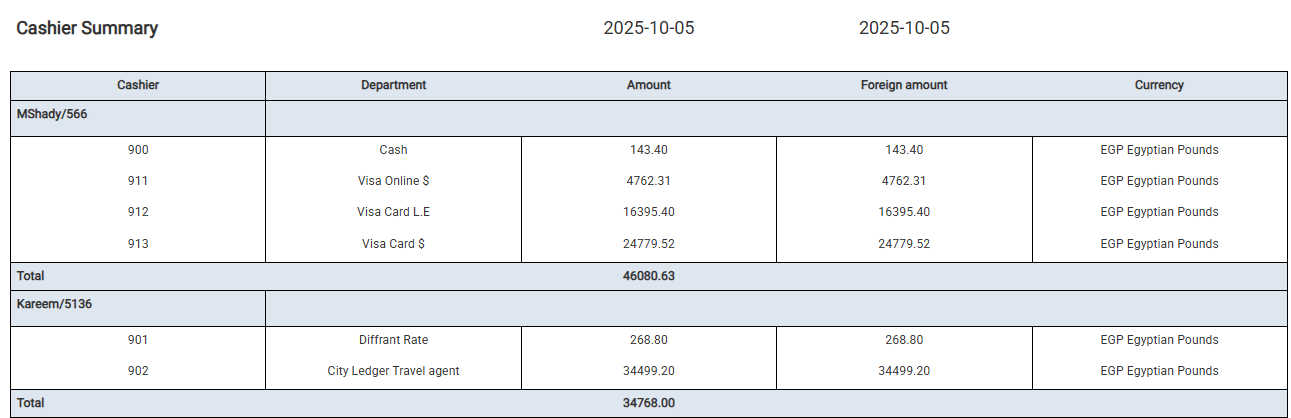
Review a consolidated summary of each cashier’s daily collections by department and currency.
Business Value
- Provides a daily snapshot of all transactions posted by each cashier.
- Helps the finance and audit teams confirm total collected amounts per payment type and department.
- Facilitates cashier accountability and supports day-end reconciliation with physical receipts.
- Enables management to identify irregularities or missing postings at the cashier level.
Use Cases
- Validating each cashier’s daily totals before closing shift.
- Comparing department-level receipts such as Cash, Visa, or City Ledger.
- Confirming currency values between local and foreign amounts.
- Reviewing audit trail consistency across departments.
Report Parameters
Report Structure
Data ColumnsGrouping and Totals
- The report is grouped by cashier, summarizing all related department postings under each name.
- Each group ends with a “Total” line displaying the cashier’s combined collection amount.
- Department codes (e.g., 900 Cash, 911 Visa Online $, 902 City Ledger Travel Agent) correspond to internal ledger accounts used in Kwentra’s financial mapping.
Example Output