Report’s Business Value:
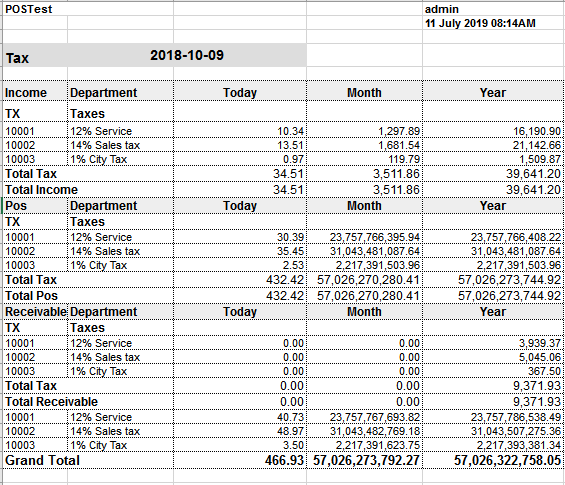
This report will help you see the tax breakdown for all billing postings that have been created on your Tax Departments.- View taxes that are applied on the Front Office Income Module.
- View taxes that are applied on items sold from POS.
- View taxes that are applied on any payments you receive through the Accounts Receivable Module.
How it works?
Reports → FO → Income → Tax Report- Put the Audit Date you would like to see the tax breakdown on.
- Choose the Export option you desire i.e. Excel “XLS / XLSX / ODS” or PDF.
Report Column Outcome:
- Module: here you would see the 3 different modules Income / POS / Receivable.
- Department Code & Description: those columns define which tax department exactly to be referred to for the values.
- Today: returns the total value of the mentioned tax department for the selected date of the report.
- Month: returns the total value of the mentioned tax department from the start of the month till the selected date of the report.
- Year: returns the total value of the mentioned tax department from the start of the year till the selected date of the report.
- Tax Total: total for each tax department group for all columns.
- Module Total: total for each module for all columns.
- Grand Total: total for all columns for all tax departments combined.