Business Value
- Enhance guest experience with birthday greetings or amenities.
- Allow front desk to plan for special touches or upselling opportunities.
- Strengthen guest loyalty by personalizing their stay.
- Streamline operations—easy identification and filtering of in-house birthdays.
Use Cases
- Reception prepares birthday surprises (cake, room decoration) for in-house guests.
- Marketing team sends birthday emails to guests during their stay.
- Restaurant staff get advance notice to greet guests at breakfast.
- Housekeeping coordinates with the front desk for special requests on birthday dates.
How to Use the Guest Birthdays Report
-
Location
- Reports → FO → Frontdesk → Guest Birthdays
-
Filters & Options
- Date Range: Select the start and end dates to view birthdays within a specific period.
- Reservation Status: Filter by Checked In, Expected, Checked Out, No Show, or Canceled.
- Group By: Option to group birthdays by Nationality or Guest Flag.
- File Type: Download as XLS, XLSX, ODS, or PDF.

-
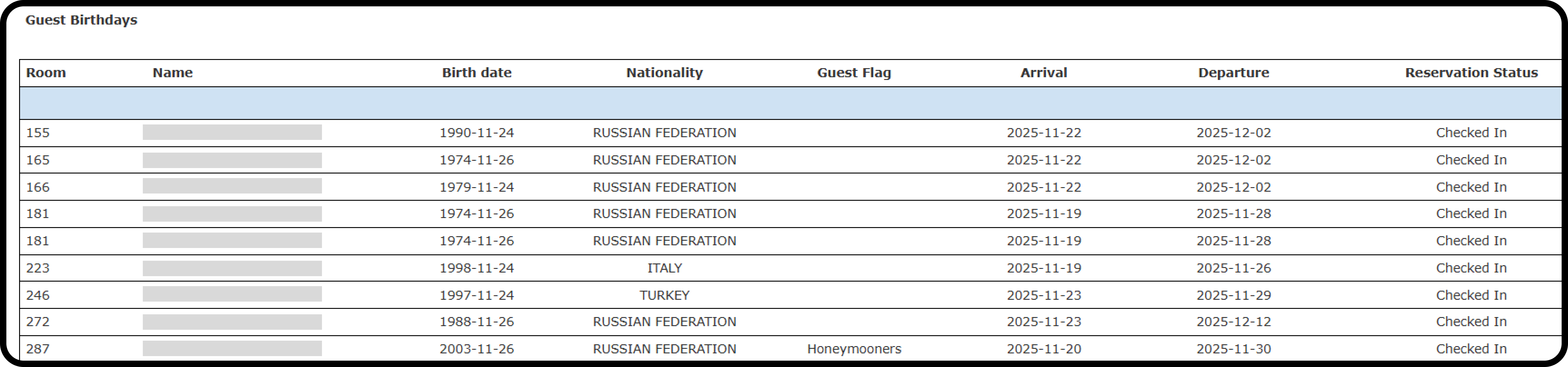
Columns Explained
- Room: Guest’s room number.
- Name: Guest’s full name.
- Birth date: Date of birth coming from the guest’s profile.
- Nationality: Guest’s nationality.
- Guest Flag: Special guest flag (e.g., Honeymooners).
- Arrival: Arrival date of the reservation.
- Departure: Departure date.
- Reservation Status: Checked In, Expected, etc.