Business Value
- Ensures guest profiles are complete and compliant with data requirements.
- Helps front office and management monitor missing or incomplete guest information.
- Improves accuracy for reporting, analytics, and guest communication.
- Enables data quality checks for auditing and regulatory compliance.
Use Cases
- Front Office Managers review the completeness of guest information during audit or before checkout.
- Night Auditors verify that mandatory details (like ID and nationality) are properly recorded.
- Guest Relations teams use it to identify missing contact details and follow up with guests.
- Finance and compliance teams ensure guest profiles meet local legal requirements.
Technical Know-How
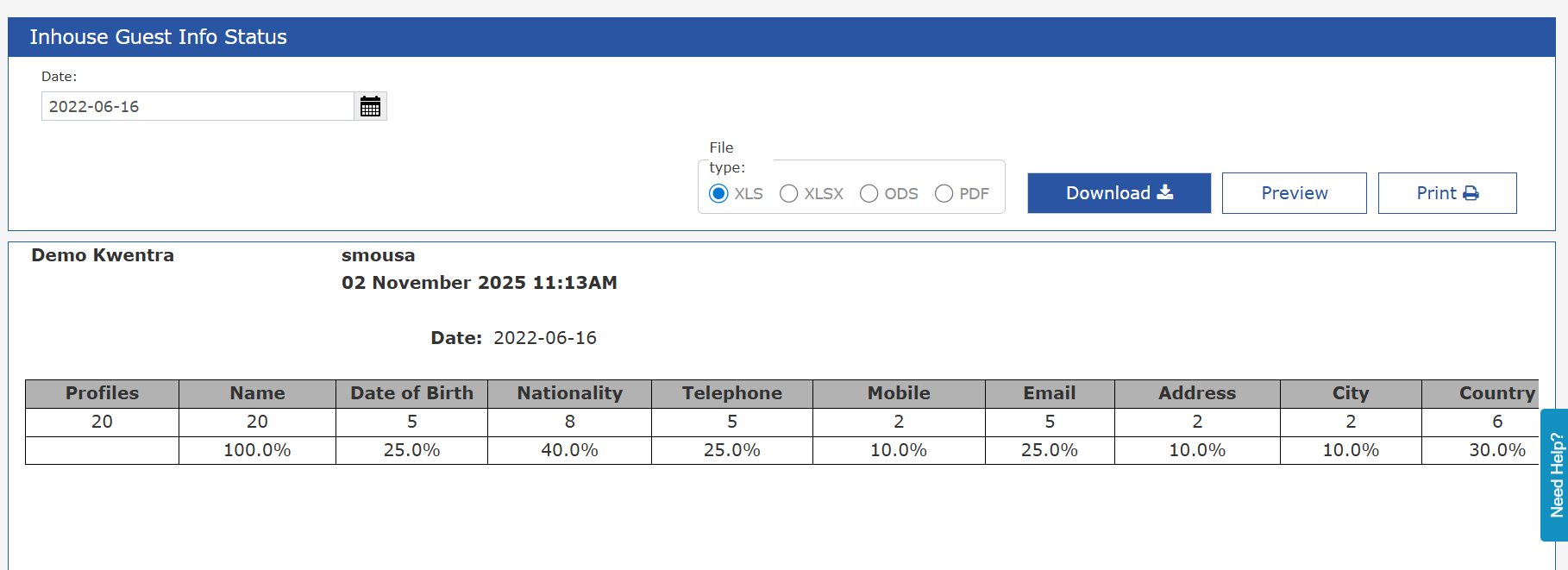
Module: Reports → Front Office → Reservations Report Name: Inhouse Guest Info Status Purpose: Displays the percentage and count of filled profile details for inhouse guests on a given date. Parameters:-
Date: Single-date filter to show inhouse guest profiles on the selected date.
- Autofilled with the system audit date.
Report Output
Each column shows two rows:- Count – Number of profiles that have the field filled.
- Completion % – Percentage of profiles with the field filled = (Profiles with Field / Total Profiles) × 100