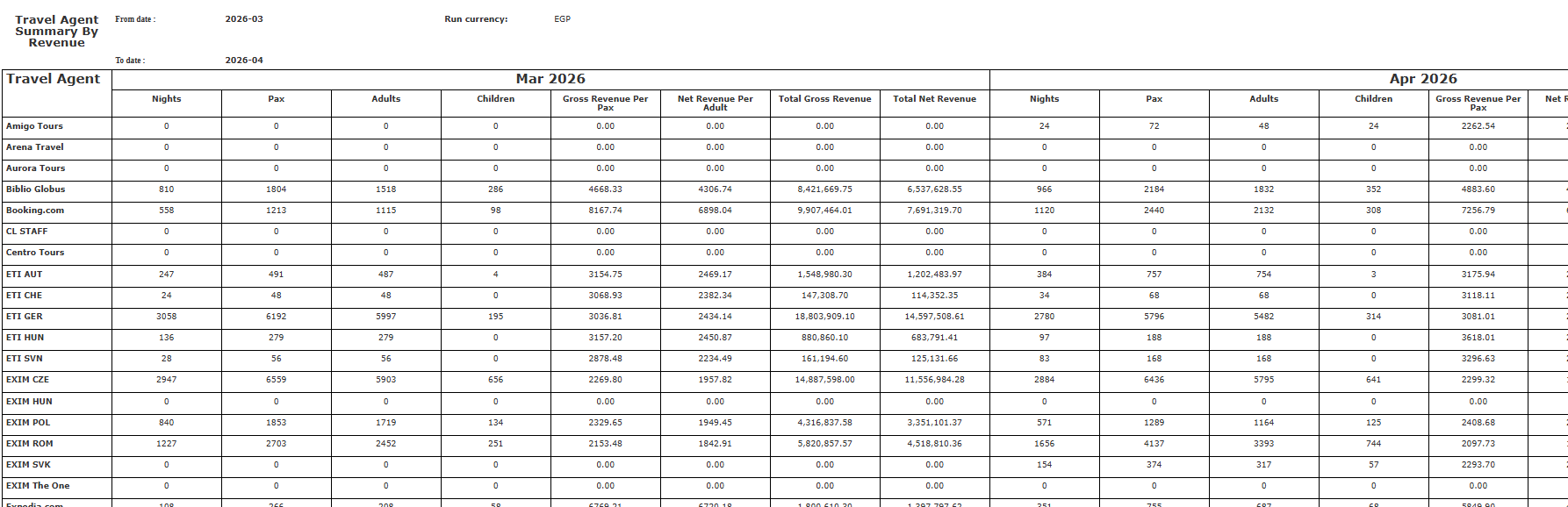
- Shows which agents drive most nights and revenue.
- Calculates Rate per Pax automatically for metrics.
- Supports multi-currency with current exchange rates.
- Covers a maximum of 12 months for seasonal trend analysis.
- Revenue manager sees top OTA by quarter month-by-month.
- Front office manager identifies high-value vs budget channels.
- GM exports a 12-month channel breakdown for ownership review.
Report Parameters
- From Date (required) — start of the reporting period (month picker).
- To Date (required) — end of the reporting period; cannot exceed 12 months from the From Date.
- Currency (required) — select the display currency; all amounts are converted using current exchange rates.
- Nights — count of all room nights in reservations for that travel agent.
- Pax — total adults and children across all reservations.
- Rate per Pax — Total Rate Amount / Pax (shown as 0 when Pax is 0).
- Total Revenue — total rate amount from all room nights.
Update: 13 May, 2026
New Report Columns
The Travel Agent Summary By Revenue Report adds Net Revenue Per Adult, Adults, and Children columns, and renames Rate Per Pax to Gross Revenue Per Pax. Column Changes The following column has been renamed:- Rate Per Pax → Gross Revenue Per Pax (same calculation: Total Gross Revenue ÷ Pax)
- Adults — Number of adult guests (excludes children)
- Children — Number of child guests (Adults + Children = Pax)
- Net Revenue Per Adult — Calculated as: Total Net Revenue ÷ Adults (children excluded)