

Report Business Value
- Shows all arrivals checked in on the selected day for real-time tracking and shift handover.
- Displays complete reservation, room, and guest info for every checked-in guest.
- Supports front desk, finance, and operations in verifying arrivals versus expected lists.
- Includes group/channel breakdowns for workload and revenue allocation.
- Enables immediate revenue analysis with net rates and new “Total Accommodation” per booking.
Use Cases
- Front Desk/Reception: Confirm and check actual arrivals for shift handover and occupancy.
- Reservations: Validate all bookings with physical check-in.
- Finance: Match actual arrivals to revenue, trace missing arrivals, and audit discounts or room upgrades.
- Management: Analyze occupancy, revenue per segment, and group/channel performance.
How does it work?
Navigation: Reports → FrontDesk → Actual Arrival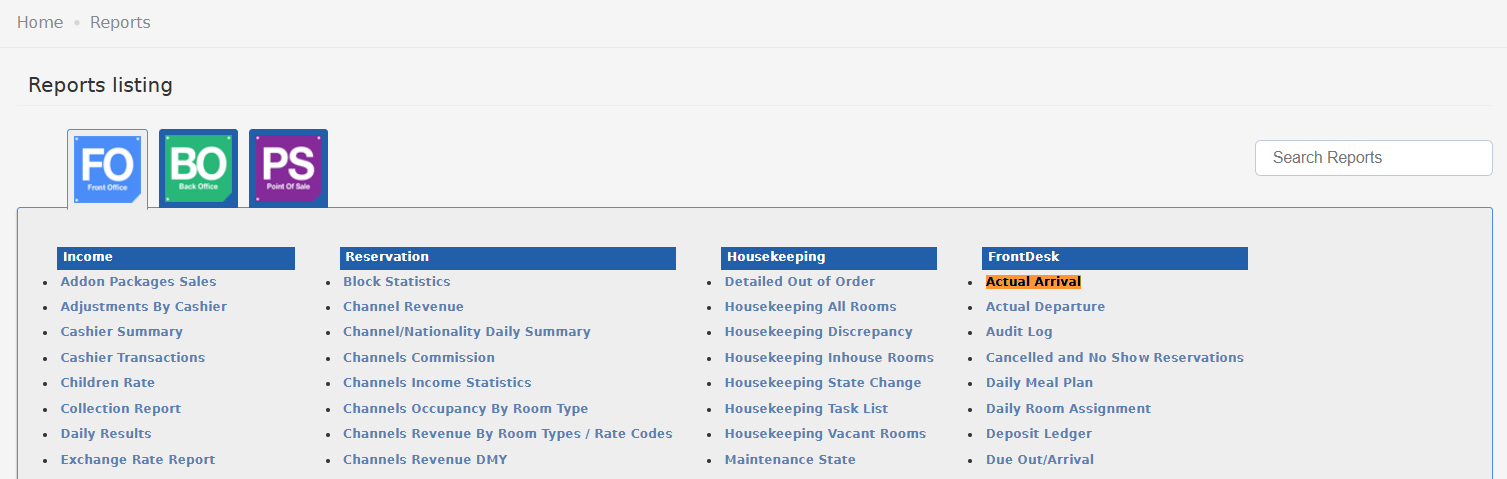
Step-by-step:
- With Rate: Select “With” to display net rates and accommodation revenue, or “Without” for guest-only details.
- Group by: Organize data by channel, group, rate code, room type, etc., or choose “None” for a flat list.
- Sort by: Choose room number, guest name, or other criteria.
- Channel, Rate code, Room type: Filter to focus the report (optional).
- Set “From date” and “To date” for the desired reporting period (for a single day, use the same date).
- Show remarks/Show other names: Include or exclude guest notes and additional names.
- Export: Choose your file type (XLS, XLSX, ODS, PDF) and click Download, Preview, or Print.
Report Column Output
Group Summary Rows
- At the end of each channel/group, summary rows provide totals for rooms, adults, and children who actually arrived.
Update: 25th of September, 2025
[New Column] Added a new column for Total Accommodation
Business Need: Previously, when selecting “With Rate”, only the net rate for the first room night was shown for each reservation. Now, a new column—“Total Accommodation”—is included directly after the “Net Base Rate”. How it works:- Total Accommodation shows the sum of the net base rate (after discounts) for all nights of the reservation.
- The value is always displayed in the system’s base currency.
- This enables instant, accurate revenue calculation per arrival and for all arrivals in total.
- Finance and management can quickly track total actual accommodation revenue per period, channel, or group.
- Simplifies reconciliation between arrivals and daily revenue.
- Supports performance reporting per channel, travel agent, or group.
Update: July 20, 2026
[New Filter & Column] Source
Business Need: The Source field — the reservation’s booking channel source, editable from the Individual Reservation screen — is already available in the Expected Arrival report but was missing from the Actual Arrival report. Without it, staff could not filter or review actual arrivals by booking source and had to cross-reference other reports for channel tracking. How it works:- A new Source multi-select filter parameter is added to the report’s search form, alongside the existing lookup filters.
- A new Source column is added to the report output, showing each reservation’s current source value (as last updated on the Individual Reservation screen).
- When one or more sources are selected, only reservations whose source matches the selection appear in the results. Leaving it empty includes all sources.
- Track channel and source performance directly from the actual arrivals list.
- Validate that source updates made on reservations are reflected in operational reports.
- Reduce cross-referencing with other reports for booking-source analysis.
Special Considerations & Best Practices
- “Actual Arrival” only shows reservations checked in on the date(s) selected; “no-shows” and future arrivals are excluded.
- Group and channel totals at the end of each block make workload and revenue review easier.
- Names field: Multiple guests per room are separated by commas if the option is enabled.
- Net Base Rate always shows the first night; Total Accommodation gives the full stay total.
- Exported currency: Always system-based, with conversions handled at posting.
Important Notes
- No two arrivals have the same reservation ID; each is a unique record for full traceability.
- If “Total Accommodation” is blank, check if the booking is non-accommodation (e.g., day-use, comp).