
Documentation Index

Fetch the complete documentation index at: https://help.kwentra.com/llms.txt

Use this file to discover all available pages before exploring further.

View room counts, guest numbers, and gross and net revenue by category for every travel agency — agencies are now sorted A to Z for fast lookup. Business Value
  • See rooms, guests, and full revenue breakdowns for every travel agency in one report.
  • Compare gross and net revenue side by side across all channels.
  • Analyse per-room and per-guest revenue to evaluate how efficiently each agency fills rooms.
  • Use the Columns filter to focus on rooms, guests, gross revenue, or net revenue only.
  • Agencies are sorted A to Z by name — find any channel instantly and compare periods consistently.
Use Cases
  • Revenue manager runs the report monthly to compare agency performance by gross and net revenue.
  • Finance team exports to XLS to reconcile agency revenue figures against invoices.
  • Front office manager checks which agencies contributed the most room nights in a given period.
How It Works Where to Find It 📍 Where: Reports → FO → Reservation → Travel Agency Statistics Report Parameters Set the following filters before running the report:
ParameterDescriptionOptions / Example
From DateStart of the reporting periode.g. 2024-12-01
To DateEnd of the reporting periode.g. 2025-01-31
ColumnsChoose which revenue columns to displayAll / Rooms Only / Guests Only / Gross revenue only / Net revenue only
File TypeFormat for the exported fileXLS
Report Structure The report is grouped by travel agency. Each agency block shows:
  • Agency header — displays the agency ID and name (e.g. “2641-TRAVCO TRAVEL - EGYPT”). Agencies are sorted A to Z alphabetically by name.
  • Guest summary row — shows total Rooms, Adults, Free Children, and Paid Children.
  • Revenue rows — one row per revenue category (Room Revenue, Food & Beverage Revenue, etc.) with the columns selected in the Columns filter.
Columns Filter Use the Columns dropdown to control which revenue figures appear:
  • All — shows all six revenue columns: Gross, Net, Gross Per Room, Gross Per Guest, Net Per Room, Net Per Guest.
  • Rooms Only — shows per-room metrics only (Gross Per Room, Net Per Room).
  • Guests Only — shows per-guest metrics only (Gross Per Guest, Net Per Guest).
  • Gross revenue only — shows Gross, Gross Per Room, and Gross Per Guest.
  • Net revenue only — shows Net, Net Per Room, and Net Per Guest.
📌 Note: Agencies are always sorted A to Z by agency name, regardless of which Columns filter is selected. Report Columns
ColumnDescriptionExample
RoomsTotal rooms booked by this travel agency in the selected period130
AdultsTotal number of adult guests from this agency’s reservations370
Free ChildrenNumber of children with a complimentary stay0
Paid ChildrenNumber of children with a paid stay0
GrossTotal revenue including taxes for the revenue category (Room Revenue, F&B, etc.)46,140.00
NetTotal net revenue for the revenue category “without taxes”38,211.18
Gross Per RoomGross revenue divided by total number of rooms354.92
Gross Per GuestGross revenue divided by total number of guests124.70
Net Per RoomNet revenue divided by total number of rooms293.93
Net Per GuestNet revenue divided by total number of guests103.27

Update: 6 May, 2026

Add Grand Total To Columns

The Travel Agency Statistics Report now includes a Grand Total row at the bottom, summing all channels for a quick performance overview.
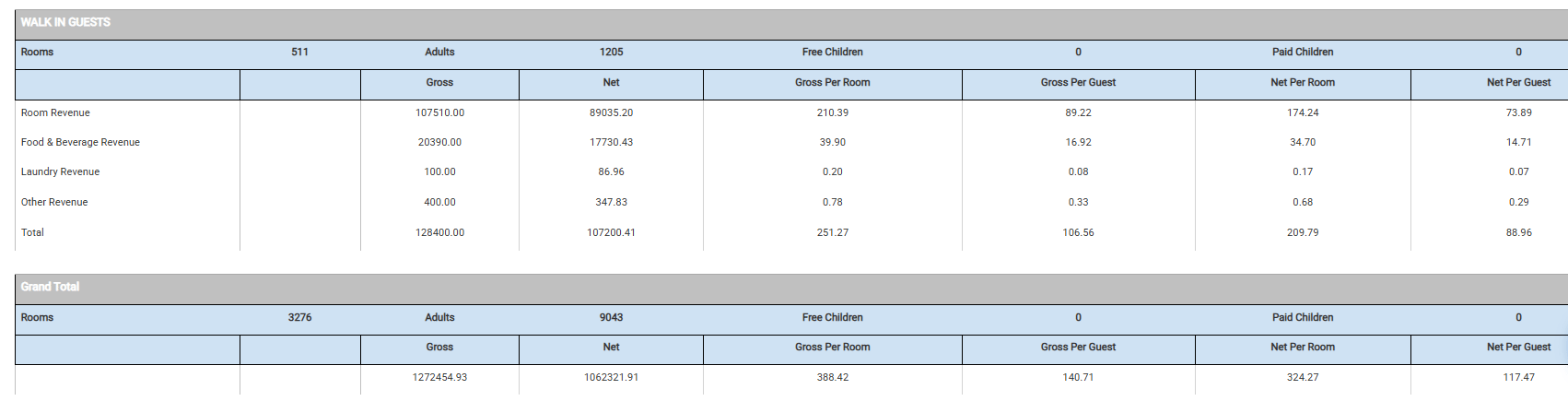
Grand Total row added at the bottom of the report. A total per channel row is also added below each channel section. Per-room and per-guest values in the Grand Total are calculated averages, not sums.