

Business Value
- Provides comprehensive visibility into revenue and occupancy by market segment, channel, or source.
- Enables data-driven pricing and marketing decisions.
- Helps identify high-value and underperforming segments.
- Supports benchmarking and business planning by day, month, or year.
- Increases accountability and transparency for all revenue streams.
Use Cases
- Analyze daily, monthly, or yearly performance by segment (e.g., Online, Travel Agency, Corporate).
- Monitor the impact of marketing campaigns on specific channels or markets.
- Identify booking trends and seasonality for each segment.
- Compare occupancy rates (OCC%) and Average Daily Rate (ADR) across different sources.
- Generate targeted sales or revenue reports for internal meetings or external partners.
Technical Know-How
1. Accessing the Report- Navigation:
Reports → FO → Reservation → Market segment dmy
- Date: Select the reporting date (the report will display Day, Month, and Year aggregation for that date).
- Level of Details: Choose between “Channels”, “Sources”, or “Markets” for segmentation.
- Reservation Confirmation: Filter by “Confirmed Only”, “Tentative Only”, or “All” reservations.
- File Type: Export to XLS, XLSX, ODS, or PDF.
- Download, Preview, Print: Use buttons to export or preview the report.
- Rooms – Number of rooms sold
- Room Rev – Room revenue
- Room Revenue: Room revenue (posted to the rooms department) attributed to this channel only.
- For revenue departments to appear as columns, need to be added and linked to revenue codes.
- ADR – Average Daily Rate
- OCC% – Occupancy percentage
- Adults / Children – Number of adults and children
- Selling Rate – Selling rate per segment
- Use “Channels” to see revenue split between OTA, Direct, Corporate, etc.
- Use “Sources” to understand which agencies or corporate accounts drive bookings.
- Use “Markets” to analyze regional demand.
FAQs
- Q: What’s the difference between ADR and Selling Rate? A: ADR is the average rate per occupied room, while Selling Rate may include package or segment-specific pricing.
Update: 23 Apr, 2026
Grand Total Row
The Market Segment DMY Report now shows a Total row at the end of each Day, Month, and Year section, summarising all channel figures in one line.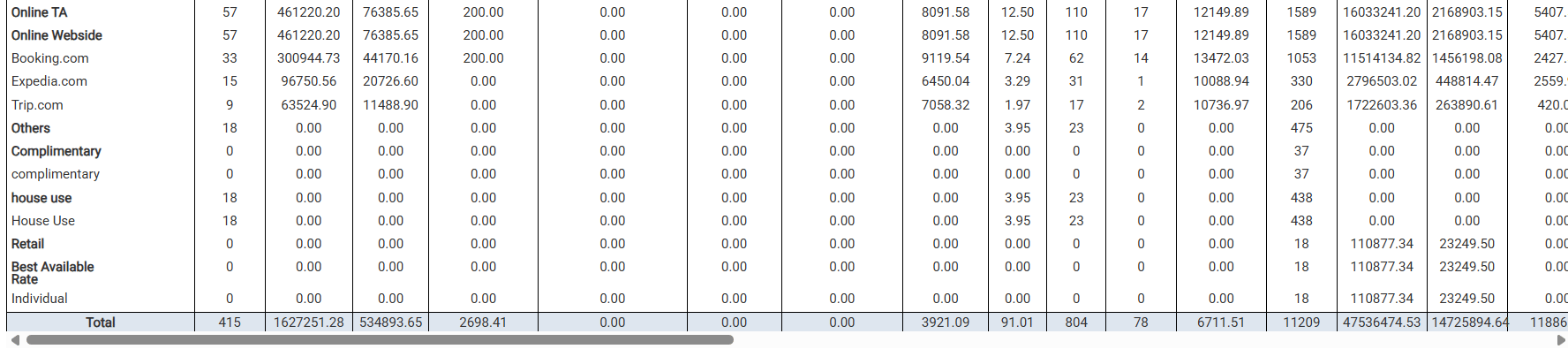
Notes
- The Total row appears at the bottom of the Day section, the Month section, and the Year section independently.
- Rooms, Adults, and Children values are always displayed as whole numbers (integers) — no decimal places.
- ADR and Selling Rate are derived figures — they are not summed; they are recalculated from the totals.
Update: 6 May, 2026
Multi-Currency Support
The Market Segment DMY Report now supports multi-currency — view daily, monthly, and yearly revenue breakdowns in any configured currency. How It Works Running the Report
Converted Fields
When a currency other than the base is selected, the following fields are automatically converted across Day, Month, and Year breakdowns:
- Gross Rate Amount
- Net Rate Amount (Room Revenue)
- Statistic type revenue departments
- ADR (Average Daily Rate)
- ASR (Average Selling Rate)