Business Value
- See profit and loss for every month in one view.
- Compare account balances across months to spot trends.
- See accounts grouped by family.
- The printed report shows the parameters you used.
Use Cases
- A finance manager checks monthly expense trends before budgeting.
- An accountant compares each month’s balances at period-end close.
- A controller adds the report to the monthly finance pack.
How It Works
Running the Report
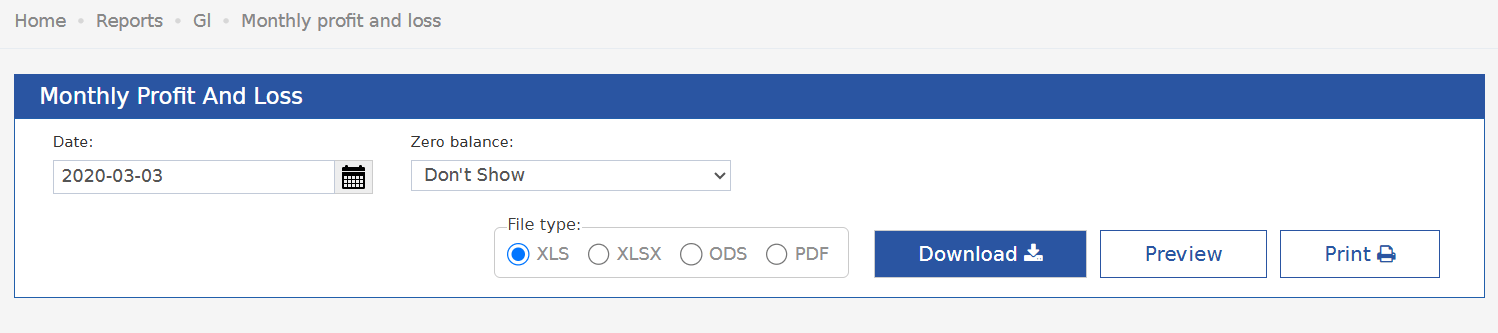
Date: Pick the report date. The report shows one column for each month, from January to this date’s month. File Type: XLS, XLSX, ODS or PDF. Actions: Download, Preview and Print.Report Layout
- Accounts are split into sections, such as Expenses.
- Inside a section, accounts are grouped under an account-family header, such as 1030 Rooms Payroll Expense.
- Each group lists its GL accounts (code and name) and ends with a subtotal row.
- There is one amount column for each month up to the selected date. A Total column comes last.
Report Columns
Update: June 14, 2026
Zero Balance Filter
You can now hide rows where every amount is zero. The report then shows only active accounts.What’s New?
There is a new Zero Balance parameter.How It Works
- Don’t Show (default): hides a row when all month columns and the Total are zero.
- Show: shows all GL accounts, even with no activity in the period.