Business Value
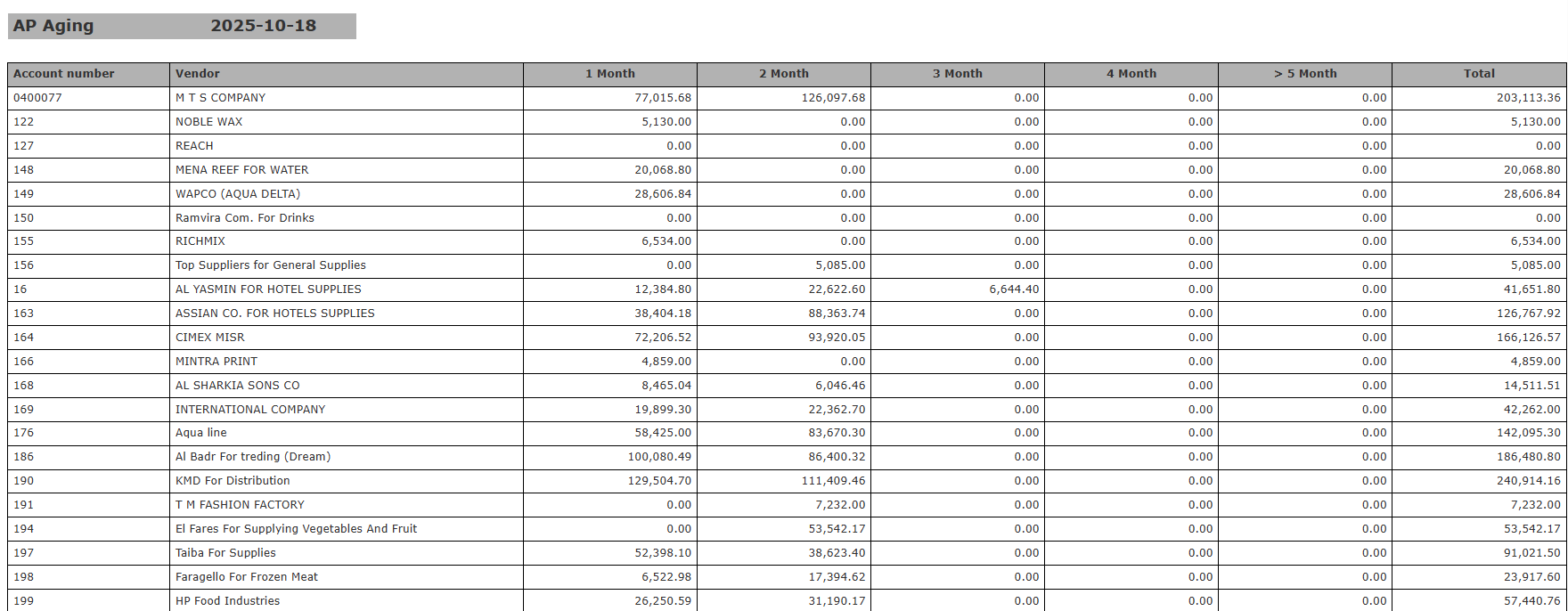
- Shows every supplier balance still to pay, split by age (1 month, 2 months and so on).
- Helps you plan cash flow and decide which payments come first.
- Protects supplier relationships by showing overdue balances early.
- Keeps financial reports correct and ready for audit.
- Feeds the Accounts Payable (AP) line of your balance sheet.
Use Cases
- Check how much you owe each supplier and how late each balance is.
- Prepare for month-end and year-end close with an up-to-date AP breakdown.
- Plan payments and avoid late fees or supply problems.
- Give auditors and management a correct aging of what you owe.
Technical Know-How
- Go to: Reports → Accounts Payable → AP Aging
- Pick the reporting date in the date picker.
- Choose the file format: XLS, XLSX, ODS or PDF.
- Click Download to export. Click Preview or Print to check it now.
- The report lists each vendor/account number. Balances are split by age:
- 1 Month, 2 Month, 3 Month, 4 Month, >5 Month, and Total.
- Use the breakdown to see which payables are due or overdue.
How Does This Reflect on the Balance Sheet?
- The Total column for each vendor is what you still owe that vendor.
- The total for all vendors appears under Accounts Payable (Current Liabilities) on your balance sheet, on the selected date.
- This value is what you owe suppliers and creditors in the short term.