Business Value
- Shows all payments on City Ledger accounts and credit cards in one place.
- Helps the Accounts Receivable team check that payments were settled and posted correctly.
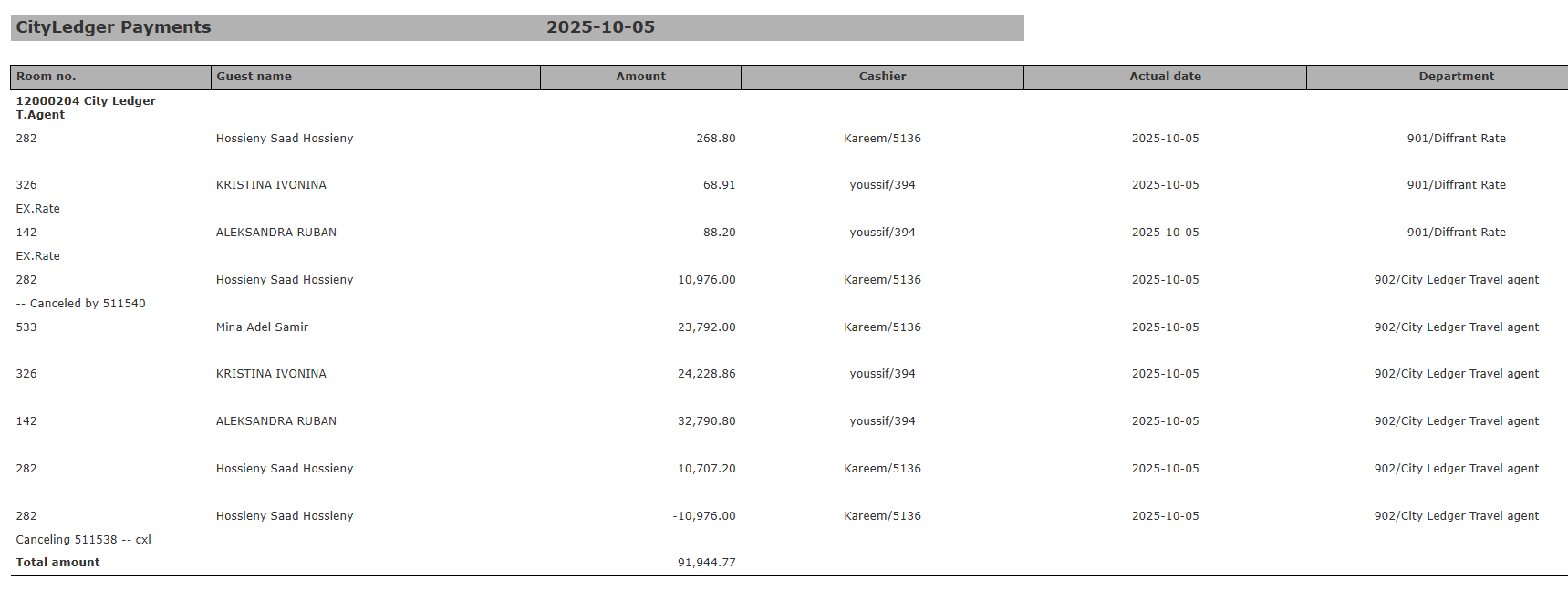
- Makes cashier and audit reconciliation easier. It shows the payment source, cashier and department.
Typical Use Cases
- Check the City Ledger payments recorded by the Front Office team.
- Review daily cashier postings for AR reconciliation.
- Audit cancelled or reversed transactions (“Canceled by” / “Canceling”).
- Track credit card settlements by card type or cashier for bank reconciliation.
Technical Overview
Access Path: Home → Reports → Receivable → CityLedger Payments Report ParametersReport Structure
Header Shows the selected date and the report title “CityLedger Payments”. Data ColumnsExample Output
Date Selected: 2025-10-05 City Ledger Total: 91,944.77 Credit Card Total: 443,093.57 Combined Total: All receipts posted on the selected date, grouped by ledger type and cashier.