

Business Value
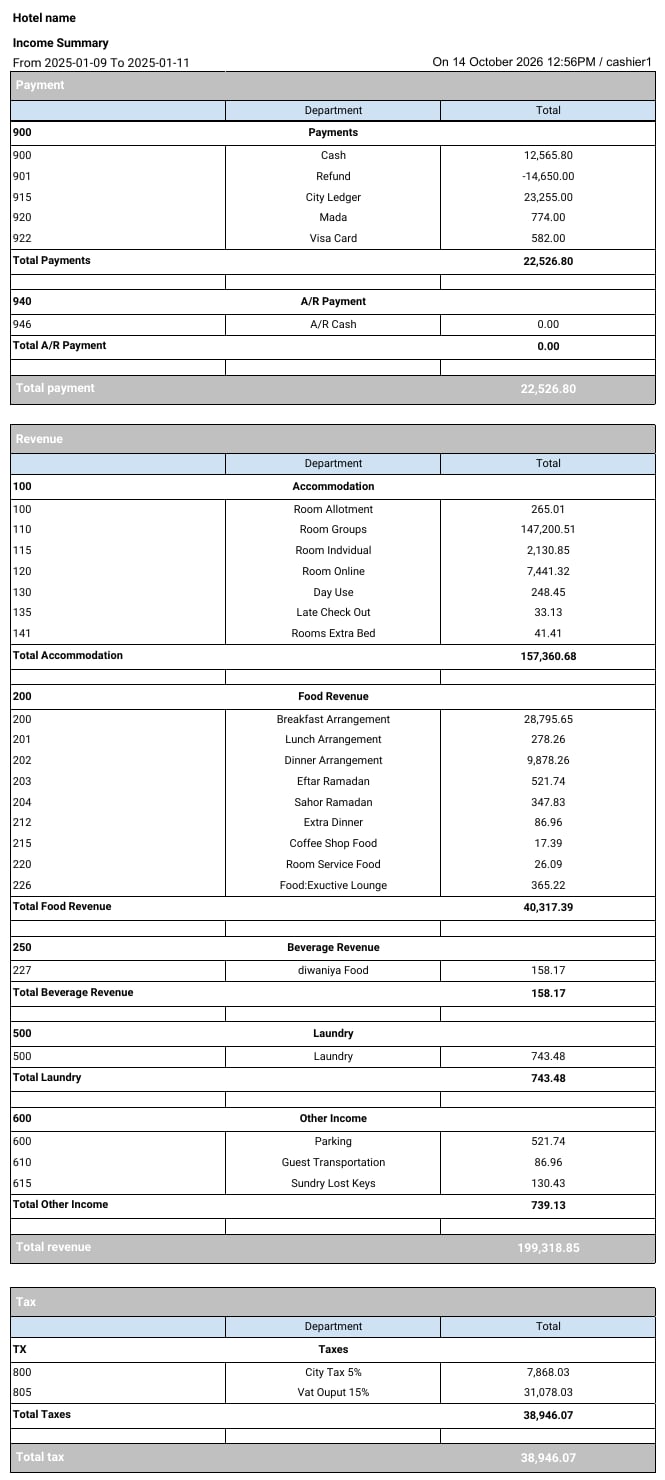
- Shows payments, revenue and tax on one page.
- Totals each department, each department group and each section.
- Shows revenue before tax, with the tax in its own section.
- Can include or leave out AR postings.
Use Cases
- A night auditor checks the day’s totals before closing the day.
- A financial controller reviews the month’s revenue by department group.
- An accountant compares the tax totals with the VAT return.
How It Works
Running the Report
- From date and To date: pick the audit dates to cover. The Hijri date shows under each field.
- Include income from accounts receivable:
- Yes: also counts charges and payments posted on AR (City Ledger) accounts.
- No: counts front office postings only.
- File type: XLS, XLSX, ODS or PDF.
- Click Preview, Download or Print.

Report Layout
The report has three sections. Each one ends with its own total row.
Inside each section:
- Departments are grouped under their department group, for example 100 Accommodation.
- Each group ends with a Total row, for example Total Accommodation.
Report Columns
For more detail, see:
- Payment Report: every payment posting.
- Tax Report: the tax on each posting.
- Revenue Report: revenue compared with your budget.