

Business Value
- Shows where each moved posting came from and where it went.
- Shows who moved it and when.
- Helps you find a charge or payment that left a guest’s folio.
- Covers moves between rooms and moves to or from AR accounts.
Use Cases
- A night auditor checks every transfer made during the day before closing it.
- A front office manager finds who moved a charge to another room.
- An accountant reviews postings moved to AR accounts in a date range.
How It Works
Running the Report
- From date and To date: pick the audit dates to cover. The Hijri date shows under each field.
- Type: choose what kind of transfers to show.
- Income: postings moved from one room to another.
- Receivable: postings moved to or from AR (City Ledger) accounts.
- File type: XLS (the default), XLSX, ODS or PDF.
- Click Preview, Download or Print.

Report Layout
- The report shows one row for each moved posting.
- Moving several postings at once gives several rows with the same rooms, cashier and time.
- There are no group or total rows.
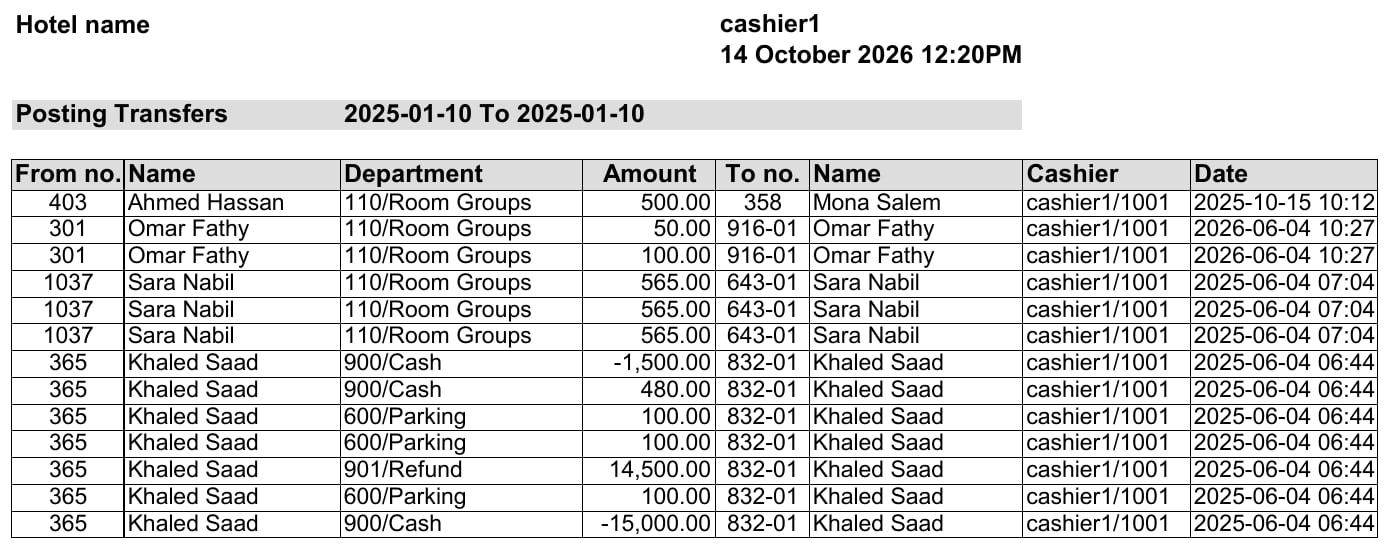
Report Columns
To learn how to move charges, see Transfer Billing Charges to a PayMaster or a Room Number.