

Business Value
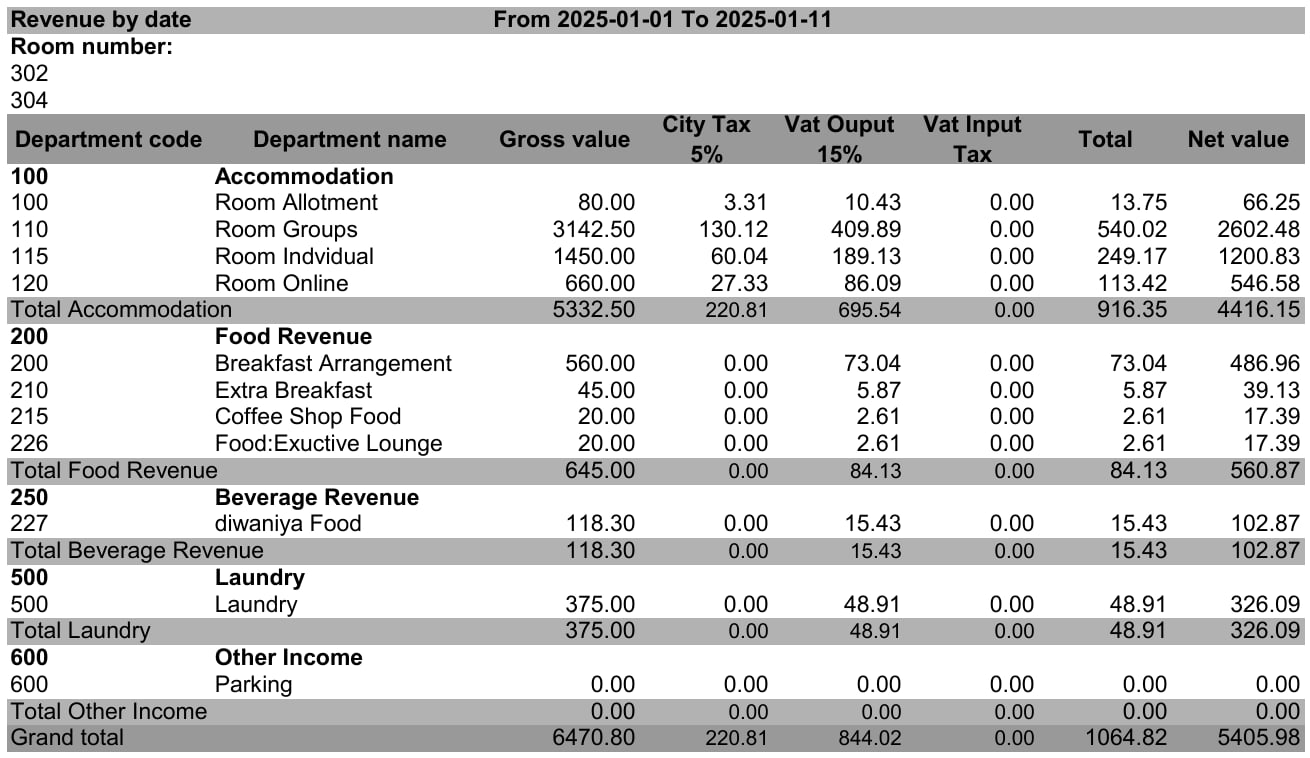
- Shows the gross value, the tax and the net value for each department.
- Splits the tax into one column per tax, such as VAT and city tax.
- Can show the revenue of one room or a few rooms only.
- Totals each department group and the whole report.
Use Cases
- An income auditor checks the tax on each revenue department for the month.
- A revenue manager reviews the revenue of a few rooms over a date range.
- An accountant checks the net revenue before posting it to the ledger.
How It Works
Running the Report
- From date and To date: pick the audit dates to cover. The Hijri date shows under each field.
- Room number: choose one or more rooms. Leave it empty to include all rooms.
- Department: choose one or more departments. Leave it empty to include all departments.
- File type: XLS (the default), XLSX, ODS or PDF.
- Click Preview, Download or Print.

Report Layout
- The rooms you picked show at the top, under Room number.
- Departments are grouped under their department group, for example 100 Accommodation.
- Each group ends with a Total row, for example Total Accommodation.
- The last row, Grand total, adds up every column.
Report Columns
For payments, revenue and tax on one page, use the Income Summary Report.