Business Value
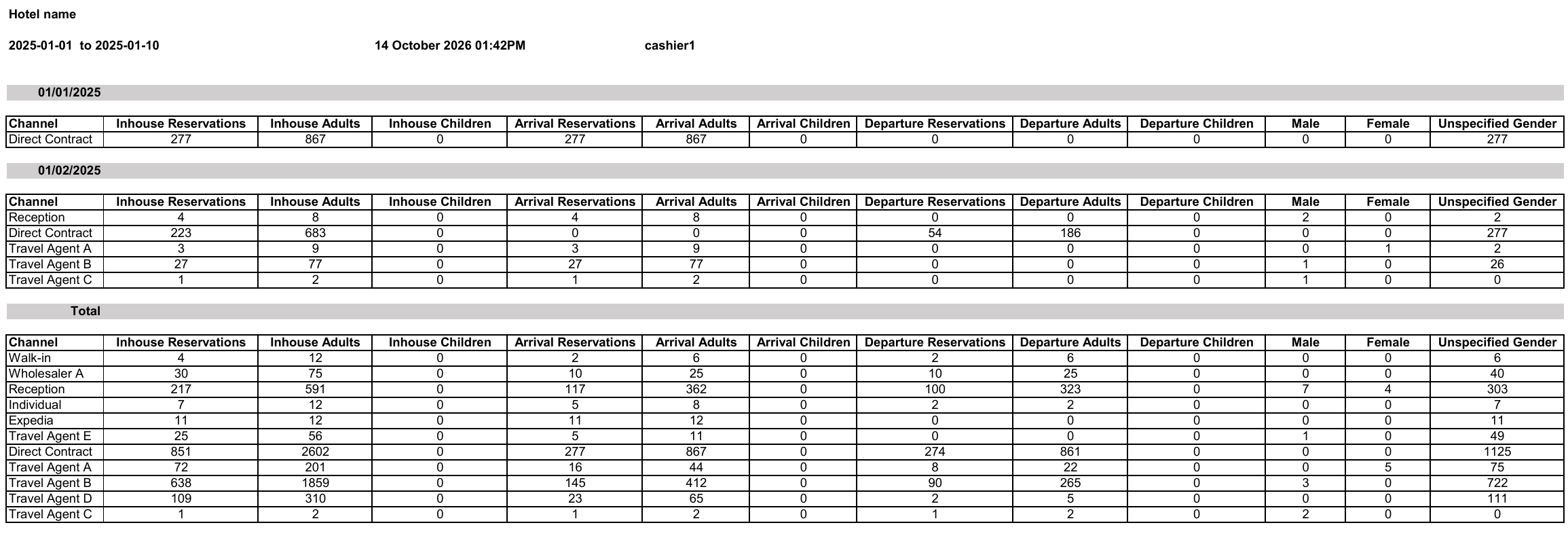
- Shows in-house, arrival and departure counts for every day in the range.
- Splits the counts by channel or by guest nationality.
- Counts reservations, adults and children separately.
- Counts guests by gender.
- Gives totals for the whole date range.
Use Cases
- A front office manager checks which channels bring the most guests each day.
- A sales manager reviews the guest nationalities for the month.
- A reservations manager plans staff for days with many arrivals.
How It Works
Running the Report
- From date and To date: pick the first and last day to show. The Hijri date shows under each field.
- Group by: choose how to split the counts.
- Channel (the default): one row per channel.
- Nationality: one row per guest nationality.
- Show ages: No (the default) or Yes. Yes adds columns that count guests by age group.
- File type: XLS, XLSX, ODS or PDF.
- Click Preview, Download or Print.

Report Layout
- The report shows one block for each day, under the date.
- Each block has one row per channel, or per nationality.
- The last block, Total, shows the totals for the whole date range.