

Business Value
- Shows nights, guests, cancellations and no-shows for every channel.
- Splits each channel’s revenue by statistics type, such as room or food and beverage.
- Shows revenue with and without taxes.
- Works out revenue per night and per guest for you.
Use Cases
- A revenue manager compares how much each travel agent earns per night.
- A sales manager checks which channels bring food and beverage revenue, not only room revenue.
- A front office manager reviews cancellations and no-shows by channel.
How It Works
Running the Report
- From date and To date: pick the first and last day of the range. The Hijri date shows under each field.
- Channel: pick one or more channels. Leave it empty to show all channels.
- Statistics types: pick one or more revenue types. Leave it empty to show all of them.
- File type: XLS, XLSX, ODS or PDF.
- Click Preview, Download or Print.

Report Layout
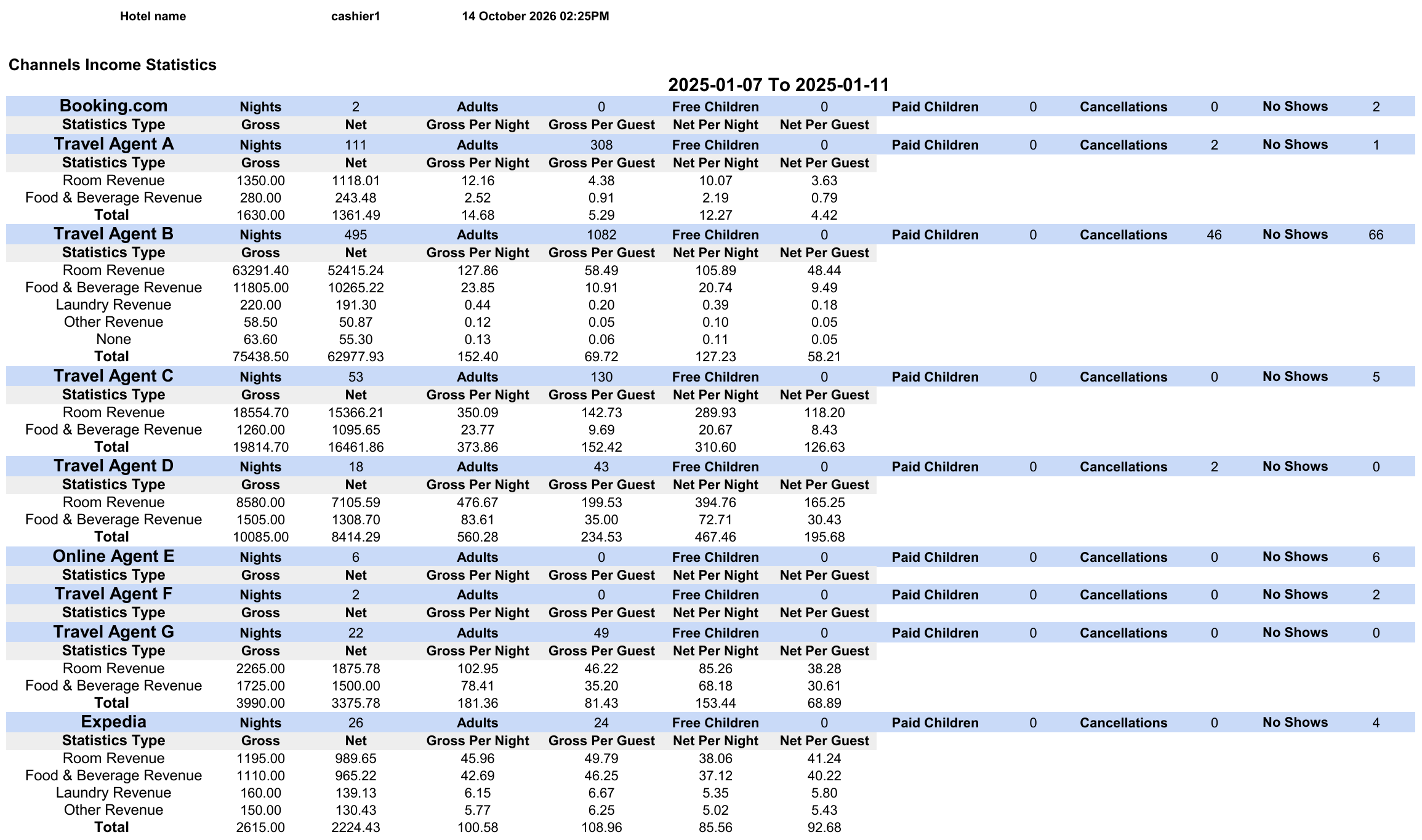
- The report shows one block for each channel.
- The first row of a block counts the channel’s nights, guests, cancellations and no-shows.
- Below it, one row for each statistics type shows that revenue.
- None shows revenue from departments with no statistics type.
- Total adds up the revenue rows of the channel.
- A channel with no revenue in the range shows only its first row.
Report Columns
The first row of each channel block:
The revenue rows below it:
For other channel revenue views, see the Channel Revenue Report.