Documentation Index
Fetch the complete documentation index at: https://help.kwentra.com/llms.txt
Use this file to discover all available pages before exploring further.
December 6, 2020
Accounts Receivable Manual Entries On Past Dates
New Update: you can now do the following actions on a past date on any of your Accounts Receivables.- Manual Charges
- Deposits
- Adjustments
Purchase Orders Authorization Level Update
New Update: You now view the authorization level, the status for each item and which level of authorization is pending when you print your Purchase Order.6th of December: Vendor Payment Report Update
Report Update: Vendor Payment Report now returns all your payments made against all kinds of receiving orders (Vendor/Manual Receiving Orders). The report shows all the payment transactions that have been made to a certain vendor in a given date range.Reports → Back Office → Vendor Payment ReportRead moreYieldPlanet Integration
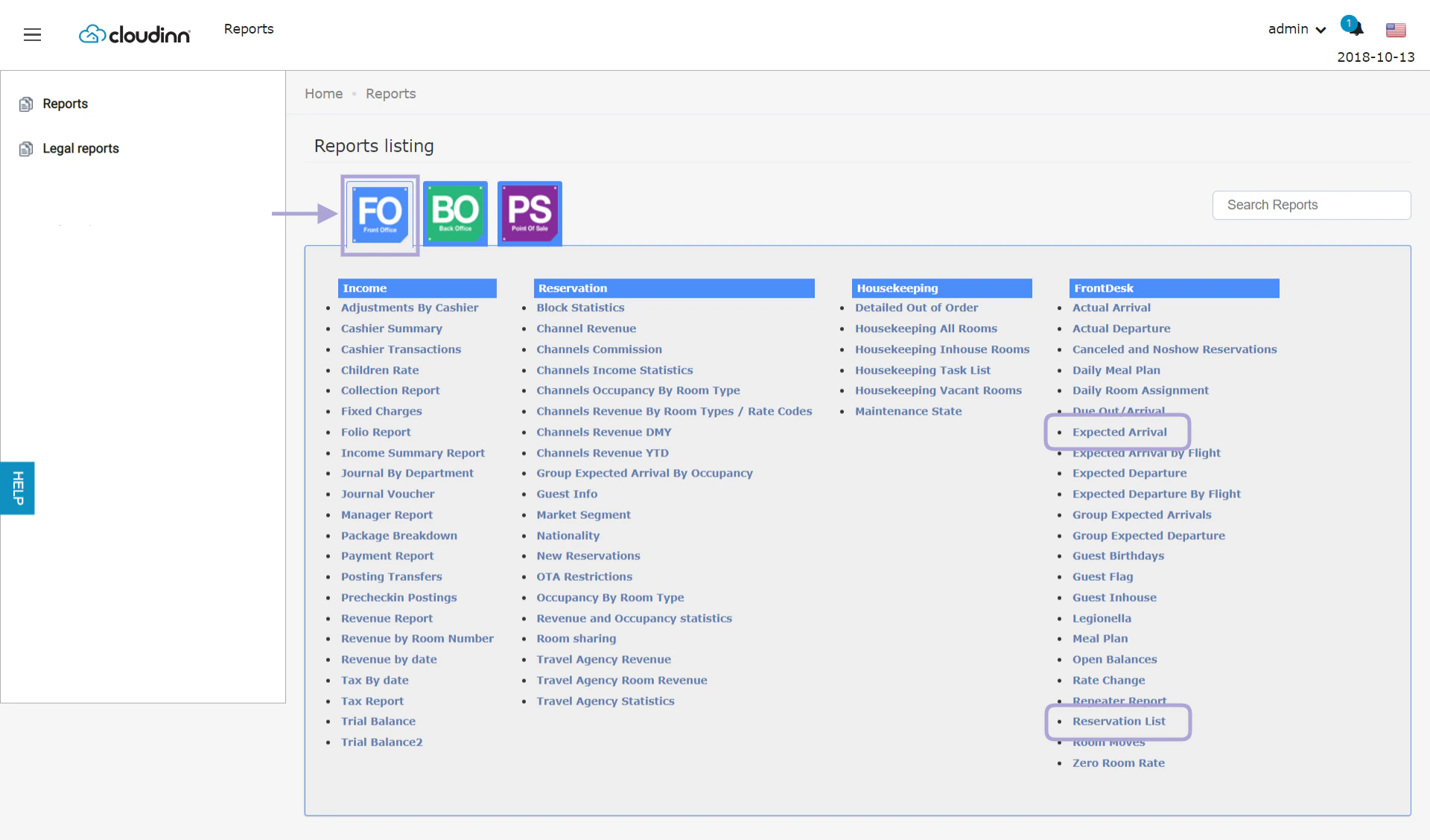
New Integration: Kwentra is now fully integrated with YieldPlanet Channel Manager.Expected Arrival & Reservation List Reports Updates
Report Update: You can now see the On Hold Reservations and the Hold Until Date in separate columns when exporting the below reports.
Guest Info Report Update
Report Update: Guest info report is now updated to have multiple search options to find guests’ profiles.Read moreHotel Internal Policy Update
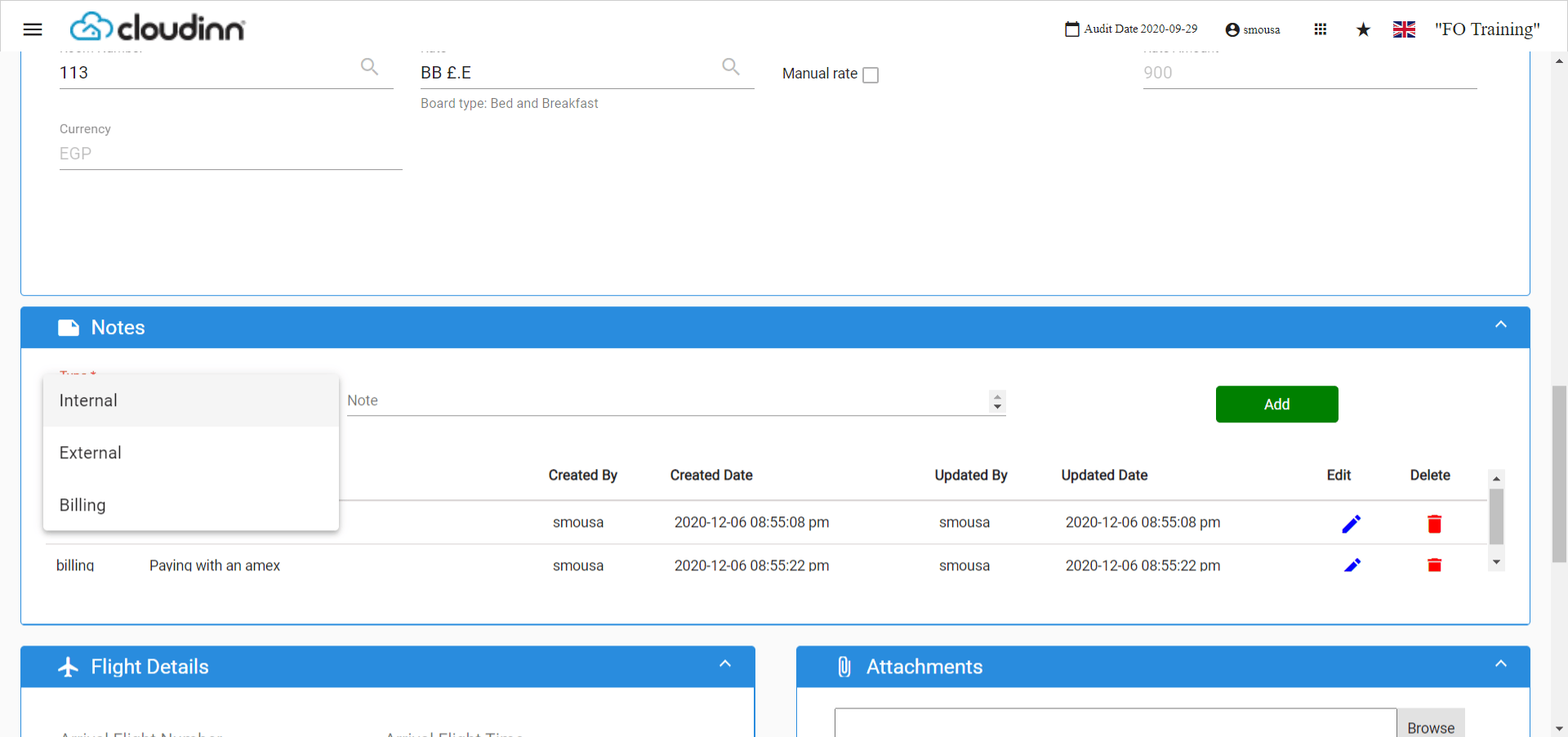
New Update: Your hotel internal policy input format is now more advanced to accept hyperlinks and have custom lables.Read moreNew Notes System for Reservations
New Update: When creating or editing your reservation, you can now addvarious types of notes for your staff to refer back to later.Front Office→ Individual Reservations → Add Reservation
Online Booking Apartments Terminologies
New Update: Added new terminologies to the Front Office Settings that affect your Online Booking Engine as well.Read moreOpen Balance Report Update
Report Update: Now you can choose to show/hide the main guest’s information and also shows the total number of people “adults+children” benefiting from the reservation with the rate code.Reports → FO → FrontDesk → Open Balances ReportRead moreNovember 3, 2020
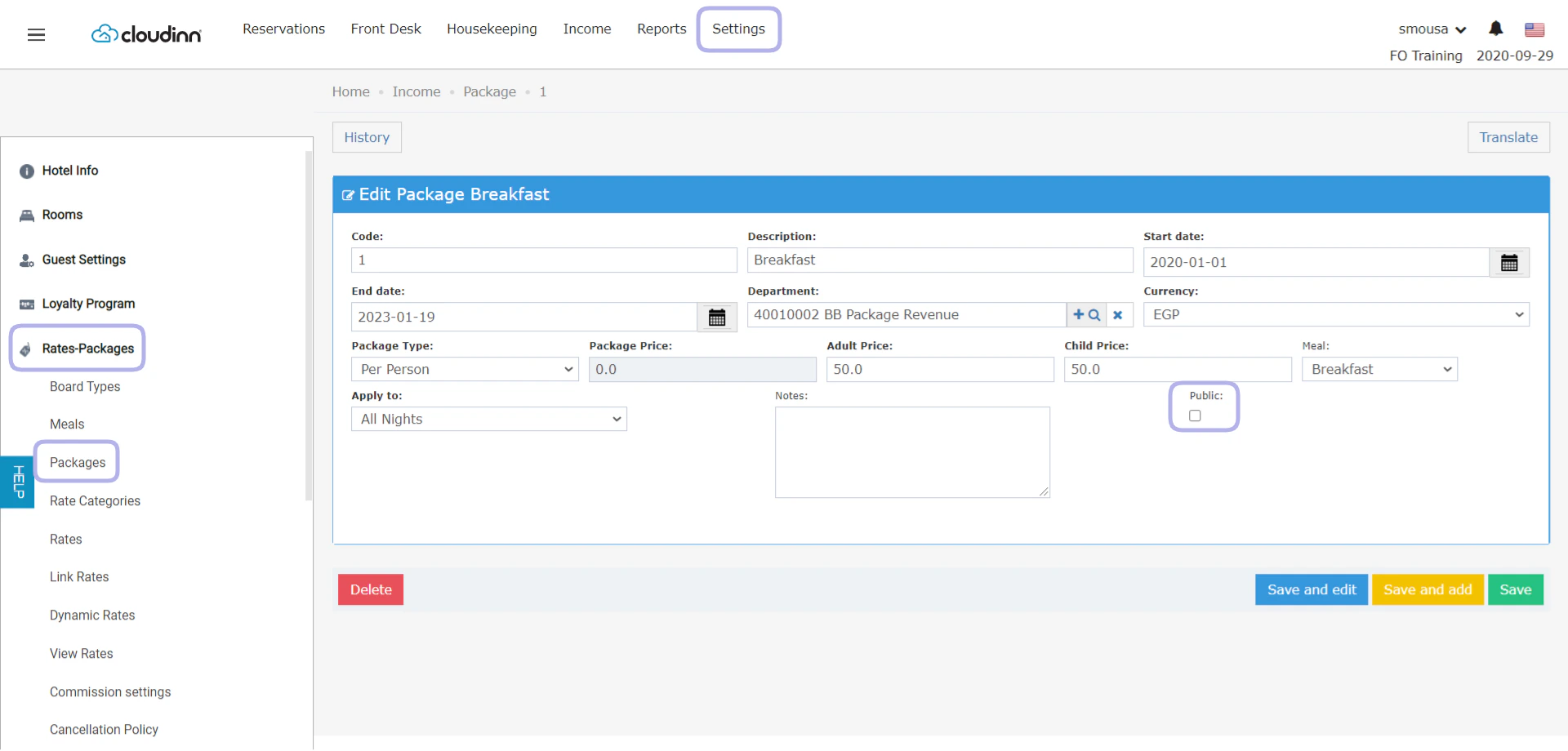
Public Add-on Packages Feature
New Feature: Add-on Packages can now be marked as public packages so as to apply on any rate code and without the need of adding it to newly created rate codesFront Office → Settings → Rates-Packages → Packages → Select Package
July 27, 2020
Configurable Check-In and Check-out times
New update: you can now configure the check in & check out times based on your operational needs.Front Office → Settings → Reservation Settings → Default Checking TimesSend Kitchen Orders to multiple POS Printers
New Feature: You can now configure your menu items to be reflecting it’s printing orders on multiple printers.Read moreJuly 19, 2020
Maintenance Report Update
Report Update: Maintenance State report would now show the comment you would leave when changing the maintenance state of a room.Reports → FO → Housekeeping → Maintenance StateRate Restriction Day of Week Update
New Update: Rate Restrictions through Front Office/Online Booking now has the “day of the week” field to allow restrictions application on certain days of the week within a date range.Read moreRoom Rack Quick Add New Update
New update: The Quick Add feature from Kwentra Room Rack now displays more rate details per night while creating the reservation.Read moreJuly 9, 2020
Priority Bed Type Selling
New Update: Front Office Auto Prioritize Bed Type Selling.Read moreAdyen Deposit Payment
New Update: Deposit Payments are now available through Adyen Online Booking Payment.Excluded Tax on Online Booking Confirmation
New Update: Excluded Taxes are now available per room on generated Online Booking/HMS Confirmations.Online Bookings made with Credit Cards
New Update: Now Kwentra Users can further use guests’ credit cards that they use to finalize payments through the Online Booking and make further transactions.June 18, 2020
Housekeeping Report Update
New Report Update: Guest names won’t show when running the Housekeeping All Room/In-House report for systems following GDPR Settings.Read moreConfirmation Template Update
New Update: The confirmation sent to guests would now have all rate details & packages under Offer Details.Online Booking Date & Time Format
New Update: All Online booking date & time related stamps and fields are configurable.Date: Any numeric date format.Time: Military or AM/PM.Online Booking New Terminologies
New Update: Now you can configure different terminologies for each property you have on the online booking widget, Update terminologies from Settings.Read moreMay 17, 2020
Accounts Receivable Reminder Email Notifications
New Feature: using the new custom uploads feature for your templates, you can now have multiple reminder notifications to be sent to your partners.Calculate Total Value of Purchase Orders
New Update: When printing the Purchase Order the total value of the items purchased will be printed alongside other PO details.Back Office → Purchase Orders → Purchase Order screen → PrintChannel Commission Report Updates
New Updates: The Channel Commission Report has been enhanced to fit your financial needs to calculate commission on the channel and reservation level.Discounts New Behavior on Front Office Billing
New Update: The user can now get to choose whether discounts apply on taxes or no. Reach out to us through our Support Channel.Support@kwentra.comExcluded/Fixed Excluded City Tax per Guest
New Feature: Applying Local City Taxes in respect to the number of guests and their type in a given reservation.Kwentra New Login Page
New Screen: Check out our new System Admin Login Screen. Login NowNew Confirmation/Cancellation Templates
New Templates: you can now enjoy the new detailed, custom-made css templates for both new reservations and cancelled ones. Read More about User Templates & Custom UploadsRoom Rack Room list view adjustment
New update: now users get to choose how many rooms to view on the single view of the room rack.Read moreApril 19, 2020
Bulk Guest Profile Update
New Feature: Updating existing Guest Profiles is now easy, all you need to do is follow the Kwentra Profile ID in the Import CSV File.Front Office → Reservations → Guest Profiles → Import guest profilesApril 13, 2020
AR Statement Invoice New Template
New Template: AR Statement Invoice shows all the information for a specific AR account based on the selected invoices, this template shows aged invoices and where do they stand in the aging cycle in addition to further info about the AR Account and bank details.Invoice Due Date for Accounts Receivable Billing
New Feature: Accounts receivable invoices now show the invoices’ due dates.New Feature: AR Invoice and AR Aging reports now follow the due date setting to be presented on the produced report.Read moreApply Manual Rate from Kwentra Room Rack
New Feature: you can apply a manual rate whilst creating a reservation using the quick add option from room rack.Read moreGuarantee Types Option Added to Front Office Reservations
New Feature: Guarantee Type option is now available on all Front Office Reservation Screens.Import Parent/Child Rooms
New Feature: Bulk Import Rooms with parent/child relationship to accommodate the Bed-Selling Scenario.Front Office → Settings → Rooms → Import RoomsNew Fields in Hotel Info Screen
New Fields: Bank Branch and RIB numbers are now available to be updated on your hotel info screen.Front Office → Settings → Hotel InfoNew Folio Template
New Template: a new folio template is available that reacts to the email/print versions of the information.Read morePro Forma Wording Change
Name Change: The proforma generated before the final folio has changed to be Information Invoice.Front Office → Reservations → Select Reservation → Billing → Tools → Information InvoiceRoom Blocking New Columns and Fields
New Feature: Added new search fields to the search engine to easily find reservations.New Feature: Added a new column Upcoming Arrival Date which reflects the first expected reservation that this room number is assigned to.Front Office → Front Desk → Rooms → Room BlockingMarch 16, 2020
Add Notes on Items Through Extras
New Feature: You can now add extra notes on any item in the POS invoice to be included in the kitchen print for instructions and notes.Read moreApply Open Discount on Total Invoice
New Feature: Apply open discount on the invoice total with the flexibility to apply a fixed discount or percentage based.Read moreAuto-Lock Terminals
New Feature: Lock Terminal Upon Submit option to automatically lock the terminal after each and every order submission to kitchen.Read moreClear Outlet Tables Automatically
New Feature: Have your Outlet Tables get cleared automatically without the need of doing it manually.Read moreDeactivate/Delete POS Terminals
New Feature: You can now enable/disable/delete POS terminals at your convenience.Item Clone Prefix
Now cloning items from POS settings won’t include the 0 prefix before the new serial number.Set Menu Report
New Report: Set Menu Report, useful to see the item sales for the items that are marked as Set Menus only.Read moreFebruary 23, 2020
SmartHotel Update
Smart Hotel Update: now reservations can be retrieved per each Hotel ID separately.Channel Occupancy by Room Type Report
New Report: Channels Occupancy by Room Types Report, helpful to see the statistics of your occupancy classified per channel per room type.Reports → FO → Reservations → Channels Occupancy by Room TypeFront Office Automatic Room Assignment
New Feature: Automatic Room Assignment feature for reservations made through Front Office Module.Rate Code Update for 6 Adults and More
New Feature: Rate details update can now accommodate 6 adults and more, any reservations having more than 6 adults the system will apply the 6th Adult rate for any occupancy higher than 6.Front Office → Settings → Rates-Packages → Rates → Select Rate → UpdateRoom Moves Report Update
Report Update: Room Moves Report now to present the action date and reservation date to show all room moves on certain dates as desired.Reports → FO → FrontDesk → Room MovesRead moreRoom Rack Advance Add Option
New Feature: Add new reservations through Kwentra Room Rack using the New Individual Reservations Screen.Read moreJanuary 19, 2020
January 15, 2020